

You can now host n8n on Google Cloud Run, which is big news for enterprise clients who demand enterprise-level security.
Key benefits of hosting n8n on Google Cloud.
If you need to self-host n8n, Google Cloud is the best platform available because of the following reasons:- Serverless deployment with Cloud Run.
- Persistent storage via Cloud SQL.
- Easy integration with Google Workspace.
- Built-in access to Gemini as the LLM.
- Fast initial setup with optional production hardening.
- Cost efficiency.
- Works for broader AI application hosting.
Serverless deployment with Cloud Run.
You can run n8n on Cloud Run without managing servers.
Cloud Run automatically scales up when workflows need to run and scales down to zero when not in use.This means you only pay when n8n is actually doing work.
Persistent storage via Cloud SQL.
Cloud SQL stores your n8n data safely, even if Cloud Run restarts or scales. Your workflows, settings, and history stay intact over time.
Easy integration with Google Workspace.
You can set up secure access so n8n can work with Gmail, Google Calendar, and Google Drive.
This allows workflows like responding to emails, scheduling calendar events, and managing documents automatically.
Built-in access to Gemini as the LLM.
n8n can call Gemini to help with tasks that require language understanding, such as sorting emails or drafting responses.
You only need to add your Gemini API key to the n8n credentials.
Fast initial setup with optional production hardening.
You can try n8n quickly using a single Cloud Run command.
When you want to use it for real work, you can set up Cloud SQL, Secrets Manager, and IAM permissions for security and reliability.
Cost efficiency.
Because Cloud Run scales to zero, you are not paying for compute when n8n is idle.
This is cost-effective for businesses that only run workflows occasionally.
Works for broader AI application hosting.
Cloud Run can host many kinds of AI applications, not just n8n.
This makes it easier to keep your automation and custom AI tools in one consistent environment.
Troubleshooting Tips:
There is a high probability that you may encounter error(s) during the n8n deployment on Google Cloud Run depending upon your specific configuration. Use Perplexity or Claude to fix debugging issues. Use this article as a general guide.
If a piece of code (command) does not work because of formatting or some other issues, you can find similar code here in the official documentation: https://docs.n8n.io/hosting/installation/server-setups/google-cloud-run/
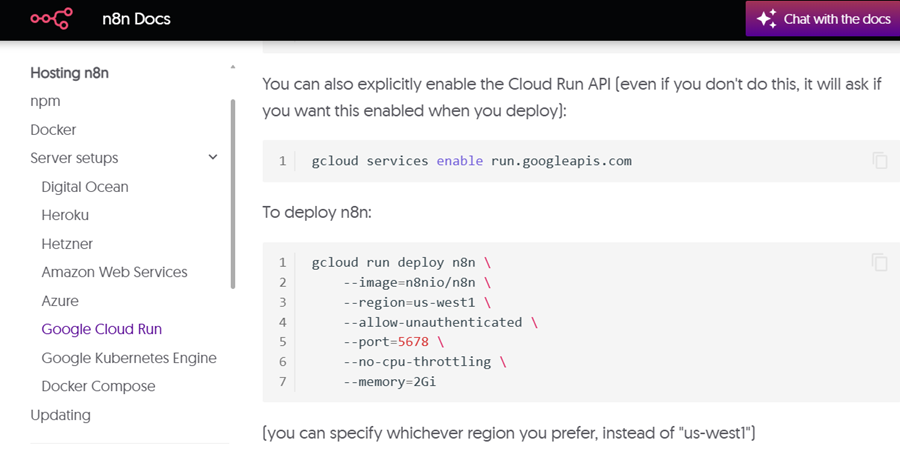
Note: My guide is not exactly identical to the official documentation. I made some improvements to the commands and added more steps during the deployment based on what actually worked for me.
Follow the steps below to deploy n8n instance on Google Cloud:
#1 Create a new Google Cloud project or use an existing one.
If you have not yet created a Google Cloud project, do this first (and ensure you have billing enabled on the project).
Otherwise, navigate to the project where you want to deploy n8n.
#2 We will follow the durable mode instructions.
As we need a production-grade deployment.