

You can build a conversational AI Agent in n8n that talks directly to your GA4 property.
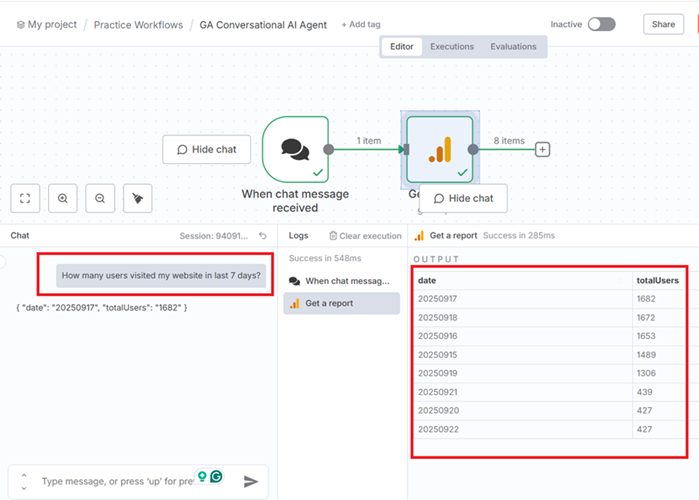
This means you can ask any question about your GA4 data in plain English through a chat interface. There is no need to open your GA4 property at all.
The most basic version of this AI agent requires only two nodes:- A Chat Trigger node.
- A Google Analytics node (Get a report).
That’s it. From there, you can expand the workflow with more logic, memory, or even API queries to make it more powerful.
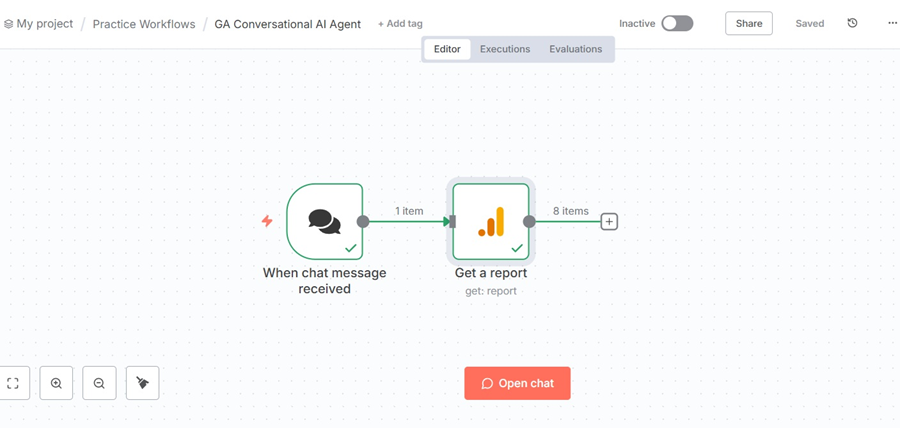
Once you have created this workflow in n8n, click on the ‘Open chat’ button and ask your questions in plain English:
However,
Your ‘Google Analytics’ node in n8n won’t work without first connecting your Google Analytics account to your n8n account.
Now, this is the hard part.
Connecting Google Analytics to n8n is not as simple as signing up with your Google account.
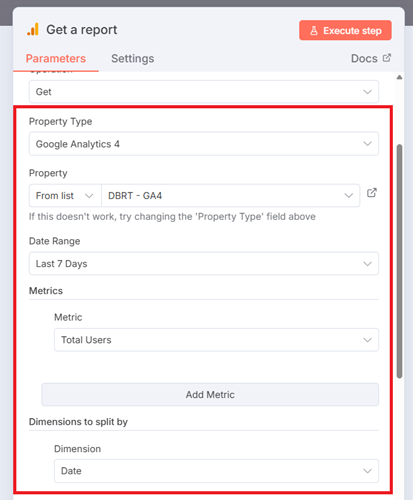
You would need to create OAuth Client Credentials (Client ID and Client Secret from the Google Cloud Console) and then select your GA4 property, date range, metrics and dimensions from the ‘Google Analytics’ node:
Step-1: Create a new Google Cloud Platform account.
Create a new Google Cloud Platform account (if you already don’t have one) with billing enabled.
- While logged into your Google account, navigate to Google Cloud Platform at https://console.cloud.google.com/
- Follow the on-screen instructions and enter your business details and payment information.
Step-2: Create a new Google Cloud Project or select an existing one.
Note: Once you have successfully created your Google Cloud Platform account, Google will automatically create a new project for you called ‘My First Project‘.