

If you run business-critical n8n workflows where uptime is paramount, you need to act immediately if your n8n instance is down, a workflow is down, or a trigger doesn't fire.
n8n does not provide this kind of monitoring.
To check whether your n8n instance is not down, you will need to manually log in to check your instance or type
[your instance URL] + /healthz to check reachability
or
[your instance URL] + /healthz/readiness to check database readiness.
For example, if your n8n instance is installed on your subdomain 'n8n' and your website is ‘example.com’
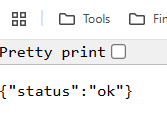
https://n8n.example.com/healthz
You should then see a message like the one below in your web browser:
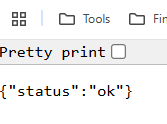
https://n8n.example.com/healthz/readiness
You should then see a message like the one below in your web browser:
Similarly, you will need to manually check whether a workflow or trigger is down, deactivated, or deleted.
In a multi-user environment, such issues are more likely to occur when someone accidentally deactivated or deleted your workflow.