

OpenAI introduced Instant Checkout inside ChatGPT for Plus, Pro, and Free users.
What is Instant Checkout?
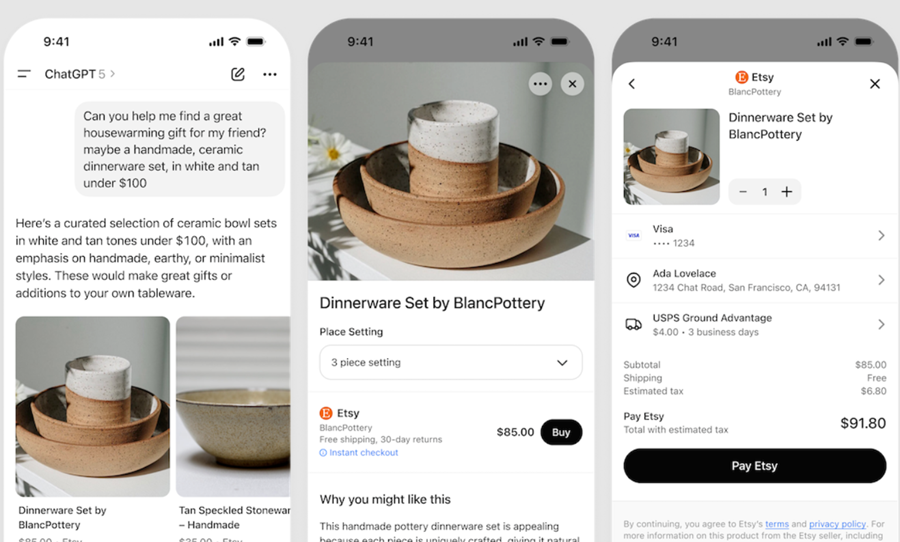
Image Source: https://developers.openai.com/commerce/guides/get-started
Instant Checkout is a way for shoppers to find and buy your products directly inside ChatGPT.
Instant Checkout is built on the Agentic Commerce Protocol (ACP), a standard that enables ChatGPT (the “agent”), your shoppers, and your business to communicate with each other to discover products, check out, and fulfil orders.
Note: Instant Checkout is currently available only in the U.S. for U.S. merchants, with plans to expand to additional countries and merchants next year.
What powers ChatGPT shopping?
- Purchases run on the Agentic Commerce Protocol (ACP), which OpenAI co-developed with Stripe.
- At launch, Etsy sellers’ products can be bought directly in ChatGPT.
How do orders and payments work?
- Your existing store systems handle orders, payments, and fulfilment.
- ChatGPT securely passes the customer’s details to your system to complete the purchase.
What merchants pay and control?
- Merchants pay a small transaction fee.
- You remain the merchant of record. You get paid directly, decide to accept or decline orders, and handle refunds and chargebacks.
How are products ranked?
- Products are ranked solely based on their relevance to the shopper’s request.
- Rankings are not influenced by sponsorships or by whether Instant Checkout is turned on.
Why use Instant Checkout as a merchant?
- Reach: Places your product catalogue in front of people who are already describing what they want.
- Trust & speed: ChatGPT provides fast, personalised recommendations, allowing customers to make purchases without leaving the chat.
- Control: You remain the merchant of record. You get paid directly, you decide to accept/decline orders, and you own refunds/chargebacks and the customer relationship.
The platforms (and their merchants) that have Instant Checkout enabled.
- Etsy (US): If you sell on Etsy, your shop is automatically enabled for Instant Checkout. You don’t need to sign up or build anything.
- Shopify: It is not live yet. When it launches, Instant Checkout in ChatGPT will be automatically enabled for Shopify stores, no signup or setup required.
All other merchants:
You can still join. Follow the steps below:- Merchant Application Form - Merchants interested in selling through ChatGPT can apply by completing a brief application form.
- Send a product feed. Share your catalog file with OpenAI. It should include details like prices, stock levels, images, shipping options, and return policies.
- Set up checkout with ACP (Agentic Commerce Protocol). This lets ChatGPT start and complete orders directly with your system.
- Connect payments through your provider (e.g., Stripe). Customers pay the same way they do today, and you continue to process payments as usual.
- Get certified by OpenAI. Before going live, OpenAI checks that your setup works smoothly from start to finish.
Checklist for Etsy & Shopify sellers.
Important points to remember:
- Your platform turns on Instant Checkout in ChatGPT for you.
- You do not need to make any technical connections that allow ChatGPT to interact with your store.
- You do not need to set up a payment connection that allows ChatGPT to pass a one-time payment token to your payment provider.
- You do need excellent product data. Make sure your product titles, descriptions, prices, stock, images, shipping options, and return windows are complete and accurate.
- Keep your Return Policy, Privacy Policy, Terms of Service, Shipping information, and any required warnings or age limits easily accessible and up to date.
A) Understand what you are getting.
- Instant Checkout enables customers to find and purchase your products directly within ChatGPT.
- You stay the merchant of record. You receive direct payments, and you retain ownership of refunds and chargebacks.
B) Make your product feed excellent.
- Write a complete title and a rich description (up to 5,000 characters).
- Keep price, availability, and inventory accurate.
- Include brand, material, weight, and category.
- Add a main image, plus any additional images you may have.
- Provide the seller's URL, return policy URL, and return window (in days).
- Ensure that shipping options and delivery estimates are clearly stated.
High-impact extras (strongly recommended).
- Add variants (size, color, gender, size system).
- Add reviews (counts and average rating).
- Add performance signals (popularity score, return rate) if you track them.
- Add compliance info (e.g., warnings or age restrictions) when relevant.
- Add region-specific prices or availability if they vary by location.
C) What the platform handles for you.
- ACP checkout plumbing (create, update, complete).
- Delegated payments with the payment provider.
- Certification and core security requirements for the integration.
D) What you should still verify.
- Your policy links work (returns, privacy, terms).
- Your shipping promises match what customers see in ChatGPT.
- Your catalog stays fresh (update whenever price or stock changes).
E) After launch.
- Keep your feed updated (as often as every 15 minutes is supported).
- Continue enriching descriptions and optional fields to improve discovery.
- Handle refunds and chargebacks as usual on your platform.
Checklist for all other merchants.
You will set up the full checkout flow: product feed, ACP checkout, delegated payments, sandbox testing, and certification.
Note: Etsy and Shopify merchants do not need to implement ACP checkout, set up delegated payments, or run sandbox testing and certification with OpenAI themselves. Those technical pieces appear to be handled at the platform level (Etsy/Shopify’s integration).
A) Understand what you are building.
- Instant Checkout allows customers to find and purchase items directly within ChatGPT.
- ACP is the standard that connects ChatGPT to your store for discovery, checkout, and fulfilment.
- You remain the merchant of record.
B) Build a product feed (the catalog file ChatGPT reads).
- Choose a format: TSV, CSV, XML, or JSON.
- Deliver over HTTPS to the allow-listed endpoint.
- Send a sample feed first for validation.
- Refresh frequently (up to every 15 minutes).
Minimum fields (must have).
- id, title, description (plain text, up to 5,000 characters), link, image_link.
- brand, material, weight, product_category.
- price (with currency), availability, inventory_quantity.
- seller_name, seller_url, return_policy (URL), return_window (days).
- enable_search, enable_checkout (requires enable_search = true).
High-impact extras (do these to win discovery).
- Variants: item_group_id, size, color, gender, size system.
- Fulfillment: shipping method and price, delivery estimate.
- Trust signals: review count and rating; performance metrics.
- Compliance: warnings or age restrictions.
- Rich media: extra images, video, 3D.
- Geo: region-specific price or availability.
How does ChatGPT find products?
ChatGPT doesn’t use keyword-style SEO. It matches clear facts, such as category, price, and delivery date.
The more complete and accurate your product data is, the more frequently your products may appear.
Customer asks in ChatGPT:
I need a 13–14 inch laptop under $800 with at least 16 GB RAM, 512 GB SSD, under 1.4 kg, and delivery by Tuesday.Product A (rich, structured data).
- Category: Laptops.
- Screen size: 13.3 inches.
- RAM: 16 GB.
- Storage: 512 GB SSD.
- Weight: 1.28 kg.
- Price: $779.
- Delivery estimate: Arrives by Tuesday.
- CPU: Intel Core i5 (12th gen).
- Battery life: Up to 12 hours.
- Ports: 2× USB-C, 1× HDMI, headphone jack.
- Wireless: Wi-Fi 6, Bluetooth 5.2.
- OS: Windows 11.
- Returns: 30-day window.
- Reviews: 4.5 average from 640 reviews.
Product B (sparse data).
- Category: Electronics.
- Screen size: 14 inches.
- RAM: Not specified.
- Storage: “Large SSD.”
- Weight: “Lightweight.”
- Price: $749.
- Delivery estimate: Not provided.
- Other specs, returns, reviews: Not provided.
What happens.
- ChatGPT turns the request into fields: category = laptop, screen = 13–14", RAM ≥ 16 GB, storage ≥ 512 GB SSD, weight < 1.4 kg, price < $800, delivery by Tuesday.
- Product A explicitly matches every field.
- Product B is missing key fields (RAM exact value, SSD size, weight, delivery date), so it cannot be confidently matched.
Result.
- Product A is very likely to appear and be recommended.
- Product B may be skipped because its data is incomplete.
C) Implement ACP checkout.
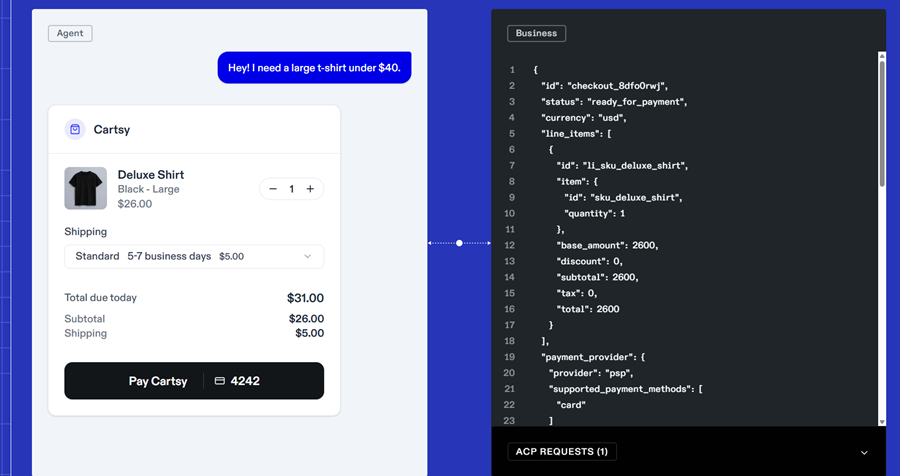
Image Source: https://www.agenticcommerce.dev/
>> Start a checkout. When the customer clicks “Buy” in ChatGPT, your system should create a new checkout and send back all the necessary information: the items, taxes or fees, shipping options, totals, any relevant messages (such as out-of-stock notifications), links to your policies, and the current status.
>> Keep the checkout updated. If the customer changes anything (address, shipping speed, items, discounts), your system should recalculate and send back the full, updated checkout.
>> Finish the purchase. When the customer pays, your system should create the order and send back the final details, including the order ID.
>> Optional actions. Allow a checkout to be cancelled. Allow ChatGPT to request the latest checkout information.
>> Send order updates automatically. When an order is created or updated, your system should notify ChatGPT right away.
- These automatic notifications are called webhooks.
- Add a small security signature (called an HMAC signature) so ChatGPT can verify the notification really came from you.
Current limitation to be aware of:
Right now, ChatGPT’s checkout flow only allows one shipping address and one shipping method per order.
Example: If a customer buys two products, one from Warehouse A and one from Warehouse B, ChatGPT won’t show two separate shipping options.
Instead, you (the merchant) must combine everything into a single shipping option and total cost for the customer to see. It keeps the checkout simple for the shopper, even if your backend (your warehouses or systems) ships items separately.
In short: Always show customers one clear shipping choice and total cost, even if you handle it with multiple shipments internally.
D) Set up payments (delegated payment spec).
>> Keep your current payment provider. You will still use the same company that processes your card payments today (for example, Stripe). OpenAI is not the seller of record; you are.
>> Use a one-time payment token. ChatGPT asks your payment provider to create a single-use token (a secure, limited permission). It has a maximum amount and an expiry time, so it cannot be misused.
>> Stripe is supported first. Stripe’s “Shared Payment Token” already works with this flow, and more providers are expected to be added.
>> Lower compliance burden if you avoid handling card numbers. If your payment provider handles the token and you do not touch raw card numbers, you may avoid extra PCI compliance work. If you choose to handle card numbers directly, you will be in PCI scope and therefore require a higher level of compliance.
How does your payment provider make delegated payments work?
- Accept a request from ChatGPT to create that single-use token.
- The request includes basics such as the card method, the allowed amount and currency, the checkout it belongs to, the merchant's details, when it expires, and any risk checks.
- If all is good, the provider returns a token (think of it as a one-time ticket) that your store can charge.
- If something is wrong (for example, an invalid card or a duplicate request), the provider sends back a clear error message, allowing you to display a friendly message to the customer.
E) Test in sandbox (prove the whole checkout flow works).
>> Start a checkout with and without a shipping address. When a valid address is added, your system should show shipping options and taxes.
>> Change the shipping option. The totals should update correctly.
>> Make a test payment using the one-time token from your payment provider. The request must include all required details and the built-in security checks.
>> Finish the checkout. You should get a final order record back that confirms success.
>> Check that your system sends automatic order updates back to ChatGPT (these are called webhooks), and that they include the required security stamp.
>> Try common error cases on purpose and show clear messages to the customer:
- A missing field (invalid request).
- An item that is out of stock.
- A payment that is declined.
>> Send the same request twice with the same unique key and confirm you get the same result (this prevents double charges). If you change the request but reuse the same key, your system should reject it with a clear conflict message.
>> Confirm basic security and network setup: you use HTTPS with a valid certificate, and you have allowed-listed the official OpenAI IP addresses.
F) Certification and launch.
For non-Etsy/Shopify merchants, a certification step with OpenAI is required after completing sandbox testing.
What certification is (simple):
- You share sample request/response logs from your sandbox runs.
- OpenAI verifies that you meet the conformance requirements, including correct data shapes (schema), proper error codes, reasonable rate limits, reliable webhook delivery, and that the flow works end-to-end.
What certification allows:
- Production access to Instant Checkout in ChatGPT for your store.
- Your products can be purchased inside ChatGPT (once your feed is live and checkout/payments are connected).
- Confidence that your feed, checkout endpoints, and payment tokenization behave correctly and securely.
Note: For Etsy/Shopify sellers, you do not need to do this certification yourself. It is handled at the platform level. You should still keep product data and store policies accurate, because that is what customers and ChatGPT will see.
G) After launch, maintain accuracy and reliability.
- Keep your product feed fresh and accurate (price, stock, and delivery info).
- Handle refunds and chargebacks as usual, and send an order-update webhook so ChatGPT stays in sync.
- Continue to refine product descriptions and optional fields (such as variants, delivery estimates, and reviews) to increase their visibility in more shopper requests over time.