

In the context of setting rules or constraints, there are two categories of prompts: False Positive prompts and Conservative Prompts.
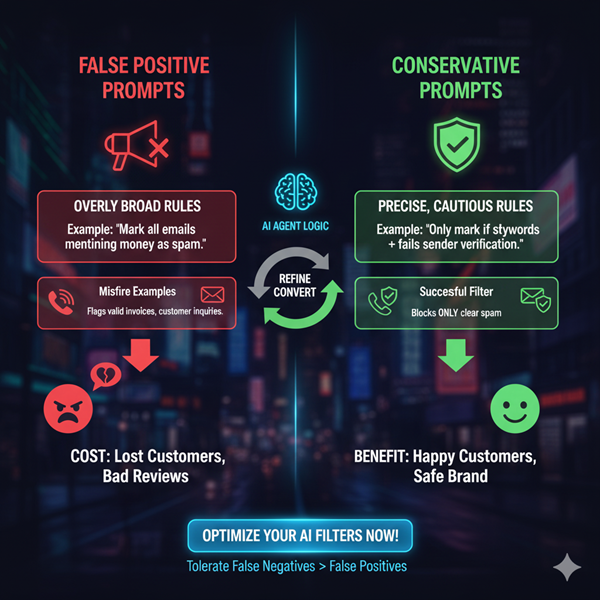
False Positive Prompts.
>> Prompts that increase the likelihood of false positives by being overly broad, aggressive, or poorly constrained.
>> Regular prompts used for setting rules or constraints often fall into this category because they don’t explicitly guard against misclassification.
>> Example: “Mark all emails mentioning money as spam.” → Flags valid invoices and salary slips.
Conservative Prompts.
>> Prompts that are carefully structured to minimize misclassifications by being strict, precise, and cautious.
>> These prompts set clear boundaries and require stronger evidence before the AI takes an action.
>> “Only mark an email as spam if it contains known spam keywords and fails sender verification.”
Most of the time, you would need to convert a regular prompt into a conservative prompt before you can use it for setting rules or constraints for AI Agents.
The following is an example of a false positive prompt that is used to detect spam calls in the context of voice AI Agents:
# Spam Detection Rules

Classify a call as spam if:

- The caller attempts to sell a product or service

  (e.g., credit card, insurance, loan, business loan, warranty).

- The caller makes a sales attempt 2 times or more.
Example of misfire:
Caller: “Do you guys offer financing? I heard you take a credit card, maybe Synchrony?”
This would be incorrectly flagged as spam call because the rules catch any mention of a “credit card.”
Another example of misfire:
Caller: “Do you take insurance for repairs?”
This would be incorrectly flagged as spam call because the rules catch any mention of “insurance.”