

What Is Caveman?
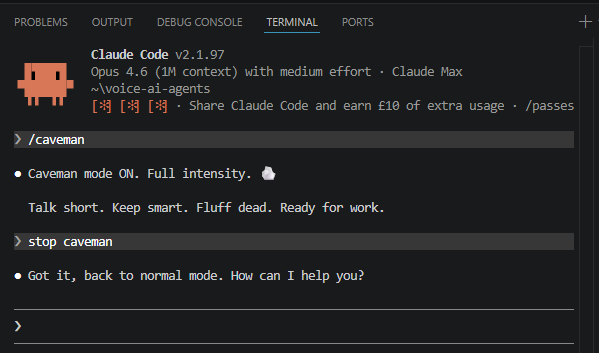
Caveman is a Claude Code skill that makes Claude respond like a caveman, stripping out all the filler words while keeping full technical accuracy.
For example:
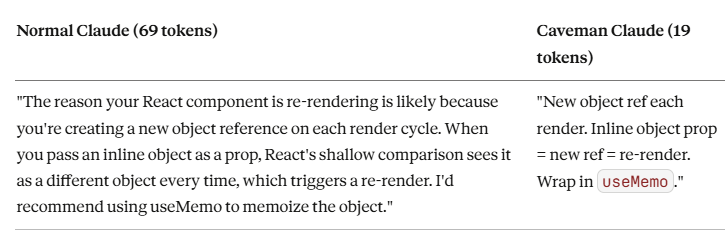
Normal Claude wastes tokens on things like:
- "I'd be happy to help you with that" (8 wasted tokens).
- "The reason this is happening is because" (7 wasted tokens).
- "I would recommend that you consider" (7 wasted tokens).
Caveman Claude just says what needs to be said. Then stops.
When you use Caveman, you:
- Save money - 75% fewer output tokens = 75% less cost.
- Faster responses - fewer tokens to generate = speed increase.
- Same accuracy - only fluff removed, all technical content kept.
A Claude Code skill is a markdown file that lives in ~/.claude/skills/ on your machine. Claude Code reads it automatically at the start of every session.
You install it once, and it's available permanently. No reinstalling per session.
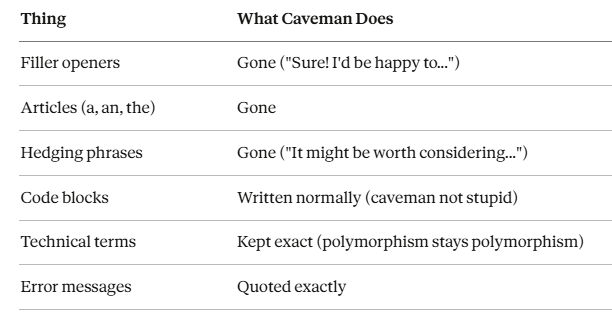
What Caveman Removes vs Keeps?
Who is the Caveman for?
Caveman is a tool for experienced developers seeking speed and cost savings, not for those still learning.
The 75% token reduction is only a benefit if the 75% you're cutting was an explanation you didn't need anyway.
Here's why. Take this example:
Beginner asks: "Why is my React component re-rendering too much?"
Normal Claude:
"The reason your React component is re-rendering is likely because you're creating a new object reference on each render cycle. When you pass an inline object as a prop, React's shallow comparison treats it as a different object each time, triggering a re-render. This is a common React performance issue. I'd recommend using useMemo to memoize the object. This tells React to reuse the same reference unless the dependencies change."
Caveman Claude:
"New object ref each render. Inline object prop = new ref = re-render. Wrap in useMemo."
For an experienced React developer, the caveman answer is perfect. They know what object references are, what shallow comparison means, and how to implement useMemo. The explanation was noise.
For a beginner, the caveman answer raises more questions than it answers:
- What is an object reference?
- What is shallow comparison?
- What is useMemo, and where do I put it?
- Why does any of this cause a re-render?
The tokens caveman strips out are not filler for a beginner; they are the lesson. Without that context, the beginner either gets stuck or has to ask three follow-up questions to get back to where a normal Claude would have left them in a single response.
So caveman effectively trades learning for efficiency.
A good trade for a senior developer shipping production code. A bad trade for anyone still building their mental model of how things work.
Do not use caveman if:
- You are learning a new language, framework, or concept.
- You need Claude to explain its reasoning, not just give you the fix.
- You are onboarding to a codebase you do not fully understand yet.
- You are using Claude as a teaching tool.
- You are not a developer.
Installing Caveman.
Note: The README on the caveman GitHub page shows claude install-skill JuliusBrussee/caveman . This command does not exist in Claude Code yet. Install manually using the steps below.
Step 1: Open the terminal in Claude Code and create the skills directory.
mkdir -p ~/.claude/skills/cavemanStep 2: Clone the repo.
git clone https://github.com/JuliusBrussee/caveman.git ~/Downloads/caveman-tmpStep 3: Copy the skill.
cp -r ~/Downloads/caveman-tmp/caveman/. ~/.claude/skills/caveman/Step 4: Clean up.
rm -rf ~/Downloads/caveman-tmpStep 5: Restart Claude Code.
Close and reopen Claude Code. The skill is picked up automatically from ~/.claude/skills/ on startup.
How to Use Caveman?
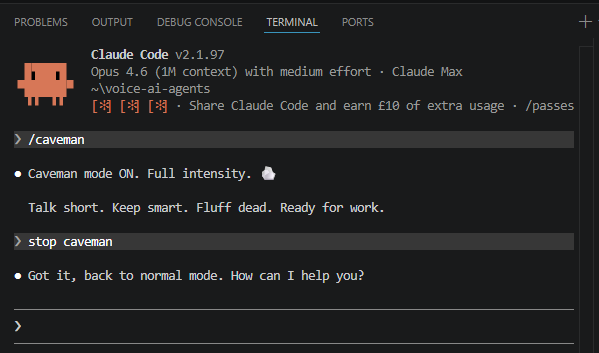
Important: /caveman is a command inside Claude Code, not your terminal. Make sure you launch Claude Code first:
claudeOnce you see the > prompt inside Claude Code, then type:
/cavemanOther ways to trigger it:
- "talk like caveman"
- "caveman mode"
- "less tokens please"
To turn it off:
- "stop caveman"
- "normal mode"
Where Is the Skill Installed?
On Windows with bash, the skills directory resolves to:
C:\Users\<your-username>\.claude\skills\caveman
~ in bash equals your home folder ($HOME), which on Windows is C:\Users\<your-username>\.
Source:
GitHub repo: https://github.com/JuliusBrussee/caveman