

Any intelligent fool can make things bigger, more complex, and more violent. It takes a touch of genius and a lot of courage to move in the opposite direction. - E.F. Schumacher.
You may often come across big and complicated n8n workflows like the one below:
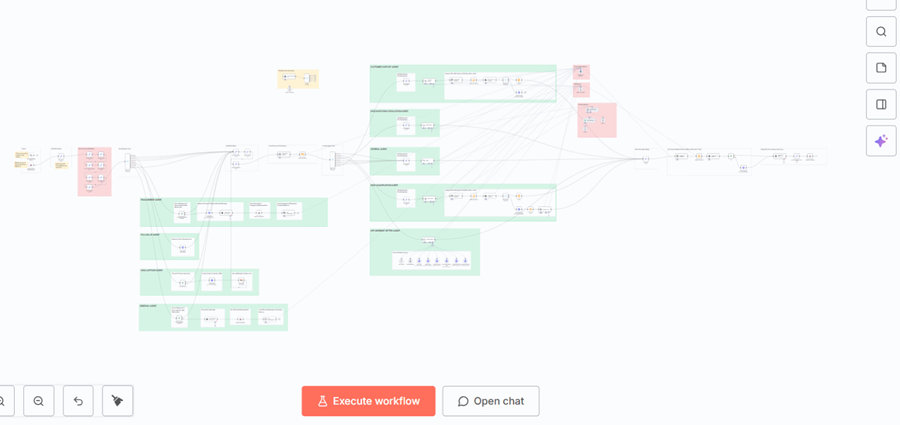
Developers who create large, tangled, monolithic workflows often do so not out of carelessness, but because they are still in the early stages of their automation maturity.
In other words, they are rookies in workflow design.
What distinguishes a novice AI developer from an experienced one?
Here is why that tends to happen and what distinguishes a novice AI developer from an experienced one:- They prioritize getting it to work, not keeping it maintainable.
- They don’t understand the cost of complexity.
- They confuse visibility with control.
- They don’t apply software engineering principles.
- They underestimate how often logic will change.
- They don’t think in data contracts.
- They skip documentation and naming discipline.
- They haven’t learned to separate business logic from orchestration.
- They equate “it works” with “it’s good.”
- They lack debugging experience.
New developers prioritize getting it to work, not keeping it maintainable.
New developers focus on the immediate goal of making the workflow run.
They measure success by seeing the green checkmark, not by considering how the workflow will be updated later.
Experienced developers design for change, not just for execution.
New developers don’t understand the cost of complexity.
At first, adding one more node feels harmless. Soon, the workflow becomes a tangle of dependencies that only its creator understands.
Rookies have not yet encountered the debugging challenges that come with a 70-node chain.
Experienced developers avoid that by modularizing early.
New developers confuse visibility with control.
Beginners like seeing everything on one canvas because it feels transparent. In reality, too much visual sprawl hides logical structure.
Experts prefer small, well-defined modules because clarity comes from boundaries, not from size.
New developers don’t apply software engineering principles.
Workflow automation tools like n8n are visual, but they still require a disciplined approach to engineering.
Rookies often ignore principles such as “don’t repeat yourself,” separation of concerns, single responsibility, and reusability.
Experienced developers apply these principles even in low-code tools.
New developers underestimate how often logic will change.
Early developers assume the logic is final. In practice, business rules, APIs, and integrations are constantly changing.
Experienced builders anticipate change and design modular sub-workflows to ensure that updates do not impact unrelated parts.
New developers don’t think in data contracts.
Rookies pass entire JSON blobs through many nodes without defining a structure.
Experts define clear inputs and outputs for each module, making debugging and maintenance easier.
New developers skip documentation and naming discipline.
Beginners rely on memory to remember what each node does. Over time, even they forget.
Experienced developers add notes, use descriptive names, and label paths clearly because they build for future readers, not just for themselves.
New developers haven’t learned to separate business logic from orchestration.
Rookies mix validation, booking, error handling, and notifications in one long chain.
Experts delegate these tasks by keeping the main workflow as the orchestrator and using sub-workflows for logic.
New developers equate “it works” with “it’s good.”
A rookie considers a successful test run as completion.
A professional sees it as the start of hardening the workflow through modularization, validation, logging, and security.
New developers lack debugging experience.
Many new developers have not yet faced the pain of chasing a single faulty node in a large, monolithic workflow.
Experienced developers modularize because they have learned from such failures.
What does Modularizing n8n Workflow mean?
Modularizing an n8n workflow means breaking one large, complex workflow into several smaller, self-contained workflows that each perform a single, well-defined function and then connecting them together using sub-workflows.
In n8n, this is typically done through the “Execute Workflow” node, which allows one workflow to call another and pass data between them:

Instead of one huge workflow that handles every step (from validation to booking to notifications), you create multiple smaller workflows where each has one responsibility.
For example:
- Main Orchestrator Workflow → receives the webhook, verifies the request, and routes it.
- Contact Lookup Workflow → finds or creates a contact in GHL.
- Availability Workflow → checks business hours and retrieves available slots.
- Booking Workflow → creates the appointment and sends confirmation.
- Logging Workflow → records every action for audit or debugging.
Each of these can run independently and can be reused in other automations.
The goal of modularizing n8n workflows.
The goal of modularization is to make workflows easier to understand, maintain, debug, and scale.
By splitting logic into smaller units, you prevent a single failure from stopping the entire automation, and you can test or replace individual parts without affecting others.
Imagine an API node fails deep in a 60-node chain.
Now you have to run the whole workflow to reproduce it.
Logs become harder to interpret because multiple branches intersect and overlap with each other.