
Open the Retell AI dashboard, and you will find a tab labelled "Transfer Screening Agents."
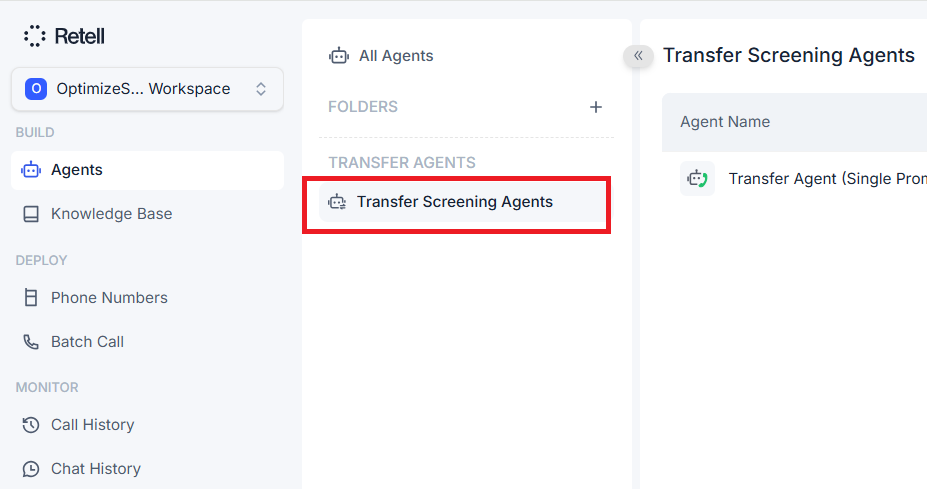
Click on the ‘Create Transfer Agent’ button:
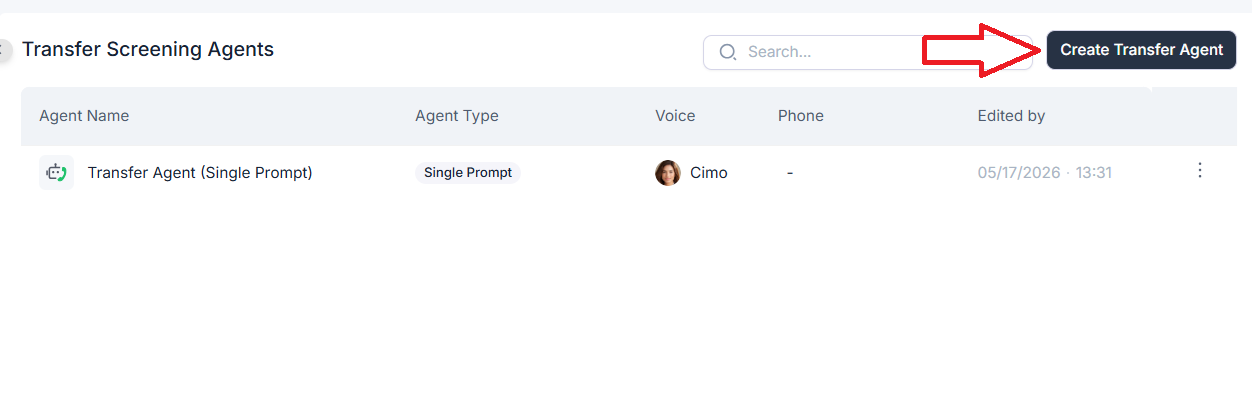
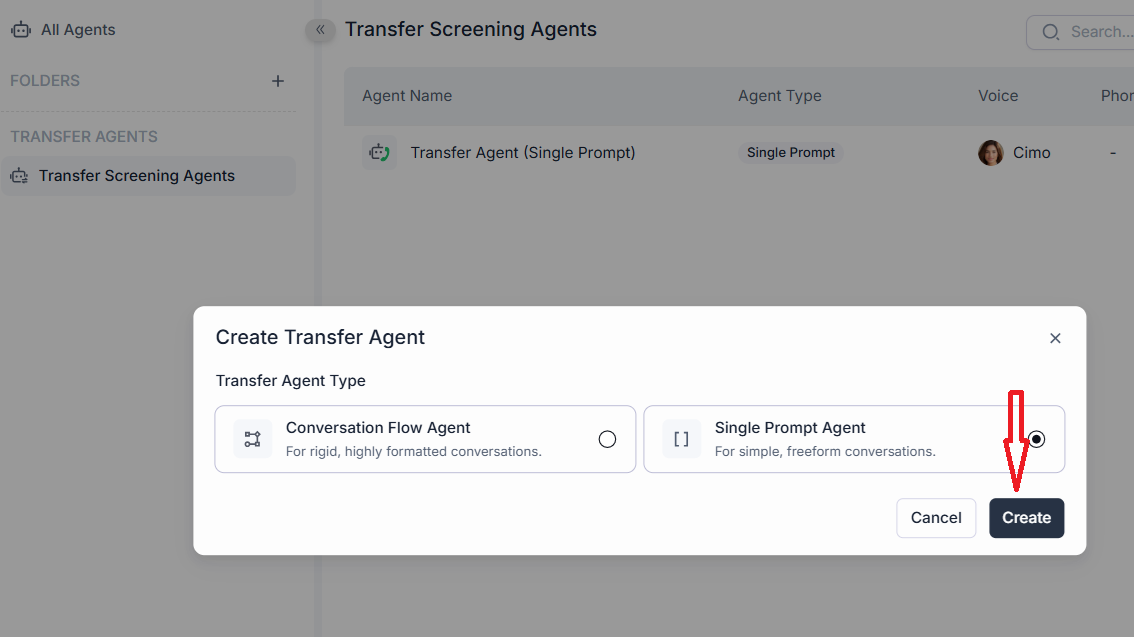
Select ‘Single Prompt Agent’ and click on ‘Create’:
You now see an agent builder that is identical to a regular Retell agent. Same prompt field. Same voice picker. Same tools. Same model selector:
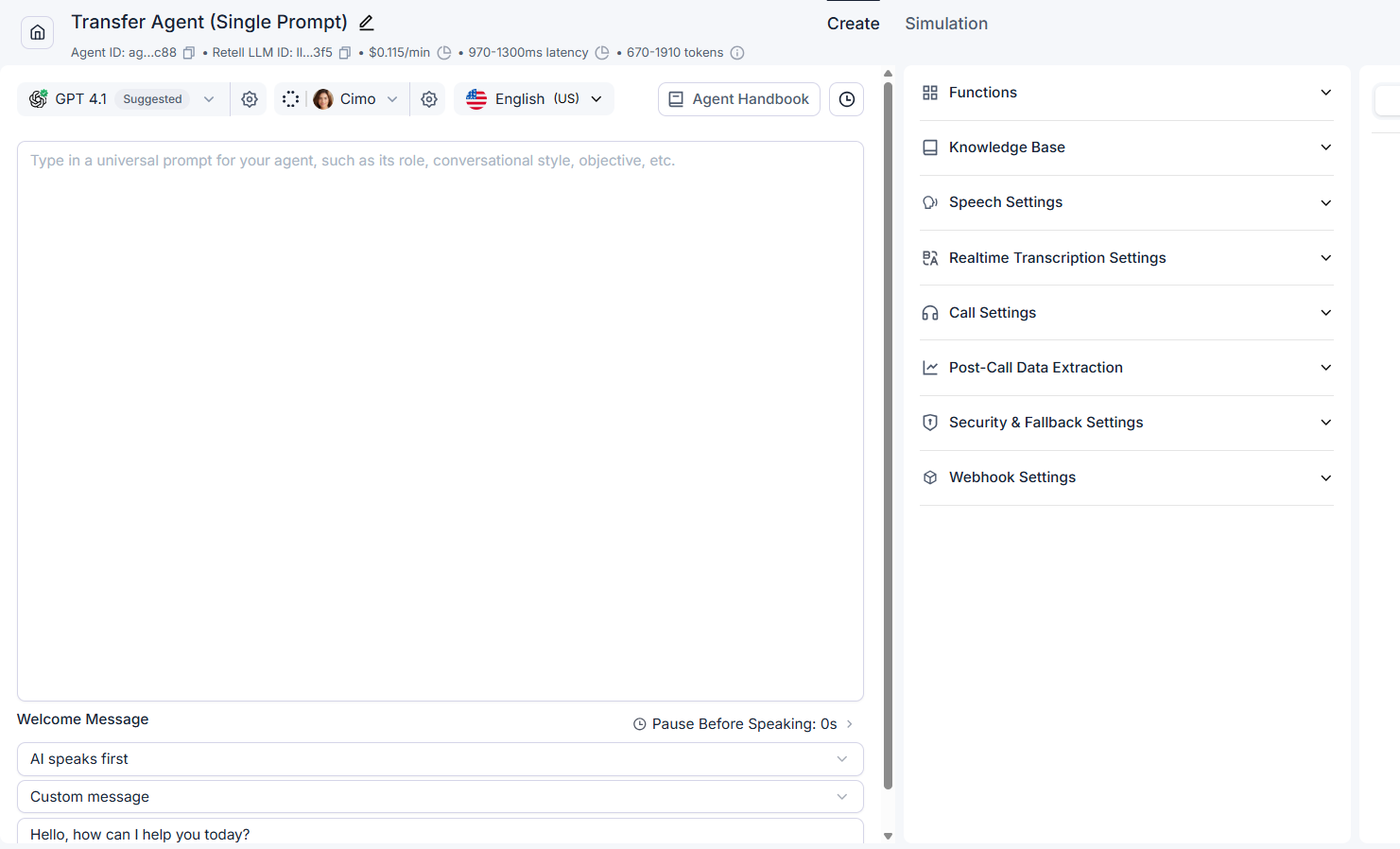
So what makes it a "screening agent"? And why does Retell give it its own tab if the editor is the same as every other agent in your account?
This article unpacks what these agents actually do, where they sit in the call flow, why the name is confusing, and when they earn their place in a build. The mechanics are not obvious until you understand the two different transfer tools Retell exposes, so we will start there.
The two transfer tools in Retell.
This is the single most important thing to grasp. Retell has two separate tools that both involve the word "transfer," and they do completely different things.
Agent Transfer swaps which AI agent is handling the current call. No new outbound call is placed. The caller stays on the same line. The voice on the other end of their line changes because a different agent is now in charge.
Transfer Call places a new outbound call. It dials a phone number, runs warm or cold-transfer logic (whisper, human detection, three-way intro), and connects the result.
Most of the confusion about screening agents stems from missing this distinction. The screening agent pattern uses both tools in sequence, with different jobs.
What a transfer screening agent actually is.
A transfer screening agent is a regular Retell agent designed to be invoked as the destination of an Agent Transfer, not as the answerer of an inbound call.

The "Transfer Screening Agents" tab is where you keep these agents.
The builder fields are identical to those of a normal agent, but the role is restricted.
A screening agent cannot be tied to a phone number. It cannot answer inbound calls directly. It can only be summoned when another agent hands the call to it via Agent Transfer.
That restriction is useful. It stops you from accidentally pointing a customer-facing phone number at an agent whose prompt was written for a colleague-facing job.
What is actually happening on the call?
The flow uses both transfer tools. Here is the full sequence.
- The caller dials your business number. Agent A (the frontline agent) answers and qualifies them.
- Agent A decides the lead is worth handing to a human. It calls its Agent Transfer tool, which is configured to hand off to Agent B (the screening agent).
- Control of the caller's leg passes to Agent B. The caller is still on the same line, but a different AI is now driving. No new dial has happened yet.
- Agent B says a short holding line to the caller. Something like "Let me get a technician on the line for you, please hold for a moment."
- Agent B now calls its own Transfer Call tool. This is the tool that actually dials the rep's number. The warm-transfer settings (whisper, human detection, on-hold music, three-way intro) are configured on this tool inside Agent B.
- The caller hears on-hold music. The rep's phone rings. The rep picks up. Agent B then briefs the rep on the rep's leg of the call.
- Agent B asks the rep whether to take the call.
- If yes, Agent B triggers the three-way bridge. The intro message plays to both parties. Agent B drops off. The rep and the caller continue alone.
- If no, Agent B cancels the outbound leg. The rep's phone disconnects. Agent B is still the active agent on the caller's leg and handles the fallback. A callback offer, a requeue, or a polite end.
The key thing to notice: Agent A never dials the rep.
Agent A just swaps control to Agent B. Agent B is the one who does the dialling, using its own Transfer Call tool.
During the warm-transfer dance, Agent B is effectively running both sides of the conversation.
It is on the caller's leg (where it places the caller on hold) and on the rep's leg (where it briefs the rep). It bridges them if the rep accepts. It returns to the caller alone if the rep declines.
Why is this called "agentic warm transfer"?
Retell distinguishes two flavours of warm transfer in its docs.
Direct warm transfer. The main agent uses its own Transfer Call tool to dial the rep. A static whisper message is played to the rep; optionally, a three-way intro plays to both parties and the call bridges. No second AI is involved on the rep's side. The whisper text is fixed; it cannot adapt to the rep's questions.
Agentic warm transfer. A screening agent is involved. The screening agent runs as a live AI on the rep's leg, can adapt its briefing, answer the rep's questions, and decide whether to bridge or cancel. The "agentic" word refers to this. The agent has agency on the rep's leg, not just a static whisper.
A screening agent only makes sense in the agentic version.
If your handoff is a static "you have a lead from Tampa, here are the details" with no live decision-making, you do not need a screening agent. A direct warm transfer with a whisper message will do the job at lower complexity.
The name "screening" is misleading.
The name throws people off because it makes it sound like the screening agent is doing another round of qualification with the caller. That makes no sense. The main agent already qualified the caller before initiating the handoff.
The word "screening" comes from old call centre and personal assistant language.
A receptionist screens incoming calls for the boss. "May I ask who is calling and what this is regarding? Let me see if she is available." The boss then decides whether to take it.
The caller may already be perfectly legitimate.
The screening is for the receiver, not the sender. In Retell's flow, the screening agent acts like the receptionist on behalf of the rep.
It tells the rep who is calling, what they want, and whether the rep wants to take it. The verb describes the direction. Away from the rep, not towards the caller.
A more accurate name would be "handoff briefer" or "rep-side agent." That is closer to what the slot does. "Screening" is just the historical term that stuck.
What remains to be screened after the main agent has already qualified the lead?
Plenty, but none of it is about the caller's qualification. It is about runtime conditions that the main agent cannot know.
The rep may be on a roof, mid-job, or on a different call. The rep may not cover that postcode, product, or price band. The rep may have spoken to this lead earlier in the day and know something the main agent does not.
The briefing itself may surface information that makes the rep want to redirect. A complaint flag, an attitude red flag, and a number they would rather a colleague handled. The rep may simply prefer to call this lead back in twenty minutes from a quieter spot.
These are decisions only a human can make in the moment. The screening agent's job is to give the human enough information to make that decision quickly and cleanly, then either bridge or reject.
A concrete example.
The main agent (Agent A) answers an inbound call from a residential HVAC contractor in Florida.
The homeowner says the AC is not cooling. Agent A qualifies. Address in Tampa, system age, urgency, willingness to pay a service call fee today. Lead looks good.
Agent A calls Agent Transfer and hands the call to Agent B (the screening agent). The caller is unaware of this swap; from their side, the voice on the line continues, just with a slightly different style.
Agent B says: "Thanks Sarah, give me a moment to get a technician on the line for you." The caller hears hold music.
Agent B then calls its own Transfer Call tool, which is configured with the on-call tech's number, warm transfer enabled, and a whisper message. The tech's phone rings. The tech picks up. The whisper plays privately: "Live agentic transfer, please hold for briefing."
Agent B briefs the tech: "Tampa job, AC out, homeowner is home now and ready to pay the service fee today. Want me to put her through?"
Two paths from here.
Path A. Tech says, "Put her through." Agent B triggers the three-way bridge. The intro plays to both parties: "Mike, this is Sarah from Tampa with the AC out. Sarah, this is Mike. He will be your tech today." Agent B drops off. Tech and the homeowner finish the booking themselves.
Path B. Tech says, "I am on a roof right now. Can you offer her a callback in thirty minutes?" Agent B cancels the outbound leg. The tech's phone disconnects. Agent B is still on the caller's leg. It picks back up with the caller: "Mike is on a job right now. Can we ring you back at ten past four?" Agent B collects callback consent and ends the call.
The flow needs both Agent Transfer and Transfer Call. Agent Transfer moves the caller from Agent A to Agent B. A Transfer Call inside Agent B dials the tech.
When do you actually need a screening agent?
Not every transfer needs one. Three rules of thumb.
If your rep just wants the call bridged with no briefing, use a basic cold transfer from Agent A. No screening agent needed. The main agent's Transfer Call tool dials the rep and bridges the call.
If your rep wants a briefing but will always take the call, you do not need the reject path. Use a direct warm transfer from Agent A with a whisper message. No screening agent needed. The whisper text is static, but for "always accept" flows that is fine.
If your rep needs to decide in real time whether to accept, redirect, or reject based on the briefing, that is where a screening agent earns its place.
The same is true if the rep needs to ask the AI questions about the prior conversation before making a decision, or if you want the briefing to adapt to the lead rather than play the same lines every time.
The richer the rep-side decision, the more value a screening agent adds. The simpler the handoff, the more you can get away with a whisper message or a plain cold transfer.
So conceptually:
Simple handoff → cold or warm transfer from Agent A, no screening agent.
Contextual but always‑yes handoff → warm transfer from Agent A with whisper / three‑way, no screening agent.
Context + decision + back‑and‑forth with AI → use a screening agent (often via Agent Transfer → screening agent → screening agent’s own Transfer Call).
Other Articles on Voice AI.
- Voice AI Knowledge Base Creation Best Practices.
- How to build Cost Efficient Voice AI Agent.
- When to Add Booking Functionality to Your Voice AI Agent.
- Without IP your AI company is worth nothing.
- AI Automation Agency Pricing Rules.
- How to Prevent Toll Fraud in Retell AI.
- Voice AI - Build once → Sell many → Collect monthly forever.
- State Machine Architectures for Voice AI Agents.
- Missing Context Breaks AI Agent Development.
- Avoid the Overengineering Trap in AI Automation Development.
- Retell Conversation Flow Agents - Best Agent Type for Voice AI?
- How To Avoid Billing Disputes With AI Automation Clients.
- Don't 'Build' AI Automation Workflows, 'Code' Them.
- Critical Aspect of Prompt Engineering - Domain Parameters.
- Zero Shot vs Single Shot vs Multi Shot Prompting.
- How to Build Reliable AI Workflows.
- Stop Building AI You Can't Fix.
- Automating 100% of your workflows is a disaster waiting to happen.
- How to build Voice AI Agent that handles interruptions.
- AI Automation Without CRM Is Useless for Business Growth.
- Structured Data in Voice AI: Stop Commas From Being Read Out Loud.
- Why Your Voice AI Sounds Robotic and How to Fix It.
- Why You Need an AI Stack (Not Just ChatGPT).
- AI Default Assumptions: The Hidden Risk in Prompts.
- Vibe Coding Fails Without Context and Expertise.
- How to make your Voice AI Agent Date & Time Aware.
- Why AI Agents lie and don't follow your instructions.
- How to Write Safer Rules for AI Agents.
- Two-way syncs in automation workflows can be dangerous.
- Using Twilio with Retell AI via SIP Trunking for Voice AI Agents.
- The Realistic Latency Target for Voice Agents.
- The required-field loop that breaks voice agents.
- Why your Voice prompt needs a clean-up pass.
- When to split your voice agent - The Bleed Test Framework.
- Abuse Ladder in Voice AI.
- Understanding Retell AI Transfer Screening Agents.
- The 80/20 Rule of Voice Agent Development.
- Retell AI Current Time Awareness has a reliability problem.
- Every dynamic variable in voice agent needs a fallback.
- When your Voice AI grader is wrong, not your agent.