

A Voice AI Agent is a system that can listen, understand, and respond in real time.
A Voice AI Agent is made up of the following four components:
- ASR (Automatic Speech Recognition).
- NLP (Natural Language Processing).
- Normalizer.
- TTS (Text-to-Speech).
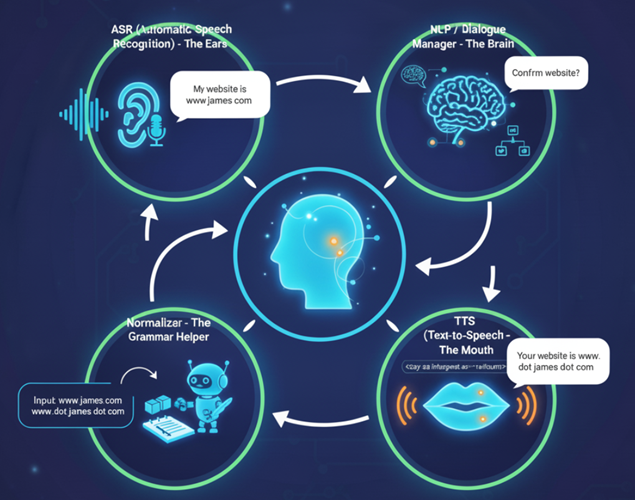
To optimize the agent’s output, you need to understand each of these components.
Why do these components matter?
- If ASR struggles, the agent mishears the caller.
- If NLP is weak, the agent may misunderstand the intent.
- If the Normalizer isn’t tuned, punctuation and structured data (emails, URLs) get read awkwardly.
- If TTS isn’t natural, the voice sounds robotic or unclear.
Optimizing each component = a smoother, more human-like Voice AI Agent.
#1 ASR (Automatic Speech Recognition) - The Ears.
ASR is the component used by the voice AI Agent to listen. It converts spoken language into text.
For example:
Caller says: “My website is www.abc.com.”
ASR outputs: My website is www.abc.com.
Why ASR Matters in Voice AI?
If ASR is weak, problems cascade through the system:
- Mishearing = Misunderstanding.
- Caller says: “I need to book a flight to Rome.”
- Poor ASR outputs: “I need to book a flight to roam.”
- The NLP then processes the wrong text, leading to wrong intent detection.
- Caller says: “I need to book a flight to Rome.”
- Loss of Trust.
- Frequent transcription errors frustrate users.
- If they need to repeat themselves often, they’ll feel the agent is “deaf” rather than intelligent.
- Frequent transcription errors frustrate users.
- Structured Data Errors.
- ASR often struggles with emails, numbers, URLs, or domain-specific terms.
- Caller says: “My email is john_doe99@gmail.com”.
- ASR outputs: “my email is John though night at Gmail com.” → unusable for downstream tasks.
- ASR often struggles with emails, numbers, URLs, or domain-specific terms.
- Accent & Noise Sensitivity.
- Strong ASR models handle diverse accents, background noise, and speaking speeds.
- Weak ones fail in real-world call environments.
- Strong ASR models handle diverse accents, background noise, and speaking speeds.
In short:
- ASR quality decides how well the Voice AI “hears” you.
- If ASR struggles → the agent mishears → everything else (NLP, Normalizer, TTS) is compromised.
- ASR doesn’t affect the agent’s voice quality (that’s TTS). But when ASR keeps mishearing, the agent’s behavior becomes robotic, repeating or misunderstanding instead of adapting like a human.
#2 NLP (Natural Language Processing) / Dialogue Manager - The Brain.
The NLP /Dialogue Manager is the component used by the voice AI Agent to understand and determine the response.
Example:
See my website is www.abc.com. → decides to confirm the website with the caller.
Why NLP Matters in Voice AI?
If NLP is weak, problems cascade through the system:
Misunderstanding = Wrong Intent.
Caller says: “I need to book a flight to Rome.”
NLP misinterprets as “Check flight status for Rome.”
The agent responds with irrelevant information, breaking the flow of conversation.
Loss of Context.
Caller: “I need to book a flight.”
Agent: “Where to?”
Caller: “Rome.”
Weak NLP treats each utterance in isolation and misses the link, so it can’t resolve “Rome” to the booking request.
Poor Intent & Entity Extraction.
Caller says: “Transfer $200 to my savings account.”
Weak NLP outputs: Intent = Transfer money. Entity = missing amount, missing account type.
Without accurate entities, the agent can’t complete the task.
Ambiguity Handling.
Caller says: “Can you book me a ticket for Friday?”
A strong NLP model clarifies: “Do you mean this Friday or next Friday?”
A weak NLP model guesses and risks making the wrong booking.
In short:
NLP quality decides how well the Voice AI understands you.
If NLP struggles → the agent misunderstands intent → responses feel irrelevant, repetitive, or unhelpful.
NLP doesn’t affect the voice quality (that’s TTS).
But when NLP keeps misunderstanding, the agent’s behavior becomes robotic, answering incorrectly or out of context instead of responding naturally like a human.
#3 Normalizer - The Grammar Helper.
Normalizer is the component used by the voice AI Agent to prepare the response.
Tasks include:
- Expanding abbreviations: Dr. → “Doctor”.
- Converting numbers: 123 → “one hundred twenty-three”.
- Handling special tokens like URLs, emails, and punctuation.
For example:
Input: Your website is www.abc.com.
Normalizer Output: Your website is www dot abc dot com.
Why Normalizer Matters in Voice AI?
If the Normalizer isn’t tuned, problems cascade through the system:
Awkward Reading of Structured Data.
Caller says: “My website is www.james.com.”
Without normalization, the agent says: “Your website is www dot james dot com period.”
A tuned Normalizer removes the trailing “period” and makes the reading natural.
Incorrect Expansion of Abbreviations.
Text: “Dr. Smith will see you at 4 PM.”
Weak Normalizer: “D-R Smith will see you at 4 P-M.”
Strong Normalizer: “Doctor Smith will see you at four P-M.”
Numbers Read Literally.
Text: “123 Main Street.”
Weak Normalizer: “One two three Main Street.”
Strong Normalizer: “One hundred twenty-three Main Street.”
Emails and URLs Misread.
Text: “Contact me at john_doe99@gmail.com.”
Weak Normalizer: “Contact me at John doe ninety-nine at Gmail com.”
Strong Normalizer: “Contact me at john underscore doe ninety-nine at Gmail dot com.”
In short:
- The Normalizer decides how well the Voice AI prepares text for speech.
- If the Normalizer struggles → punctuation, numbers, and structured data are spoken awkwardly → the agent sounds clumsy instead of polished.
- The Normalizer doesn’t affect understanding (that’s NLP), but it does shape how natural the output feels when spoken.
#4 TTS (Text-to-Speech) - The Mouth.
TTS is the component used by the voice AI Agent to speak the response.
In normal sentences, TTS doesn’t literally say “comma.”
Instead, it converts punctuation (like , or .) into pauses, intonation changes, or pitch shifts.
Example text: “We specialize in GA4, GTM, and BigQuery consulting.”
How TTS speaks: “We specialize in GA4 [slight pause] GTM [slight pause] and BigQuery consulting.”
TTS does not say “comma” aloud. It just uses the comma to decide rhythm. This makes conversation sound natural.
Why TTS Matters in Voice AI?
If TTS is weak, problems cascade through the system:
Robotic Voice Quality.
Text: “Hello, how can I help you today?”
Weak TTS: flat, monotone delivery.
Strong TTS: natural prosody, friendly intonation.
Poor Punctuation Handling.
Text: “We specialize in GA4, GTM, and BigQuery consulting.”
Weak TTS: literally says “GA4 comma GTM comma and BigQuery consulting.”
Strong TTS: adds natural pauses instead of saying “comma.”
No Rhythm or Pausing.
Text: “Your appointment is on October 12th at 3:30 PM.”
Weak TTS: rushed and hard to follow.
Strong TTS: adds slight pauses and emphasis → “Your appointment is on October twelfth [pause] at three thirty PM.”
Mispronunciations.
Text: “SQL can be pronounced sequel or S-Q-L.”
Weak TTS: wrong choice without flexibility.
Strong TTS: supports phoneme control via SSML to pronounce correctly.
In short:
- TTS quality decides how well the Voice AI speaks to you.
- If TTS struggles → the agent sounds robotic, unclear, or unnatural → breaking user trust.
- TTS doesn’t affect hearing (that’s ASR) or understanding (that’s NLP), but it directly controls how “human” the agent’s voice feels.
Popular TTS Engines.
Amazon Polly → Amazon’s TTS engine (part of AWS).
Google Cloud Text-to-Speech → Google’s TTS engine (part of Google Cloud).
Microsoft Azure Speech (Speech Service) → Microsoft’s TTS engine (part of Azure).
IBM Watson Text to Speech → IBM’s TTS engine (part of Watson services).
These are all enterprise-grade, cloud-based engines that support SSML for controlling pronunciation, pacing, and emphasis.
SSML (Speech Synthesis Markup Language) for enterprise-grade Voice AI systems.
SSML is a markup standard (based on XML) that lets you control how a TTS (Text-to-Speech) engine speaks text.It’s like HTML for voice.
Instead of just handing raw text to the engine, you wrap it in tags to fine-tune pronunciation, pacing, emphasis, and audio effects.
Your issue with commas/periods sticking to structured data can often be solved with SSML.
For example:
Instead of (plain text):
Hello John, your flight is confirmed for 11/05/2025 at 7:45 AM.
Your flight number is AA3456.
Please arrive at Terminal 2, Gate 14B.
Use (SSML):
<speak>
  Hello <emphasis level="strong">John</emphasis>,
  your flight is confirmed for
  <say-as interpret-as="date" format="mdy">11/05/2025</say-as>
  at
  <say-as interpret-as="time">7:45am</say-as>.
  <break time="400ms"/>
  Your flight number is
  <say-as interpret-as="characters">AA</say-as>
  <say-as interpret-as="digits">3456</say-as>.
  <break time="500ms"/>
  Please arrive at Terminal
  <say-as interpret-as="digits">2</say-as>,
  Gate
  <say-as interpret-as="characters">14B</say-as>.
  <prosody rate="slow" pitch="+1st">Safe travels!</prosody>
</speak>