
Follow me on LinkedIn - AI, GA4, BigQuery

Use the ‘event_timestamp’ for the ‘first_visit’ event instead of ‘user_first_touch_timestamp’ wherever possible.

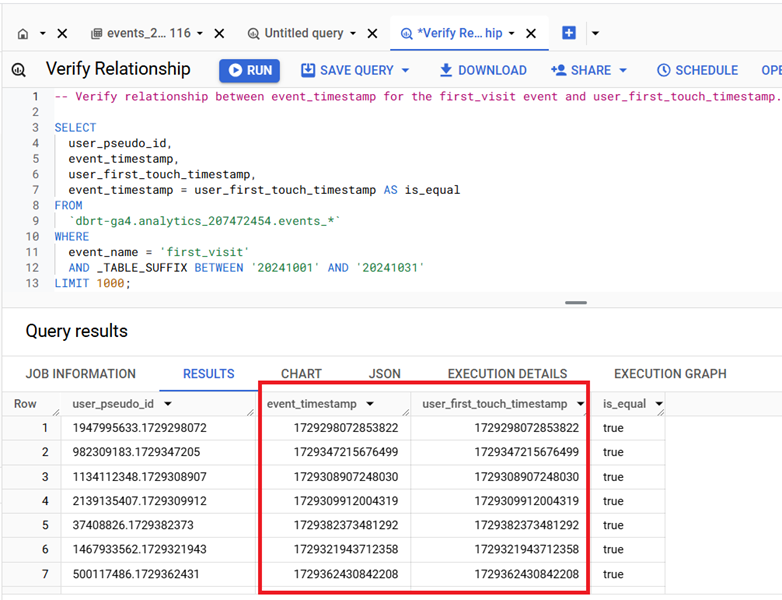
Both the ‘event_timestamp’ for the ‘first_visit’ event and ‘user_first_touch_timestamp’ represent the same exact moment of the first recorded interaction of the user with your website.
relationship 1

You can verify the relationship between ‘event_timestamp’ for the ‘first_visit’ event and ‘user_first_touch_timestamp’ by using the following SQL:

1

2

3

4

5

6

7

8

9

10

11

12

13

-- Verify relationship between event_timestamp for the first_visit event and user_first_touch_timestamp.


SELECT

  user_pseudo_id,

  event_timestamp,

  user_first_touch_timestamp,

  event_timestamp = user_first_touch_timestamp AS is_equal

FROM

  `dbrt-ga4.analytics_207472454.events_*`

WHERE

  event_name = 'first_visit'

  AND _TABLE_SUFFIX BETWEEN '20241001' AND '20241031'

LIMIT 1000;

The ‘user_first_touch_timestamp’ field is relatively new and may not work on old datasets. If the field was not recorded at the time of data collection, it may be null or absent.

‘event_timestamp’ is universally reliable across all datasets regardless of the date range, as it is tied directly to every event recorded in GA4.

Every event, regardless of type or date range, will always have a valid ‘event_timestamp’.

‘event_timestamp’ is versatile and can be used for both event-level and user-level aggregation.

For user-level analyses, you can derive insights by grouping or aggregating events by ‘user_pseudo_id’ and using the earliest ‘event_timestamp’ as the user’s “first touch.”

  1. Tracking Pages With No Traffic in GA4 BigQuery.
  2. First User Primary Channel Group in GA4 BigQuery
  3. How to handle empty fields in GA4 BigQuery.
  4. Extracting GA4 User Properties in BigQuery.
  5. Calculating New vs Returning GA4 Users in BigQuery.
  6. How to access BigQuery Public Data Sets.
  7. How to access GA4 Sample Data in BigQuery.
  8. Understanding engagement_time_msec in GA4 BigQuery.
  9. GA4 BigQuery Attribution Tutorial.
  10. How to backfill GA4 data in BigQuery.
  11. How to send data from Google Search Console to BigQuery.
  12. Google Advanced Consent Mode and GA4 BigQuery Export.
  13. Google Analytics 4 BigQuery Tutorial for Beginners to Advanced.
  14. Prompt Engineering for GA4 BigQuery SQL Generation.
  15. How to create a new BigQuery project.
  16. How to create a new Google Cloud Platform account.
  17. How to overcome GA4 BigQuery Export limit.
  18. BigQuery Cost Optimization Best Practices.
  19. event_timestamp vs user_first_touch_timestamp GA4 BigQuery.
  20. GA4 BigQuery Video Tracking Report.