
In GA4 BigQuery export data table the ‘entrances’ calculated for (not set) landing pages are usually zero. It is because, for (not set) landing pages, the ‘entrances’ event parameter is either NULL or missing.
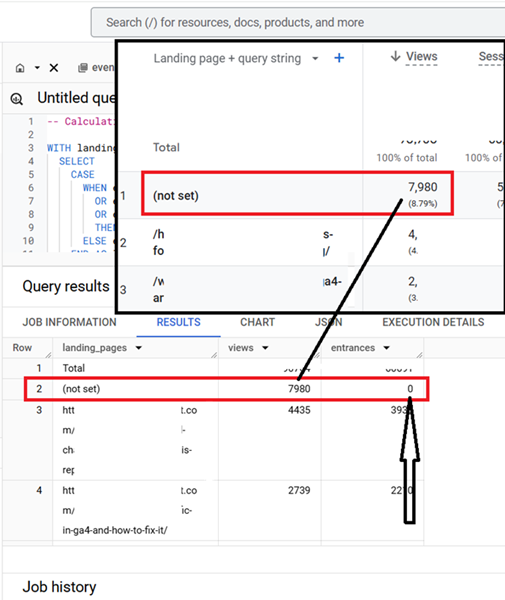
The ‘entrances’ event parameter indicates whether a ‘page_view’ is the first page of a session (landing page).
entrances = 1: Indicates the ‘page_view’ is a landing page for the session.
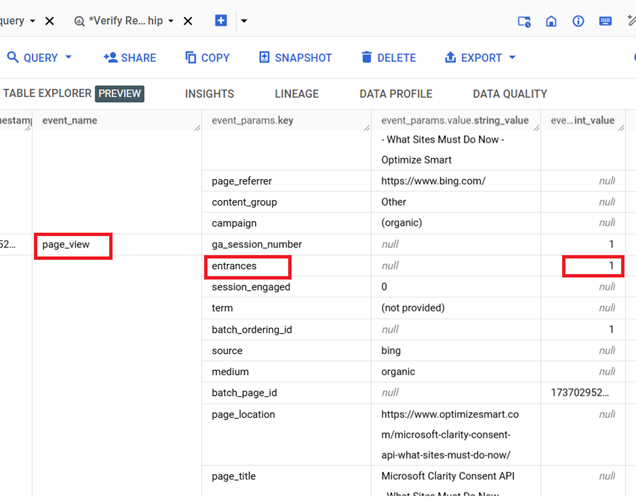
entrances IS NULL or missing: Indicates the ‘page_view’ is not the first page of a session and, therefore, not a landing page. But it could also mean that it is a (not set) landing page.
(not set) in the Landing Pages generally occurs when the ‘page_location’ event parameter is either:
- NULL (not captured by the tag or misconfigured).
- An empty string (“”).
- An invalid or default value like wwssSRy. drt/
Since (not set) indicates a situation where the ‘page_location’ data is incomplete or invalid, GA4 BigQuery often does not register these events as valid landing pages.
Therefore, the ‘entrances’ parameter for these events is likely NULL or missing, meaning the event is not flagged as a landing page.
However, the same pages are often registered as valid landing pages in the GA4 UI. This is because of differences in how GA4 BigQuery exports and the GA4 UI handle (not set) pages.
Differences in how GA4 BigQuery exports and the GA4 UI handles (not set) pages.
BigQuery relies on the explicit presence of entrances = 1 for identifying landing pages.
If this parameter is null or missing for (not set) rows, those events are excluded from the entrances count in your query.
In the GA4 UI, the landing page metrics appear to default to counting all first ‘page_view’ events in a session as landing pages, even if ‘page_location’ is missing or invalid.
The GA4 UI likely applies different internal rules to handle missing or incomplete data.
It may infer that the first ‘page_view’ event of a session is a landing page, regardless of whether entrances are explicitly set to 1.
To make BigQuery results align with GA4 UI for (not set) landing pages, you will need to treat the first ‘page_view’ event of a session as a landing page for (not set) pages.
Related Article: Calculating Landing Page Dimension in GA4 BigQuery.

Related Articles:
- GA4 BigQuery Video Tracking Report.
- Counting GA4 Sessions in BigQuery? Watch for These Caveats.
- Calculating User Paths in GA4 BigQuery.
- Calculating Conversion Paths in GA4 BigQuery.
- Don’t Aggregate Unconsented Events in GA4 BigQuery.
- How to track file downloads in GA4 BigQuery.
- How to create GA4 Content Group Report in BigQuery.
- How to create GA4 Site Search Tracking report in BigQuery.
- How to track outbound / external links in GA4 BigQuery data table.
- How to track GA4 BigQuery Schema Change.
- Stop Splitting GA4 Tables in BigQuery Keep Them Nested.
- How To Correctly Calculate GA4 Active Users in BigQuery.
- How to Calculate GA4 Engaged Users in BigQuery.
- Stop Chasing GA4 Backfills in BigQuery.
- Google Analytics 4 Scroll Tracking Report in BigQuery.
- Google Analytics 4 Landing Page Report in BigQuery.
- Google Analytics 4 Exit Page Report in BigQuery.
- Google Analytics 4 Landing Page Dimension in BigQuery.
- GA4 (not set) Landing Pages Show 0 Entrances in BigQuery.
- Google Analytics 4 Page Title, Page Path & Views in BigQuery