
Follow me on LinkedIn - AI, GA4, BigQuery

Follow the steps below to create a Google Analytics Scroll Tracking Report in BigQuery:

Step-1: By default, GA4 tracks only 90% of vertical scroll events (via the enhanced measurement tracking feature). You need to set up custom events using the Google Tag Manager to track other scroll depths (like 10%, 25%, 50%, and 75%) or horizontal scroll tracking.


Step-2: Once you have set up scroll tracking and collected at least a couple of days of data, navigate to your GA4 BigQuery data table and run a query to check how the scroll events are being recorded and what event parameters are being passed along with this event type. This will give you a good idea of what scroll-tracking data to extract.


The SQL below is automatically generated via a text prompt in ChatGPT.

-- Check how the scroll event is being collected.
SELECT *
FROM `dbrt-ga4.analytics_207472454.events_*`
WHERE
  _TABLE_SUFFIX = '20241001'
  AND event_name = 'scroll';


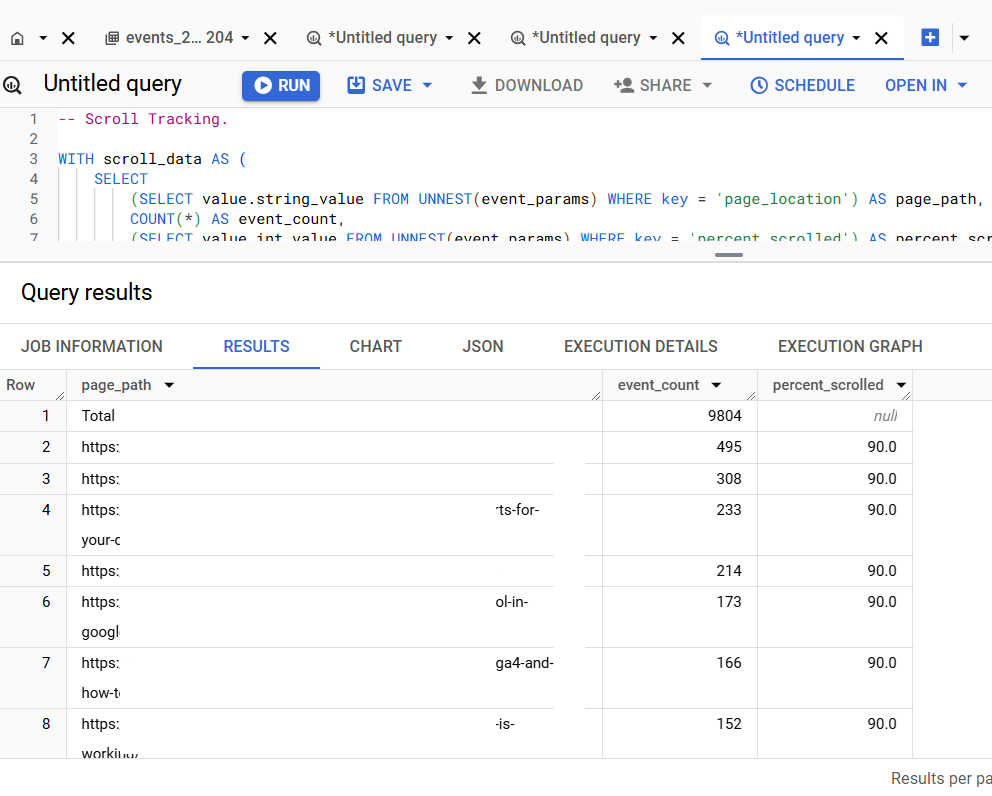
The SQL below is automatically generated via a text prompt in ChatGPT.

-- Scroll Tracking.
WITH
  scroll_data AS (
    SELECT
      (
        SELECT value.string_value
        FROM UNNEST(event_params)
        WHERE key = 'page_location'
      ) AS page_path,
      COUNT(*) AS event_count,
      (
        SELECT value.int_value
        FROM UNNEST(event_params)
        WHERE key = 'percent_scrolled'
      ) AS percent_scrolled
    FROM `dbrt-ga4.analytics_207472454.events_*`
    WHERE
      event_name = 'scroll'
      AND _TABLE_SUFFIX BETWEEN '20241001' AND '20241031'
    GROUP BY page_path, percent_scrolled
  ),
  aggregated_data AS (
    SELECT
      page_path,
      SUM(event_count) AS event_count,
      AVG(percent_scrolled) AS percent_scrolled
    FROM scroll_data
    GROUP BY page_path
  ),
  total_row AS (
    SELECT
      'Total' AS page_path,
      SUM(event_count) AS event_count,
      NULL AS percent_scrolled
    FROM aggregated_data
  )
SELECT * FROM total_row
UNION ALL
SELECT *
FROM aggregated_data
ORDER BY event_count DESC;

If you want to learn to automate SQL generation via text prompts in ChatGPT, enrol in my GA4 BigQuery course.
Instead of teaching you SQL, I teach you to create effective text prompts in chatGPT, which will automatically create your desired SQL.

The focus is entirely on teaching the underlying logic (instead of the actual SQL). So that you can scale across ‘N’ SQL use cases and generate consistent outputs repeatedly with 100% accuracy.

  1. GA4 BigQuery Video Tracking Report.
  2. Counting GA4 Sessions in BigQuery? Watch for These Caveats.
  3. Calculating User Paths in GA4 BigQuery.
  4. Calculating Conversion Paths in GA4 BigQuery.
  5. Don’t Aggregate Unconsented Events in GA4 BigQuery.
  6. How to track file downloads in GA4 BigQuery.
  7. How to create GA4 Content Group Report in BigQuery.
  8. How to create GA4 Site Search Tracking report in BigQuery.
  9. How to track outbound / external links in GA4 BigQuery data table.
  10. How to track GA4 BigQuery Schema Change.
  11. Stop Splitting GA4 Tables in BigQuery Keep Them Nested.
  12. How To Correctly Calculate GA4 Active Users in BigQuery.
  13. How to Calculate GA4 Engaged Users in BigQuery.
  14. Stop Chasing GA4 Backfills in BigQuery.
  15. Google Analytics 4 Scroll Tracking Report in BigQuery.
  16. Google Analytics 4 Landing Page Report in BigQuery.
  17. Google Analytics 4 Exit Page Report in BigQuery.
  18. Google Analytics 4 Landing Page Dimension in BigQuery.
  19. GA4 (not set) Landing Pages Show 0 Entrances in BigQuery.
  20. Google Analytics 4 Page Title, Page Path & Views in BigQuery