
By default, GA4 counts users as engaged if they have generated one or more engaged sessions.
An engaged session in GA4 is defined as a session that meets at least one of the following criteria:
- It lasts 10 seconds or longer (default threshold, which can be adjusted in GA4 property).
- Has one or more conversion events.
- Has two or more page views or screen views.
If a user generates at least one session meeting these criteria, they are considered an engaged user in GA4.
When calculating engaged users in GA4 BigQuery, you can either use this definition or create your own criteria for calculating engaged users.
For example,
I count a user as engaged if they have spent at least a minute (60000 ms) on the website, have two or more page/screen views, and/or triggered a conversion event(s).
Query Logic for Calculating Engaged Users.
One query logic for calculating engaged users in GA4 BigQuery is to sum up the ‘engagement_time_msec’ for all events for each unique user within the specified date range.
The ‘engagement_time_msec’ event parameter represents the time spent during an event.

The time spent is calculated in milliseconds.
The ”engagement_time_msec” is calculated separately for each event in a session.
If a user needs to spend at least a minute on a website to be labelled engaged, it means the sum of the ”engagement_time_msec” for all events for each unique user within the specified date range should exceed 60000 milliseconds (or 1 minute).
Why not use the ‘session_engaged=1’ event parameter to calculate engaged users?
This is because even when ‘session_engaged=0’, you can still see a value for ‘engagement_time_msec’.

It happens because ‘engagement_time_msec’ is calculated at the event level (event scope), whereas ‘session_engaged’ is calculated at the session level (session scope).
Even if a session is not flagged as engaged (session_engaged = 0), individual events within that session may still accumulate engagement time.
For example,
A user fires a single event with ‘engagement_time_msec’ = 5000 (5 seconds) but does not meet the criteria for an engaged session.
In this case, ‘session_engaged’ could be 0, but ‘engagement_time_msec’ is still recorded.
Once you understand the logic, calculating Engaged users via text prompt is easy.
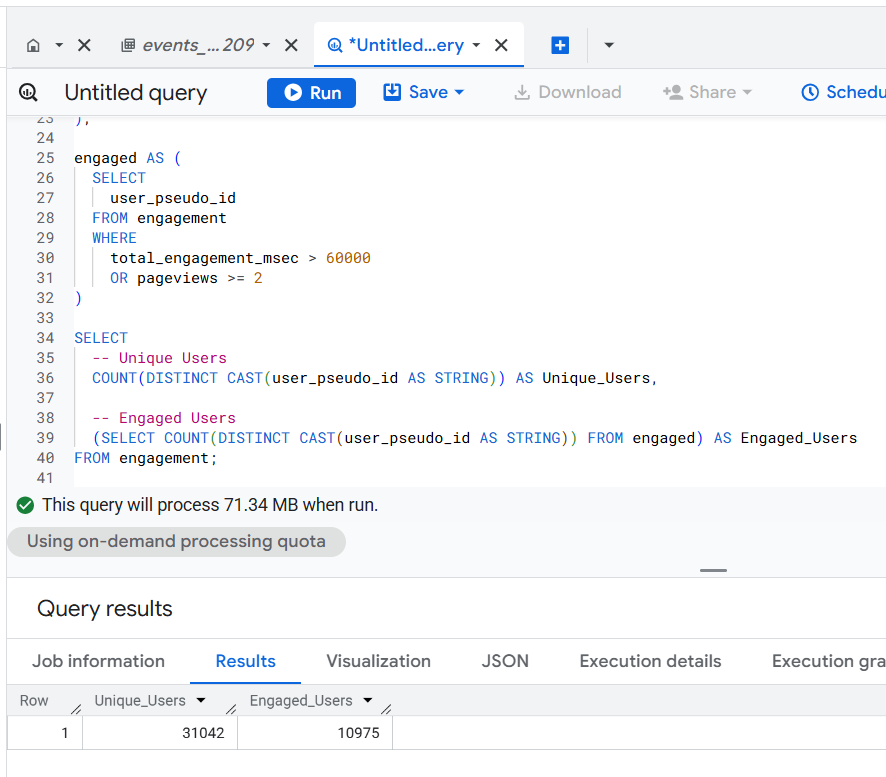
The SQL below is automatically generated via a text prompt in GA4 BigQuery Composer (a custom chatGPT) that calculates Engaged users in GA4 BigQuery:
-- Calculate Unique Users and Engaged Users.
WITH base AS (
SELECT
user_pseudo_id,
event_name,
(SELECT ep.value.int_value
FROM UNNEST(event_params) ep
WHERE ep.key = 'engagement_time_msec') AS engagement_time_msec
FROM
`dbrt-ga4.analytics_207472454.events_*`
WHERE
_TABLE_SUFFIX BETWEEN '20251001' AND '20251031'
),
engagement AS (
SELECT
user_pseudo_id,
SUM(IFNULL(engagement_time_msec, 0)) AS total_engagement_msec,
COUNTIF(event_name = 'page_view') AS pageviews
FROM base
GROUP BY user_pseudo_id
),
engaged AS (
SELECT
user_pseudo_id
FROM engagement
WHERE
total_engagement_msec > 60000
OR pageviews >= 2
)
SELECT
-- Unique Users
COUNT(DISTINCT CAST(user_pseudo_id AS STRING)) AS Unique_Users,
-- Engaged Users
(SELECT COUNT(DISTINCT CAST(user_pseudo_id AS STRING)) FROM engaged) AS Engaged_Users
FROM engagement;
As you can see, the SQL is 40 lines of code.
But since I used AI, it took me less than 5 minutes to go from design to production ready SQL.
The ‘design’ part is where I understand the logic and craft my text prompt. This is the most time consuming part.
Generating the required SQL takes only a couple of seconds.
If you hand-craft this SQL logic, it could be a couple of hours depending on your skill set.
And what if you want to use these two metrics with other GA4 metrics and dimensions or test different query logics?
There could be ‘N’ use cases, and it won’t be possible to provide you ready-made SQL code for every possible use case.
That’s why understanding the query logic is very important. So you can scale across 'N' SQL use cases.
Regardless, that’s how you can calculate engaged users in GA4 BigQuery.
======================
Learn the underlying logic for calculating various GA4 dimensions and metrics in BigQuery and leave the actual SQL generation to ChatGPT.
Your GA4 BigQuery data is only as good as the query logic you use. Once you understand the query logic, you can scale across 'N' SQL use cases.
That's what I teach in my GA4 BigQuery Course. The focus is entirely on teaching the underlying logic (instead of the actual SQL).
