
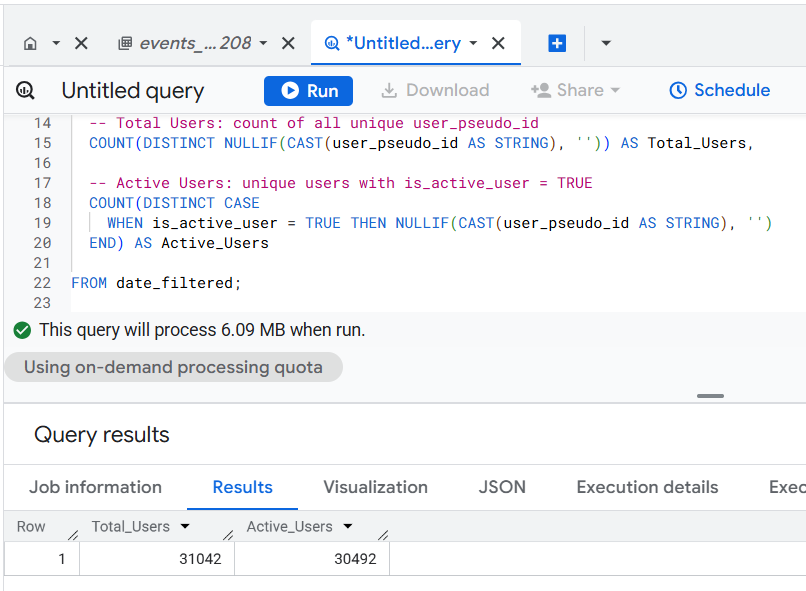
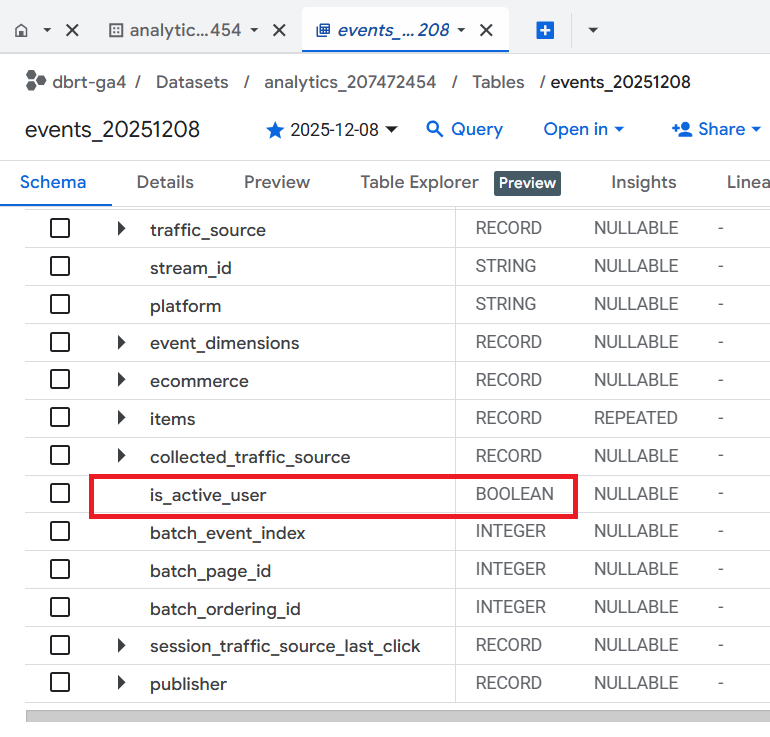
You can calculate 'Active Users' in GA4 BigQuery by counting the number of unique users who triggered at least one event during the specified date range that was flagged as active (is_active_user = true).
Once you understand the logic, calculating active users via text prompt is easy.
The SQL below is automatically generated via a text prompt in GA4 BigQuery Composer (a custom chatGPT) that calculates Active users in GA4 BigQuery:
-- Calculate Active Users
WITH date_filtered AS (
SELECT
user_pseudo_id,
is_active_user
FROM
`dbrt-ga4.analytics_207472454.events_*`
WHERE
_TABLE_SUFFIX BETWEEN '20251001' AND '20251031'
)
SELECT
-- Total Users: count of all unique user_pseudo_id
COUNT(DISTINCT NULLIF(CAST(user_pseudo_id AS STRING), '')) AS Total_Users,
-- Active Users: unique users with is_active_user = TRUE
COUNT(DISTINCT CASE
WHEN is_active_user = TRUE THEN NULLIF(CAST(user_pseudo_id AS STRING), '')
END) AS Active_Users
FROM date_filtered;
Limitations of Calculating Active Users via 'is_active_user'
#1 The ‘is_active_user’ is set at the day level.
- 'is_active_user' is set at the day level, meaning it indicates whether a user had activity on a specific day.
- It does not differentiate between multiple sessions or shorter timeframes (e.g., hourly activity or specific event engagement).
- This lack of granularity can make it unsuitable for more detailed analyses, such as session-level or event-level activity trends.
#2 This query logic can overcount active users.
- If a user is flagged as active, the 'is_active_user' flag applies to all their events on that day.
- This can result in overcounting, especially if users generate many events during a session.
- It does not account for the intensity or duration of engagement, treating all flagged users equally.
#3 This query logic directly aggregates event-level data to calculate user-level metrics.
- The query aggregates event-level data directly to user-level metrics by counting unique 'user_pseudo_id' values.
- There is no intermediate aggregation at the session or event parameter level to provide finer control or context over user activity.
- This simplicity may miss opportunities for more nuanced insights (e.g., analyzing sessions or event types).
#4 This query logic is a quick, high-level snapshot of active users based on the ‘is_active_user’ flag.
- It is suitable for beginners and/or small data sets.
- It doesn’t involve complex calculations or definitions, relying solely on the predefined 'is_active_user' flag.
Note: The ‘is_active_user’ field was introduced in July 2023, meaning it is unavailable in older datasets or exported data prior to this date.
More accurate Query Logic for calculating Active Users.
Calculate the values of the 'Active Users' column by combining the data from the following three methods and deduplicating active users across methods.
#1 Calculate the values of the 'Active Users' by counting the distinct values of the 'user_pseudo_id' field where the 'event_date' of the user's first event of the day (within the specified time range) matches their 'first interaction date' (derived from 'user_first_touch_timestamp' field).
#2 Calculate the values of the 'Active Users' by counting the distinct values of 'session_engaged' event parameter where 'session_engaged' is 1.
#3 Calculate the values of the 'Active Users' by counting the distinct values of 'engagement_time_msec' event parameter where 'engagement_time_msec' is > 0.
These three methods together match the official definition of Active Users in GA4:
Active Users are those who, within the specified date range, either triggered an engaged session, are considered new users, or triggered an event with the ‘engagement_time_msec’ parameter.
This query logic offers a robust and multi-faceted view of active users by integrating diverse behavioral data and ensuring deduplication.
Once you understand the logic, calculating active users via text prompt is easy.
The SQL below is automatically generated via a text prompt in GA4 BigQuery Composer (a custom chatGPT) that calculates Active users in GA4 BigQuery:
-- Calculate Active Users. The correct method.
WITH base AS (
SELECT
user_pseudo_id,
event_date,
user_first_touch_timestamp,
event_timestamp,
(SELECT ep.value.string_value FROM UNNEST(event_params) ep WHERE ep.key = 'session_engaged') AS session_engaged_str,
(SELECT ep.value.int_value FROM UNNEST(event_params) ep WHERE ep.key = 'engagement_time_msec') AS engagement_time_msec
FROM
`dbrt-ga4.analytics_207472454.events_*`
WHERE
_TABLE_SUFFIX BETWEEN '20251001' AND '20251031'
),
-- 5.1: Users active because their *first event of the day* matches their *first interaction date*
first_event_day AS (
SELECT
user_pseudo_id,
event_date,
FIRST_VALUE(event_timestamp) OVER (
PARTITION BY user_pseudo_id, event_date
ORDER BY event_timestamp ASC
) AS first_event_ts,
user_first_touch_timestamp
FROM base
),
active_method_1 AS (
SELECT DISTINCT user_pseudo_id
FROM first_event_day
WHERE event_date = FORMAT_DATE('%Y%m%d', DATE(TIMESTAMP_MICROS(user_first_touch_timestamp)))
),
-- 5.2: Users active because they had session_engaged = '1'
active_method_2 AS (
SELECT DISTINCT user_pseudo_id
FROM base
WHERE session_engaged_str = '1'
),
-- 5.3: Users active because they had engagement_time_msec > 0
active_method_3 AS (
SELECT DISTINCT user_pseudo_id
FROM base
WHERE engagement_time_msec > 0
),
-- Deduplicate users across all three activation methods
active_users AS (
SELECT DISTINCT user_pseudo_id
FROM (
SELECT user_pseudo_id FROM active_method_1
UNION DISTINCT
SELECT user_pseudo_id FROM active_method_2
UNION DISTINCT
SELECT user_pseudo_id FROM active_method_3
)
),
total_users AS (
SELECT COUNT(DISTINCT user_pseudo_id) AS total_users
FROM base
)
SELECT
total_users,
(SELECT COUNT(*) FROM active_users) AS active_users
FROM total_users;
Note: The difference between the two queries is massive, but my dataset is currently small enough that both approaches appear to return identical results.
- As your dataset scales (millions of events per day), differences should become increasingly large.
- My second version aligns with GA4 official Active Users calculation rules.
- The first version relies entirely on the precomputed flag, whose logic may not capture all true active users.
As you can see, the SQL is 69 lines of code.
But since I used AI, it took me less than 5 minutes to go from design to production ready SQL.
The ‘design’ part is where I understand the logic and craft my text prompt. This is the most time consuming part.
Generating the required SQL takes only a couple of seconds.
If you hand-craft this SQL logic, it could be a couple of days' work depending on your skill set.
And what if you want to use these two metrics with other GA4 metrics and dimensions or test different query logics?
There could be ‘N’ use cases, and it won’t be possible to provide you ready-made SQL code for every possible use case.
That’s why understanding the query logic is very important. So you can scale across 'N' SQL use cases.
Regardless, that’s how you can calculate active users in GA4 BigQuery.
======================
Learn the underlying logic for calculating various GA4 dimensions and metrics in BigQuery and leave the actual SQL generation to ChatGPT.
Your GA4 BigQuery data is only as good as the query logic you use. Once you understand the query logic, you can scale across 'N' SQL use cases.
That's what I teach in my GA4 BigQuery Course. The focus is entirely on teaching the underlying logic (instead of the actual SQL).
