
Follow me on LinkedIn - AI, GA4, BigQuery
When working with Google Analytics 4 data in BigQuery, always assume that any event parameter can be stored in multiple data type columns. Account for all possible data types when querying.

You could be underreporting GA4 ‘Engaged Sessions’ in BigQuery and likely making mistakes while using all calculated metrics.


One of the most annoying aspects of writing SQL queries is ensuring that you extract the values of a field with the correct data type.
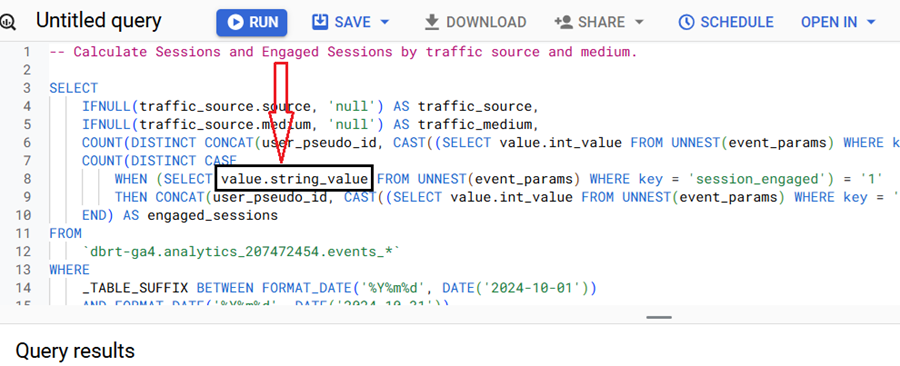
string data type

A single event parameter can have a value stored in one of the following four data types: string, integer, float, or double.
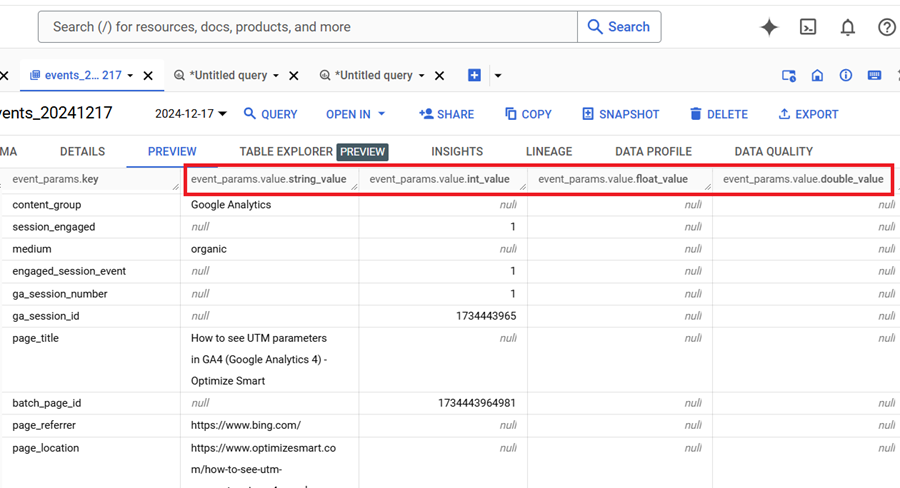
A single event parameter can have a value stored in one of the following four data types

It is never the case that the value is stored in two or more data type columns at the same time.

However, there is always a possibility that the value of an event parameter can be stored in different data-type columns across different rows.

This is a direct result of how GA4 processes and sends event data to BigQuery using a “schema-on-read” approach, where field types can change based on the payload.


For example,

The value of the ‘session_engaged’ parameter is typically stored as a string value and often stored as ‘1’ for engaged sessions and ‘0’ for non-engaged sessions.
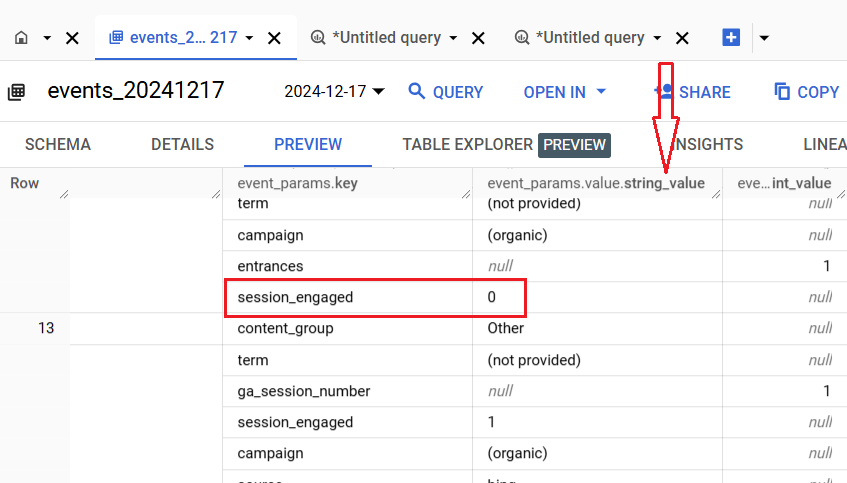
session engaged stored as string

But sometimes, the value of the ‘session_engaged’ parameter can also be stored as an integer value.
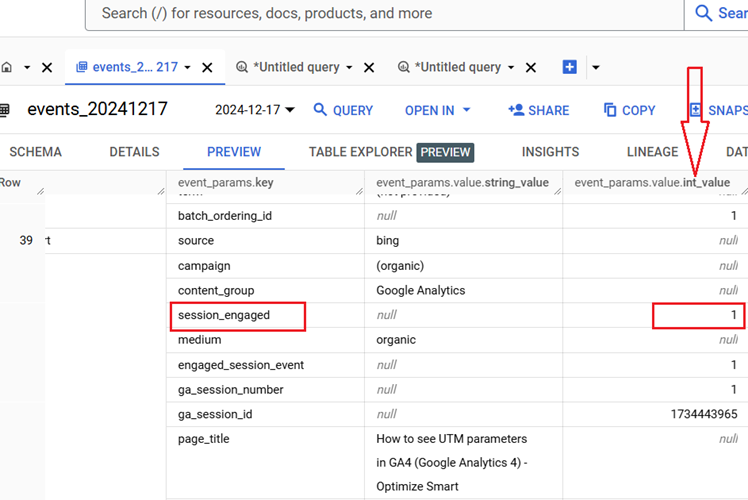
session engaged stored as integer

So, when writing SQL queries for calculating engaged sessions, it is important to account for both data types.

I recommend going one step further and using the query logic that ensures that the value will always be extracted correctly, regardless of the data type used in GA4 BigQuery. You can do that by extracting the first non-null value from the four data types.

This query logic will handle cases where GA4 BigQuery fields can exist in multiple data types.

This approach not only avoids underreporting but also makes your queries future-proof if Google changes how GA4 stores event parameter types.


The objective is to eliminate the need to check the data type used to extract a particular field's value in GA4 BigQuery.

I teach you such logic in my GA4 BigQuery course, where you can learn to automate SQL generation via text prompts in ChatGPT.

There could be ‘N’ use cases, and it won’t be possible to provide ready-made SQL code for every possible case.

So, it is better that you understand the logic to scale SQL generation to the moon.

The future belongs to those who can query raw GA4 data in BigQuery, apply SQL logic, automate SQL generation via AI and drive insights beyond what GA4 UI can offer.

GA4’s event ingestion process doesn’t predefine strict data types for event parameters.

Differences in data type can result from changes in client-side GTM implementation, Google Tag script updates, or even server-side tagging.

For example, if one version of GTM sends ‘1’ as a string and another version sends 1 as an integer, you will see variability in BigQuery.


When working with GA4 BigQuery data, always assume that event parameters can be stored in different data type columns (string_value, int_value, float_value, double_value) across rows.

The screenshot below shows before and after accounting for all possible data types while calculating various metrics:

account for all possible data types in ga4 bigquery
  1. How to create GA4 Site Search Tracking report in BigQuery.
  2. How to track outbound / external links in GA4 BigQuery data table.
  3. How to track GA4 BigQuery Schema Change.
  4. Stop Splitting GA4 Tables in BigQuery Keep Them Nested.
  5. How To Correctly Calculate GA4 Active Users in BigQuery.
  6. How to Calculate GA4 Engaged Users in BigQuery.
  7. Stop Chasing GA4 Backfills in BigQuery.
  8. Google Analytics 4 Scroll Tracking Report in BigQuery.
  9. Google Analytics 4 Landing Page Report in BigQuery.
  10. Google Analytics 4 Exit Page Report in BigQuery.
  11. Google Analytics 4 Landing Page Dimension in BigQuery.
  12. GA4 (not set) Landing Pages Show 0 Entrances in BigQuery.
  13. Google Analytics 4 Page Title, Page Path & Views in BigQuery
  14. Google Analytics 4 Unique Pageviews in BigQuery.
  15. Google Analytics 4 Traffic Attribution in BigQuery.
  16. Finding Real Google Analytics 4 Conversion Paths in BigQuery.
  17. Tracking Google Analytics 4 UTM Parameters in BigQuery.
  18. Tracking Google Analytics 4 AI Traffic in BigQuery.
  19. Tracking peak time for Website Traffic in GA4 BigQuery.
  20. How to Correctly Work With Google Analytics Data Types in BigQuery.