

The two biggest complaints I often hear about GA4 are the Google Analytics data API quota limits and the daily BigQuery export limits.
Standard GA4 properties have a BigQuery export limit of 1 million events /day for daily (batch) exports.
Use the following methods to overcome the GA4 BigQuery Export limit:
#1 Seriously evaluate your tracking requirements.
First, you should seriously evaluate if you really need to track all events at such granularity at the GA4 property level.
Are you collecting unnecessary data, esp. at the expense of business-critical information?
Many businesses have this bad habit of collecting as much data as possible about their users.
You can get away with this bad habit while using Universal Analytics. But GA4 won’t let you get away.
GA4 has an unspecified limit on the number of rows it will process to produce the data tables you see in reports via the user interface or data API.
This row limit has been placed to reduce the data processing cost.
When you use a high cardinality dimension, it increases the number of rows that are processed for a data table.
And when the underlying data table hits the unspecified row limit, any data past the row limit is reported under the (other) row.
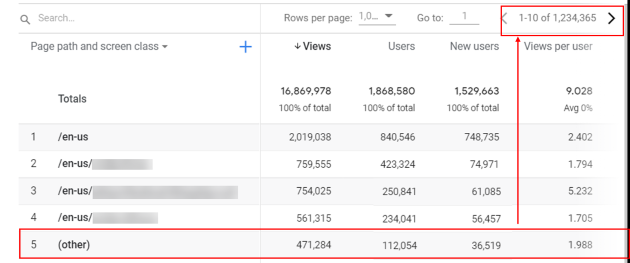
There could be a case where the underlying data table has to process dimensions that are not part of the report you see. Such dimensions can also contribute to the cardinality limit.
And if these dimensions are high cardinality dimensions, it could affect the cardinality limit of the underlying data tables throughout your GA4 property.
So even one high cardinality dimension can negatively affect the cardinality limit of most of the data you see in your GA4 property.
So the best practice is to avoid collecting high cardinality dimensions.
Audit your GA4 property and find and remove events that are not business-critical information. Track fewer events.
There needs to be a solid business case and approval process before you start tracking events or high cardinality dimensions in GA4.
For example, client ids can easily become a high cardinality dimension and introduce (other) rows in most of your data tables.
Do you really need to track client ids?
The best practice is to minimize the number of events you track (without losing critical information) so you don’t easily hit the API quota or BigQuery export limits.
Identify the most critical events that directly impact your business objectives. Track these events first. Remove any redundant or unnecessary events.
You might be able to reduce the number of events being tracked without losing critical information. Thus avoid hitting the daily export limit.