
Follow me on LinkedIn - AI, GA4, BigQuery

Here is how you can track file downloads in GA4 BigQuery:

GA4 BigQuery Tracking File Downloads

By Tracking file downloads, you can determine the most downloaded files on your website.

A GA4 property provides built-in file download tracking via its ‘File downloads’ enhanced measurement feature:
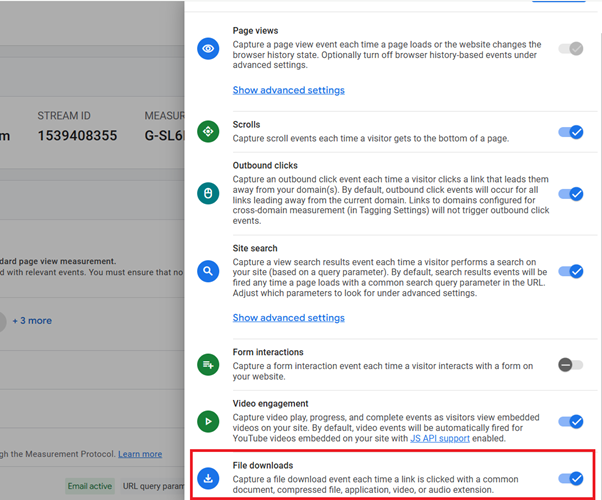
‘File downloads enhanced measurement feature

The ‘file_download’ event.

Once you have enabled/setup file download tracking in your GA4 property, whenever a user downloads a file (by clicking on a link leading to a file) on your website, GA4 fires the ‘file_download’ event.

By default, GA4 fires the ‘file_download’ event for the downloaded files with one of the following file extensions:

.pdf, .xls, .xlsx, .doc, .docx, .txt, .rtf, .csv, .exe, .key, .pps, .ppt, .pptx, .7z, .pkg, .rar, .gz, .zip, .avi, .mov, .mp4, .mpe, .mpeg, .wmv, .mid, .midi, .mp3, .wav, .wma.

In other words, the file extensions that match the following regex will trigger the ‘file_download’ event:

pdf|xlsx?|docx?|txt|rtf|csv|exe|key|pp(s|t|tx)|7z|pkg|rar|gz|zip|avi|mov|mp4|mpe?g|wmv|midi?|mp3|wav|wma

Note: If the file you want to track does not match any of the above file extensions, you will need to track the file downloads via GTM.

You can see the ‘file_download’ event in your GA4 property via the ‘Events’ report:

‘file download event in your GA4 property

The ‘file_download’ event parameters.

Several event parameters are automatically sent along with the ‘file_download’ event. But the ones which are worth mentioning are:

#1 file_extension – This event parameter provides the extension of the downloaded file. For example: .pdf, .docx, .exe etc.

file extension event parameter
file extension event parameter 2

#2 file_name – This event parameter provides the name of the downloaded file.

file name

#3 link_text – This event parameter provides information about the link’s text that was clicked to download the file.

#4 link_url – This event parameter provides information about the full URL of the downloaded file.

link url

#5 page_location – This event parameter provides information about the full URL of the page from which the file was downloaded.

page location

You can see the various event parameters of the ‘file_download’ event via the DebugView report.

the DebugView report

Finding the ‘file_download’ event’s data in GA4 BigQuery Data Tables.

You should check how the ‘file_download’ events are being recorded in the GA4 BigQuery data tables and what event parameters are being passed along with these events.

‘file download events data in BigQuery

Take a close look at the various event parameters which are sent along with the ‘file_download’ events. While creating a text prompt, we will refer to these event parameters.

This knowledge will later help you in building SQL queries.

Tracking File Downloads.

Follow the steps below to track file downloads in GA4 BigQuery data tables:

Step-1: Make sure that the ‘File downloads’ tracking feature under ‘Enhanced Measurement’ is enabled in your GA4 property and that you have collected at least a couple of days of ‘file_downloads’ event data in your BigQuery data set.

Step-2: Navigate to your GA4 BigQuery data table and run a query to check how the ‘file_downloads’ events are being recorded and what event parameters are being passed along with this event type. This will give you a good idea of what files download tracking data to extract.

Step-3: Calculate the values of the ‘Page Location’ column by extracting the values from the ‘page_location’ event parameter for each ‘event_name’ top-level field where ‘event_name’ is ‘file_download’.

Step-4: Calculate the values of the ‘Link Text’ column by extracting the values from the ‘link_text’ event parameter for each ‘event_name’ top-level field where ‘event_name’ is ‘file_download’.

Step-5: Calculate the values of the ‘Link URL’ column by extracting the values from the ‘link_url’ event parameter for each ‘event_name’ top-level field where ‘event_name’ is ‘file_download’.

Step-6: Calculate the values of the ‘File Name’ column by extracting the values from the ‘file_name’ event parameter for each ‘event_name’ top-level field where ‘event_name’ is ‘file_download’.

Step-7: Calculate the values of the ‘File Extension’ column by extracting the values from the ‘file_extension’ event parameter for each ‘event_name’ top-level field where ‘event_name’ is ‘file_download’.

Step-8: Calculate the values of the ‘File Downloads’ column by counting the total number of ‘file_download’ events for each unique ‘Page Location’.

Step-9: Sort the table in descending order for ‘File Downloads’.

Step-10: The top row of the data table should show:

10.1 ‘Total’ under the ‘Page Location’ column.

10.2 An empty string under the following columns: ‘Link Text’, ‘Link URL’, ‘File Name’ and ‘File Extension’.

10.3 The total number of ‘File Downloads’ across all ‘Page Location’ under the ‘‘File Downloads’’ column.

The SQL below (40 lines of code) for tracking file downloads is automatically generated via a text prompt in ChatGPT.

-- Tracking File Downloads.

WITH
  file_downloads AS (
    SELECT
      (
        SELECT value.string_value
        FROM UNNEST(event_params)
        WHERE key = 'page_location'
      ) AS page_location,
      (
        SELECT value.string_value
        FROM UNNEST(event_params)
        WHERE key = 'link_text'
      ) AS link_text,
      (
        SELECT value.string_value
        FROM UNNEST(event_params)
        WHERE key = 'link_url'
      ) AS link_url,
      (
        SELECT value.string_value
        FROM UNNEST(event_params)
        WHERE key = 'file_name'
      ) AS file_name,
      (
        SELECT value.string_value
        FROM UNNEST(event_params)
        WHERE key = 'file_extension'
      ) AS file_extension
    FROM
      `dbrt-ga4.analytics_207472454.events_*`
    WHERE
      event_name = 'file_download'
      AND SAFE.PARSE_DATE('%Y%m%d', _TABLE_SUFFIX)
        BETWEEN DATE '2024-10-01'
        AND DATE '2024-10-31'
  ),
  aggregated AS (
    SELECT
      page_location,
      link_text,
      link_url,
      file_name,
      file_extension,
      COUNT(*) AS file_downloads
    FROM file_downloads
    GROUP BY page_location, link_text, link_url, file_name, file_extension
  ),
  total AS (
    SELECT
      'Total' AS page_location,
      '' AS link_text,
      '' AS link_url,
      '' AS file_name,
      '' AS file_extension,
      SUM(file_downloads) AS file_downloads
    FROM aggregated
  )
SELECT * FROM total
UNION ALL
SELECT *
FROM aggregated
ORDER BY file_downloads DESC;

If you want to learn to automate SQL generation via text prompts in ChatGPT, enrol in my GA4 BigQuery course.

Instead of teaching you SQL, I teach you to create effective text prompts in chatGPT, which will automatically create your desired SQL.

The focus is entirely on teaching the underlying logic (instead of the actual SQL). So that you can scale across ‘N’ SQL use cases and generate consistent outputs repeatedly with 100% accuracy.

[No prior knowledge of BigQuery or SQL required.]

  1. GA4 BigQuery Attribution Tutorial.
  2. How to backfill GA4 data in BigQuery.
  3. How to send data from Google Search Console to BigQuery.
  4. Google Advanced Consent Mode and GA4 BigQuery Export.
  5. Google Analytics 4 BigQuery Tutorial for Beginners to Advanced.
  6. Prompt Engineering for GA4 BigQuery SQL Generation.
  7. How to create a new BigQuery project.
  8. How to create a new Google Cloud Platform account.
  9. How to overcome GA4 BigQuery Export limit.
  10. BigQuery Cost Optimization Best Practices.
  11. event_timestamp vs user_first_touch_timestamp GA4 BigQuery.
  12. GA4 BigQuery Video Tracking Report.
  13. Counting GA4 Sessions in BigQuery? Watch for These Caveats.
  14. Calculating User Paths in GA4 BigQuery.
  15. Calculating Conversion Paths in GA4 BigQuery.
  16. Don’t Aggregate Unconsented Events in GA4 BigQuery.
  17. How to track file downloads in GA4 BigQuery.
  18. How to create GA4 Content Group Report in BigQuery.
  19. How to create GA4 Site Search Tracking report in BigQuery.
  20. How to track outbound / external links in GA4 BigQuery data table.