

In this article, I will show you how to query GA4 data in BigQuery without understanding a single line of SQL code.
I have been using GA4 with BigQuery for over 1100 days (i.e. over 3 years) now.
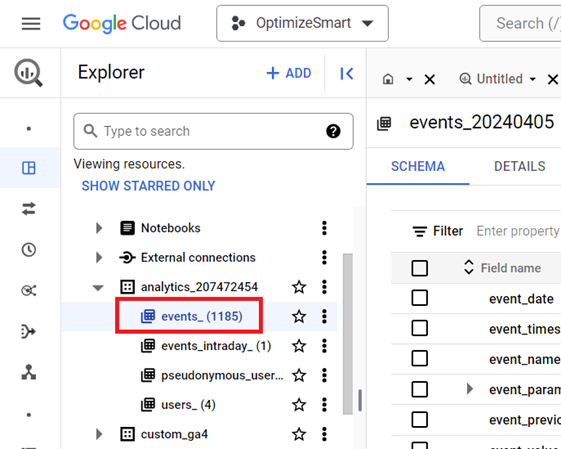
I also teach BigQuery.
A lot of people don’t use BigQuery because they need to learn SQL first, and SQL is hard.
My goal is to make BigQuery accessible to all and make the knowledge of SQL irrelevant.
What is BigQuery?
BigQuery is a data warehouse from Google that is used to provide business intelligence through reports and dashboards.
It is a data storage and management system used to bring data from several data sources (like Google Analytics, Google Ads, Facebook, etc.) for the purpose of reporting and analysis.
BigQuery is one of the products of the Google Cloud platform.
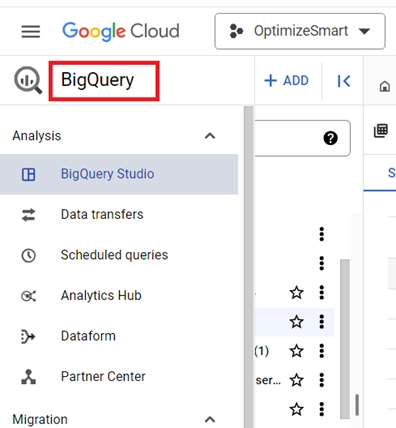
Therefore, in order to use BigQuery, you will need a Google Cloud Platform account.
Why should you use GA4 with BigQuery?
To benefit from GA4 the most, learn and master BigQuery.
When you use GA4 with BigQuery, you can:
- Save your user-specific data from being deleted.
- You can access unsampled raw events and user-level data.
- Your data is not subject to cardinality limits.
- You actually own your data.
- You can do advanced data manipulation.
- You can integrate GA4 data with other data sources.
- You can work retroactively on GA4 data.
- BigQuery lets you easily filter out or modify incorrect GA4 data.
#1 Save your user-specific data from being deleted.
Most people don’t know, but they lose user-specific data for inactive website users in GA4 every 2 or 14 months based on their current data retention settings:
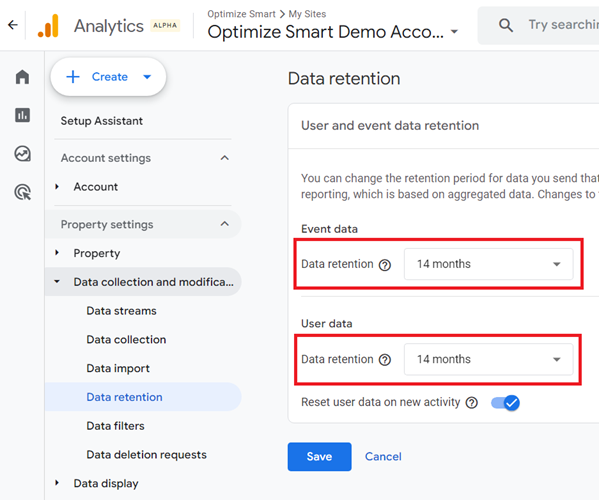
To avoid this data loss, connect your GA4 property to BigQuery and start collecting GA4 data there.
#2 You can access unsampled raw events and user-level data.
In GA4, the raw events and user-level data are only available via the explorations reports, but they are subject to data sampling.
On the other hand, BigQuery data tables do not suffer from data sampling issues.
You get access to unsampled raw events and user-level data when you use BigQuery with GA4.
#3 Your data is not subject to cardinality limits.
When you access GA4 data via the reporting interface or the data API, it can suffer from cardinality issues.
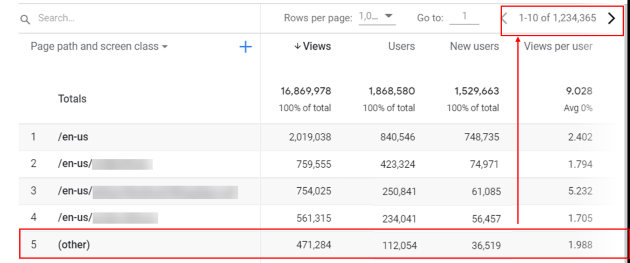
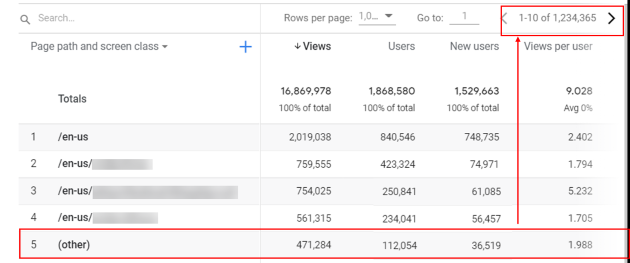
When using GA4 reports, you should avoid cardinality wherever possible. That’s how you can remove the (other) row from appearing in your GA4 reports.
Cardinality refers to the number of unique values in a data set.
A data set is a set of observed values for a particular variable.
For example,
Consider the following data set: {20, 15, 61, 8}
This data set has four unique values. Therefore the cardinality of this data set is four.
The data set with many unique values is called a high cardinality data set.
Google defines high cardinality dimensions as dimensions with more than 500 unique values in one day.
So if GA4 reports more than 500 unique values for the ‘Item name’ dimension in one day, then it would be considered as a high cardinality dimension.
When you use a high cardinality dimension in a GA4 report, it could result in some (or a lot of data) reported under the (other) row:
#4 You actually own your data.
When you use BigQuery to collect and store GA4 data, you get complete control and ownership of your data.
This means you can choose how long to keep your data, who has access to it, how it is used, etc.
When you use GA4 to collect and store your data, your data is stored on Google’s servers and is subject to Google’s data retention policies.
#5 You can do advanced data manipulation.
When you use BigQuery, you can manipulate GA4 data in ways that are many times not possible when using the GA4 user interface or the data API.
One of the biggest advantages of using BigQuery is that it does not have the same limitations as the GA4 user interface and API regarding which dimensions and metrics can be queried together.
That means you can perform more advanced data segmentation and analysis when using GA4 with BigQuery.
When you use GA4 with BigQuery, you get access to a wide range of tools and features that are not available in the GA4 user interface or the data API.
For example,
With BigQuery, you can create custom queries to extract specific data, join data from multiple data sources, and perform complex calculations and aggregations.
BigQuery also provides machine learning capabilities that can help you forecast future trends and gain deeper insights.
As a result of these capabilities, many companies and web analysts use BigQuery as their primary tool for querying analytics data.
They may use the GA4 user interface and API for basic queries and reporting but rely mainly on BigQuery for more advanced analysis and insights.
#6 You can integrate GA4 data with other data sources.
Since BigQuery is a data warehouse, it allows you to import data from multiple data sources and then combine and correlate them with GA4 data.
These data sources could include (but are not limited to) CRMs, shopping carts, marketing automation platforms, etc.
You can easily integrate BigQuery with data visualisation tools like Looker Studio and can thus easily visualise GA4 data.
Integrating GA4 data with other data sources can provide several key advantages, such as a better understanding of the customer’s purchase journey, better decision-making, and improved marketing effectiveness.
#7 You can work retroactively on GA4 data
When you use the GA4 user interface or the data API, the conversions and filters do not work retroactively and are collected and reported only from when you first set up your tracking.
That means that if you want to calculate conversions based on historical data, it is not possible with the GA4 user interface or data API.
However, when you use BigQuery to store your GA4 data, you can work retroactively on your data and perform calculations and analysis based on historical data.
#8 BigQuery lets you easily filter out or modify incorrect GA4 data.
When you use GA4 with BigQuery, you can easily filter out or modify incorrect GA4 data from your analysis and reports.
This can help ensure that your data analysis and reports are based on accurate data and can lead to better decision-making.
In contrast, when you use the GA4 user interface or data API to query data, filtering out or modifying incorrect data can be more challenging.
This is because the GA4 user interface and data API do not provide SQL querying capabilities, which makes it harder to manipulate the data to filter out or modify incorrect data.
Why are people reluctant to use BigQuery?
Despite several advantages of using GA4 with BigQuery, many people are still reluctant to use BigQuery and rely on either the GA4 user interface or the data API.
They are two main reasons why people are reluctant to use BigQuery:
#1. They think it is crazy expensive to use, but it is not (for the majority of companies).
#2 They need to know SQL really well.
Related Articles:
What is SQL?
BigQuery is of little use to you if you can’t query the data.
But to query the data in BigQuery, you need to know SQL.
SQL (Structured Query Language) is a programming language which is used to store, access and manipulate data in a database like BigQuery.
Why should you use natural language to generate SQL?
SQL has a complex syntax and structure.
You will need to learn and memorise many keywords, operators, and functions. And understanding how to combine them can be challenging.
SQL queries can become progressively harder to understand and debug as they become more complex.
Even small syntax errors or logical mistakes can result in incorrect results.
Complex queries often involve nested subqueries, multiple joins, and complex logic, which can be difficult to follow.
All of this can make SQL hard to learn and use, especially for absolute beginners.