
You can calculate the values of the Google Analytics 4 ‘Engaged Sessions’ metric in BigQuery by counting distinct sessions for which the value of the ‘session_engaged’ event parameter is 1.
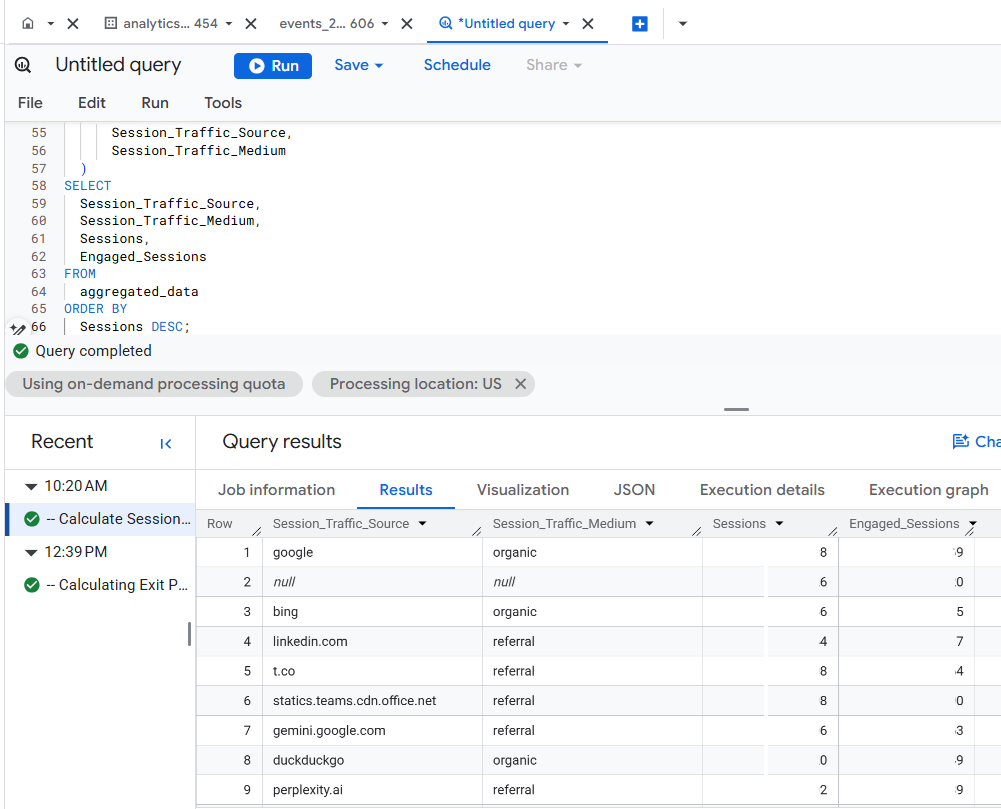
The ‘session_engaged’ is an array of structures within the ‘event_params’ array of structures.
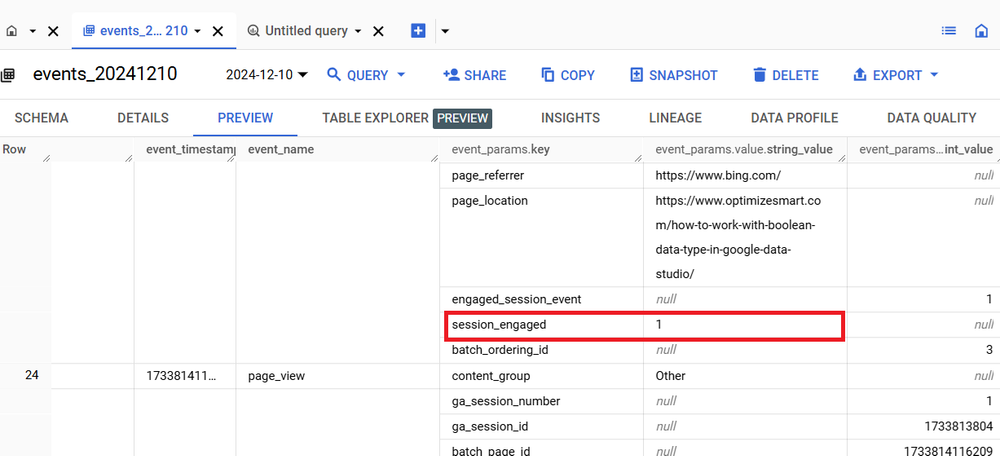
Use the following SQL (automatically generated via a text prompt in ChatGPT) to track GA4 Sessions and Engaged Sessions by traffic source and medium in BigQuery:
-- Calculate Sessions and Engaged Sessions by traffic source and medium.
WITH
session_level_data AS (
SELECT
user_pseudo_id,
CAST(
(
SELECT ep.value.int_value
FROM UNNEST(event_params) ep
WHERE ep.key = 'ga_session_id'
)
AS INT64) AS ga_session_id,
NULLIF(
MAX(
(
SELECT ep.value.string_value
FROM UNNEST(event_params) ep
WHERE ep.key = 'source'
)),
'') AS Session_Traffic_Source,
NULLIF(
MAX(
(
SELECT ep.value.string_value
FROM UNNEST(event_params) ep
WHERE ep.key = 'medium'
)),
'') AS Session_Traffic_Medium,
MAX(
CAST(
(
SELECT ep.value.string_value
FROM UNNEST(event_params) ep
WHERE ep.key = 'session_engaged'
)
AS INT64)) AS Session_Engaged
FROM
`dbrt-ga4.analytics_207472454.events_*`
WHERE
_TABLE_SUFFIX BETWEEN '20241001' AND '20241031'
GROUP BY
user_pseudo_id,
ga_session_id
),
aggregated_data AS (
SELECT
NULLIF(Session_Traffic_Source, '') AS Session_Traffic_Source,
NULLIF(Session_Traffic_Medium, '') AS Session_Traffic_Medium,
COUNT(*) AS Sessions,
COUNTIF(Session_Engaged = 1) AS Engaged_Sessions
FROM
session_level_data
GROUP BY
Session_Traffic_Source,
Session_Traffic_Medium
)
SELECT
Session_Traffic_Source,
Session_Traffic_Medium,
Sessions,
Engaged_Sessions
FROM
aggregated_data
ORDER BY
Sessions DESC;

I am not a fan of cookie-cutter reports. But if you want one, this one could be for you.
All you have to do is supply your table ID to generate SQL that works for you.
If you want to customize this report according to your unique data analysis requirements then you need to understand the “logic” used behind calculating the various metrics in this report.
Once you understand the logic, customizing this report is easy peasy.
I teach you such logic in my GA4 BigQuery course, where you can learn to automate SQL generation via text prompts in ChatGPT.

There could be ‘N’ use cases, and it won’t be possible to provide ready-made SQL code for every possible case.
So, it is better that you understand the logic to scale SQL generation to the moon.
The future belongs to those who can query raw GA4 data in BigQuery, apply SQL logic, automate SQL generation via AI and drive insights beyond what GA4 UI can offer.
Related Articles:
- Google Analytics 4 Landing Page Report in BigQuery.
- Google Analytics 4 Exit Page Report in BigQuery.
- Google Analytics 4 Landing Page Dimension in BigQuery.
- GA4 (not set) Landing Pages Show 0 Entrances in BigQuery.
- Google Analytics 4 Page Title, Page Path & Views in BigQuery
- Google Analytics 4 Unique Pageviews in BigQuery.
- Google Analytics 4 Traffic Attribution in BigQuery.
- Finding Real Google Analytics 4 Conversion Paths in BigQuery.
- Tracking Google Analytics 4 UTM Parameters in BigQuery.
- Tracking Google Analytics 4 AI Traffic in BigQuery.
- Tracking peak time for Website Traffic in GA4 BigQuery.
- How to Correctly Work With Google Analytics Data Types in BigQuery.
- Three SQL Query Logic You Must Use For GA4 in BigQuery.
- Four Rules for Google Analytics Data Aggregation in BigQuery.
- Top 10 Optimization Strategies for GA4 SQL in BigQuery.
- How To Correctly Track GA4 Sessions in BigQuery.
- Tracking Google Analytics 4 Engaged Sessions in BigQuery.
- Tracking Google Analytics 4 Total Users in BigQuery.
- Tracking Google Analytics 4 New Users in BigQuery.
- Tracking Google Analytics 4 Returning Users in BigQuery.