

Most businesses deploy a voice AI agent and just hope it works. The smart ones test two versions against each other.
Retell AI has a built-in AB testing feature that lets you run two versions of the same agent simultaneously, splitting incoming calls between them.
Here is how it works in practice.
You create two versions of your agent: let's call them V2 and V3.
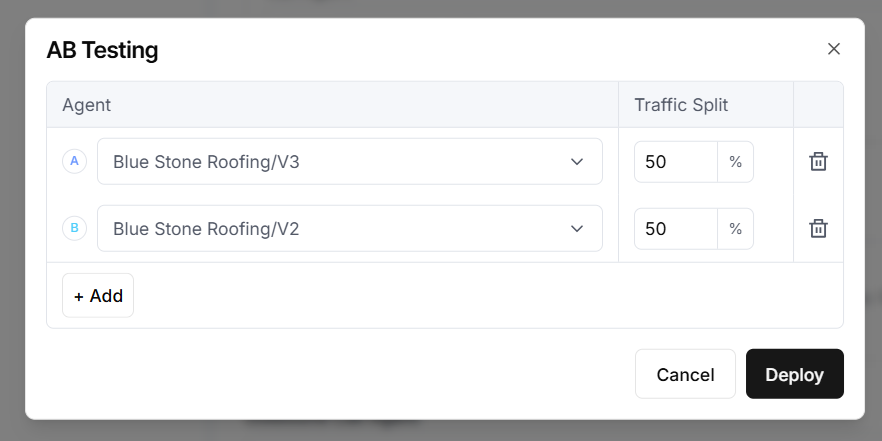
V3 might have a refined opening script, a different objection-handling approach, or a new way of qualifying leads.
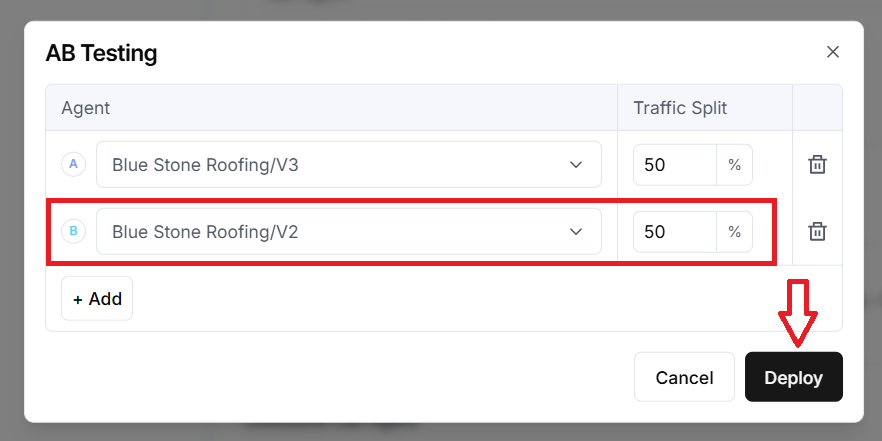
You set each version to receive 50% of incoming calls, hit Deploy, and let real conversations do the judging.
No guesswork. Just data from actual callers.
One important caveat first.
AB testing only works if you have the call volume to support it. You need roughly 100 or more calls per week across both variants combined for the results to be statistically significant.
Below that threshold, the differences you see could easily be down to chance rather than the actual performance of each agent version.
If your business is already at that volume, this feature becomes genuinely powerful.
Even a small improvement in how the agent handles the first 30 seconds can have a measurable impact on conversion rates.
AB testing gives you a controlled way to find those improvements without taking the entire system offline or gambling on an untested rewrite.
You can also run more than two variants. The interface lets you split traffic across multiple agent versions, so a three-way test is possible if your volume supports it.
The practical use case.
Say your roofing company's agent is closing appointments at a certain rate.
You rewrite the qualification questions based on feedback from your sales team. Instead of replacing the old agent outright, you deploy both versions side by side.
After a week of real calls (assuming the volume is there), you check which version booked more jobs and retire the weaker one.
That is the kind of iteration that turns a decent voice AI agent into a high-performing one.
In Retell AI, A/B testing is supported for:
- Inbound calls.
- Outbound calls.
- Inbound chats (Incoming chat conversations).
- Outbound chats (Chat sessions you initiate).
Steps to run A/B tests in Retell AI.
#1 Navigate to your Retell AI workspace.
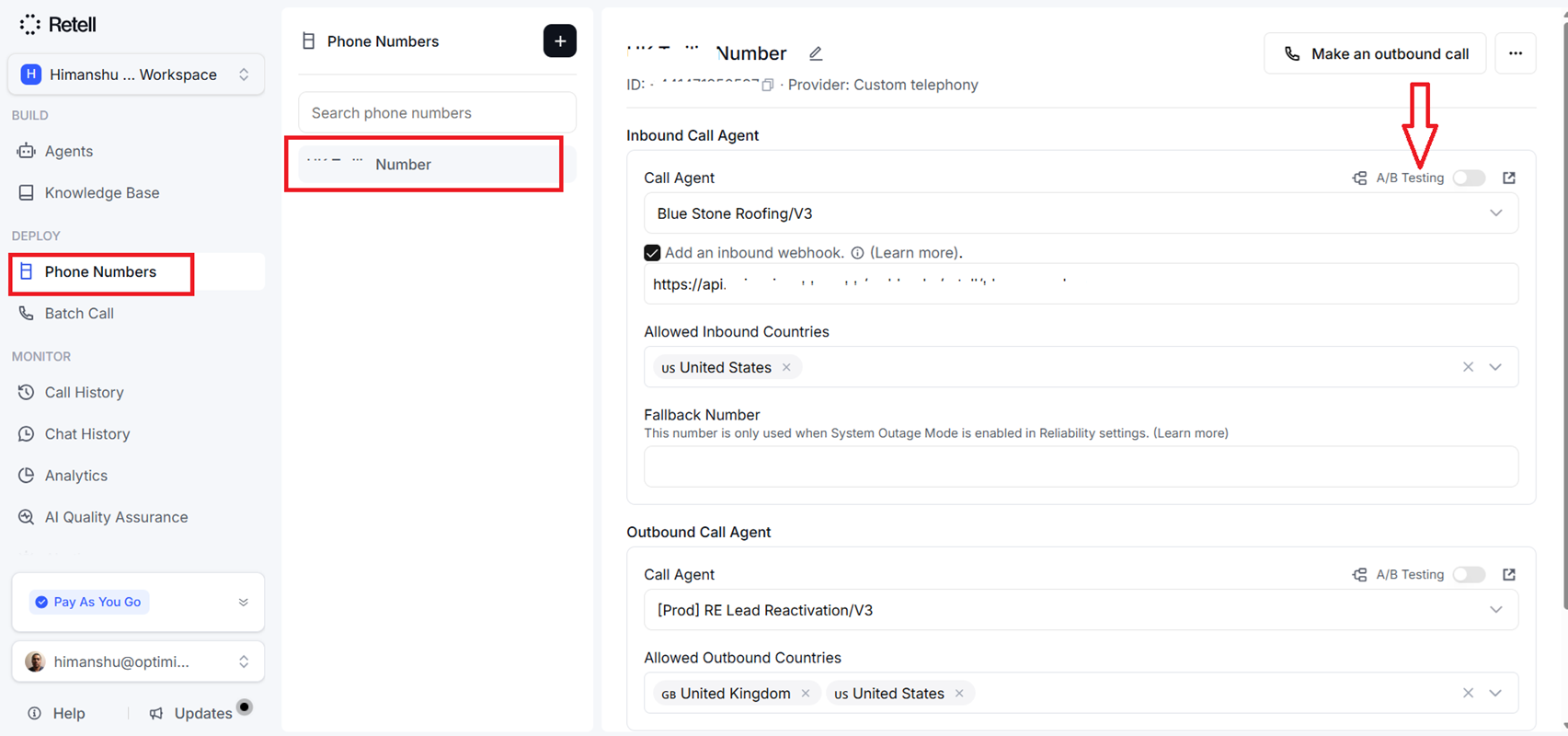
#2 Click on ‘Phone numbers’ from the left-hand side navigation.
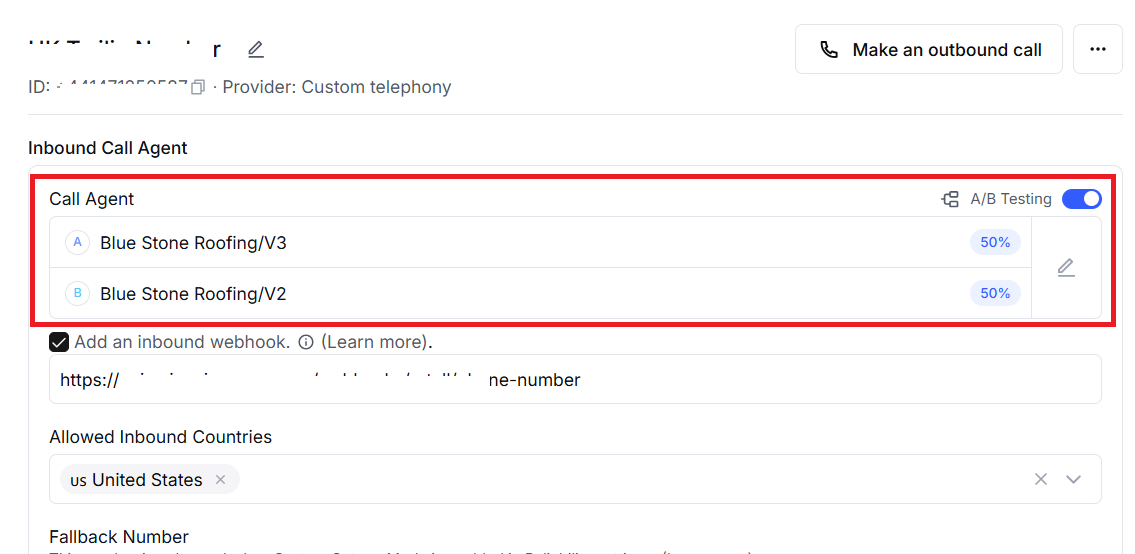
#3 Turn on the A/B Testing toggle that appears next to the Call Agent field:
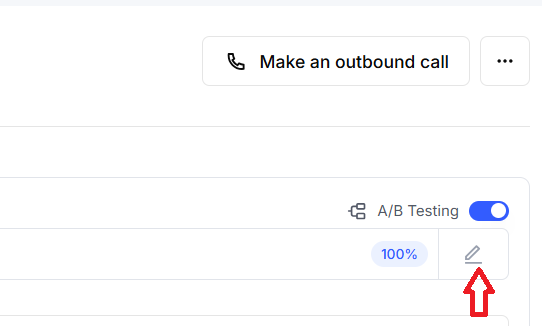
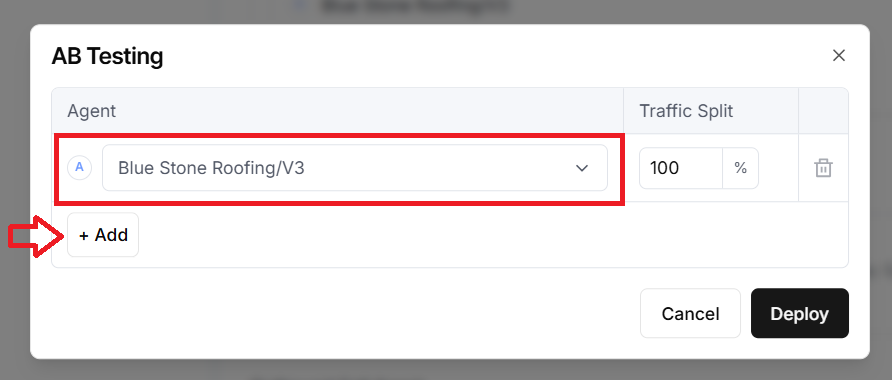
#4 Click on the pencil icon to add one or more agents and set the traffic percentage for each:
Related Articles:
- How to Self Host n8n on Google Cloud - Tutorial.
- How to use APIs in n8n, GoHighLevel and other AI Automation Workflows.
- How to use Webhooks in n8n, GoHighLevel and other AI Automation Workflows.
- What is OpenRouter API and how to use it.
- How to Connect Google Analytics to n8n (step by step guide).
- How To Connect Google Analytics MCP Server to Claude.
- State Machine Architectures for Voice AI Agents.
- Using Twilio with Retell AI via SIP Trunking for Voice AI Agents.
- Retell Conversation Flow Agents - Best Agent Type for Voice AI?
- How to build Cost Efficient Voice AI Agent.
- When to Add Booking Functionality to Your Voice AI Agent.
- n8n Expressions Tutorial.
- n8n Guardrails Guide.
- Modularizing n8n Workflows - Build Smarter Workflows.
- How to sell on ChatGPT via Instant Checkout & ACP (Agentic Commerce Protocol).
- How to Build Reliable AI Workflows.
- Correct Way To Connect Retell AI MCP Server to Claude.
- How to setup Claude Code in VS Code Editor.
- How to use Claude Code Inside VS Code Editor.
- How To Connect n8n MCP Server to Claude.
- How to Connect GoHighLevel MCP Server to Claude.
- How to connect Supabase and Postgres to n8n.
- How to Connect WhatsApp account to n8n.
- How to make your AI Agent Time Aware.
- Structured Data in Voice AI: Stop Commas From Being Read Out Loud.
- How to build Voice AI Agent that handles interruptions.
- Error Handling in n8n Made Simple.
- How to Write Safer Rules for AI Agents.
- AI Default Assumptions: The Hidden Risk in Prompts.
- Why AI Agents lie and don't follow your instructions.
- Why You Need an AI Stack (Not Just ChatGPT).
- How to use OpenAI Agent Kit, Agent Builder?
- n8n AI Workflow Builder And Its Alternatives.
- Two-way syncs in automation workflows can be dangerous.
- Missing Context Breaks AI Agent Development.
- How To Avoid Billing Disputes With AI Automation Clients.
- ChatGPT prompt to summarize YouTube video.
- Avoid the Overengineering Trap in AI Automation Development.
- How to Correctly Self Host n8n on Hostinger VPS.
- The correct way to setup Cal.com for Voice AI.
- Custom Reporting For Voice AI.
- How To Bill Your Voice AI Clients Like A Pro.
- Voice AI Knowledge Base Creation Best Practices.
- How to build Cost Efficient Voice AI Agent.