

What does it mean to rewire the n8n workflow?
Every node in tools like ‘n8n’ passes data (usually JSON) to the next node it's connected to .
When you drag new nodes in, delete old ones, or reconnect existing ones, you are rewiring the workflow.
Examples of rewiring nodes:
- You insert a new node between two existing ones.
- You delete a node and reconnect the remaining ones directly.
- You add another branch so multiple nodes feed into one target node.
- You reorder connections so a node’s input now comes from a different source.
Visually, it’s like unplugging and reconnecting cables between nodes in a flowchart, same concept, just digital.
Rewiring nodes is inevitable.
Even the most carefully designed workflows evolve over time.
The following are the most common and unavoidable rewiring reasons:- Debugging or iteration - You test your flow, realise you need a Set or IF node earlier in the process, and insert it between existing nodes.
- Adding new logic - You add logging, filtering, or API calls to an existing workflow, changing the connection path.
- Workflow optimisation - You merge, split, or reorder nodes to improve performance or clarity.
- Error handling - You add error branches or conditional paths that require reconnecting outputs.
- Version updates - n8n updates or integrations changes, require you to adapt your wiring.
In the real world, no mature workflow stays wired exactly the same forever.
Dynamic reference syntax can silently break your workflows.
Let’s say you have a node named: Webhook.
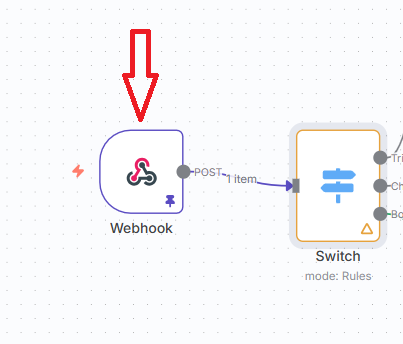
And you want to refer to the ‘name’ field within the body:

When you use dynamic references like {{ $json.body.name }}, their meaning depends on which node is connected right before the current one.
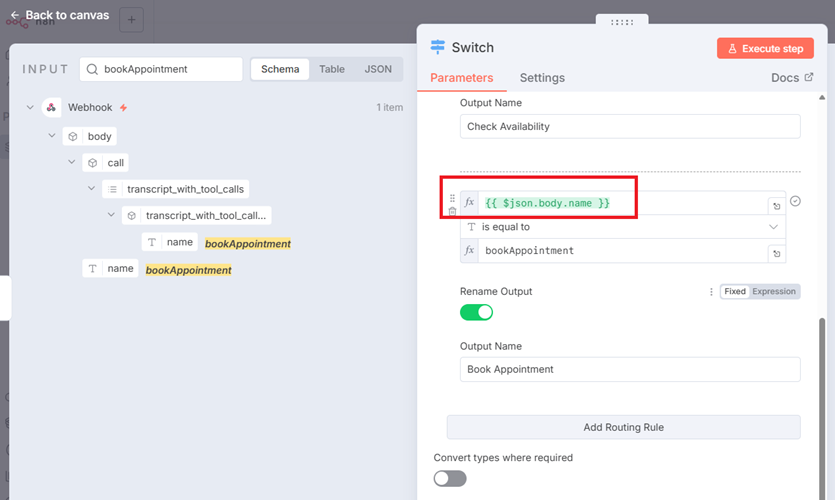
So if later you rewire or reorder nodes, $json now refers to a different node’s output than before.
Your logic may silently break, return wrong data, or fail entirely.
You significantly increase debugging complexity when you use dynamic reference syntax.
Always use static reference syntax.
Instead of referencing data by workflow position (like $node[0] or $input.first()), you reference it by the node’s name exactly as it appears in your workflow.
Static reference syntax ensures your workflow expressions always reference the correct node, even if you later rewire (move or reconnect) the nodes.
So instead of:
{{ $json.body.name }}
Use
{{ $('Webhook').item.json.body.name }}

It's going to be more time-consuming manually referencing the node instead of using the simple drag and drop, but you need to reference the node only once and your workflow becomes rewiring proof.
Related Articles:
- How to Self Host n8n on Google Cloud - Tutorial.
- How to use APIs in n8n, GoHighLevel and other AI Automation Workflows.
- How to use Webhooks in n8n, GoHighLevel and other AI Automation Workflows.
- What is OpenRouter API and how to use it.
- How to Connect Google Analytics to n8n (step by step guide).
- How To Connect Google Analytics MCP Server to Claude.
- State Machine Architectures for Voice AI Agents.
- Using Twilio with Retell AI via SIP Trunking for Voice AI Agents.
- Retell Conversation Flow Agents - Best Agent Type for Voice AI?
- How to build Cost Efficient Voice AI Agent.
- When to Add Booking Functionality to Your Voice AI Agent.
- n8n Expressions Tutorial.
- n8n Guardrails Guide.
- Modularizing n8n Workflows - Build Smarter Workflows.
- How to sell on ChatGPT via Instant Checkout & ACP (Agentic Commerce Protocol).
- How to Build Reliable AI Workflows.
- Correct Way To Connect Retell AI MCP Server to Claude.
- How to setup Claude Code in VS Code Editor.
- How to use Claude Code Inside VS Code Editor.
- How To Connect n8n MCP Server to Claude.
- How to Connect GoHighLevel MCP Server to Claude.
- How to connect Supabase and Postgres to n8n.
- How to Connect WhatsApp account to n8n.
- How to make your AI Agent Time Aware.
- Structured Data in Voice AI: Stop Commas From Being Read Out Loud.
- How to build Voice AI Agent that handles interruptions.
- Error Handling in n8n Made Simple.
- How to Write Safer Rules for AI Agents.
- AI Default Assumptions: The Hidden Risk in Prompts.
- Why AI Agents lie and don't follow your instructions.
- Why You Need an AI Stack (Not Just ChatGPT).
- How to use OpenAI Agent Kit, Agent Builder?
- n8n AI Workflow Builder And Its Alternatives.
- Two-way syncs in automation workflows can be dangerous.
- Missing Context Breaks AI Agent Development.
- How To Avoid Billing Disputes With AI Automation Clients.
- ChatGPT prompt to summarize YouTube video.
- Avoid the Overengineering Trap in AI Automation Development.