

When you use tools like ChatGPT, Perplexity, or other AI assistants for topics such as GA4, GTM, or BigQuery, it’s easy to assume that the answers are directly pulled from the websites they cite. That assumption is often wrong.

For example,
You may see AI responses reference credible sources like OptimizeSmart.
Naturally, this creates confidence; the source is real, so the information must be accurate, right?
Not necessarily.
The Real World Example:
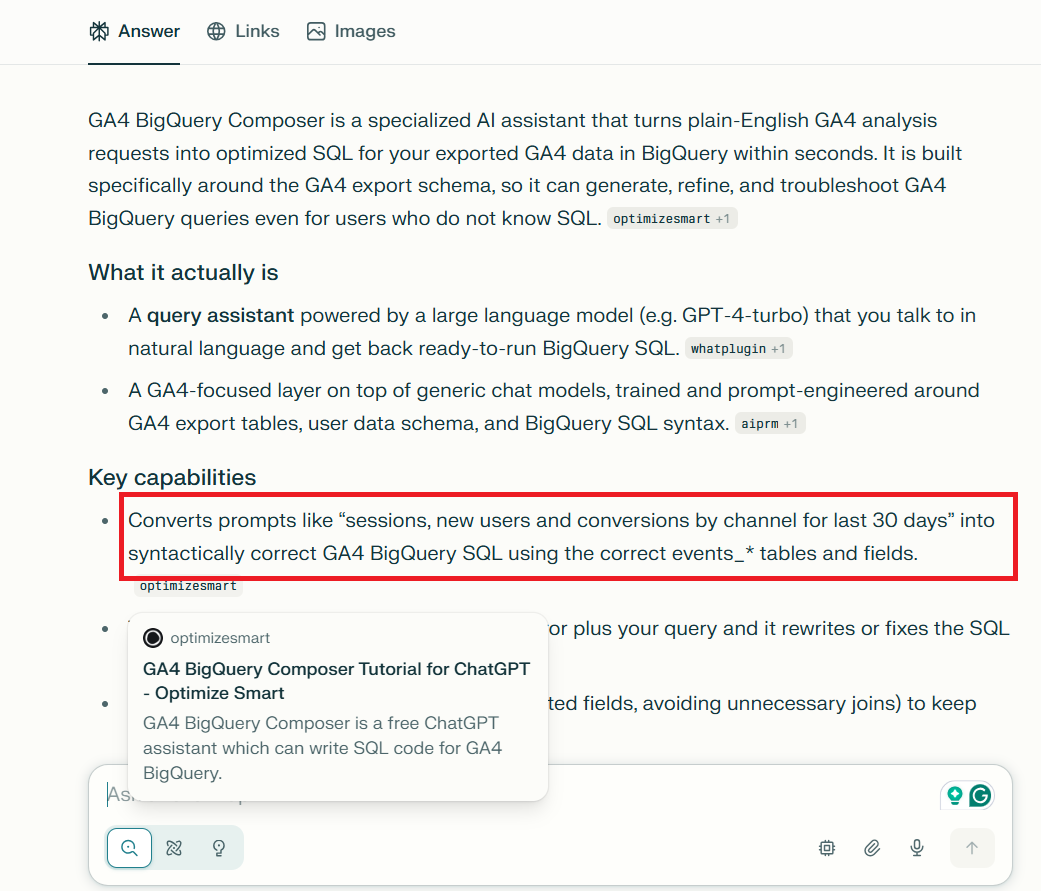
In one Perplexity response, the following statement was generated:
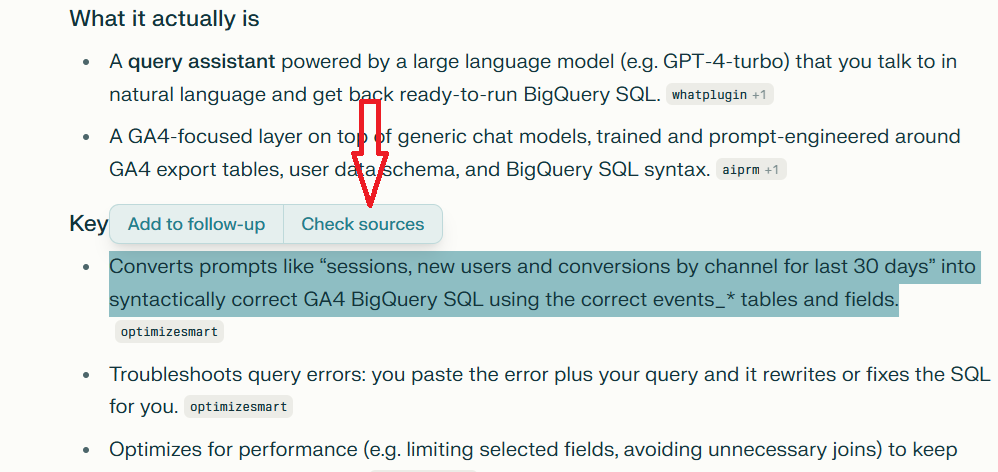
“Converts prompts like ‘sessions, new users and conversions by channel for last 30 days’ into syntactically correct GA4 BigQuery SQL using the correct events_* tables and fields.”
When you click “Check Sources” and review the cited content, you’ll find that this statement does not appear anywhere in the referenced source:
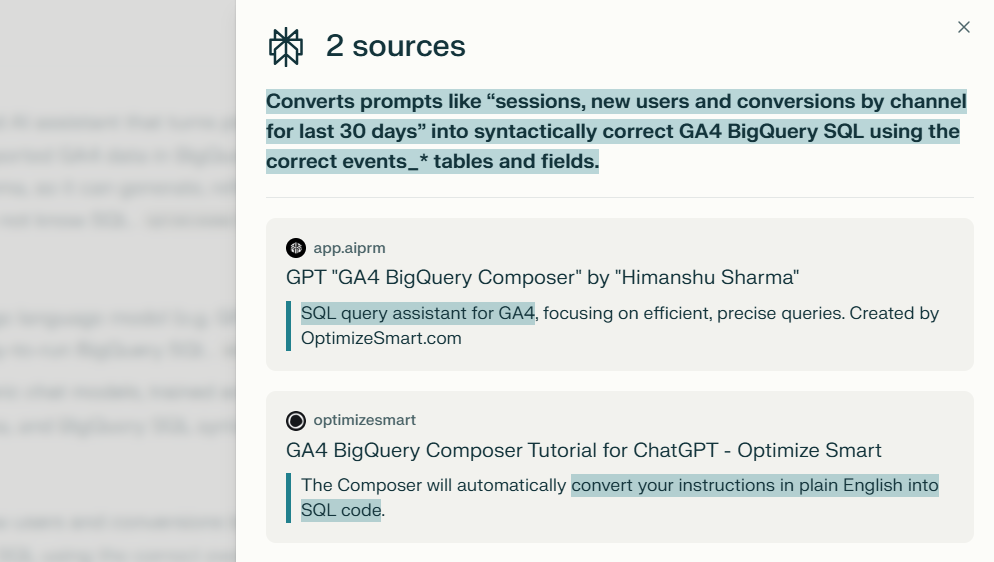
What you’re seeing isn’t extracted information; it’s the model’s interpretation.
The false confidence transfer.
This isn’t just about incorrect citations. It’s about trust being transferred incorrectly.
When an AI cites a credible source, users subconsciously transfer trust from the source to the AI’s interpretation. That’s where things become risky.
The source may be accurate and trustworthy, but the AI’s claim about what the source says may not be.
LLMs can hallucinate even when referencing high-quality sources.
They can:
- Invent details.
- Misinterpret content.
- Attribute claims to sources that never made them.
LLMs don't "read" sources in the way humans do.
When tools like Perplexity or ChatGPT with web search cite a source, the citation mechanism is often disconnected from the generation mechanism.
The model retrieves content, but then generates a response that may only loosely correlate with what was actually retrieved.
LLMs are trained to produce plausible text, not verified text.
The citation is essentially a post-hoc attribution rather than a direct quotation system.
There's no hard constraint forcing the generated text to match the retrieved content verbatim or even semantically.
LLMs can also hallucinate information from the documents you upload.
When you ask an AI to analyse or summarise your uploaded files, it might:
- Misquote or misinterpret your content.
- Read only parts of your uploaded file.
- Confidently summarize without telling you what was skipped.
The hallucination occurs because the default RAG methods used by most AI models are not very reliable.
They can misattribute information or present inaccuracies even when the data source is your own.
And that’s especially dangerous.
Why?
Because when an AI says:
“Row 147 of your spreadsheet…” or “Page 112 of your report…”
You’re far less likely to double-check. You assume accuracy because it’s your data.
The AI won’t say, “I only read 10% of this file.”
It will speak with confidence, as if it had seen everything.
Take any AI-generated answer and compare it with the original source it claims to reference.
You’ll often find:
- Mismatches.
- Misinterpretations.
- Entirely invented details.
This manual comparison is the fastest way to understand the real limits of AI-generated answers.
Best practices for mission-critical work.
- Always verify important details yourself.
- Don’t blindly trust AI-cited sources or summaries.
- Go back to the original source before making decisions.
- When building RAG systems, validate that retrieved answers truly come from your data, not from on-the-fly generation.
- For compliance reporting, financial audits, or legal documentation, traditional methods may be safer. The time saved isn't worth the risk if one hallucinated number reaches a client or regulator.
- Any AI-assisted analysis that informs a client deliverable or business decision gets human verification before it ships.
AI is powerful, but confidence without verification is where things break.
Related Articles:
- How to Self Host n8n on Google Cloud - Tutorial.
- How to use APIs in n8n, GoHighLevel and other AI Automation Workflows.
- How to use Webhooks in n8n, GoHighLevel and other AI Automation Workflows.
- What is OpenRouter API and how to use it.
- How to Connect Google Analytics to n8n (step by step guide).
- How To Connect Google Analytics MCP Server to Claude.
- State Machine Architectures for Voice AI Agents.
- Using Twilio with Retell AI via SIP Trunking for Voice AI Agents.
- Retell Conversation Flow Agents - Best Agent Type for Voice AI?
- How to build Cost Efficient Voice AI Agent.
- When to Add Booking Functionality to Your Voice AI Agent.
- n8n Expressions Tutorial.
- n8n Guardrails Guide.
- Modularizing n8n Workflows - Build Smarter Workflows.
- How to sell on ChatGPT via Instant Checkout & ACP (Agentic Commerce Protocol).
- How to Build Reliable AI Workflows.
- Correct Way To Connect Retell AI MCP Server to Claude.
- How to setup Claude Code in VS Code Editor.
- How to use Claude Code Inside VS Code Editor.
- How To Connect n8n MCP Server to Claude.
- How to Connect GoHighLevel MCP Server to Claude.
- How to connect Supabase and Postgres to n8n.
- How to Connect WhatsApp account to n8n.
- How to make your AI Agent Time Aware.
- Structured Data in Voice AI: Stop Commas From Being Read Out Loud.
- How to build Voice AI Agent that handles interruptions.
- Error Handling in n8n Made Simple.
- How to Write Safer Rules for AI Agents.
- AI Default Assumptions: The Hidden Risk in Prompts.
- Why AI Agents lie and don't follow your instructions.
- Why You Need an AI Stack (Not Just ChatGPT).
- How to use OpenAI Agent Kit, Agent Builder?
- n8n AI Workflow Builder And Its Alternatives.
- Two-way syncs in automation workflows can be dangerous.
- Missing Context Breaks AI Agent Development.
- How To Avoid Billing Disputes With AI Automation Clients.
- ChatGPT prompt to summarize YouTube video.
- Avoid the Overengineering Trap in AI Automation Development.