

Most publicly shared AI Automation workflows have little to no commercial value.
AI Workflows Built for Content Marketing (aka the Demo workflows).
When you build a real end-to-end automation for a business, there’s usually one piece that looks shiny on its own or is the easiest to share without giving away all of the value for free. That’s the part you often see on social media: the demo workflow.
The demo workflows look good in a video or post, but since they aren’t end-to-end solutions, they provide little to no commercial value.
They’re just one piece of a puzzle, usually the easiest or most visible part.
On the surface, Demo workflows look impressive. But in the real world, without CRM integration and a connected system, they have no business value.
Examples of demo workflows:
- A workflow that generates emails but doesn’t sync replies back into the CRM.
- A workflow that pushes data into a spreadsheet but isn’t tied to pipeline stages.
- A chatbot that answers FAQs but doesn’t qualify or store leads.
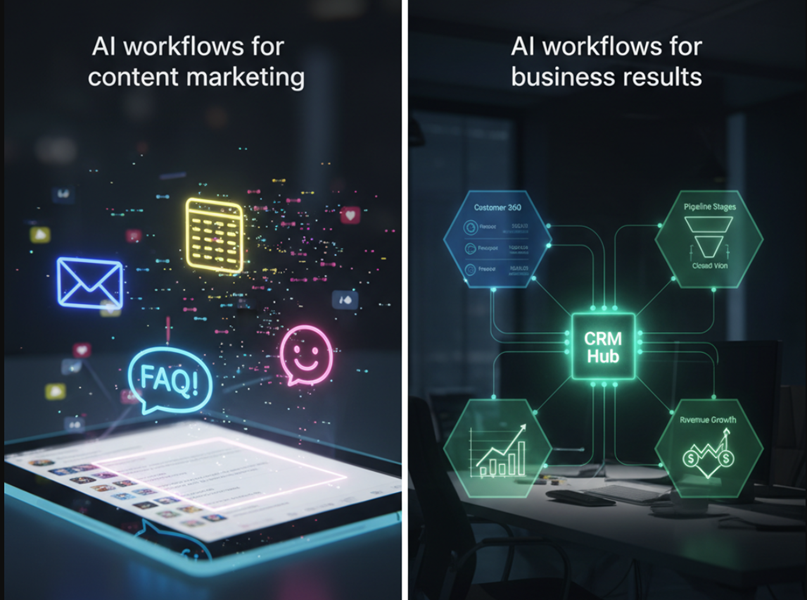
AI Workflows Built for Real Business Results.
AI workflows built for business results are end-to-end solutions, closing the loop so every action ties back to:
- A customer record (full history across email, calls, invoices).
- A pipeline stage (prospecting, negotiation, closed-won).
- A revenue goal (upsells, retention, lifetime value).
Since these workflows deliver real business value, they’re rarely shared publicly for free.
They’re too valuable to be shared online for free. If they are shared, you usually have to pay a premium fee (license).
Once you obtain the license, you can resell these pre-built workflows to different clients with minor modifications.
Public Tutorials on AI Automation Workflows Often Skip the Hard Part: Connecting Workflows to CRMs, Pipelines and the Rest of the Infrastructure.
Without that, you lose the ability to:- See the full activity history of a customer.
- Attribute actions to specific pipeline stages.
- Spot churn or engagement risk at the user level.
- Automate “next best actions” like follow-ups or upsells.
That’s why most workflows you see on YouTube or LinkedIn feel incomplete.
They show you what’s possible, not what drives business outcomes.
I purchased a production-ready, multi-channel workflow automation (better call it AI infrastructure) from an AI agency earlier this year.
It turned out to be so complex that it took me over six months and several courses just to understand its components and how to customize it.
Sure, I could have deployed it sooner, but it’s never a good idea to use or sell something you don’t fully understand.
So, I chose to delay gratification.
Several times I almost gave up. The complexity was overwhelming.
Honestly, I bit off more than I could chew but the sunk cost kept me pushing forward.
To make sense of it all, I created 100+ pages of documentation to track the workflows, nodes, integrations, and agents.
Yeah, it’s that complex.
And even if someone wanted to steal it, they couldn’t. This isn’t a single workflow file.
It’s an AI infrastructure made up of several platforms and AI agents and they all need to talk to each other in order to work. Without the documentation and orchestration, it’s useless.
The upside?
I’ve learned more from this investment than from any AI course I’ve ever enrolled in.
And thanks to this journey, I can now clearly tell who actually sell AI agents and who’s just pretending.
No AI course teaches you how to build and manage production-ready automations.
Most publicly shared AI automation workflows have little to no commercial value.
They’re “demo workflows.” Built for content marketing.
This may be hard to believe especially if you’ve never been behind the scenes to see what really goes into building commercial workflow automations that deliver real business value.
When you build a real end-to-end automation, there’s usually one shiny piece that looks good in isolation, that’s the part people share online for free.
But without CRM integration, without a fully connected system, these demo workflows have zero business value.
They look impressive in a video. They don’t work in the real world.
If you truly want to learn AI automation, here’s my advice:
#1 Hire an AI agency to build production-ready workflows for you. It’s going to cost you lot more than any course you enroll in. But you will actually learn the true AI automation.
#2 Study what you see being deployed in your company like a lab rat. It could take several months but it’s worth it.
#3 Learn from the real experience, not the easy parts gurus post online.
#4 Or wait for me to come up with a course on creating production-ready AI automation workflows (but fair warning: that’s going to be a long wait).
Related Articles:
- How to Self Host n8n on Google Cloud - Tutorial.
- How to use APIs in n8n, GoHighLevel and other AI Automation Workflows.
- How to use Webhooks in n8n, GoHighLevel and other AI Automation Workflows.
- What is OpenRouter API and how to use it.
- How to Connect Google Analytics to n8n (step by step guide).
- How To Connect Google Analytics MCP Server to Claude.
- State Machine Architectures for Voice AI Agents.
- Using Twilio with Retell AI via SIP Trunking for Voice AI Agents.
- Retell Conversation Flow Agents - Best Agent Type for Voice AI?
- How to build Cost Efficient Voice AI Agent.
- When to Add Booking Functionality to Your Voice AI Agent.
- n8n Expressions Tutorial.
- n8n Guardrails Guide.
- Modularizing n8n Workflows - Build Smarter Workflows.
- How to sell on ChatGPT via Instant Checkout & ACP (Agentic Commerce Protocol).
- How to Build Reliable AI Workflows.
- Correct Way To Connect Retell AI MCP Server to Claude.
- How to setup Claude Code in VS Code Editor.
- How to use Claude Code Inside VS Code Editor.
- How To Connect n8n MCP Server to Claude.
- How to Connect GoHighLevel MCP Server to Claude.
- How to connect Supabase and Postgres to n8n.
- How to Connect WhatsApp account to n8n.
- How to make your AI Agent Time Aware.
- Structured Data in Voice AI: Stop Commas From Being Read Out Loud.
- How to build Voice AI Agent that handles interruptions.
- Error Handling in n8n Made Simple.
- How to Write Safer Rules for AI Agents.
- AI Default Assumptions: The Hidden Risk in Prompts.
- Why AI Agents lie and don't follow your instructions.
- Why You Need an AI Stack (Not Just ChatGPT).
- How to use OpenAI Agent Kit, Agent Builder?
- n8n AI Workflow Builder And Its Alternatives.
- Two-way syncs in automation workflows can be dangerous.
- Missing Context Breaks AI Agent Development.
- How To Avoid Billing Disputes With AI Automation Clients.
- ChatGPT prompt to summarize YouTube video.
- Avoid the Overengineering Trap in AI Automation Development.