

- Text/Voice Prompts.
- Markdown prompts.
- JSON prompts.
- Schema Prompts.
- JSON + Schema Prompts.
- Code Block Prompts.
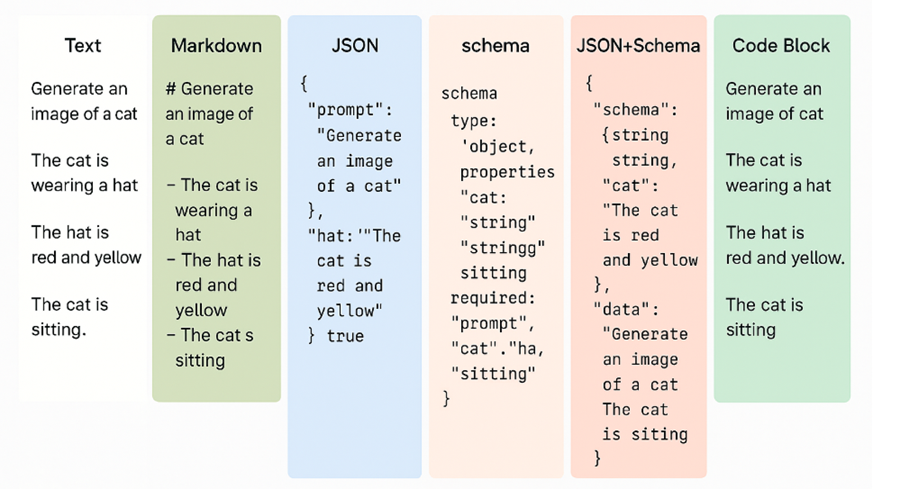
#1 Text/Voice Prompts.
In the case of Text/voice prompting, you provide instructions to LLMs using natural language.
Following is an example of a Text prompt:
Generate an image of a cat.
The cat is wearing a hat.
The hat is red and yellow.
The cat is sitting.
When to use Text/Voice Prompts:
>> For everyday tasks where precision is not mission critical.
>> As a user prompt, since your end user will naturally rely on text/voice.
>> Creative or exploratory tasks such as writing, video, image, or audio generation.
Strengths of Text/Voice Prompts:
>> Best for creative or exploratory work (writing or video/audio/image generation).
>> Ideal as a user-facing input layer for your automation workflow.
Weaknesses of Text/Voice Prompts:
>> Easily misinterpreted or ignored by the LLM.
>> Not reliable for mission-critical tasks (e.g., human handover, handling money, altering databases, sensitive operations, strict rules of engagement).
>> No matter how carefully you phrase or emphasise instructions (even with all caps or repetition), text prompts are still suggestions for LLMs and not guarantees. For example, you may prompt the LLM not to delete the database under any circumstances, but it can still go ahead and delete it.
#2 Markdown Prompts.
In the case of markdown prompting, you provide instructions to LLMs using markdown format.
Following is an example of a Markdown prompt:
# Generate an image of a cat
- The cat is wearing a hat
- The hat is red and yellow
- The cat is sitting
When to use Markdown Prompts:
>> For creating system prompts, where you define the personality of your LLM, set goals, provide context, and define rules of engagement.
Strengths of Markdown Prompts:
>> Less easily misinterpreted or ignored by the LLM than text prompts.
>> Great for creating knowledge base documents.
Weaknesses of Markdown Prompts:
>> Not suitable for everyday tasks.
>> Not as readable as text prompts.
>> Not reliable for mission-critical tasks.
>> Completely unsuitable for creative or exploratory work or as a user-facing input layer.
#3 JSON Prompts.
In the case of JSON prompting, you provide instructions to LLMs using JSON.
Following is an example of a JSON prompt:
{
  "prompt": "Generate an image of a cat",
  "cat": "The cat is wearing a hat",
  "hat": "The hat is red and yellow",
  "sitting": true
}
When to use JSON prompts:
>> For structured automation workflows where outputs need to be parsed downstream.
>> For passing data between steps in a pipeline.
>> For function calling or tool integration.
>> For tasks where precision is very important.
Strengths of JSON prompts:
>> It's hard for LLMs to misinterpret, ignore or hallucinate when using JSON prompts. In fact, the probability of misinterpretation is close to zero.
>> Forces the LLM to “think in slots” rather than free text.
>> Easier to debug and enforce consistency across runs.
>> Great for vibe coding.
Weaknesses of JSON prompts:
>> You need to be comfortable reading JSON. You don’t need to code, but you do need to understand keys, values, and nesting.
>> In text prompts, you can add a new rule with one sentence. In JSON prompts, you must add it as a new "requirement": "R13: …" and possibly extend the schema.
>> Models sometimes produce invalid JSON (missing commas, trailing text).
>> Same weaknesses as markdown prompts.
#4 Schema Prompts.
In the case of Schema prompting, you define strict rules for output (types, enums, required fields) without necessarily wrapping the full prompt in JSON.
Following is an example of a Schema prompt:
{
  "type": "object",
  "properties": {
    "prompt": { "type": "string" },
    "cat": { "type": "string" },
    "hat": { "type": "string" },
    "sitting": { "type": "boolean" }
  },
  "required": ["prompt", "cat", "hat", "sitting"]
}
When to use Schema Prompts:
>> For validation-heavy tasks (e.g., classification, entity extraction, safe responses).
>> When you want the LLM to reject invalid values/types at the prompt level.
>> When precision is required, but you still want some flexibility in input/output.
Strengths of Schema Prompts:
>> Strong guardrails - enforces datatypes, lengths, and enums.
>> Helps eliminate drift and hallucination.
>> Useful for automation that depends on the exact output format.
Weaknesses of Schema Prompts:
>> Requires domain knowledge to design schemas correctly (e.g., GA4 BigQuery schema).
>> Adds complexity for authors.
>> Still possible for the model to “pretend” it validated fields without true enforcement.
#5 JSON+Schema Prompts.
In the case of JSON+Schema prompting, you combine structured inputs (JSON) with strict schema validation.
Following is an example of a JSON+Schema prompt:
{
  "schema": {
    "type": "object",
    "properties": {
      "prompt": { "type": "string" },
      "cat": { "type": "string" },
      "hat": { "type": "string" },
      "sitting": { "type": "boolean" }
    },
    "required": ["prompt", "cat", "hat", "sitting"]
  },
  "data": {
    "prompt": "Generate an image of a cat",
    "cat": "The cat is wearing a hat",
    "hat": "The hat is red and yellow",
    "sitting": true
  }
}
When to use JSON + Schema Prompts:
>> Production workflows where correctness is critical (ETL pipelines, analytics queries, regulated data).
>> When you need both structure and strict validation at the same time.
>> Mission-sensitive automation where errors have financial consequences.
Strengths of JSON + Schema Prompts:
>> The most reliable way to control LLM output.
>> Combines machine-readability with validation.
>> Reduces hallucinations and ensures repeatability.
>> Auditable and testable (you can check if outputs conform to schema).
>> Great for vibe coding.
Weaknesses of JSON + Schema Prompts:
>> More rigid and harder to customize.
>> Authoring and maintenance are heavier compared to text/Markdown.
>> Requires strong domain knowledge (otherwise you’ll get invalid or incomplete results).
#6 Code Block Prompts.
In the case of Code block prompting, you force the LLM to output its response inside a code block (e.g., sql, python), requiring human review before execution.
Following is an example of a Code Block prompt:
-- ⚠️ Human review required before execution
-- Task: Delete old analytics events before 2023-01-01
-- Ensure this will NOT affect active data tables.

DELETE FROM `myproject.analytics.events_*`
WHERE event_date < '2023-01-01';
When to use Code Block prompts:
>> Mission-critical tasks where human-in-the-loop review is mandatory.
>> Sensitive operations like financial transactions, deleting data, schema migrations.
>> Scenarios where accidental execution must be prevented at all cost.
Strengths of Code Block prompts:
>> Enforces a pause for human review before running code.
>> Adds an extra safety layer for dangerous instructions.
Weaknesses of Code Block prompts:
>> Slower (requires human approval in the loop).
>> Still needs external validation/testing before execution.
>> Not suitable for fully automated workflows (bottleneck).
No prompting style is better than the other. It all depends upon your use case. In real life, you may combine multiple prompting styles.
You should always strive to create a balance between ease of use, accuracy and security and not fixate on one prompting style.
Related Articles:
- How to Self Host n8n on Google Cloud - Tutorial.
- How to use APIs in n8n, GoHighLevel and other AI Automation Workflows.
- How to use Webhooks in n8n, GoHighLevel and other AI Automation Workflows.
- What is OpenRouter API and how to use it.
- How to Connect Google Analytics to n8n (step by step guide).
- How To Connect Google Analytics MCP Server to Claude.
- State Machine Architectures for Voice AI Agents.
- Using Twilio with Retell AI via SIP Trunking for Voice AI Agents.
- Retell Conversation Flow Agents - Best Agent Type for Voice AI?
- How to build Cost Efficient Voice AI Agent.
- When to Add Booking Functionality to Your Voice AI Agent.
- n8n Expressions Tutorial.
- n8n Guardrails Guide.
- Modularizing n8n Workflows - Build Smarter Workflows.
- How to sell on ChatGPT via Instant Checkout & ACP (Agentic Commerce Protocol).
- How to Build Reliable AI Workflows.
- Correct Way To Connect Retell AI MCP Server to Claude.
- How to setup Claude Code in VS Code Editor.
- How to use Claude Code Inside VS Code Editor.
- How To Connect n8n MCP Server to Claude.
- How to Connect GoHighLevel MCP Server to Claude.
- How to connect Supabase and Postgres to n8n.
- How to Connect WhatsApp account to n8n.
- How to make your AI Agent Time Aware.
- Structured Data in Voice AI: Stop Commas From Being Read Out Loud.
- How to build Voice AI Agent that handles interruptions.
- Error Handling in n8n Made Simple.
- How to Write Safer Rules for AI Agents.
- AI Default Assumptions: The Hidden Risk in Prompts.
- Why AI Agents lie and don't follow your instructions.
- Why You Need an AI Stack (Not Just ChatGPT).
- How to use OpenAI Agent Kit, Agent Builder?
- n8n AI Workflow Builder And Its Alternatives.
- Two-way syncs in automation workflows can be dangerous.
- Missing Context Breaks AI Agent Development.
- How To Avoid Billing Disputes With AI Automation Clients.
- ChatGPT prompt to summarize YouTube video.
- Avoid the Overengineering Trap in AI Automation Development.