

If you've self-hosted n8n on a VPS and your webhooks from Retell AI, GoHighLevel, Twilio, or any other service are failing with a 403 Forbidden error, your n8n instance isn't the problem.
Most likely, Cloudflare is blocking the requests before they ever reach your server.
I ran into this exact issue while setting up a Retell AI post-call webhook for a real estate lead reactivation workflow.
The pre-call webhook worked fine. n8n was running perfectly. But the post-call webhook kept failing with a 403.
Here's exactly what happened and how I fixed it.
The symptoms.
- Retell AI "Test webhook" returns status 403.
- Post-call analysis data (interest level, timeline, notes) never reaches your Google Sheet or CRM.
- Your pre-call webhook may work intermittently or stop working without warning.
- n8n logs show no errors because the request never reaches n8n.
How to confirm Cloudflare is the problem.
SSH into your VPS and test the webhook locally, bypassing Cloudflare entirely:
curl -X POST http://localhost:5678/webhook/your-webhook-path \
  -H "Content-Type: application/json" \
  -d '{"event":"call_ended","call":{"call_id":"test123"}}'
If you get a valid JSON response from n8n, your instance is working fine.
Now test the same URL externally through your domain:
curl -X POST https://n8n.yourdomain.com/webhook/your-webhook-path \
  -H "Content-Type: application/json" \
  -d '{"event":"call_ended","call":{"call_id":"test123"}}'
If this returns a 403 with an HTML page containing "Attention Required! | Cloudflare" and "Sorry, you have been blocked", that confirms it. Cloudflare's security features are intercepting and rejecting the webhook POST requests.
Why does this happen?

When your n8n subdomain is proxied through Cloudflare (orange cloud), all incoming traffic passes through Cloudflare's network first.
Cloudflare's security features, particularly Bot Fight Mode, managed WAF rules, and Super Bot Fight Mode, treat automated POST requests from services like Retell AI, GoHighLevel and Twilio as suspicious bot traffic and block them.
The worst part is that this issue can be intermittent.
Cloudflare may allow some requests and block others depending on the sender's IP reputation, request pattern and which security rules are active at that moment.
So things can appear to work during testing and then break in production with real calls.
The fix.
The cleanest and most reliable fix is to keep your n8n subdomain on DNS only (grey cloud) in Cloudflare.
Go to your Cloudflare dashboard → DNS → find the A and AAAA records for your n8n subdomain → click the orange cloud icon to switch it to grey (DNS only).

That's it.
Traffic now goes directly to your VPS, bypassing Cloudflare entirely for that subdomain. Your webhooks will work immediately.
Your main website domain stays on Cloudflare with full protection. Only the n8n subdomain bypasses it.
What about WAF skip rules?
I tried creating a WAF rule to skip all security checks for requests to /webhook/ on the n8n subdomain. The rule was configured correctly.
URI Path starts with /webhook/ AND hostname equals n8n.yourdomain.com, action set to Skip with all WAF components ticked.
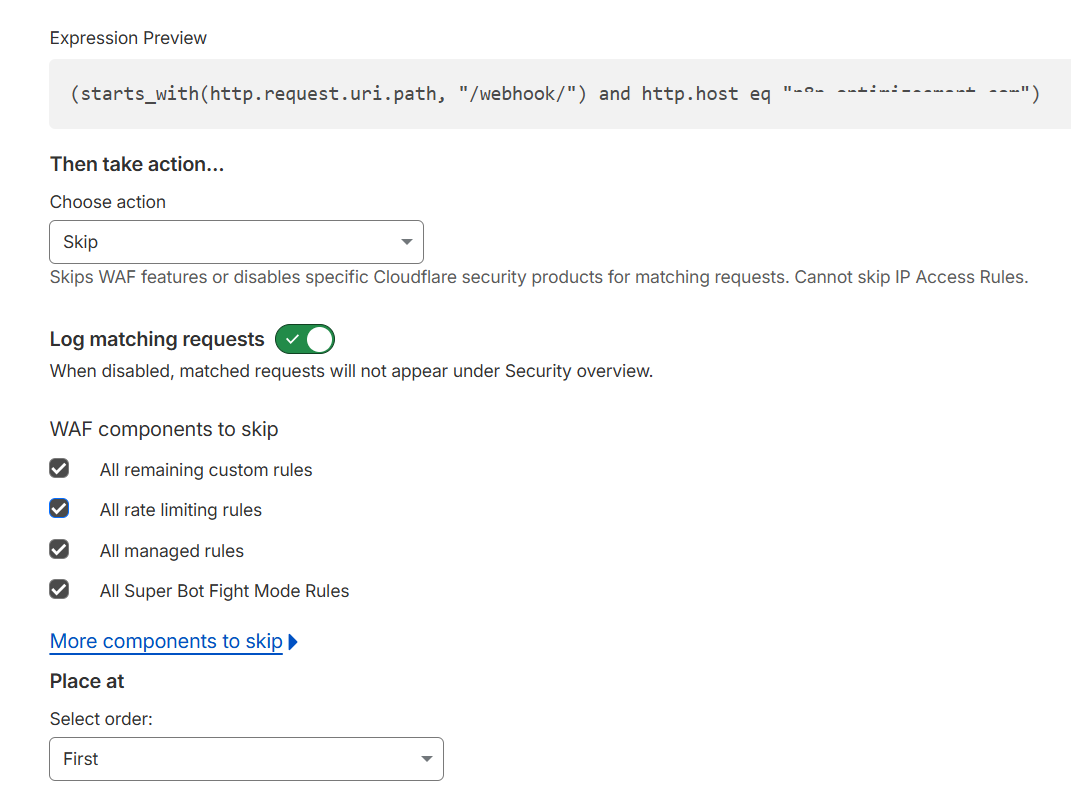
It didn't work.
Cloudflare's Bot Fight Mode operates independently of WAF custom rules and continues to block the webhook requests. Disabling Bot Fight Mode might help, but it affects your entire Cloudflare account, not just the n8n subdomain.
DNS only (grey cloud) is the only approach that reliably fixes this without side effects.
Is DNS only safe?
Your VPS IP address is visible via DNS lookup for the n8n subdomain, but your server is already protected by UFW with only ports 22, 80, and 443 open. That's sufficient for an n8n instance.
Your main website keeps full Cloudflare protection. The n8n subdomain is the only thing exposed directly.
Quick checklist for self-hosted n8n webhook issues:
- Is the workflow active in n8n? Inactive workflows return 403 on their own.
- Are you using the production webhook URL, not the test URL?
- Test locally with curl on the VPS. Does n8n respond?
- Test externally. Does the same URL return a 403 error on your domain?
- If external returns 403 with Cloudflare HTML → switch n8n DNS to grey cloud.
- Restart n8n after making changes: cd /opt/n8n && docker compose down && docker compose up -d
This was one of the issues I ran into while setting up self-hosted n8n for Retell AI voice agent workflows.
If you're planning to self-host n8n, I've written a complete step-by-step guide covering the entire setup from VPS purchase through DNS, Docker, SSL, Cloudflare configuration and workflow migration: https://optimizesmart.com/blog/how-to-correctly-self-host-n8n-on-hostinger-vps/
Related Articles:
- How to Self Host n8n on Google Cloud - Tutorial.
- How to use APIs in n8n, GoHighLevel and other AI Automation Workflows.
- How to use Webhooks in n8n, GoHighLevel and other AI Automation Workflows.
- What is OpenRouter API and how to use it.
- How to Connect Google Analytics to n8n (step by step guide).
- How To Connect Google Analytics MCP Server to Claude.
- State Machine Architectures for Voice AI Agents.
- Using Twilio with Retell AI via SIP Trunking for Voice AI Agents.
- Retell Conversation Flow Agents - Best Agent Type for Voice AI?
- How to build Cost Efficient Voice AI Agent.
- When to Add Booking Functionality to Your Voice AI Agent.
- n8n Expressions Tutorial.
- n8n Guardrails Guide.
- Modularizing n8n Workflows - Build Smarter Workflows.
- How to sell on ChatGPT via Instant Checkout & ACP (Agentic Commerce Protocol).
- How to Build Reliable AI Workflows.
- Correct Way To Connect Retell AI MCP Server to Claude.
- How to setup Claude Code in VS Code Editor.
- How to use Claude Code Inside VS Code Editor.
- How To Connect n8n MCP Server to Claude.
- How to Connect GoHighLevel MCP Server to Claude.
- How to connect Supabase and Postgres to n8n.
- How to Connect WhatsApp account to n8n.
- How to make your AI Agent Time Aware.
- Structured Data in Voice AI: Stop Commas From Being Read Out Loud.
- How to build Voice AI Agent that handles interruptions.
- Error Handling in n8n Made Simple.
- How to Write Safer Rules for AI Agents.
- AI Default Assumptions: The Hidden Risk in Prompts.
- Why AI Agents lie and don't follow your instructions.
- Why You Need an AI Stack (Not Just ChatGPT).
- How to use OpenAI Agent Kit, Agent Builder?
- n8n AI Workflow Builder And Its Alternatives.
- Two-way syncs in automation workflows can be dangerous.
- Missing Context Breaks AI Agent Development.
- How To Avoid Billing Disputes With AI Automation Clients.
- ChatGPT prompt to summarize YouTube video.
- Avoid the Overengineering Trap in AI Automation Development.
- How to Correctly Self Host n8n on Hostinger VPS.
- The correct way to setup Cal.com for Voice AI.
- Custom Reporting For Voice AI.
- How To Bill Your Voice AI Clients Like A Pro.
- Voice AI Knowledge Base Creation Best Practices.
- How to build Cost Efficient Voice AI Agent.