
Follow me on LinkedIn - AI, GA4, BigQuery

Understanding the following terms in the context of Google BigQuery Storage can help you make informed decisions about managing your data and optimizing storage costs:

  1. Storage Units
  2. Number of rows
  3. Number of partitions
  4. Logical bytes vs Physical bytes
  5. Active bytes vs Long term bytes
  6. Total Logical bytes.
  7. Active logical bytes.
  8. Long term logical bytes.
  9. Total Physical bytes.
  10. Active physical bytes.
  11. Long term physical bytes.
  12. Time travel physical bytes.

#1 Storage Units.

The storage units are used to measure the amount of data that can be stored on a device or storage media. 

Storage units can be defined as decimal units of measurement or binary units of measurement.

Decimal units are based on the decimal system, which uses base 10. 


The following are the most common decimal storage units:

  1. Bit (b) is a binary digit, meaning it can be either a 0 or a 1. It is the smallest unit of data storage. 
  2. Byte (B) is a group of 8 bits. One byte can represent a single character or a small piece of data.
  3. Kilobyte (KB) is equal to 1,000 bytes.
  4. Megabyte (MB) is equal to 1,000 kilobytes.
  5. Gigabyte (GB) is equal to 1,000 megabytes.
  6. Terabyte (TB) is equal to 1,000 gigabytes.
  7. Petabyte (PB) is equal to 1,000 terabytes.

Binary units are based on the binary system, which uses base 2. 


The following are the most common binary storage units:

  1. Kibibyte (KiB): A kibibyte is equal to 1,024 bytes.
  2. Mebibyte (MiB): A mebibyte is equal to 1,024 kibibytes.
  3. Gibibyte (GiB): A gibibyte is equal to 1,024 mebibytes.
  4. Tebibyte (TiB): A tebibyte is equal to 1,024 tebibytes.
  5. Pebibyte (PiB): A pebibyte is equal to 1,024 tebibytes.

To summarize:

1 KB (kilobyte) = 1,000 bytes (decimal) 

1 KiB (kibibyte) = 1,024 bytes (binary)

This means that a KiB is about 2.4% larger than a KB.


What is the purpose of using decimal and binary storage units?

The main difference between decimal and binary storage units is that binary storage units are more precise. 

Therefore, they are better suited for estimating the monthly cost of data storage and processing.

That’s why when you use the Google Cloud pricing calculator, all the storage units are defined using binary units of measurement:


The decimal storage units are most commonly used for displaying storage information to end users. 

For example, the storage information displayed for a BigQuery data table uses the decimal storage units:
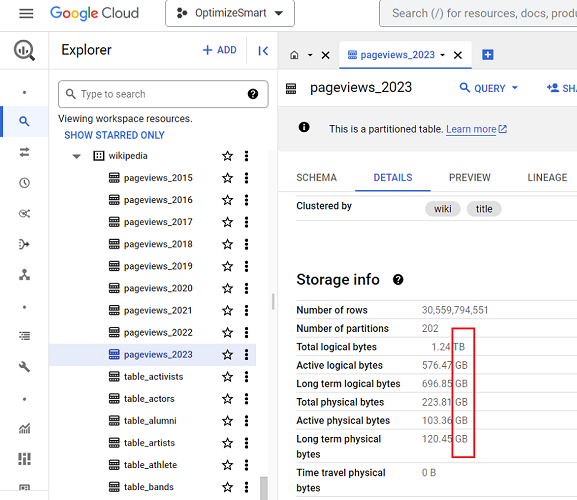
#2 Number of rows.

In Google BigQuery, when you view the details of a data table, it shows the number of rows under the storage information: 

The number of rows (or records) is shown to give users an immediate understanding of the volume of data in the table.


A table with a large number of rows can take longer to query than a table with a small number of rows.

Thus, the number of rows in a data table can affect query performance.

For these reasons, BigQuery data tables show the number of rows under the storage information. 

#3 Number of partitions.

In Google BigQuery, when you view the details of a data table, it can show the number of partitions under the storage information: 

BigQuery data tables show the number of partitions under the storage information because the number of partitions in a table can affect query performance and storage costs.

Partitions in BigQuery are a way of dividing a data table into smaller, logical units based on a specified partition key.

The partitioning keys should be columns that are frequently used in queries.

This division helps reduce storage costs and improve query performance by allowing BigQuery to efficiently focus on only the relevant partitions when processing a query.


For example, GA4 BigQuery data tables are already partitioned by day. 

This creates a separate partition for each day of data, making it much easier to find data for a specific day, since BigQuery only needs to search that partition.

The partitioning of GA4 BigQuery data tables is a great example of how partitioning can improve query performance. 


Important factors when partitioning a BigQuery data table.

Keep the following factors in mind when you are considering partitioning a BigQuery data table:

#1 The number of partitions you create will affect the performance of queries. Too many partitions can slow queries, while too few can make them less efficient. 

#2 The size of the partitions also affects query performance. Too large partitions can slow queries, while too small partitions can make them less efficient.


#3 If you have a table that is frequently queried by date, you should partition the table by date (time-based partitioning).

#4 If you have a table that is frequently queried by a specific column, you should partition the table by that column (column-based partitioning).

#5 If you have a table that is growing rapidly, you should partition the table to improve the performance of queries and reduce storage costs.

#4 Logical bytes vs Physical bytes.


The Logical Bytes represent the uncompressed size of the data table.

It refers to the amount of data processed when running a query without any data pruning or optimizations (like filtering, partition elimination, or clustering).


The logical bytes help estimate the potential cost of querying the entire dataset without any optimization.

In contrast, Physical Bytes represent the compressed size of the data table, reflecting the actual space it occupies on disk. This is the amount of space charged by BigQuery.

#5 Active bytes vs Long term bytes.


The Active bytes refer to the amount of data currently used by active queries, cached queries and other operations, such as loading data into the table or exporting data from the table.

The ‘Active bytes’ metrics are updated periodically. 


The Active Bytes metric can help you understand how much storage your queries use. This information can help optimize your queries to improve performance.

In contrast, the Long term bytes refer to the amount of data NOT currently used (by active queries, cached queries and other operations, such as loading data into the table or exporting data from the table) but that is still stored in the table. 


The Long Term Bytes metrics can help you understand how much storage your table is using that is not currently in use.

This information can help optimize your storage costs by identifying tables that can be archived or deleted.

#6 Total Logical Bytes.


The ‘Total Logical Bytes’ represents the total uncompressed size of the data table, including all the data contained within it. 

The total logical bytes in a data table can be calculated by adding the sizes of each column. 


The size of each column is determined by the type of data stored in the column and the length of the data.

For example, a column that stores text data will take up more space than a column that stores numeric data. 

Similarly, a column that stores a long text string will take up more space than a column that stores a short text string.

#7 Active logical bytes.


The ‘Active logical bytes’ refers to the amount of data currently used by active queries, cached queries and other operations, such as loading data into the table or exporting data from the table.

The ‘Active logical bytes’ metric is updated periodically. 


The ‘Active logical bytes’ metric is different from the Total logical bytes metric in that it only reflects the data that is currently being used by the table.

On the other hand, the ‘Total logical bytes’ metric reflects the total amount of data stored in the table, regardless of whether or not the data is currently being used.

#8 Long term logical bytes.


The ‘Long term logical bytes’ refers to the amount of data NOT currently used (by active queries, cached queries and other operations, such as loading data into the table or exporting data from the table) but that is still stored in the table. 

The ‘Long term logical bytes’ metric is updated periodically. 

#9 Total Physical bytes.


The ‘Total Physical Bytes’ represents the total compressed size of the data table, including all the data contained within it. 

This is the amount of space the table actually occupies on disk. This is the amount of space charged by BigQuery.

The main difference between ‘total logical bytes’ and ‘total physical bytes’ metrics is that total logical bytes refer to the uncompressed size of the table, while total physical bytes refer to the compressed size of the table.

#10 Active physical bytes.


The ‘Active physical bytes’ refers to the amount of compressed data currently used by active queries, cached queries and other operations, such as loading data into the table or exporting data from the table. 

The ‘Active physical bytes’ metric is updated periodically. 


The main difference between Active Logical Bytes and Active Physical Bytes is that Active Logical Bytes refer to the uncompressed size of the data currently being used by a table. 

In contrast, Active Physical Bytes refer to the compressed size of the data currently being used by a table.

#11 Long term physical bytes.


The ‘Long term physical bytes’ refers to the amount of compressed data NOT currently used by active queries, cached queries and other operations, such as loading data into the table or exporting data from the table.

The ‘Long term physical bytes’ metric is updated periodically. 


What is Time Travel in BigQuery?

Time travel functionality in BigQuery allows you to perform various data recovery and historical analysis tasks. 

It enables you to query data that has been updated or deleted, restore deleted tables, or access expired tables within a specific time travel window, which is typically the past seven days by default:

Time Travel in BigQuery

During this time travel period, any changes or deletions made to data in the dataset’s tables are retained in case you need to recover them.


To learn more about time travel, check out the official help documentation from Google: Data retention with time travel and fail-safe.

#12 Time travel physical bytes.


The ‘Time travel physical bytes’ metric represents the storage size used for maintaining the historical data required for time travel functionality.

This metric is calculated by considering the compressed data stored for time-travel purposes and the compression algorithm used to compress this historical data. 

The ‘Time travel physical bytes’ metric is updated periodically to provide accurate information about the storage requirements for time travel.