

What Is a GA4 Assistant?
A GA4 Assistant is a dedicated Claude project configured to work as a personal Google Analytics 4 analyst. Think of it like a Custom ChatGPT, but specifically built for analytics.
It combines three things:
- Custom instructions that define your business context and preferences.
- Uploaded reference files like metric definitions, benchmarks, and goals.
- A live connection to the Google Analytics MCP server for real-time data access.
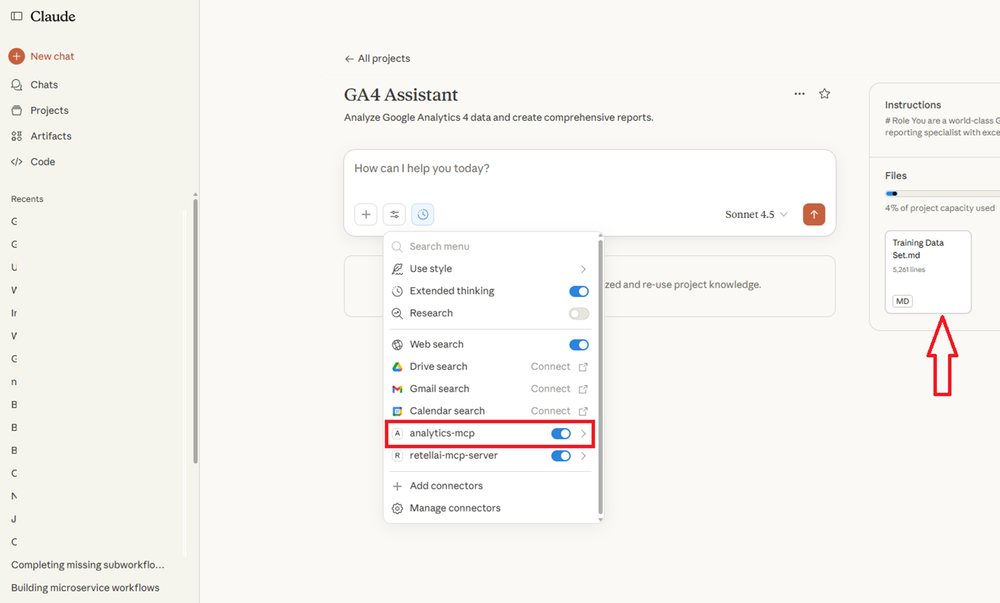
The result: instead of manually navigating GA4 reports and interpreting data yourself, you ask questions in plain English and get actionable answers tailored to your business.
Why Use a GA4 Assistant?
- Automatic Property Selection.
- Persistent Context and Memory.
- Speed and Efficiency.
- Organised History and Collaboration.
1. Automatic Property Selection.
The Google Analytics MCP server can access every GA4 property linked to your Google account.
Normally, this means specifying the property name in every single query.
With a GA4 Assistant, you set your primary property once, and it's used by default.
Example:
| Without GA4 Assistant | With GA4 Assistant |
|---|---|
| "Show me users for my E-commerce Store property" | "Show me users" |
| "What's bounce rate for my E-commerce Store property?" | "What's bounce rate?" |
| "Top pages for my E-commerce Store property" | "Top pages" |
You only mention a property name when you want data from a different one, e.g., "Show me users for my Blog property."
2. Persistent Context and Memory.
Every conversation builds on the last.
Your assistant remembers your GA4 properties, custom metrics, business goals, and past analyses, so you never have to re-explain your setup.
Example: If you've previously told Claude that "conversions" in your business means completed purchases (not lead form submissions), it applies that definition automatically in future queries.
3. Speed and Efficiency.
Simple queries get complete answers using your preferred metrics, date ranges, and comparisons, without repetitive setup.
Example: Asking "How did we do last week?" could automatically return your key metrics (sessions, conversions, revenue) compared to the previous week, because Claude already knows what matters to your business.
4. Organised History and Collaboration.
- Reference past reports and track how metrics have changed over time.
- Team members can review shared analyses and maintain consistent methodology.
- Decisions and insights are documented as a natural audit trail.
Selling GA4 Assistants as a Product.
You can package GA4 Assistants as a done-for-you service for clients.
What do you deliver?
A complete, personalised analytics solution set up as a Claude project, including:
- Google Analytics MCP server installation and configuration.
- Custom project instructions tailored to the client's business.
- Property configuration and documentation.
- Business context files and metric definitions.
- Historical benchmark reports.
- Team training on using the assistant.
- Ongoing maintenance and updates (optional monthly retainer).
How to position It?
Headline: "Your 24/7 Google Analytics expert for a one-time fee."
Key selling points:
- Get instant analytics insights without learning GA4's complex interface.
- Ask questions in plain English, get answers in seconds.
- No more waiting for analyst reports or struggling with dashboards.
Prerequisite.
Before creating your GA4 Assistant, you must have the Google Analytics MCP server successfully connected to Claude Desktop.
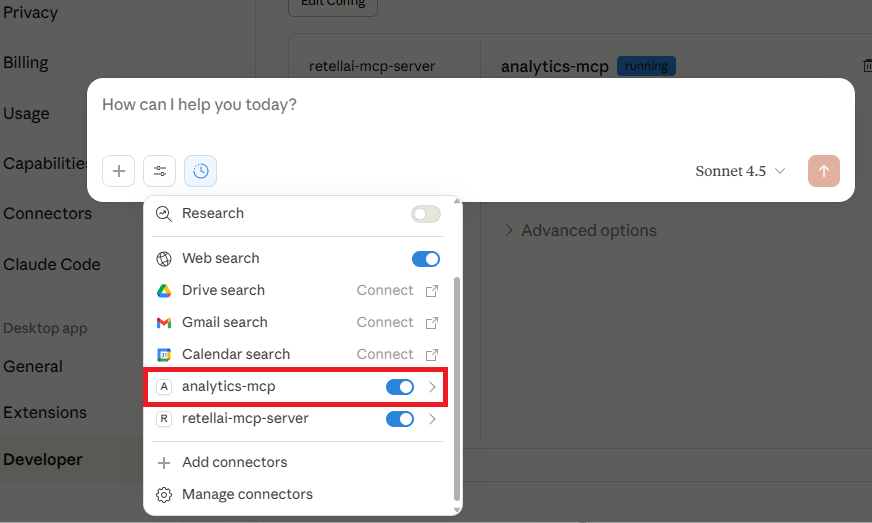
See: How to Connect Google Analytics MCP Server to Claude for setup instructions.
Other Articles on GA4.
- Tracking New, Qualified and Converted Leads in GA4.
- Free GA4 training and tutorial with Certification.
- Understanding GA4 Ecommerce Reports (Monetization Reports).
- GA4 Ecommerce Tracking via GTM: Step-by-Step Setup Guide.
- How to see UTM parameters in GA4 (Google Analytics 4).
- GA4 UTM parameters not working? Here is how to fix it.
- How To Use UTM parameters in GA4 (Campaign Tracking).
- How to track AI traffic in GA4.
- Understanding Google Analytics 4 cookies – _ga cookie.
- GA4 (Google Analytics 4) Measurement Protocol Tutorial.
- GA4 Unassigned Traffic: Causes and How to Fix it Fast.
- GA4 Regex (Regular Expressions) Tutorial.
- GA4 Direct Traffic Spike: Common Causes and How to Fix Them.
- gtag.js – Google Tag in Google Analytics 4 and beyond.
- GA4 Scopes – User, Session, Event & Item scopes.
- GA4 Conversion Tracking (Key Events) Tutorial.
- GA4 (not set) - Guide to fixing (not set) issue.
- GA4 Certification Exam: Questions, Answers for Skillshop (GAIQ).
- GA4 User Properties (User Scoped Custom Dimensions) – Tutorial.
- Tracking Organic Traffic in GA4 - Complete Guide.
- Tracking Events in GA4 (Google Analytics 4).
- GTM Server Side Tagging - Setup Guide.
- Using Subfolder for GTM Server Side Tagging (Same Origin Tracking).
- Understanding Event Parameters in Google Analytics 4 (GA4).
- How to Uninstall GTM Server Side Tagging.
- How to remove (other) in GA4 reports and avoid Cardinality.
- Creating GA4 Assistant via Claude for your customers.
- How To Set Up User ID in GA4 - Cross Device Tracking.
- GA4 Mobile App Tracking - Firebase Integration.
- How to use DebugView report in Google Analytics 4 (GA4).
- How to Track Phone Calls in Google Analytics 4.
- How to detect GTM Server Side Tagging.