A contraction is a shortened form of two words, usually made by replacing missing letters with an apostrophe.
Examples:
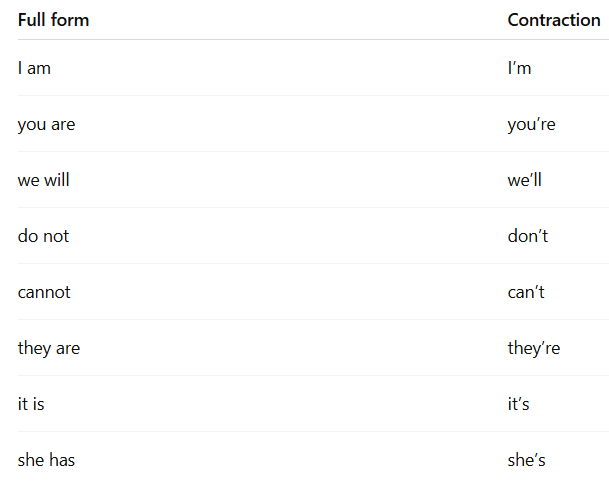
Using contractions is one of the easiest ways to make a voice agent sound more natural.
Check the demo below:

Why does this matter?
People usually use contractions when they speak.
When a voice agent avoids contractions, it can sound stiff, scripted, or overly formal. That is not what most callers want from a receptionist.
If your prompt sounds formal, the agent may sound formal too.
Customer service scripts, help desk documents, and business templates often use phrases like:
“I do not have access to that information.”
or:
“We will assist you shortly.”
Those phrases may be fine in writing, but they sound cold on a call.
A more natural version would be:
“I don’t have that info here.”
or:
“We’ll help you with that shortly.”
The rule “Do not use abbreviations or contractions” makes the problem worse because it tells the agent to avoid normal spoken English.
Formal writing does not work well in speech.
Formal wording can be fine in emails, policies, and legal documents. But when spoken aloud, it can sound slow and unnatural.
A receptionist would usually not say:
“I am Lisa.”
They would say:
“I’m Lisa.”
Or even better:
“Hi, this is Lisa.”
The goal is not to make the agent casual. The goal is to make it sound like normal spoken English.
Read your prompt out loud at normal phone-call speed.
If you naturally say a contraction while reading, but the script does not use one, fix the script.
Write the line the way a real person would say it.
A simple rule:
Use contractions unless there is a specific reason not to.
For voice agents, “I’m,” “we’ll,” and “don’t” usually sound more natural than “I am,” “we will,” and “do not.”
Related Articles:
- Custom Reporting For Voice AI.
- How To Bill Your Voice AI Clients Like A Pro.
- Voice AI Knowledge Base Creation Best Practices.
- How to build Cost Efficient Voice AI Agent.
- How to Self Host n8n on Google Cloud - Tutorial.
- How to use APIs in n8n, GoHighLevel and other AI Automation Workflows.
- How to use Webhooks in n8n, GoHighLevel and other AI Automation Workflows.
- What is OpenRouter API and how to use it.
- How to Connect Google Analytics to n8n (step by step guide).
- How To Connect Google Analytics MCP Server to Claude.
- State Machine Architectures for Voice AI Agents.
- Using Twilio with Retell AI via SIP Trunking for Voice AI Agents.
- Retell Conversation Flow Agents - Best Agent Type for Voice AI?
- How to build Cost Efficient Voice AI Agent.
- When to Add Booking Functionality to Your Voice AI Agent.
- n8n Expressions Tutorial.
- n8n Guardrails Guide.
- Modularizing n8n Workflows - Build Smarter Workflows.
- How to sell on ChatGPT via Instant Checkout & ACP (Agentic Commerce Protocol).
- How to Build Reliable AI Workflows.
- Correct Way To Connect Retell AI MCP Server to Claude.
- How to setup Claude Code in VS Code Editor.
- How to use Claude Code Inside VS Code Editor.
- How To Connect n8n MCP Server to Claude.
- How to Connect GoHighLevel MCP Server to Claude.
- How to connect Supabase and Postgres to n8n.
- How to Connect WhatsApp account to n8n.
- How to make your AI Agent Time Aware.
- Structured Data in Voice AI: Stop Commas From Being Read Out Loud.
- How to build Voice AI Agent that handles interruptions.
- Error Handling in n8n Made Simple.
- How to Write Safer Rules for AI Agents.
- AI Default Assumptions: The Hidden Risk in Prompts.
- Why AI Agents lie and don't follow your instructions.
- Why You Need an AI Stack (Not Just ChatGPT).
- How to use OpenAI Agent Kit, Agent Builder?
- n8n AI Workflow Builder And Its Alternatives.
- Two-way syncs in automation workflows can be dangerous.
- Missing Context Breaks AI Agent Development.
- How To Avoid Billing Disputes With AI Automation Clients.
- ChatGPT prompt to summarize YouTube video.
- Avoid the Overengineering Trap in AI Automation Development.
- How to Correctly Self Host n8n on Hostinger VPS.
- The correct way to setup Cal.com for Voice AI.
- Claude Beats ChatGPT for Voice AI Agents.