

Do you want to go into the technical side or the non-technical side of web analytics?
The technical side deals with implementation stuff: installing/ fixing tracking on a website.
The non-technical side involves creating strategies, framework, conversion optimization, data analysis, and reporting.
These two are entirely different career paths within the web analytics field and require entirely different skill sets to succeed.
Choosing one career path means abandoning the other path.
I don’t want you to be in a situation where you invested a significant amount of your time and resources in developing skills in a field only to find later this is not something you really want/enjoy doing for a living.
See, web analytics is a very broad field.
There are so many ‘things that you can learn and master.
But if you are not going to use them daily in your professional life, what’s the point of mastering them?
For example,
What’s the point of learning GTM in great detail if you use it only for one-off work?
What’s the point of learning all those GTM tricks and hacks you don’t need to use in the immediate future?
The technical side of web analytics.
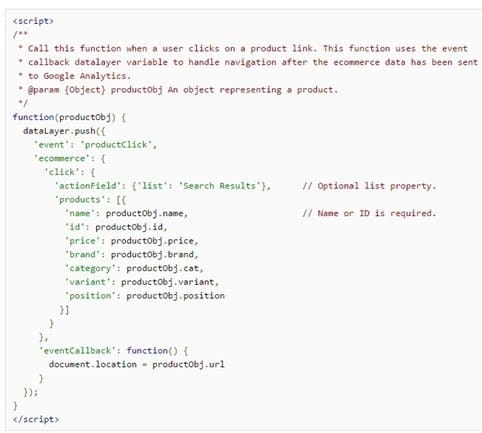
The technical side deals with implementation stuff: installing/fixing tracking on a website.
If you want to go into the technical side of web analytics, then you are planning to become a GA developer whose job is to set up/fix website tracking issues on a daily basis.
Then you would need to learn HTML, JavaScript, DOM, and regex and acquire at least working knowledge of various JS libraries, databases, server-side language, CMS and shopping carts.
Here you would be creating ETL functions with or without Google Tag Manager (GTM). In-depth GTM training is really helpful for you.
You won’t really learn GTM without adequate knowledge of HTML, JavaScript, DOM and GA development environment.
If your course instructor is not teaching you (and most don’t) these things but still claims to make you a master of GTM, then you picked up the wrong training course.
That’s why I don’t teach GTM in our web analytics training program.
This stuff is too technical for most people, and I don’t want to make false promises of making you a master in GTM when it is not really possible.
Ask yourself the following questions:
Do I have a strong coding background?
Was I a developer before I moved into web analytics?
Do I have the inclination and/or the capacity to learn to code for the foreseeable future?
Do I really enjoy traversing the DOM, setting up and fixing data layers, adding/editing code, and dealing with developers on a daily basis?
If your answer to any of these questions is ‘No’, then don’t go technical. You would be shooting yourself in the foot by planning to become a GA developer.
People grossly underestimate the technicality involved in setting up/fixing website tracking issues.
They actually believe that they can learn all this in just a couple of weeks/months. It takes years and decades to learn all of this stuff. I know that because I have been doing this for over a decade.
I deal with developers all of the time. And I have worked on setting up/fixing tracking on countless websites. I know the technicality involved.
The technical side of web analytics is a lot harder than you think.
Even seasoned developers with decades of experience struggle with code and technical issues. It is not easy at all.
All of the people who advise you to “go technical” in web analytics have strong coding backgrounds and are more or less one-trick ponies.
They can’t think beyond that. That’s their limitation. They can’t really fathom the non-technical side of analytics.
Their world revolves around JavaScript and setting up and fixing tracking issues. That’s all they have ever done.
They truly believe that what they do is website analysis. But what they are basically doing is development work.
It is a different type of development work, but it is still development work.
Even when you have got adequate knowledge of HTML, DOM, and JavaScript, you would still need the help of the client’s web developers/IT.
That is because if you are not familiar with the server-side language used by your client and/or the client’s development environment or database, then you will need the help of the client’s IT/web developer to add server-side code to your data layers or to query their database for you.
Without adding server-side code to GTM data layers, you can’t implement/debug many of the sophisticated trackings (like ‘enhanced ecommerce tracking’) in GA via GTM.
Thus you must also be able to communicate well with developers in the language they understand.
When you work with them, they will ask you many technical questions under the assumption that you are already familiar with the technology they use.
Technical projects usually do not last for more than a couple of weeks. Thus there is little to no possibility of generating monthly recurring revenue from a client.
You would need a constant flow of new clients each month. As an individual, you will most likely max out after 10 clients.
As an agency, you will most likely max out after 100 clients. So you can scale your business and income only to an extent.
There is a glass ceiling.
The future of the technical side of Web Analytics.
The future of Google Tag Manager (and, by extension, ‘website tracking’) is bleak.
If all you know is GTM (Google Tag Manager) and your entire livelihood depends upon setting up and fixing website tracking issues via GTM, you have built your career on the sand :(
It is only a matter of time before everything falls apart.
For example, Oribi Analytics (now acquired by LinkedIn) is a no-code analytics platform.
That means you don’t need to add tracking code or deploy tags to capture individual events.
No need to scrape the HTML DOM, wrestle with JavaScript, and create tags and triggers to capture events.
No need to register events via custom dimensions/metrics. None of that BS.
All users’ interactions are tracked automatically and not just on a single domain but across domains. You don’t even need to set up cross-domain tracking.
It makes GTM pretty much useless.
Oribi is one of the most popular no-code analytics platforms. However, they are/will not remain the only ones.
More players will enter the market as more people realize the benefits of using a no-code analytics platform.
Besides the tools like Oribi, GTM has another arch enemy, Customer Data Platforms (like segment.com).
Segment and GTM are designed to route data from one data source to another.
However, unlike GTM, you can use Segment much more easily to route data between multiple data sources.
Though Segment often promotes itself as an alternative to GTM, it is not a replacement (yet).
However, here is a thing, I don’t see any reason why Segment (or any similar tool) can not also provide the features of a traditional TMS (Tag Management Solution) in the coming years.
If you keep this possibility in mind, there will come a time when traditional TMS will no longer be required.
Because of that reason, the future of GTM is bleak.
If you develop your entire skillset around specific tools, do not be surprised if you become obsolete overnight.
No tool or technology lasts forever.
My point is to develop skills that are not heavily dependent on specific tools or technology. That way, you can future-proof your career.
Plugins and automation are a big threat to the people who work on the technical side of web analytics.
For example, many shopping carts have now got enhanced ecommerce tracking built-in.
They are many plugins available in the market through which you can easily install GA, GTM, event tracking, enhanced ecommerce tracking, etc., in just a few steps.
More and more CMS, Shopping Carts, and CRMs now natively integrate with Google Analytics and GTM, thus eliminating the need to integrate with GA manually.
Tools like ‘segment’ have started to threaten the very existence of Google Tag Manager.
Every couple of weeks, some new plugin pops up in the market, automating certain aspects of tracking.
All these tools and technologies are reducing the demand for website tracking services.
And when there is more supply than demand, competition becomes fierce, and market value goes down. So then you can’t charge more.
Automation is and will hit the technical side of web analytics the hardest in the coming years.
To make matters worse, many seasoned web developers with decades of experience worldwide are now on their way to becoming GA developers.
And it is not very hard for them to quickly acquire the skills necessary because of their strong coding background.
As a ‘would-be Google Analytics developer’, you would be directly or indirectly competing with seasoned developers with decades of experience in coding from all over the world.
As a GA developer, you are not very hard to replace, as skilled and cheap labour is easily available in other parts of the world.
You would be doing the same work, which can be outsourced to the third world for a rock-bottom price.
Therefore you may have a hard time commanding a disproportionately large salary in the near future.
Should you go into the non-technical side of web analytics?
If you want to go into the non-technical side of web analytics, then you need to learn to analyze and interpret data.
You need to learn the maths and stats behind web analytics.
This is where conversion optimization, A/B testing, maths, and statistics, etc. come into the picture.
This is where web analytics training is going to help you.
This is where you learn to use the practical application of Google Analytics.
If you want a career which is both intellectually stimulating and financially rewarding, then learn and master the non-technical side of web analytics where you analyze data, carry out A/B tests, conversion optimization etc.
Because that kind of work is directly tied to improving the business bottom line and has got tremendous market value.
This kind of work can not be easily outsourced to the third world.
You will face less competition (in comparison to GA developers) and get more opportunities, as good web analysts/optimizers are still short in supply and great in demand.
No one will pay you tens of thousands of dollars to set up enhanced ecommerce tracking. Just forget about that.
But you might get a conversion optimization project where you can charge, say, $40k.
The money really flows in the non-technical side of web analytics.
And unlike the technical side, you can generate monthly recurring revenue from clients. Most people would be better off sticking to the non-technical side.
If you have to choose between working on your strength or working on your weakness, then choose strength.
“It is far more lucrative and fun to leverage your strengths instead of attempting to fix all the chinks in your armour.
The choice is between multiplication of results using strengths or incremental improvement fixing weaknesses that will, at best, become mediocre.
Focus on better use of your best weapons instead of constant repair.”
– Tim Ferriss (4 hours work week)
The future of the non-technical side of Web Analytics.
People working on the non-technical side of web analytics have their own unique challenges.
Machine learning based tools are going to be both a boon and the biggest threat in the near future.
Machine learning is a set of algorithms used to develop systems that can:
- Learn from existing and new data without being explicitly programmed.
- Automatically apply what they have learned to the new data.
- Draw inferences from data sets and make predictions about future outcomes/events.
For example, both Amazon and Netflix use machine learning for their recommendation engines.
Facebook uses machine learning to produce its news feed.
Google Adwords uses machine learning to execute automated bidding strategies.
Google Analytics uses machine learning to produce its data-driven attribution model.
Many tools based on behavioural/marketing automation, like Infer, giosg, etc, use machine learning.
Optimization tools powered by machine learning can do many things which humans can not do.
For example,
#1 Machine learning-based tool can generate personalised product recommendations for each visitor of your website. So different users are likely to see different products being recommended on the same landing page, at the same time and in the same geolocation. This is called real-time personalization, which has increased Amazon’s sales by 35%.
#2 Machine learning-based tools can adjust pricing and offer in real-time to maximize conversions. So different people can see different prices and promotions/offers for the same product at the same time and in the same geolocation.
If your propensity to buy a product is zero, you may not see any offer as your buying behaviour can not be modified by any treatment (sales, discount).
If your propensity to buy a product is very high, you may not need any treatment (sales, discount) to guide you towards purchase. In that case, you may not see any offer.
When you are eager to buy, why offer discounts and reduce the average order value?
If your propensity to buy a product is high, but you are not completely sure, you are a candidate who may need a treatment (sales, discount) to guide you towards purchase. In that case, you are most likely to see an offer.
So as you can see, there are many things that machine learning tools can do that human cannot do.
That said, it doesn’t mean that machine learning will completely remove humans from the equation, at least not soon.
But in the near future, machine learning-based tools will be widely used to optimize websites for conversions.
And they will be used not just by big players (like Google and Facebook) but also by small and medium-sized businesses.
This could eliminate many manual tasks in conversion optimization, most notably A/B testing.
The technical and non-technical sides of web analytics.
You deal with both the technical and non-technical sides of web analytics when you deal with data science (which is used in business intelligence).
Business Intelligence is not web analytics. It is a completely different field. So do not get confused here.
You do not need to learn ‘R, ‘supply chain analytics’, ‘stakeholder management’, ‘predictive analytics’ etc., in order to become a web analyst.
Those who give you such advice are confused. They can’t differentiate between BI (business intelligence) and Web Analytics.
Should you go into the training side of web analytics?
The training side of web analytics involves training and educating people about web analytics and/or digital marketing.
This training can be in the form of one-on-one coaching, group coaching, online coaching, courses, webinars, workshops, etc.
If you have been in the web analytics and digital marketing industry for at least 5 years and you genuinely like helping people, then you qualify to go into the training side of web analytics.
Here you can start with one on one coaching.
Then graduate to group coaching and then finally to online self-paced courses.
But why at least 5 years?
According to my experience, you need at least that many years of experience in order to coach people’s web analytics and/or digital marketing.
A lot of money can be made on the training side of web analytics.
In fact, you can make the most amount of money (6, 7 or even 8 figures a year) in your analytics career by providing training to others.
Ideally, this should be the final stage of your web analytics career, where you have acquired so much experience and knowledge that you are now ready to share it with others.
How to future-proof your career with digital analytics?
Your career is not future-proof if you currently do online marketing or CRO for a living.
First, understand that unless you are considered the father of Robotics or Artificial Intelligence, you can not get away with sweeping statements like
“Robots WILL NEVER be able to replace…..[insert your job here]”
Example: “AI can never write better ad copy than humans”.
If a big part of your job involves doing repetitive manual tasks and/or following checklists/SOPs, it can and will be fully automated. It is just a matter of time.
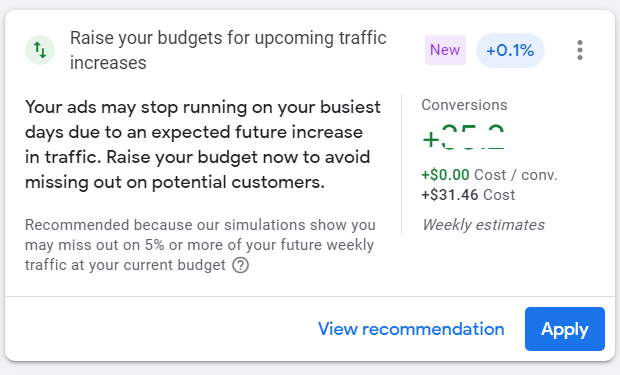
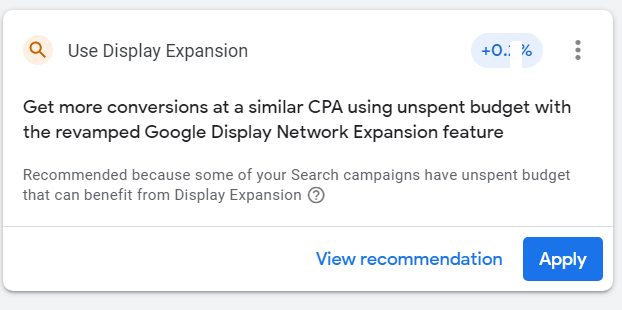
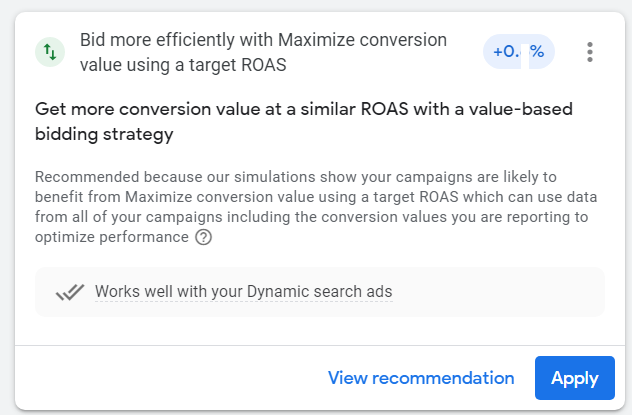
For example, the way things are progressing with Google Ads, it is becoming pretty evident that Google does not want you to create/optimize your ad copies, select your keywords or even manage your ad spending.
It is well known that Google Ads recommendations are usually about increasing ad spending.
But lately, Google Ads is pushing advertisers to hand them more control over their ads and ad spending.
Following are some of the top recommendations from Google Ads…
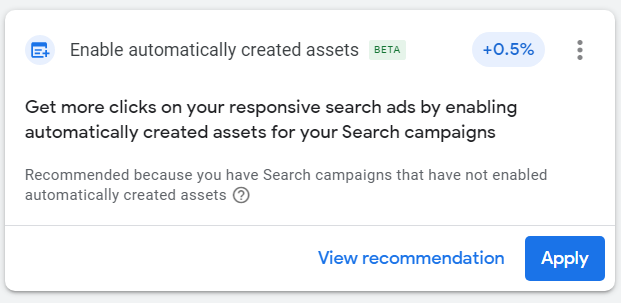
Here is how Google defines automatically created assets:
“Automatically created assets add headlines, descriptions, and other assets based on content from your landing page, domain, and ads.
Automatically created assets will be used in combination with assets you provide and can lead to an increase in performance for your campaigns while saving you time.”
To make matter worse (at the time of writing this article), Google is testing automatically applied recommendations by offering advertisers $100 in Google Ads credit:
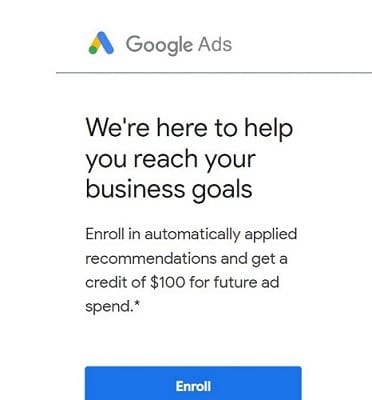
If this test works out well for Google, it will have huge implications for the online marketing industry.
Imagine all of the recommendations above are automatically applied by Google to your ad account without your knowledge or consent.
Following are examples of other functionalities Google Ads has removed or made considerably worse as they take away progressively more control from advertisers:
#1 Exact match keywords are no longer exact match.
#2 Broad match keywords have become too broad (match types will also be gone soon).
#3 Google Ads are heavily promoting broad match campaigns that utilize machine learning to find audiences likely to convert.
#4 You can no longer target videos via keywords.
#5 Google removed expanded text ads and replaced them with responsive search ads that don’t perform as well.
Sooner or later, Google may take away all the ad controls from marketers.
Other advertising platforms like ‘Facebook’ are also moving toward taking away more control from marketers.
Now take a close look at your day-to-day work and see how many repetitive tasks you carry out each day which does not require much thinking but just following a checklist or SOP (Standard Operating Procedure).
If another person gets hold of your checklists/SOPs, can they replace you easily?
If the answer is yes, you will be replaced by a plug-in or software in the near future.
The skills you possess right now will most likely still be required in the near future. That’s the good news.
However, there is no guarantee that you, as a human being, would be required for those skills.
For example, SEO may still be required in the near future, but a plug-in or software could replace SEO professionals.
Any career that requires a lot of interactions with other human beings would likely survive, like people who are into sales, hospitality, care, counselling, education, training etc.
Digital analytics is one of the future proof careers, most likely for another 10-15 years.
Now you may be thinking about machine learning. Can’t it replace digital analysts?
Yes, it can, but the probability is very low.
Because machines are not good at understanding the context in which data should be analyzed and interpreted.
Even ChatGPT (an AI-enabled chatbot) admits that it can not interpret analytics data like humans.
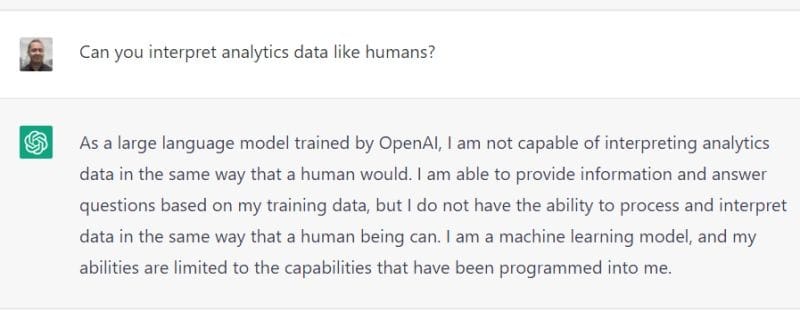
The factors required to understand the context (like an organization’s collective know-how and interaction with other human beings…) are often outside the digital realm.
You can not create a checklist or an SOP to find and understand the context in which data should be analyzed and interpreted.
If this were the case, every human being who followed some checklist/SOP would be able to interpret the same data/chart correctly, and there would be no misinterpretation of data.
Different people can analyze and interpret the same data differently, even if you give them a checklist. It all depends upon the context in which the data is interpreted.
If you understand the context better, your data interpretation will be more accurate.
At some point, most of the marketing, optimization and experimentation tasks you see today being manually performed will be fully automated.
But human beings would likely still be required for the overall supervision and strategic decisions.
Now the question is whether you would be one of those few lucky human beings the machines would still require.
How to Make Digital Analytics AI Proof?
People often ask if Digital Analytics is an AI-proof skill. It doesn’t need to be. Digital analytics and AI are both rooted in data science, the very foundation of AI itself.
Both digital analytics and machine learning are subsets of data science, and data science is what creates AI in the first place.
It’s like asking, “Can I be dad-proof?”
As a digital analyst, your dad is data science, and your siblings are Python, statistics, and machine learning. You are all part of the same data-science family.
Instead of worrying about whether AI will replace your role, focus on how data science fundamentals empower you to work with AI tools and frameworks. In other words, get familiar with your dad and siblings.
I asked ChatGPT to help me think about our family dynamics:
You don’t need to be afraid of AI replacing you.
As long as you understand the data pipeline, from collection (GA4, GTM) to analysis (BigQuery, SQL) to automation (machine learning), your skills will remain relevant and in demand for the foreseeable future.
The tools, methods, and perhaps even the ethical considerations around digital analytics might evolve, but the core need to analyze and understand digital interactions remains.
What is the difference between Web Analytics and Google Analytics?
Web Analytics is the core skill. Google Analytics is just a tool used to implement ‘Web Analytics’. You can also implement ‘web analytics’ via other tools like ‘adobe analytics’, ‘matomo’ etc.
Using Google Analytics without a good understanding of ‘web analytics’ is like driving around in a car in a big city without understanding the traffic rules and road signs.
You will either end up somewhere other than your destination or get involved in an accident.
You learn data analysis and interpretation from web analytics, not Google Analytics.
The direction in which your analysis will move will determine the direction in which your marketing campaigns and, eventually, your company will move to get the highest possible return on investment.
You get that direction from ‘web analytics’ and not from ‘Google Analytics’.
You learn to set up KPIs, strategies and measurement frameworks for your business from ‘web analytics’ and not from ‘Google Analytics’.
So if you are taking a course only on “Google Analytics’, you are learning to use one of the tools of ‘web analytics’. You are not learning the ‘web analytics’ itself.
Since anyone can learn to use Google Analytics in a couple of weeks, you do not get any competitive advantage in the marketplace just by knowing GA.
You need to know much more than GA to work as a Web Analyst.
What is the difference between Web Analytics and Conversion Optimization?
Web Analytics is the core discipline. Conversion optimization is one of the applications of web analytics.
Web Analytics is like grammar and words, and conversion optimization is the language based on that grammar. So if you try to speak conversion optimization without knowing the grammar, you will speak it all wrong.
One tip that will skyrocket your Web Analytics Career.
I don’t use the word ‘skyrocket’ lightly, and yes this is not just a clickbait title. Though it is a clickbait title. I’ll just admit it. The marketer inside me could not resist the temptation of using clickbait.
In the next few minutes, I will prove to you how my one tip will completely change the way you do analysis for good.
Not only will you be doing more meaningful analysis going forward but you will also save countless working hours which can be used to do other important tasks like reading my blog : )
So what is my one tip?
Ask questions.
That’s it. These two words are the holy grail of digital analytics which nobody wants to tell you. It is so important. It is so precious.
This is my “one thing” that drives my analysis these days. I spend less time in finding answers on my own and more time asking questions. I help the clients find their own answers.
I ask questions, lots of questions, tons of questions.
“Every day is a question day.
Every question drives a follow up question.”
I ask questions to improve my understanding of the client’s business. I ask questions to understand his perspective. I ask questions to quickly deploy solutions. I ask questions to truly embrace Agile Analytics methodologies.
“The art and science of asking questions is the source of all knowledge.” – Thomas Berger
It took me quite long to consciously realize the fact that business questions can never be answered as accurately by anyone other than the people who actually run the business.
That no amount of scanning GA reports, excel hacks, JavaScript and APIs wrestling, A/B testing can replace the understanding, my client has developed over the years by successfully running a profitable business.
That GA reports are the last thing I should be looking at and not the first.
That knowledge of internet marketing and industry best practices doesn’t automatically make me an expert in any industry I choose to work in.
That I must acknowledge my client’s expertise and come to terms with the fact that my knowledge of his business can not supersede his understanding of his own business.
That I am here to guide and not to dictate to him how to run his business.
Once I changed my mindset, I experienced a drastic improvement in my analysis and work life. I no longer need to live in fear of ‘I need to be right’ or recommend something which ‘has’ to work.
I no longer need to spend countless hours going through the GA reports in the hope of finding something which may need fixing because I know exactly what needs to be fixed.
I no longer need to chase KPIs because I solve for customers and not for KPIs.
I no longer need to rely just on my own understanding of the client’s business to produce recommendations.
I no longer need to assume that the problem I am fixing is the one that matters the most to the target audience of my client.
How am I able to do all that? …………I ask questions, lots of questions, tons of questions.
In Agile Analytics, success doesn’t come from the level of insight you get or the volume of tracking solutions you implement, but from your ability to ask questions which quickly solve your customer problems either wholly or in parts.
You need to keep asking questions until you reach the underlying source of the problem.
Here is one real-life example:
Client: “We need to increase our average order value. We want maximum number of people to buy both workshops and our mobile app.”
Me: “How much you charge for workshop and mobile app?”
Client: “We charge £140 for workshop and £5 for mobile app.”
Me: Do you think it is a good idea, if you charge £145 for your workshop and provide mobile app for free to people who attend workshop. In this way people who attend workshops get something for free (a small incentive to buy) and you are always guaranteed to sell mobile apps.
Client: “Yes I think so. Thanks.”
This is a real-life example. I have not made it up.
There are a few things worth pointing out here:
#1 At no point I used Google Analytics to fix the problem of increasing average order value.
I could have used it, but there was simply no need for it in this particular situation. So do I always need to use Google Analytics to fix customers’ problems? The answer is NO.
If I hadn’t asked this question, I would have dived into GA reports in the hope of finding some answers and would probably be running an A/B test in the hope of increasing the average order value.
#2 At no point I dictated to my client to do this or that. Even my solutions sound like a question. There is a good reason for that. I am not sure what I am proposing will work because my understanding of the client’s business is limited.
I am not sure whether the market is willing to pay £145 for my client’s workshop.
So if my recommendation doesn’t work later, it won’t undermine my professional ability. It won’t make me look stupid.
#3 I subtly acknowledge the expertise of my client by asking for his approval on my proposal by saying: “Do you think it is a good idea?”
What marketers usually do when it comes to making recommendations, is say something like this “You need to do this”, or “You need to do that”.
“That’s how it works”, “It is industry best practice“, “because John Mueller said so”, “because Google said so”…….
When you say something like this to your client, you immediately take all the burden of proof.
Now you have to be right or you risk undermining your professional abilities and skills.
You can never be so sure about someone else business.
You don’t have hands-on experience in dealing with your client’s business operations. You have no idea what is going on out there in their company.
So you should not be 100% sure that what you are recommending will work.
Another real-life example,
Client: “I want to increase signups on my website.”
Me: After scanning the website, “Why you are asking for credit card details for free trial?”
Client: “That’s the way it has been set up”.
Me: “What was your signup rate like when you removed credit card details requirement for free trial?”
Client: “We have never tested that? Let us test that”
Result: The client experienced a major lift in signups after removing the requirement for entering credit card details.
There are a few things worth pointing out here:
#1 Again at no point I used Google Analytics before making the recommendation. I could have used it, but there was simply no need for it in this particular situation.
#2 At no point I dictated to my client to do this or that in the name of industry best practices. I subtly made the recommendation, to test by asking a question.
#3 I made sure that I didn’t sound like my recommendation of conducting a test has to work. It has to increase signups. Tests succeed, and they can also fail to produce results. That’s why they are known as “tests”.
You have now realized it by now that asking questions is an ‘art’.
Asking questions is not simple.
Many people don’t ask questions or ask enough questions because of the fear of looking stupid in front of others and/or they just don’t want to bother their client/boss every day.
“Man, this guy ask lot of questions. Does he even know what he is doing. Doesn’t sound like an expert to me.”
I used to think like that. Asking too many questions will undermine my professional abilities and make me look clueless.
I need to sound like an expert and command like an expert: “Do this or face the consequences”.
But that never really worked. I spend countless hours finding a problem that someone somewhere in my client’s company was already aware of.
What is the point of spending hours and days digging out information/insight which is already known to someone in your organization?
Your time would be best spend finding answers to questions which no one can answer.
Another interesting thing happened.
By asking questions, a lot of questions, tons of questions, I was unknowingly showing a genuine interest in my client’s business.
My clients were not getting annoyed as I thought.
They, in fact, become super excited to learn more about their own business by answering my questions. “oh, we never thought of that”, and “that sounds like a good suggestion”…
And I also learned a lot by asking questions in this process.
Secondly, every time I asked questions, I was subtly acknowledging my client’s expertise which helped me in getting my recommendations implemented.
Getting your recommendations implemented is the most important thing for a consultant.
Recommendations are a dime a dozen otherwise.
Here is how you can pull off my ‘ask questions’ strategy:
#1 Overcome your fear of asking questions.
I won’t lie to you. It is not easy. But you need to find a way to overcome this fear in order to get extraordinary results from your analysis and work life.
#2 No question is a stupid question.
There is no such thing as a stupid question.
Ask a question even if your question has already been answered, but you either weren’t paying attention or you don’t quite get it.
#3 Ask questions whose answers seem pretty obvious.
Ask even those questions that can be answered just by doing little research.
For example, I often ask my clients, “where do the majority of your customers live?”
I can easily get an answer to this question by looking at the ‘location’ report in Google Analytics.
But I still ask such questions for three main reasons:
#1 I am unsure whether the Google Analytics report I am looking at is giving me accurate insight. Maybe there is some data collection or data sampling issue which is skewing the analytics data.
#2 I want to check the understanding of my client about his business. Often such questions disclose valuable insight. Entrepreneurs who are passionate about their business, usually know a lot about their target market. They often know much more than your GA reports can ever spill out.
#3 I want to match the understanding of my client with the insight I am getting from Google Analytics. In this way, I can quickly detect anomalies in data.
For example,
If my client is telling me that their top-selling product is ‘XYZ’ and my GA ecommerce report is telling me that the top-selling product is ‘PQR’ then either my client is wrong or my GA data.
In any case, I now need to do some detective work.
#4 Don’t try to figure out everything on your own.
Not only is it a futile attempt but also not the best use of your precious time.
Your time is best spent finding answers to the questions; no one has been able to answer so far.
But for that, you need to know first which questions have already been answered.
#5 Acknowledge the expertise of your client by asking questions.
We often take our clients for granted when it comes to deciding what is right and what is wrong for their business.
They may not know the importance of title tags in search engine ranking. They may not be aware of landing page design best practices.
But they do know how to run a business. Running an online store is not an easy job.
It may look easy, but it is not. Try to sell something on eBay or Amazon, and you will get my point.
Your client is more knowledgeable than you think, and you need to acknowledge his expertise, take his input, and take advantage of his industry experience in order to fuel your analysis and rapidly deploy solutions.
There is always someone somewhere standing, right under your nose waiting for you to ask a question and you are looking for the answers in analytics reports. Not good.
#6 Ask questions every day.
You are rewarding your client/boss poorly if you are not asking questions every single day.
Asking questions is a sign of intelligence. It is a sign of understanding.
It is a sign of progress you are making in your analysis. If you don’t have any questions to ask then we have got a bigger problem here.
#7 Give answers that sound like questions.
You can never be 100% sure that what you recommend will work.
Avoid communicating this message to your client by talking in absolutes or citing industry best practices or sounding dead sure.
You don’t need to sound like an expert or command like an expert.
You can always subtly make a recommendation by asking a question. You just need to act as a guide and help your client find answers to his problems.
#8 Your client already knows the answer; he is just unaware of it.
If you keep asking questions until you reach the underlying source of the problem, your client will at some point answer his own problem.
Trust me on that. It works wonderfully.
If you are not getting an answer to a problem, you are not asking enough questions.
#9 Raise objections by asking questions.
If you think something is not right, whether it is pricing, design element, landing page, campaign budget or targeting, then ask ‘why’.
Ask why it is the way it is.
You will often get useful insight from the client about why things are the way they are.
Avoid jumping to conclusions and start making recommendations or start doing testing just because the landing page is not following industry best practices.
#10 Ask follow-up questions.
The only way to truly benefit from my ‘ask questions’ strategy is by asking follow-up questions.
Every question you ask can/should help you in asking more questions so that you can quickly reach the underlying source of the problem.
#11 Make asking questions your daily habit.
You need to make asking questions your daily habit. Otherwise, you will most likely forget my tip in a few weeks.
Plan out in advance what questions you will ask tomorrow.
Write it down somewhere on your work desk that you have to ask questions every day.
Use the following quote as a reminder and as an inspiration:
“The art and science of asking questions is the source of all knowledge.”
FAQ: Should I charge fixed fees per project, or should you charge hourly?
Let me tell you a little more about how I charge and why I charge that way, especially for technical projects.
I charge for my expertise and not for my time.
I charge a fixed fee from the client, which is for producing the result they want, and give them an approximate timeframe of the delivery of results (usually measured in weeks) without mentioning the number of hours it will take to complete the project.
It is not that I don’t care about the time involved, but most of the time, I already know the number of hours it may take to complete a particular task.
I have been in this business for over a decade and have worked with countless clients on countless projects.
I never charged any client by the hour from the very beginning of my career to this date. Billing by the hour is just as nonsensical to me as billing by pixel, line of code, or colour.
They are arbitrary units of measure that have nothing whatsoever to do with the outcome of the work. No client cares how many hours you worked. All they care about is the end result.
Besides, a client cannot know whether you worked that many hours and the task took that many hours.
Some people are able to complete the task within an hour, while others may take days or weeks.
And I have seen first-hand how some developers are able to complete a particular task in a few minutes while others take weeks to complete the same task.
It all depends upon their level of experience and expertise.
It is in your best interest to the bill as many hours as possible. And it is in the client’s best interest not for that to happen.
So you see, there is a conflict of interest here which could result in a dispute regarding the number of hours being billed.
I try to avoid all such headaches by not charging by the hour. It also limits my earning potential if I charge by the hour.
For example, if I charge by the hour, I cannot justify charging hundreds or thousands of dollars for a 10-minute work.
If I do not charge by the hour, I can easily justify charging hundreds or thousands of dollars for a 10-minute work because then I am charging for my expertise and not for my time.
If I do not charge by the hour, I can take on more projects than I can realistically handle all at once.
I get the time freedom because I can give the timeframe of delivering results in weeks, even if it is just a few hours/days of work (if done in one sitting), and the clients do not care how long it takes because they are not being billed every hour.
FAQ: Should I work for a giant corporation, a publicly traded company? Will it help you with your career?
The only benefits that you get working for such a business are that a) you are paid well and b) you can boast about your job. ‘’I work for blah blah”.
Other than that, you are just a little cog in a giant wheel. You can not bypass your immediate boss.
The decision-makers do not hear your voice no matter how loud you shout.
You are pushed around by internal politics, bureaucracy and other operational inefficiencies. Nobody outside your department knows or cares that you exist.
Working for such a corporate giant is mostly a ‘curse’. You end up working with some ‘entity’ that moves as fast as a sloth.
Most of your time ends up just getting approvals from different departments, and the remaining time is gone to attending pointless meetings on Webex.
By the time they implement your recommendation, it is no longer relevant. So you have no results to show, regardless of how hard you work.
Even if you cannot show any results, you still get to keep your job, which may sound good on the surface but eventually stops you from growing.
That’s why such companies are full of incompetent people who have worked there for 10, 15, or 20 years and have no desire to leave until their retirement.
You would be better off working for a small or medium-sized company.
Marketing and Web Analytics complement each other.
There is an old saying, “you can’t manage what you can’t measure”.
For example, you can’t manage marketing campaigns if you can’t measure their performance. But what I have found after my stint in the world of digital analytics is that.
“you can not effectively measure what you can’t manage”.
For example, if you are measuring the performance of an SEO campaign, you must know how SEO works in the first place.
You must know about the latest and greatest in the field of Search.
You must know all about: Google Panda, Penguin, Link Building, semantic markups, best practices etc.
If you don’t, then this lack of knowledge reflects in your recommendations which are the most important part of any analysis.
Without solid recommendations, any analysis has no commercial value as it can’t move the corporate needle.
Needless to say, marketing and analytics complement each other.
You can’t be good in either without a great understanding of both disciplines.
I also believe that you need a great understanding of statistics in order to be good at analytics.
I was suggested to learn the basics of accounting once in order to hone my analytics skills. But I think this skill is more relevant to people who are into business intelligence.
Regarding preparation for the GAIQ test, the best place to learn is through this article: GAIQ (Google Analytics Individual Qualification) Exam Preparation 2022 (includes GA4)
The second best place is Google Analytics itself. Without practical knowledge, you will have a hard time passing this test.
Books on web analytics.
Following is the list of analytics books I recommend:
1. Microsoft Excel Data Analysis and Business Modeling – This is my favourite book on data science. This is a great book to learn statistics which really matter for digital analytics professionals. I highly recommend it to any existing/aspiring analyst.
2. Maths and Stats for Web Analytics and Conversion Optimization – I am biased here, as I am the author of this book. But this is the only book ever published which explains maths and stats in the context of Web Analytics and Conversion Optimization.
3. Attribution Modelling in Google Analytics and Beyond – I am biased here, as I am the author of this book. But this is the only book ever published on Attribution Modelling.
4. Attribution Modelling in Google Ads and Facebook – I am biased here, as I am the author of this book. But this is the only book ever published on Google Ads and Facebook Attribution Modelling.

Related Articles.
- Best Types of Charts in Excel for Data Analysis, Presentation and Reporting.
- KPI Meaning, Examples, Calculation & Dashboard Tutorial.
- Understanding A/B Testing Statistics to get REAL Lift in Conversions.
- Web Analytics Career Path – How to Become a Web Analyst.
- How to calculate maximum CPA and profitable ROAS.
- Bare Minimum Statistics for Web Analytics.
- Predictive Analytics & Marketing – The Next Stage of Business Optimization.