

To detect the GTM Server Side tagging on a website, follow the steps below:
Step-1: Right-click on a web page in the Google Chrome web browser and then select ‘Inspect‘.
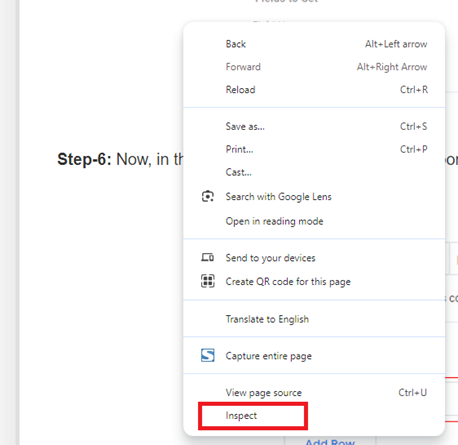
Step-2: Click on the ‘Network‘ tab, hit CTRL+R and search for ‘/collect‘.
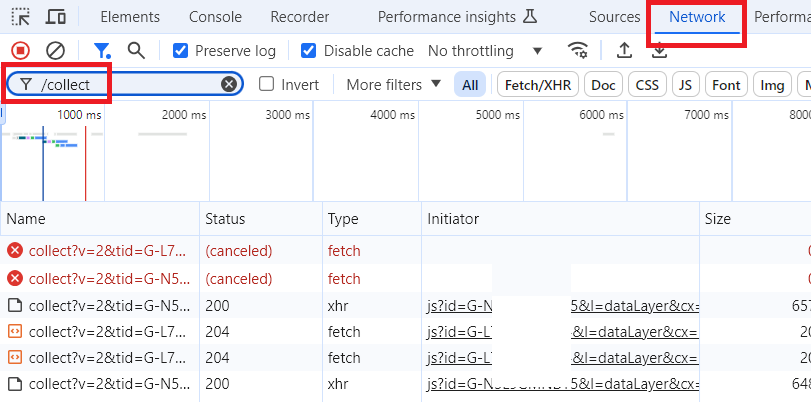
Step-3: Click on the search results that start with ‘/collect?V=2‘ one by one until you find the request URL (under the ‘Headers‘ section) that does not start with something like
‘https://region1.google-analytics.com/g/collect?‘
but start with a subdomain like:
‘https://sgtm.yourtargetwebsite.com/g/collect?v=2‘
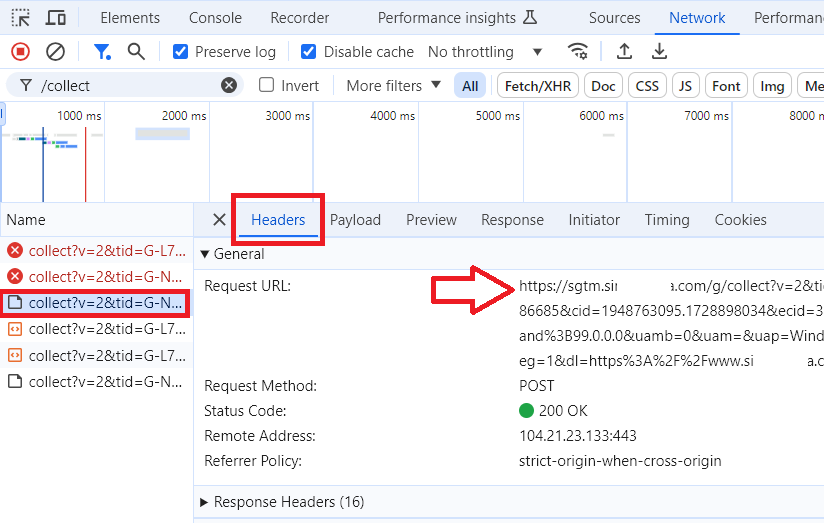
That’s a strong indication that the website is using Server Side tagging.
Step-4: Click on the “Application” tab in the Developer Tools panel, expand the ‘Cookies‘ section, click on the website’s domain you are investigating and locate the FPID cookie:
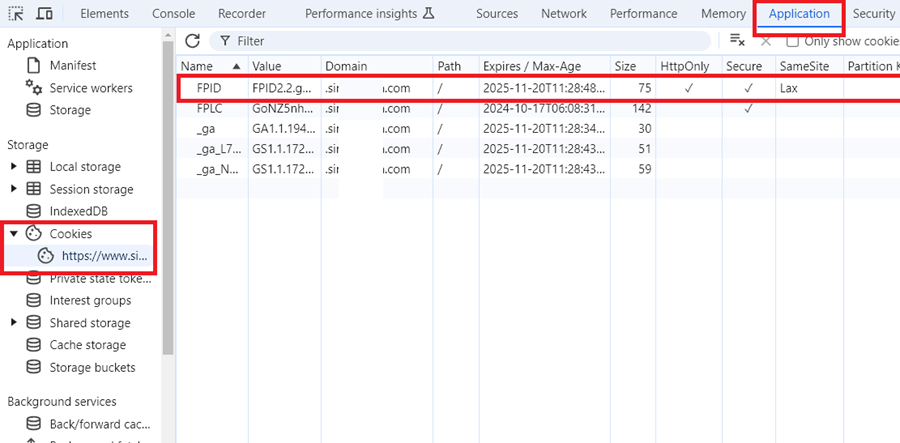
Step-5: Once you find the FPID cookie, look at the “HttpOnly” column. It should display a checkmark (✓) if it’s set to true.
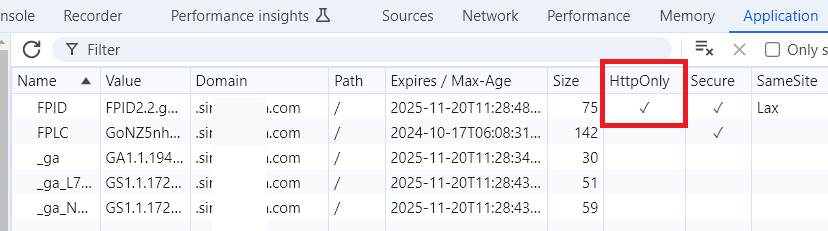
If you find an FPID cookie with the HttpOnly flag set (checkmark in the HttpOnly column), it’s a strong indication that the website is using Server Side tagging.
Using Claude to detect GTM Server Side Tagging even when using a subfolder and a custom loader.
The detection process can be reduced to a simple prompt:
"Here is the source code of [website]. Identify any GTM or analytics implementations, including server-side proxied versions. Explain what you found and how you identified it."
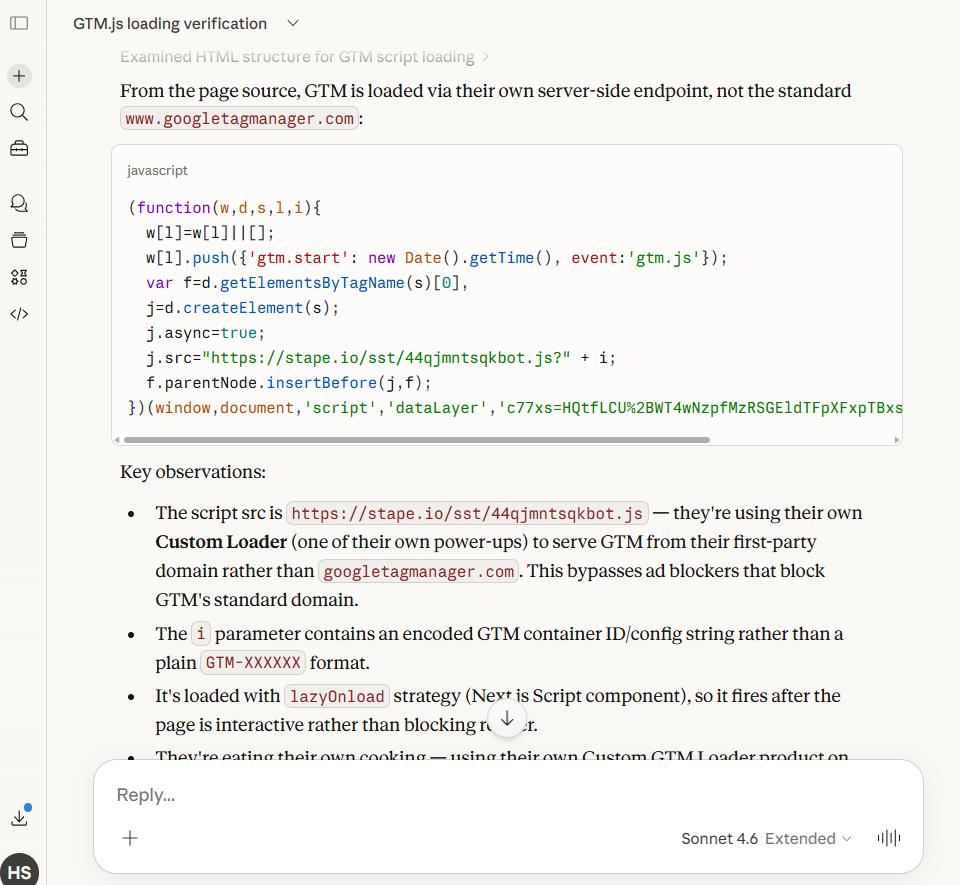
This works on any public website because every public website serves its HTML openly.
How Claude can detect GTM Server-Side Tagging even when using a subfolder and a custom loader.
Three reasons, all visible in plain HTML:
1. The code structure is unmistakable.
The GTM loader is a very specific JavaScript pattern, an IIFE that initialises a dataLayer array, pushes a gtm.start timestamp, creates an async script element, and injects it into the DOM.
That pattern is identical whether GTM loads from Google or from a proxied endpoint. Changing the src URL does not change the structure.
Claude recognises the fingerprint the same way a human developer would, by reading what the code does, not where it points.
2. The src domain mismatch is the tell.
Once the code is identified as GTM boilerplate, the src value becomes the key signal. Standard GTM always points to googletagmanager.com.
Any deviation (a first-party domain, a subfolder path like /sst/, a subdomain like sgtm.simoahava.com) immediately flags a proxied setup.
The obfuscated filename and encrypted container ID actually make it more obvious, not less, because standard GTM never does either of those things.
3. Context on the same page confirms it.
The page source does not just contain the loader snippet. It contains navigation, footer links, meta tags, and product references, all of which Claude reads in the same pass.
In Stape's case, their own homepage lists Custom Loader as a product. A company selling GTM custom loading infrastructure, whose own GTM loads from a non-standard endpoint, is self-evidently using its own product. Claude joins those dots without any additional prompting.
The short version: ad blockers check one thing (the URL). Claude checks everything (the URL, the code structure, the surrounding context, and how the three relate). That is why swapping the domain defeats a blocklist but not an AI.
The custom loader model will become obsolete as browsers and ad blockers adopt AI.
Because the entire strategy rests on one assumption: ad blockers are dumb. They match URLs against a list. Swap the URL, bypass the blocker. Simple.
AI breaks that assumption completely.
An AI-powered ad blocker doesn't check lists; it watches what code does as it executes.
And the GTM custom loader always does the same things regardless of domain: initialises dataLayer, pushes a gtm.start event, injects an async script, fires tracking events, writes cookies. That behaviour is the fingerprint. You can't swap it out the way you swap a domain.
This is already happening. Safari's ITP uses machine learning. Firefox's Enhanced Tracking Protection uses behavioural heuristics. The shift from list-matching to behaviour analysis is underway now, not on a future roadmap.
You can change where a script loads from, but you cannot change what it does. And what it does is always tracking.
Regardless, using a Subfolder for GTM Server-Side Tagging (Same-Origin Tracking) remains the best practice for now.

Other Articles on GA4.
- Tracking New, Qualified and Converted Leads in GA4.
- Free GA4 training and tutorial with Certification.
- Understanding GA4 Ecommerce Reports (Monetization Reports).
- GA4 Ecommerce Tracking via GTM: Step-by-Step Setup Guide.
- How to see UTM parameters in GA4 (Google Analytics 4).
- GA4 UTM parameters not working? Here is how to fix it.
- How To Use UTM parameters in GA4 (Campaign Tracking).
- How to track AI traffic in GA4.
- Understanding Google Analytics 4 cookies – _ga cookie.
- GA4 (Google Analytics 4) Measurement Protocol Tutorial.
- GA4 Unassigned Traffic: Causes and How to Fix it Fast.
- GA4 Regex (Regular Expressions) Tutorial.
- GA4 Direct Traffic Spike: Common Causes and How to Fix Them.
- gtag.js – Google Tag in Google Analytics 4 and beyond.
- GA4 Scopes – User, Session, Event & Item scopes.
- GA4 Conversion Tracking (Key Events) Tutorial.
- GA4 (not set) - Guide to fixing (not set) issue.
- GA4 Certification Exam: Questions, Answers for Skillshop (GAIQ).
- GA4 User Properties (User Scoped Custom Dimensions) – Tutorial.
- Tracking Organic Traffic in GA4 - Complete Guide.
- Tracking Events in GA4 (Google Analytics 4).
- GTM Server Side Tagging - Setup Guide.
- Using Subfolder for GTM Server Side Tagging (Same Origin Tracking).
- Understanding Event Parameters in Google Analytics 4 (GA4).
- How to Uninstall GTM Server Side Tagging.
- How to remove (other) in GA4 reports and avoid Cardinality.
- Creating GA4 Assistant via Claude for your customers.
- How To Set Up User ID in GA4 - Cross Device Tracking.
- GA4 Mobile App Tracking - Firebase Integration.
- How to use DebugView report in Google Analytics 4 (GA4).
- How to Track Phone Calls in Google Analytics 4.
- How to detect GTM Server Side Tagging.