

Nobody wants to be average, and yet we all love averages.
That is why our analytics reports are all jam-packed with averages:
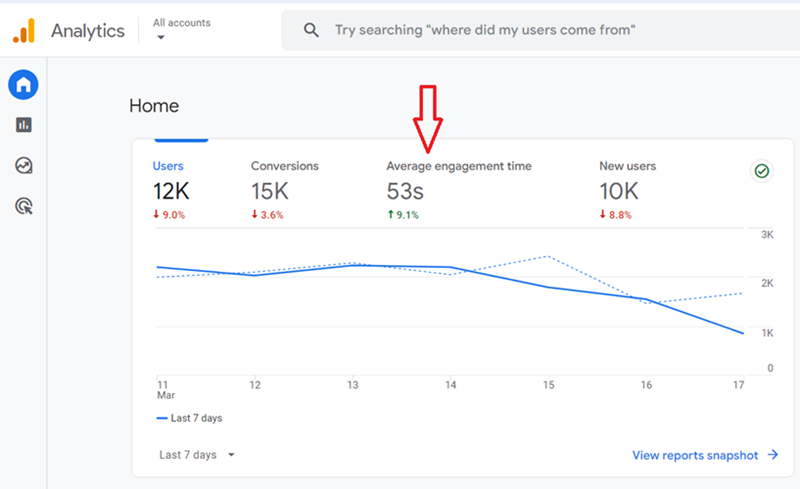
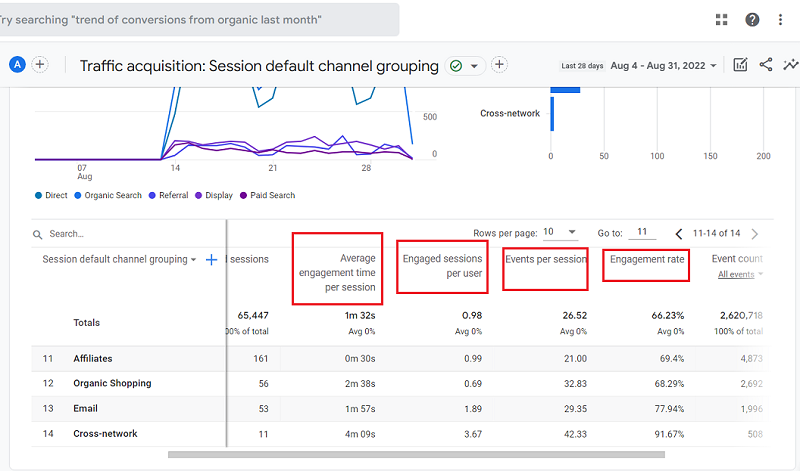
In order to analyze and report above average, we would first need to stop being obsessed about all the metrics which are ‘average’ and take the insight they provide with a huge grain of salt.
Any set of measurements has two important properties:
- The central value
- The spread about that value.
We calculate the central value with the aim of determining a typical value in a data set.
A data set is a set of observed values for a particular variable (say avg. time on site).
We measure the spread with the aim to determine how similar or varied the set of observed values are in a data set.
If the set of observed values is similar, then the average (or mean) can be a good representative of all the values in the data set.
If the set of observed values varies by a large degree, then the average (or mean) is not a good representative of all the values in the data set.
We calculate the central value through Mean, Median and Mode.
We measure the spread of data values through Range, Interquartile Range (IQR), Variance and Standard Deviation.
Mean
The mean (also known as arithmetic mean or population mean) is simply an average of the numbers. It is denoted by the Greek letter µ (“mu”).
It is calculated as
Mean = sum of numbers /count of numbers
For example, let us suppose a website has got five web pages with the following engagement rate for each page:
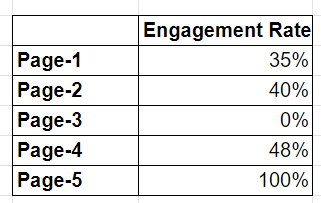
Now engagement rate of the website = (35+40+0+48+100)/5 = 223/5 = 44.6%
But is 44.6% a true engagement rate?
No.
Look at the distribution of engagement rate across all the web pages.
Two web pages, page 3 and page 5 have extreme values of 0% and 100%.
We call such values ‘outliers’ in statistics.
Outliers have the sadistic ability to skew ‘averages’.
Another example:
Let us suppose a website has got five web pages with the following average engagement time for each page:
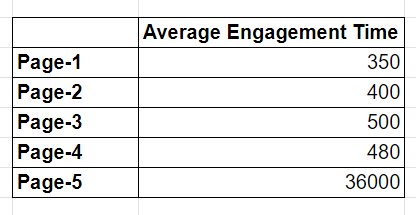
Now average engagement time on the website = (350+400+500+480+36000)/5 = 37730/5 = 7546 = 2 hrs 6 minutes
But is ‘2hrs 6 minutes’ a true average engagement time on the website?
No.
Look at the distribution of average time across all the web pages.
The web page ‘page 5’ has extreme values of 36000.
Again, the outlier ‘36000’ is skewing our average metric.
This is the fundamental problem with averages and the tragedy is that GA4 uses this metric throughout its reports.
You can’t really escape from ‘averages’.
As long you keep analyzing and reporting these average metrics, you will get average results.
So what is the solution then?
Calculate Median
Median is a middle number in a sorted list of numbers.
For example, let us suppose a website has got five web pages with the following engagement rate for each web page:
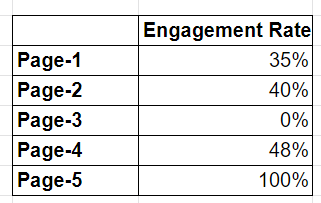
Let us first sort the list: 0%, 35%, 40%, 48%, 100%
If we calculate the median (instead of the mean) of this data set then it will be 40%.
Now is 40% a true representative of a typical engagement rate of each web page?
Yes.
This is because, unlike the mean, the median (or middle value) is not impacted by outliers (in our case: 0% and 100%).
Similarly,
Let us suppose a website has got five web pages with the following average engagement time for each page:
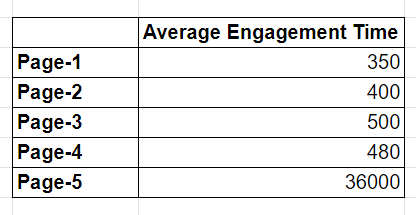
Let us first sort the list: 350, 400, 480, 500, 36000
Here the middle number is 480. So the median of the data set is 480.
Now is 480 seconds (or 8 minutes) a true representative of a typical engagement time on a web page?
Yes.
This is because, unlike the mean, the median (or middle value) is not impacted by outliers (in our case: 36000)
Note: You can always download Analytics data/report into excel and calculate the median of any data set (no matter how large) through MEDIAN excel function.
However, calculating the median of each and every data set all day long can be very time consuming and not practical for many.
So what is the solution?
The solution is that you first measure the spread of the data values in a data set and then decide whether or not you can trust the average value reported by your analytics tool, like Google Analytics.
There are two ways of measuring the spread:
1. You look at the distribution of values in a data set and find and eliminate outliers (or extreme values).
2. You calculate spread through IQR, variance or standard deviation.
Look at the distribution of values in a data set and find and eliminate outliers
I use this method majority of the time.
We measure the spread by calculating the ‘Range’, which is simply the difference between the maximum value and minimum value in a data set.
If the minimum value of average engagement time is something like 4 minutes and 30 seconds and the maximum value is something like 9 minutes and 30 seconds.
The Range is calculated as:
9 minutes 30 seconds – 4 minutes 30 seconds = 5 minutes
Let us suppose that the average engagement time of 9 minutes and 30 seconds is an outlier.
This outlier is skewing the ‘average engagement time’ because it has increased the value of the range.
If we discount this outlier, then the new maximum value would be something like 5 minutes 30 seconds.
So now the Range would be:
5 minutes 30 seconds – 4 minutes 30 seconds = 1 minute
A small range indicates that the central value (in our case, the average engagement time) is a better representative of the typical value in a data set.
So if we discount the outlier and then calculate the average engagement time, then we will get a better central value or typical value.
That’s why it is important that we look at the distribution of values, calculate the spread and identify and discount outliers before we choose to trust an average metric/value.
Granted, this is not the most accurate way to measure spread and determine the central value, but it is practical and works, esp. when you have to look at hundreds of reports day and night, and you don’t have time to calculate median or spread through IQR.
So instead of blindly relying on averages, you look at the distribution of data points.
Determine how narrow or widespread the distribution of values is in a data set by calculating the ‘Range’.
A very widespread distribution means you can’t rely on the average metric.
Another example: Average Rank
Not only do average metrics haunt Google Analytics reports; but you can also find them haunting Google Search Console reports:
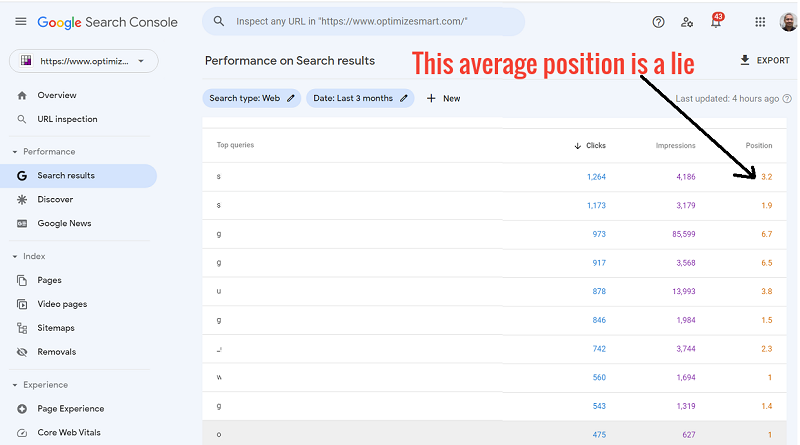
Here is the actual distribution of ranking positions:
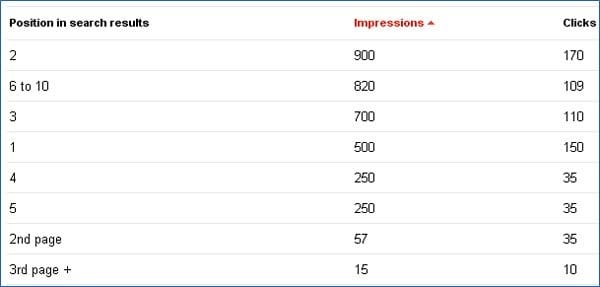
If you are ranking from position 2 to 3rd+ page (or better say position 2 to 30+ position) for a search query then you can not rely on an average value.
This is because the range of ranking positions is too large.
You don’t need to manually calculate the range here. It is quite evident from the distribution.
That’s why I urge you to look at the distribution.
If you don’t measure the spread of data values, you will never know whether or not your average value is a true representative of the typical value in a data set.
That’s why it is important that you calculate both the central value and the spread of the data values.
Note: You can calculate range in excel by using the formulas Max and Min.
For example: =MAX(F4:P4)-MIN(F4:P4). Here F4:P4 is a cell range.
Max() returns the largest value and Min() returns the lowest value in a set of values.
Calculating spread through IQR, Variance or Standard Deviation
The more difficult and time-consuming way of calculating spread is through IQR, variance or standard deviation.
If you have a very large data set with a lot of outliers, then you can’t depend upon the visual method I explained above to determine the spread of data values.
You then use IQR, variance or standard deviation to calculate the spread.
I recommend using IQR because it is a better measure of a spread than the range or standard deviation, as it is less likely to be distorted by outliers.
So you calculate the IQR and then decide whether you can rely on the average value reported by your analytics tools.
In order to understand IQR, you first need to understand quartiles.
A quartile is one of the four equal groups in which a data set can be divided. For example, consider the following ordered data set:
Here the point between the lowest 25% of the values is called the 25th Percentile or the lower Quartile.
The lower quartile is denoted by Q1.
The point between 50% of the values is called the 50th Percentile or the second Quartile.
This second quartile is actually the median. So median is also denoted by Q2.
The point between the lowest 75% of the values is called the 75th Percentile or the Upper Quartile.
The upper quartile is denoted by Q3.
The difference between the Upper quartile and lower quartile is called the Interquartile Range.
So, IQR = Q3-Q1
In Excel 2013 and beyond, there is a function called QUARTILE through which you can calculate Q1, Q3 and eventually IQR.
Syntax: =QUARTILE (array, quart)
Here ‘array’ is the range of cells that contain the data set.
‘Quart’ is the parameter that is used to specify which quartile to return.
It can have three values: First Quartile, Median Value and Third Quartile, as shown below:
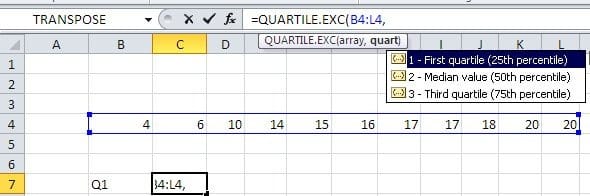
Through the QUARTILE function, you can calculate the first and third quartiles.
Once you have done this, then find IQR using the formula Q3-Q1:
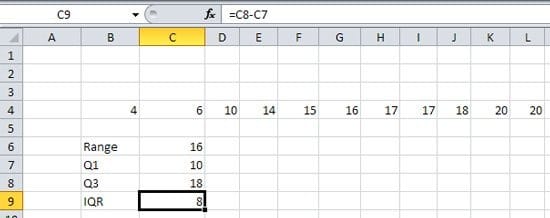
The data values that deviate from the middle value by more than twice the IQR are called outliers.
The data values that deviate from the middle value by more than 3.5 times the IQR are called ‘far outliers’.
In order to get a better understanding of how IQR works, you must know how it is calculated manually.
The following video explains calculating IQR manually.
Related Post: Common Google Analytics Mistakes that kill your Analysis, Reporting and Conversions
Segmentation – Powerful Method to fight ‘AVERAGES’
Another powerful method to reduce the negative impact of ‘average’ metrics on your analysis and business decision is ‘Data Segmentation’.
Segment like Hell.
The more you will segment the data, the smaller will be the data set, and the data values will be more close to the mean or average value.
In layman’s language, the more you will segment the data; the more accurate your average metrics will be.
Because of this reason, you will get a better insight if you analyze the Goal conversion rate of organic search for each of your goals in your target market (say New York) than the conversion rate of the organic search for all of the locations from which your site gets traffic.
Like it or not but you learned a lot of statistics in this post to fight averages.
In order to become above average in marketing or analytics, you need to learn even more statistics.
“Analyzing data without a basic understanding of statistics will always almost result in erroneous conclusions. “ – That’s my theory
I have proved this theory time and again in my posts:
- Is your conversion Rate Statistically Significant?
- Here is Why Conversion Volume Optimization is better than CRO
- Beginners Guide to Maths and Stats behind Web Analytics
- Predictive Analytics & Marketing – The Next Stage of Business Optimization
I can’t stress enough the importance of statistics and its supersets econometrics and data science in solving real-life problems.
Let me give you one good example.
According to the law of diminishing marginal utility, the first unit of consumption of a good/service produces more utility than the second and subsequent units.
This means the very first article that you will read on a topic, say ‘Google authorship’, will produce more benefits than the second and subsequent articles on the same topic.
So more articles you will read on ‘Google Authorship’, the less you will benefit from it.
Then soon, you will reach the point of diminishing returns and once you crossed this point, your efficiency will start decreasing, and you will be less productive.
Needless to say, in our industry, every new shiny thing/topic (from Pinterest to Google Authorship) is tortured to death in the name of blogging and thought leadership, and we tend to read every new article on the same topic in the hope of gaining something new.
But at the same time, we forget how the law of diminishing marginal utility is making us less and less productive with each additional unit of consumption.
Reading more will give you less time to do more, and if you do less and read more then you will learn less.
So reading more doesn’t always mean you learn more. It generally means you learn less. That’s why I suggest reading less.
So here we go. I just applied the law of diminishing marginal utility in solving a real-life problem (increasing productivity) and saving you countless hours.

Related Articles.
- Best Types of Charts in Excel for Data Analysis, Presentation and Reporting.
- KPI Meaning, Examples, Calculation & Dashboard Tutorial.
- Understanding A/B Testing Statistics to get REAL Lift in Conversions.
- Web Analytics Career Path – How to Become a Web Analyst.
- How to calculate maximum CPA and profitable ROAS.
- Bare Minimum Statistics for Web Analytics.
- Predictive Analytics & Marketing – The Next Stage of Business Optimization.
- How to improve data reporting skills – FREE Training.
- Maths and Stats behind Web Analytics – Beginners Guide.
- Learn to Analyze & Report above Average.
- What Matters More? Conversion Volume or Conversion Rate – Case Study.
- Is Your Conversion Rate Statistically Significant?
- Why Conversion Volume Optimization is better than CRO.