

First things first.
Both ‘New’ and ‘Returning’ GA4 users need to be manually calculated in BigQuery.
They are not available as default fields in the GA4 BigQuery export schema.
Most users calculate new and returning GA4 users all wrong in BigQuery.
In fact, GA4 UI is also calculating and reporting it all wrong.
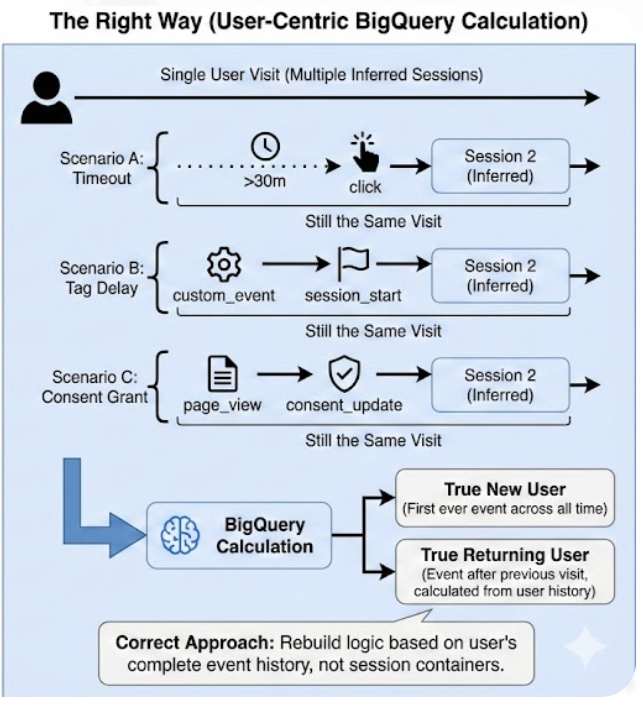
Any GA4 event can potentially start a new session if no active session exists, which means both ‘New’ and ‘Returning’ users metrics need to be manually calculated.
Whenever GA4 encounters an event without a previous session, it can consider it as a part of a new session.
That means if GA4 detects an event and no existing session is active (based on ‘ga_session_id’ or user session logic), it can create a new session regardless of the event type.

For example:
1) If the first event of a user’s visit is a custom event (like a click or custom engagement event) or an ecommerce event (like ‘purchase’), and neither ‘session_start’ nor ‘user_engagement’ has fired, GA4 can infer the start of a session from this first event. This behaviour is common with server-side tracking or Measurement Protocol implementations.
2) A session can start with a ‘page_view’ event due to a delayed or missing ‘session_start’ event. In this case, GA4 assumes the session started with the ‘page_view’.
3) A session can start without the ‘session_start’ event or the ‘user_engagement’ event if server-side events are sent via Measurement Protocol.
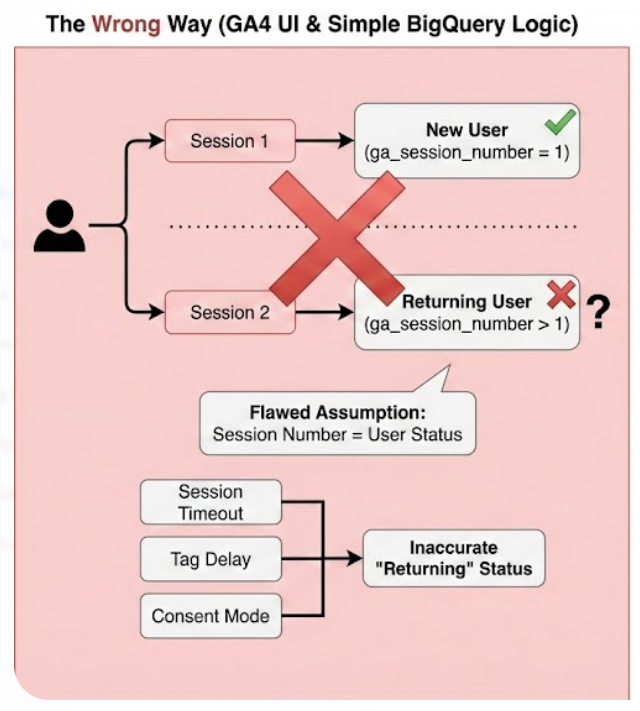
Since we have now established that any event in GA4 can start a new session, the ‘ga_session_number’ is no longer a reliable indicator of user status.
If any event is fired before ‘session_start’, it may not have the necessary context (like ‘ga_session_number’) when processed.
‘ga_session_number > 1’ doesn’t always mean “Returning User” because a user can have multiple sessions for the same visit.
For example:
User is inactive for 30+ min, new session starts (Session timeout) → Does ‘ga_session_number’ increase? Yes (Session 1 → 2) → Is it a “Returning User”? No, same user, same visit.
Slow website delays ‘session_start’ event (Tag-firing delay) → Does ‘ga_session_number’ increase? Yes (Session 1 → 2) → Is it a “Returning User”? No, same user, same visit.
User gives consent, new session starts (Consent Mode) → Does ‘ga_session_number’ increase? Yes (Session 1 → 2) → Is it a “Returning User”? No, same user, same visit.
As a result, the following definitions of new and returning users are not valid:
If the value of ‘ga_session_number’ event parameter is 1, classify the user as a ‘New User’.
If the value of ‘ga_session_number’ event parameter is greater than 1, classify the user as a ‘Returning User’.
GA4 UI leans heavily on 'session_start' and 'ga_session_number' for classification.
But as we established, any event can start a session if no active one exists, and not all sessions get a session_start.
So, the GA4 UI inherits the same flaw: it assumes sessions are neat containers when in fact they are inferred post-hoc.
To get it right, you must rebuild new vs returning logic in BigQuery from the ground up.
Recap:
BigQuery Often Shows More Returning Users Than The GA4 UI.
BigQuery can report a lot more returning users than the GA4 UI for the same time period.
This happens because of the following reasons:
- GA4 UI calculates returning users at the user level.
- BigQuery can overcount returning users if your SQL uses session-based logic.
- BigQuery and GA4 differ because BigQuery does not aggregate users automatically.
- BigQuery returning user counts are often inflated due to multiple active days.
- GA4 UI uses device + Google identity stitching.
- GA4 UI uses the full user lifetime; BigQuery sees only the exported history.
#1 GA4 UI calculates returning users at the user level.
GA4’s interface counts a user as returning only once during the reporting period, regardless of how many sessions they have.
Example: A user returns 5 times in October.
GA4 UI counts:
Returning Users = 1
Because GA4 focuses on unique users, not unique sessions or unique “returning moments.”
#2 BigQuery can overcount returning users if your SQL uses session-based logic.
BigQuery does not automatically track returning users at the session level, but most SQL patterns accidentally do because analysts often check returning status on each event or each session.
Example of unintentional session-level logic:
SELECT
  user_pseudo_id,
  event_date
FROM events
WHERE first_interaction_date < event_date
This counts every date on which the user appears as a returning user.
So if the user returned 5 times, BigQuery counts:
Returning Users = 5 (incorrect)
When what you wanted was:
Returning Users = 1 (correct)
This is why BigQuery often reports higher returning user counts than GA4.
#3 BigQuery and GA4 differ because BigQuery does not aggregate users automatically.
GA4 UI:
De-duplicates at the user level.
- Identifies only one first return.
- Uses Google’s internal identity graph.
BigQuery:
- Shows raw event-level data.
- Each row represents an event.
- Returning status must be derived manually.
If your SQL doesn't explicitly de-duplicate users, you will overcount.
#4 BigQuery returning user counts are often inflated due to multiple active days.
If a user comes back on multiple days:
GA4 UI → returning user = 1
BigQuery (when using naïve SQL) → counts returning users for each day of activity.
Thus:
BigQuery returning users > GA4 returning users.
#5 GA4 UI uses device + Google identity stitching.
This affects first-touch tracking.
BigQuery lacks:
- Cross-device user merging
- Google identity graph.
- Consent-mode adjustments.
This leads to:
- Different first-touch dates.
- Misclassified users.
- Extra returning users.
#6 GA4 UI uses the full user lifetime; BigQuery sees only the exported history.
If your BigQuery export starts mid-year:
- GA4 knows the user's first interaction was in January.
- BigQuery sees the first event as occurring in April.
Therefore:
- GA4 classifies the user as returning.
- BigQuery incorrectly classifies them as new the first time they appear.
- BigQuery later classifies all subsequent visits as returning, artificially inflating returning counts.
GA4 UI counts returning users at the user level, and it counts each user only once per reporting period. BigQuery counts returning users at the event or session level unless your SQL explicitly de-duplicates users.
That’s why BigQuery often shows more returning users.
The new logic to identify New and Returning users.
Instead of relying on ‘ga_session_number’, you can use the ‘user_pseudo_id’ or ‘user_id’ to identify new and returning users.
If the ‘user_pseudo_id’ or ‘user_id’ appears for the first time in the dataset, classify the user as "New User".
If the ‘user_pseudo_id’ or ‘user_id’ appears for the second time in the dataset, classify the user as "Returning User".
This new approach is considerably better than the old approach (relying on the values of 'ga_session_number' event parameter), but it has one big downside.
The ‘user_pseudo_id’ needs to be checked across the entire history of the dataset to identify the user's first appearance or second appearance.
So you will have to query the entire dataset (all dates) to classify users as "New" or "Returning".
This approach is not scalable for large datasets since every query will process all historical data, even if you are only interested in users from the last 7 or 30 days.
To avoid querying the entire dataset every time, you can use a rolling window of 30 or 60 days. This approach is less accurate but much faster and cheaper.
It works well if you assume that most returning users return within 30 to 60 days.
However,
If users return to your website after your rolling window, say 60 days, you will mistakenly classify them as "New Users" again. So you need to be aware of this downside.
The best logic for calculating new and returning users.
Calculate the values of the 'New Users' by counting the distinct values of the 'user_pseudo_id' field where the 'event_date' of the user's first event of the day (within the specified time range) matches 'user_first_touch_timestamp' field.
Calculate the values of the 'Returning Users' by counting distinct values of the 'user_pseudo_id' field where the 'event_date' of the user's first event of the day (within the specified time range) is after the 'user_first_touch_timestamp' field.
Once you understand the logic, calculating new and returning users via text prompt is easy.
The SQL below is automatically generated via a text prompt in GA4 BigQuery Composer (a custom chatGPT) that calculates new and returning GA4 users in BigQuery based on user_first_touch_timestamp:
-- Calculate New Users and Returning Users based on user_first_touch_timestamp.
WITH
  prep AS (
    SELECT
      user_pseudo_id,
      DATE(TIMESTAMP_MICROS(user_first_touch_timestamp))
        AS first_interaction_date,
      DATE(TIMESTAMP_MICROS(event_timestamp)) AS event_date,
      ROW_NUMBER()
        OVER (
          PARTITION BY user_pseudo_id, DATE(TIMESTAMP_MICROS(event_timestamp))
          ORDER BY event_timestamp
        ) AS rn
    FROM
      `dbrt-ga4.analytics_207472454.events_*`
    WHERE
      _TABLE_SUFFIX BETWEEN '20251001' AND '20251031'
  ),
  first_events AS (
    SELECT
      user_pseudo_id,
      first_interaction_date,
      event_date
    FROM
      prep
    WHERE
      rn = 1
  )
SELECT
  COUNT(
    DISTINCT
      CASE
        WHEN event_date = first_interaction_date THEN user_pseudo_id
        END) AS new_users,
  COUNT(
    DISTINCT
      CASE
        WHEN event_date > first_interaction_date THEN user_pseudo_id
        END) AS returning_users
FROM
  first_events;
Note: Use your table ID. Otherwise, the code would not work.
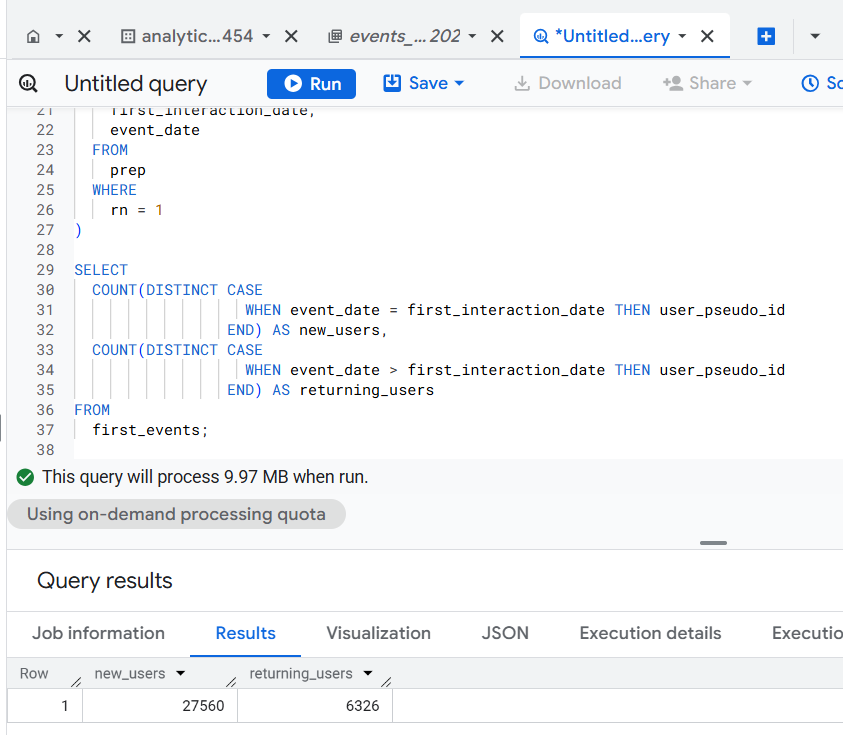
As you can see, the SQL is 37 lines of code.
But since I used AI, it took me less than 5 minutes to go from design to production ready SQL.
The ‘design’ part is where I understand the logic and craft my text prompt. This is the most time consuming part.
Generating the required SQL takes only a couple of seconds.
If you hand-craft this SQL logic, it could be a couple of hours' work depending on your skill set.
And what if you want to use these two metrics with other GA4 metrics and dimensions?
There could be ‘N’ use cases, and it won’t be possible to provide you with ready-made SQL code for every possible use case.
That’s why understanding the query logic is very important. So you can scale across 'N' SQL use cases.
Regardless, that’s how you can calculate new and returning users in GA4 BigQuery.
======================
Learn the underlying logic for calculating various GA4 dimensions and metrics in BigQuery and leave the actual SQL generation to ChatGPT.
Your GA4 BigQuery data is only as good as the query logic you use. Once you understand the query logic, you can scale across 'N' SQL use cases.
That's what I teach in my GA4 BigQuery Course. The focus is entirely on teaching the underlying logic (instead of the actual SQL).
Related Articles:
- GA4 to BigQuery Mapping Tutorial.
- Understanding the BigQuery User Interface.
- GA4 BigQuery Query Optimization.
- How to access a nested field in GA4 BigQuery data table.
- How to Calculate Unique Users in GA4 BigQuery.
- GA4 BigQuery Export Schema Tutorial.
- Calculating First Time Users in GA4 BigQuery.
- Extracting Geolocations in GA4 BigQuery.
- GA4 BigQuery SQL Optimization Consultant.
- Tracking Pages With No Traffic in GA4 BigQuery.
- First User Primary Channel Group in GA4 BigQuery.
- How to handle empty fields in GA4 BigQuery.
- Extracting GA4 User Properties in BigQuery.
- Calculating New vs Returning GA4 Users in BigQuery.
- How to access BigQuery Public Data Sets.
- How to access GA4 Sample Data in BigQuery.
- Understanding engagement_time_msec in GA4 BigQuery.