

What is engagement time?
Engagement time is the total amount of time a user spends actively engaged with your website or app.
"Actively engaged" means the page or app is in the foreground and visible to the user.
Engagement time is counted when the user is:
- Reading content on a visible, focused tab.
- Scrolling through a page.
- Watching a video in the foreground.
- Simply keeping the page open and in focus (no clicks or scrolls required).
Engagement time is not counted when:
- The browser tab is in the background.
- The app is minimised or in the background.
- The page is not visible (e.g. another window covers it).
- The session has ended.
So engagement time is not the same as wall-clock time, session duration, or passive open time.
A user who opens your page and immediately switches to another tab accumulates zero engagement time, even if the tab stays open for an hour.
What is engagement_time_msec?
engagement_time_msec is an event parameter in GA4 BigQuery that carries a portion of the accumulated engagement time (in milliseconds).
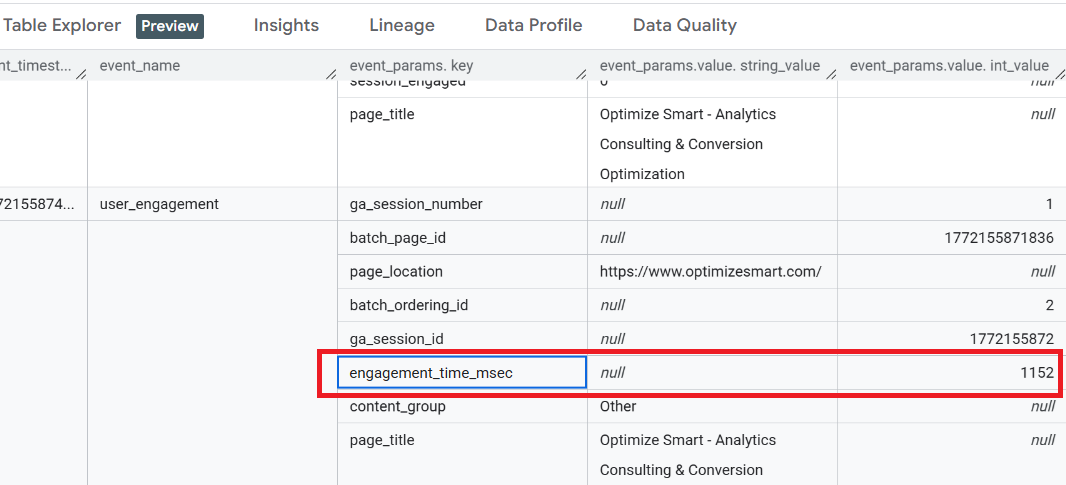
Think of it this way:
- Engagement time is a running counter that ticks in the background while the user is actively engaged.
- engagement_time_msec is a snapshot of that counter, taken each time an event is sent and then reset to zero.
Each event reports only the engagement time accumulated since the previous event, not the total engagement time for the session.

Example: How the counter works.
Imagine a user lands on a page and spends 30 seconds reading before scrolling.
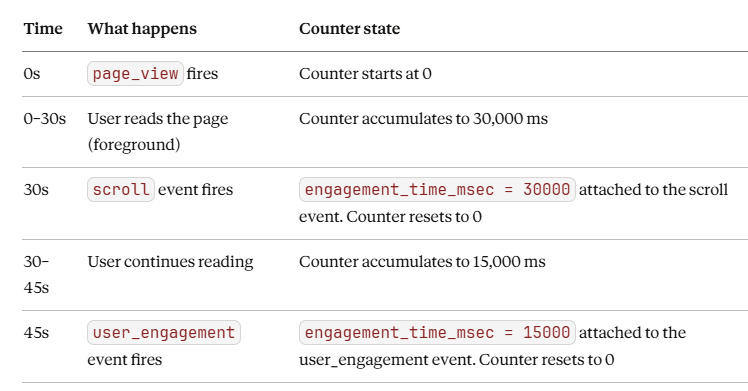
The total engagement time for this session so far is 30,000 + 15,000 = 45,000 ms (45 seconds).
No single event carries the full 45 seconds. Each carries only its slice.
Why does it work this way?
GA4 does not continuously stream engagement time to its servers. That would be expensive and impractical.
Instead, GA4:
- Accumulates engagement time locally in the browser or app.
- Waits for the next event to be sent.
- Attaches the accumulated time to that event as engagement_time_msec.
- Resets the local counter to zero.
This means engagement_time_msec is a transport mechanism. It is the vehicle that carries engagement time data from the browser to BigQuery, not the engagement time itself.
When is engagement time sent to GA4?
The accumulated engagement time is finalised and attached to the next event when any of the following occurs:
- The user switches to a different browser tab.
- The user navigates to another page on your site.
- The user closes the tab or browser window.
- The app moves to the background.
- The app or website crashes.
Example: Tab switching.
A user is reading your blog post for 20 seconds, then switches to a YouTube tab.
- GA4 detects the focus loss.
- A user_engagement event fires.
- engagement_time_msec = 20000 is attached to that event.
- The counter resets to zero.
When the user switches back to your tab, the counter resets to 0.
Which events include engagement_time_msec?
engagement_time_msec can appear on any event, but it is most commonly seen on user_engagement events.
The parameter is omitted entirely when no engagement time has accumulated since the previous event.
Events that never include engagement_time_msec.
These events fire before any measurable engagement has occurred:
- first_visit - fires immediately on first arrival.
- session_start - fires immediately when a session begins.
These events fire at the instant of arrival, so there is zero accumulated engagement time to report.
Note on ‘page_view’ event: The first page_view event in a session will not include engagement_time_msec for the same reason. However, subsequent page_view events (when the user navigates to a new page) can include engagement_time_msec accumulated from the previous page.
How engaged users are classified.
GA4 classifies a user as "engaged" if their total engagement time exceeds a threshold (default: 10 seconds).
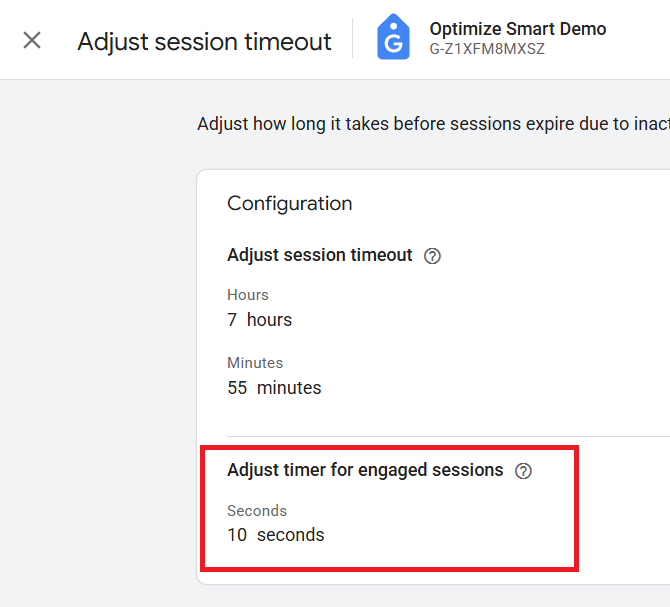
This is based on the sum of engagement_time_msec across all events in a session, not any single event value.
Example: Engaged user classification (10-second threshold):
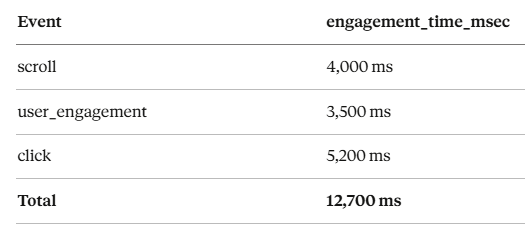
No single event exceeds 10,000 ms, but the sum (12,700 ms) exceeds the 10-second threshold. This session is classified as engaged.
Calculating total engagement time in GA4 BigQuery.
To get total engagement time per session, sum the engagement_time_msec values across all events in that session:
SELECT
  SUM(
    (
      SELECT value.int_value
      FROM UNNEST(event_params)
      WHERE key = 'engagement_time_msec'
    )) AS total_engagement_time_msec
FROM
  `dbrt-ga4.analytics_207472454.events_20260227`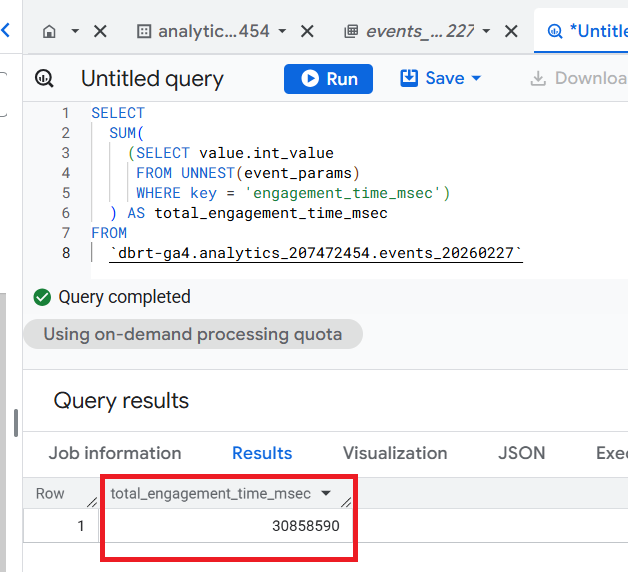
Full example: A realistic user journey.
A user visits your website, reads two pages, and leaves.
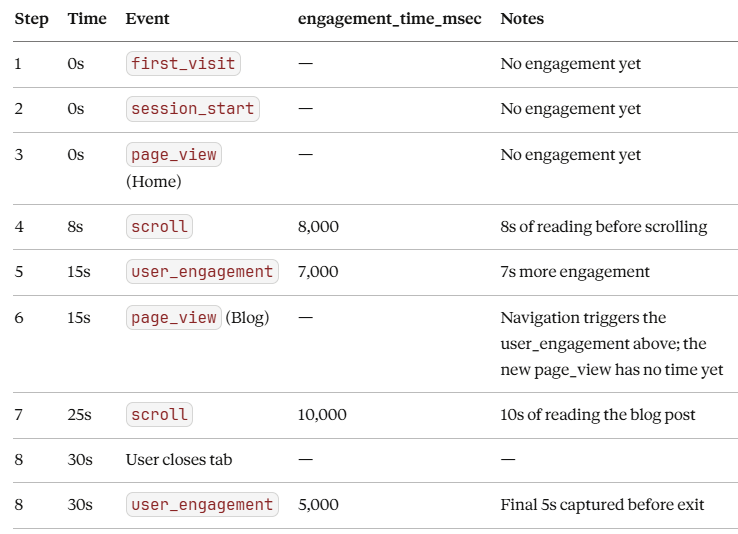
Total engagement time: 8,000 + 7,000 + 10,000 + 5,000 = 30,000 ms (30 seconds)
The user was engaged for 30 seconds across two pages. No single event carries the full value. The total is the sum of all the slices.
Common misconceptions about ‘engagement_time_msec’.
"engagement_time_msec IS engagement time."
- No.
- engagement_time_msec is the delivery mechanism.
- Engagement time is the underlying concept that GA4 tracks internally. The parameter just carries portions of it to BigQuery.
"If engagement_time_msec is missing, the user wasn't engaged."
- Not necessarily.
- The parameter is omitted when no new engagement time has accumulated since the previous event. The user may still have been engaged earlier in the session.
"A single event with engagement_time_msec = 50000 means the user was engaged for 50 seconds."
- Only for that interval between events.
- The total session engagement time could be much higher when you sum all events.
"The user must be clicking or scrolling for engagement time to count."
- No.
- Simply having the page in the foreground and visible is enough.
- A user silently reading an article accumulates engagement time without any interaction events.
Related Articles:
- GA4 to BigQuery Mapping Tutorial.
- Understanding the BigQuery User Interface.
- GA4 BigQuery Query Optimization.
- How to access a nested field in GA4 BigQuery data table.
- How to Calculate Unique Users in GA4 BigQuery.
- GA4 BigQuery Export Schema Tutorial.
- Calculating First Time Users in GA4 BigQuery.
- Extracting Geolocations in GA4 BigQuery.
- GA4 BigQuery SQL Optimization Consultant.
- Tracking Pages With No Traffic in GA4 BigQuery.
- First User Primary Channel Group in GA4 BigQuery.
- How to handle empty fields in GA4 BigQuery.
- Extracting GA4 User Properties in BigQuery.
- Calculating New vs Returning GA4 Users in BigQuery.
- How to access BigQuery Public Data Sets.
- How to access GA4 Sample Data in BigQuery.
- Understanding engagement_time_msec in GA4 BigQuery.