

Learn about GA4 attribution models and how to choose the right one for your business. Understand different models for better marketing insights and conversions.
What is a GA4 attribution model?
A GA4 attribution model is a rule or set of rules or a data-driven algorithm that is used to determine how conversion credit should be distributed to various marketing touchpoints on a conversion path.
A conversion path (also known as ‘Attribution Path’) is a path taken by users to convert on your website and/or mobile app.
The conversion path can include both website and mobile app touchpoints.
Note: In GA4, conversions are now called ‘key events’. So, I may interchange the words ‘conversions’ and ‘key events’.
What are touchpoints?
Before you can understand the concept of ‘conversion paths’, you need to understand the concept of ‘touchpoints’.
Touchpoint (also known as ‘interaction’, exposure, touch, or customer touchpoint) is the point at which a person comes into contact with your brand before, during and after completing a key event (aka conversion) on your website.
For example, in the chart below, a visitor is exposed to six different marketing channels before he makes a purchase:
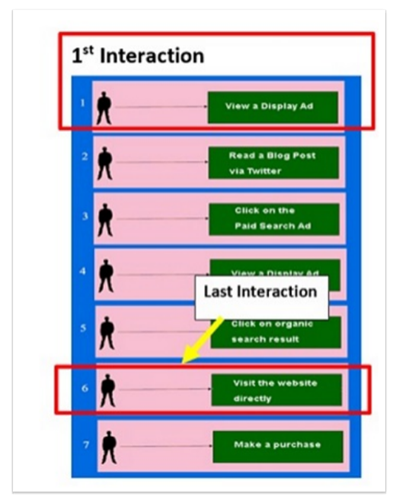
You can understand your customer’s purchase journey by identifying the touchpoints that occurred before and during key events.
By identifying the touchpoints after a key event, you can understand your customer’s satisfaction level.
The following are examples of touchpoints that can occur before a key event:
- Social media content (posts, influencer endorsements).
- Email newsletters.
- Search engine results (organic SEO).
- Display ads (banner ads on websites).
- Comparison websites (product comparisons).
- Blog articles or reviews (third-party content).
- Free trials or samples.
- Events or webinars (informational sessions).
- Referral programs.
The following are examples of touchpoints that can occur during a key event:
- Live chat support (on your website).
- Checkout process (online or in-store).
- Customer reviews (displayed on product pages).
- Mobile app interface.
- In-store displays (product placement).
- Interactive kiosks (in physical stores).
- Demo videos (on product pages).
- Payment options (available payment methods).
The following are examples of touchpoints that can occur after a key event:
- Feedback surveys (asking for reviews or satisfaction scores).
- Customer loyalty programs.
- Post-purchase thank-you messages.
- Community forums or user groups (for product support).
- Warranty services (if applicable).
- Social media engagement (following up with customers).
- Unboxing experiences (content encouraging customers to share).
- Subscription renewal reminders (for subscription-based services).
To truly understand your customer’s behaviour, you would need to identify, measure, and optimize all of these touchpoints.
If a user was exposed to six marketing channels before making a purchase, then there were six touchpoints in his attribution path.
Similarly, if a user was exposed to three marketing channels before making a purchase, then there were three touchpoints in his attribution path.
What are Conversion Paths?
A Conversion Path (also known as ‘key event path’ or ‘Attribution path’) is the sequence of touchpoints with digital marketing channels that lead to key events over a period of 1 to 90 days.
Consider the following hypothetical conversion path of a user where the user is exposed to the following six marketing channels before he makes a purchase:
- View a display ad.
- Read a blog post via Twitter.
- Click on a paid search ad.
- View a display ad.
- Click on an organic search listing.
- Visit your website directly.
- Made a purchase.
GA4 will show this conversion path as:

Where can you find attribution models in a GA4 property?
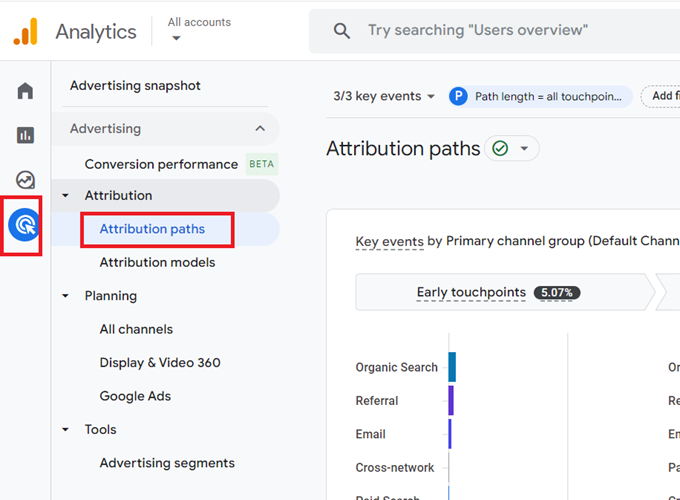
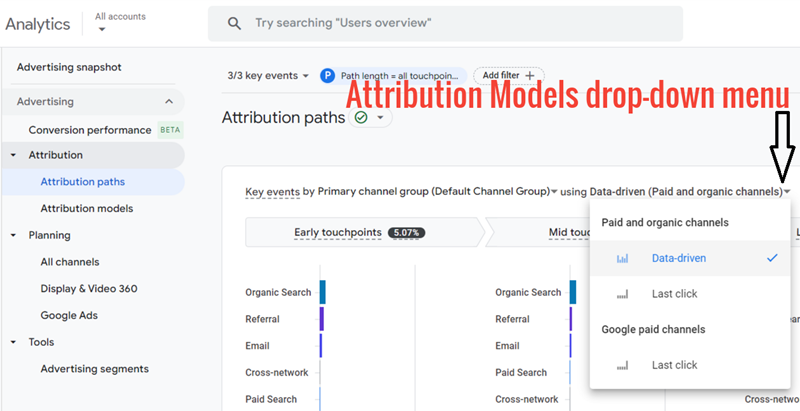
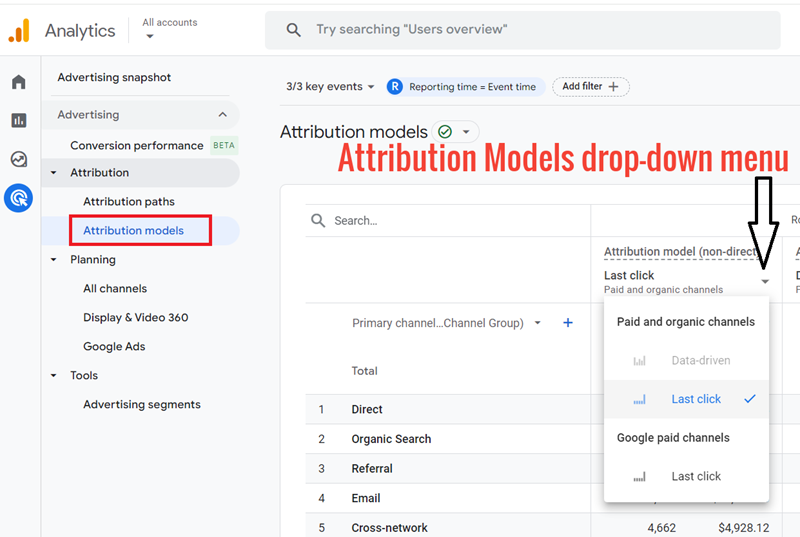
You can find attribution models in a GA4 property by clicking on ‘Advertising’ from the left menu and then selecting one of the following attribution reports: Attribution Paths report or Attribution Models report.
Finding attribution models in GA4 via the Attribution Paths report:
Finding attribution models in GA4 via the Attribution Models report:
What are the various types of GA4 attribution models?
The GA4 attribution models can be broadly classified into the following two categories:
#1 Paid and organic channels – This category includes ‘Data-driven’ and ‘Paid and organic last click’ attribution models.
#2 Google paid channels – This category includes the ‘Google paid channels last click’ attribution model.
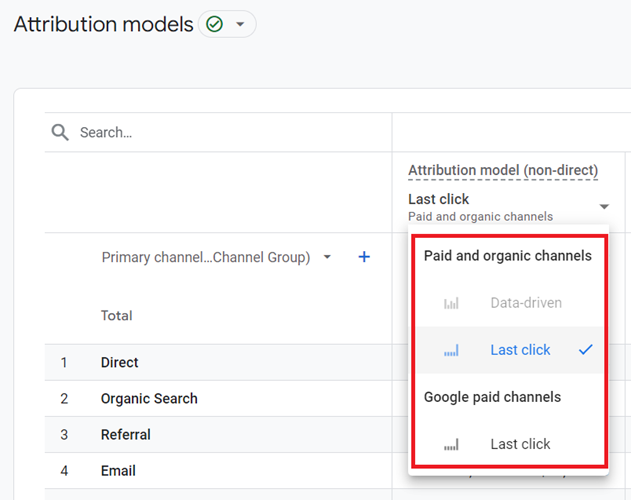
Note: All GA4 attribution models exclude direct visits from receiving conversion credit unless the conversion path consists entirely of direct visits.
What is the Data-driven attribution model in GA4?
The data-driven attribution (DDA) model assigns conversion credit to various marketing touchpoints (aka interactions) based on how they influence conversions (aka key events).
Unlike other GA4 attribution models, the DDA model uses an advertiser’s unique data to determine the actual contribution of each click interaction to a key event.
Here is how DDA models work
The DDA model analyses both converting and non-converting user paths to learn how different touchpoints affect outcomes. It factors in timing, device, ad order, and ad type.
The model estimates what might have happened without certain ad interactions, identifying which touchpoints most likely drove the key events.
The model assigns conversion credit based on how adding each touchpoint changes the probability of a key event.
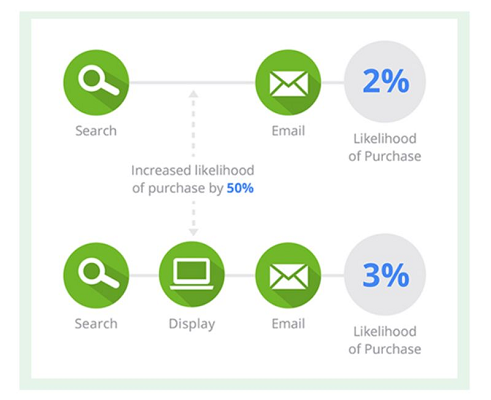
Note: The data-driven attribution model is specific to each conversion event (aka key event).
What is the ‘Paid and organic last click’ attribution model?
The ‘Paid and organic last click’ attribution Model (also known as the ‘Last non-direct click model’) gives 100% conversion credit to the last touchpoint (or engaged view through for YouTube) on a conversion path.
This attribution model does not give conversion credit to direct visits unless the conversion path is made up entirely of direct visits.
Following are the examples of conversion paths that show how the ‘Paid and organic last click’ attribution model assigns conversion credit to touchpoints:
Organic Search > Display > Social > Paid Search → 100% credit goes to Paid Search.
Email > Affiliate > Organic Search > Direct → 100% credit goes to Organic Search (ignoring Direct).
Paid Search > Social > Display > Organic Search > Affiliate → 100% credit goes to Affiliate.
Affiliate > Display > Social > Direct → 100% credit goes to Social (ignoring Direct).
Organic Search > Direct > YouTube (Engaged View) → 100% credit goes to YouTube (Engaged View).
YouTube (Engaged View) > Paid Search > Direct > Affiliate → 100% credit goes to Affiliate.
Direct > Direct > Direct → 100% credit goes to Direct (as the conversion path is made up entirely of direct visits).
What is the ‘Google paid channels last click’ attribution model?
The ‘Google paid channels last click’ attribution model (previously known as ‘the Ads-preferred Last Click model) gives 100% conversion credit to the last Google Ads click on a conversion path.
If there is no Google Ads click on a conversion path, then the last non-direct touchpoint on the conversion path gets 100% credit for the conversion.
The ‘Google paid channels last click’ attribution model does not give conversion credit to direct visits unless the conversion path is made up entirely of direct visits.
Following are the examples of conversion paths that show how the ‘Google paid channels last click’ attribution model assigns conversion credit to touchpoints:
Direct > Organic Search > Paid Search > Conversion
// Here, ‘paid search’ gets 100% credit for the conversion.
Organic Search > Paid Search > Direct > Conversion
// Here, ‘paid search’ gets 100% credit for the conversion. The ‘Direct’ touchpoint is ignored.
Paid Search > Direct > Social > Conversion
// Here, ‘paid search’ gets 100% credit for the conversion. The ‘Direct’ touchpoints are ignored.
Direct > Direct > Direct > Conversion
// Here, ‘Direct’ gets 100% credit for the conversion as the conversion path is made up entirely of direct visits.
Email > Paid Search > Organic Search > Conversion
// Here, ‘paid search’ gets 100% credit for the conversion.
Email > Social > Organic Search > Direct > Conversion
// Here, ‘organic search’ gets 100% credit for the conversion as it is the last non-direct touchpoint on the conversion path.
Which attribution model is used for conversions imported from GA4 into Google Ads?
When conversions are imported from GA4 into Google Ads, the Data-Driven attribution model is used by default.
If data is insufficient for the Data-Driven model, Google Ads may fall back to ‘Paid and organic last click’ attribution.
Note: Google depreciated the first click, linear, time decay, and position-based attribution models in November of 2023. They are no longer available in GA4 properties.
Changing attribution settings in GA4.
Through attribution settings, you can change the following settings:
- The reporting attribution model.
- Marketing channels that can receive conversion credit.
- Key event lookback window.
How to change the reporting attribution model in GA4?
GA4 uses the reporting attribution model to calculate conversion credit in all of your GA4 reports and also within the conversion reports of any linked Firebase projects.
By default, GA4 uses the data-driven model as the reporting attribution model.
Google also recommends that you use the data-driven model as the reporting attribution model.
However, you can change the reporting attribution model to any one of the following models:
- Paid and organic last click.
- Google paid channels last click.
To change the reporting attribution model in GA4, follow the steps below:
Step-1: Navigate to the admin area of your GA4 property.
Step-2: Navigate to Data Display > Attribution Settings:
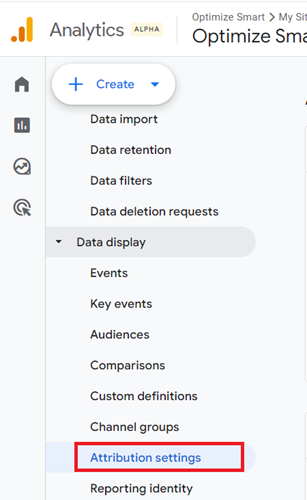
Step-3: Click on the ‘Reporting Attribution Model’ drop-down menu and select the attribution model you want to use:
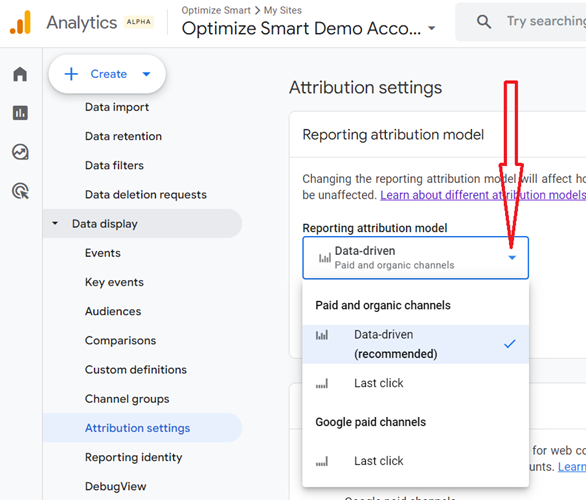
Note(1): Changing the reporting attribution model will apply to both historical and future data in your GA4 property. These changes will be reflected in GA4 reports with conversion and revenue data. User and session data will remain unaffected.
Note(2): The Event scoped traffic dimensions (like ‘Key events’, ‘Total revenue’, ‘Purchase revenue’, and ‘Total ad revenue’) are affected by changes to the reporting attribution model. But User-scoped traffic dimensions and session-scoped traffic dimensions are not affected.
Note(3): The Attribution reports are not affected by any change to the reporting attribution model.
Marketing channels that can receive conversion credit.
Under ‘Attribution Settings’, you get the option to select one of the following attribution models:
- Google paid channels.
- Paid and organic channels.
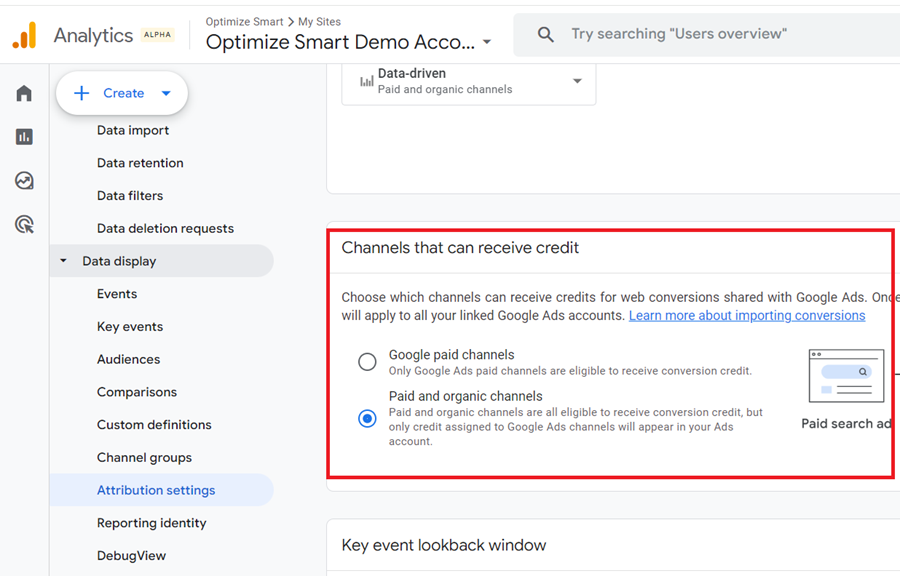
I recommend using the ‘Paid and organic channels’ attribution model because the ‘Google paid channels’ model is biased towards Google Ads.
Note(1): ‘Paid and organic channels’ only applies to web conversions and not app conversions.
Note(2): In GA4, all app conversions (key events from mobile apps) always use the ‘Google paid channels’ attribution model.
All app conversions always use the ‘Google paid channels’ attribution model.
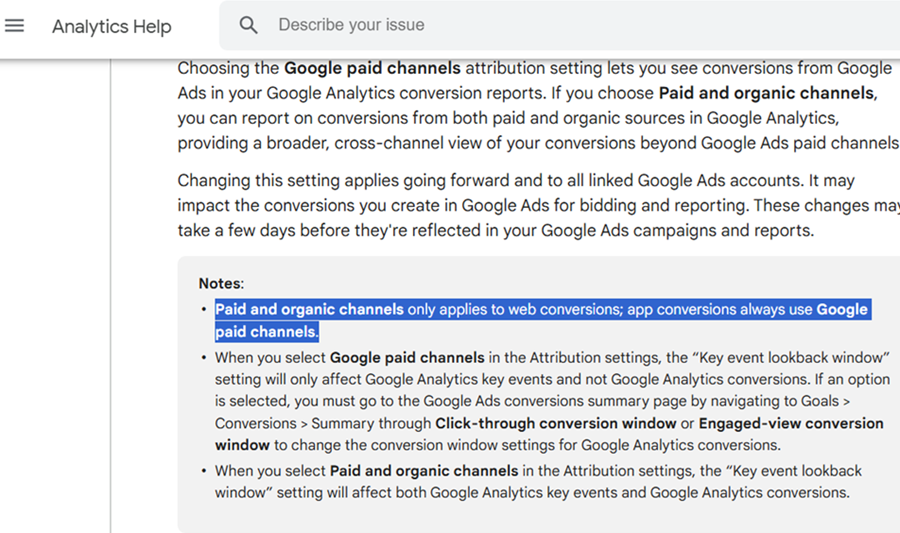
That means only Google Ads paid channels are eligible to receive conversion credit.
Only when there is no interaction with Google ads in a conversion path are other channels like organic search or email eligible for conversion credit. That’s why you can’t trust Firebase Analytics for App Conversions.
Key event lookback window.
Under ‘Attribution Settings’ you also get the option to select the Key event lookback window for Acquisition key events (first_open and first_visit) and all other key events:
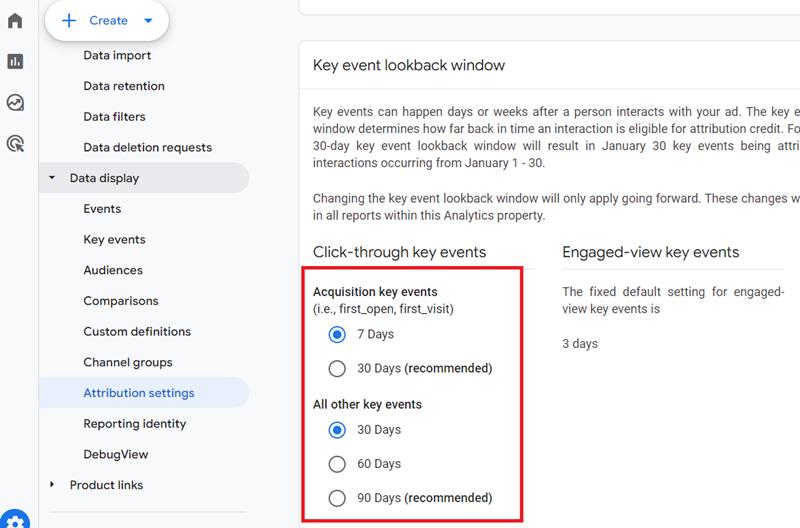
The Key event lookback window (also known as ‘conversion window’) is the time period (measured in days) that determines how far back in time a touchpoint is eligible for conversion credit.
For example,
A 30-day Key event lookback window means a touchpoint is eligible for conversion credit for up to 30 days from the day it first occurred.
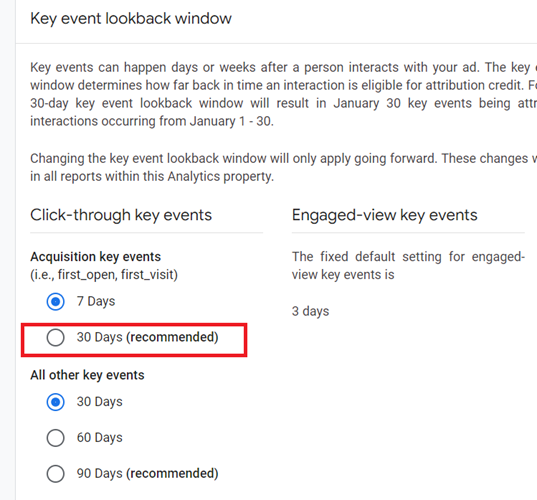
Similarly,
A 90-day Key event lookback window means a touchpoint is eligible for conversion credit for up to 90 days from the day it first occurred.
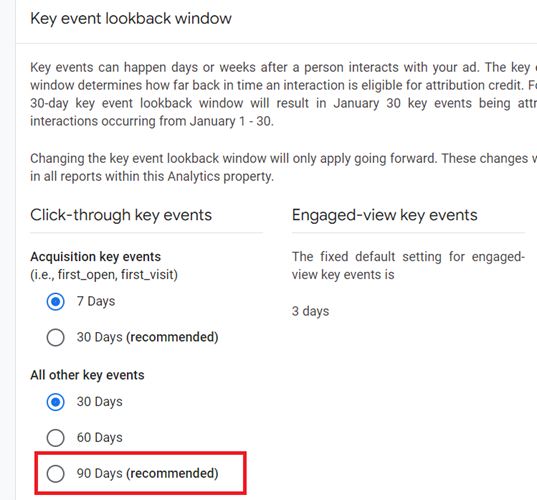
By default, GA4 uses the 30 days Key event lookback window for Acquisition key events (‘first_open’, ‘first_visit’) and 90 days Key event lookback window for all other key events for click-through key events.
GA4 uses a 3-day Key event lookback window for ‘Engaged-view key events‘.
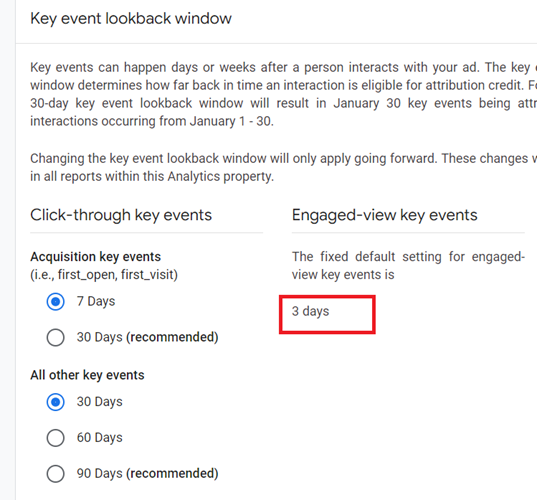
You can not change this Key event lookback window setting.
I recommend that you set your conversion window to 7 days for Acquisition key events and 30 days for all other key events to get the most accurate reporting possible in GA4.
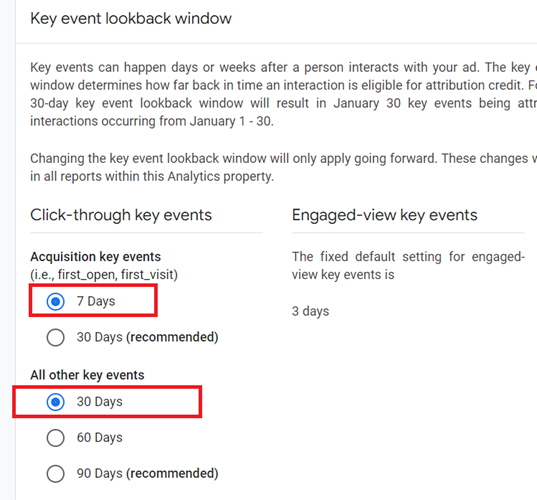
I have explained the reason for using short conversion windows in this article: Which Conversion Window to use in GA4 (Google Analytics 4).
Important points about the Key event lookback window.
#1 Changing the Key event lookback window will only apply going forward, and these changes will be reflected in all reports within the GA4 property.
#2 Changing the Key event lookback window will affect all key events, including those imported to other products.
#3 The Key event lookback window applies to all GA4 attribution models and all key event types.
#4 The key event lookback window applies to session attribution.
#5 The Key event lookback window significantly impact the key events imported to Google Ads.
Direct Traffic Misclassification in GA4
When Google Ads or Organic search traffic is misclassified as direct traffic in GA4, it won’t get conversion credit.
This happens due to referrer data loss caused by technical issues or genuine direct visits. Analyze spikes in direct traffic alongside declines in Google Ads or Organic traffic to identify misclassification and fix attribution issues.
To learn more about direct traffic misclassification, check out this article: Direct Traffic Stealing Conversions from Google Ads in GA4.
Which Attribution Model to use in GA4?
You select an attribution model, on the basis of your business model and advertising objectives.
The attribution model that you select has a great impact on conversion volume and conversion value. Thus attribution models can greatly impact the valuation of your marketing channels.
Both conversion volume and conversion value can vary from one attribution model to the other.
For example, if you select the ‘Paid and organic last click’ attribution Model then the last non-direct touchpoint on a conversion paths gets 100% credit for conversion.
If you select the ‘Google paid channels last click’ attribution Model then the last Google Ads touchpoint on a conversion paths gets 100% credit for conversion.
Similarly,
If you select the DDA model, the conversion credit are assigned to various marketing touchpoints based on how they influence conversions (aka key events).
I recommend you use the DDA model as unlike other GA4 attribution models, it uses AI and machine learning for conversion credit distribution.
GA4 uses the data-driven attribution model as its default attribution setting, highlighting its importance and effectiveness.
Related Article: How to reduce Direct Traffic in Google Analytics 4 (GA4).

Other Articles on GA4.
- Google Analytics 4 Channels, Source and Medium explained.
- Path exploration report in GA4 (Google Analytics 4) – Path analysis.
- How to use Microsoft Clarity with GA4 (Google Analytics 4).
- GA4 vs GA4 360 – Pricing, Limits, Billing and more.
- Setup Enhanced Conversions for Leads using Data Layer in Google Tag Manager.
- Self-referral Google Analytics 4 – Referral exclusion GA4.
- GA4 Attribution Paths (Conversion Paths) Report.
- Google Tag Manager Tutorial.
- GA4 Attribution Models Explained: How to Choose the Right One.
- Looker Studio (Google Data Studio) Tutorial.
- Google Tag Manager Data Layer Tutorial with Examples.