

GA4 uses a placeholder called ‘(not set)’ whenever it does not receive any information for the ‘Landing Page’ dimension:
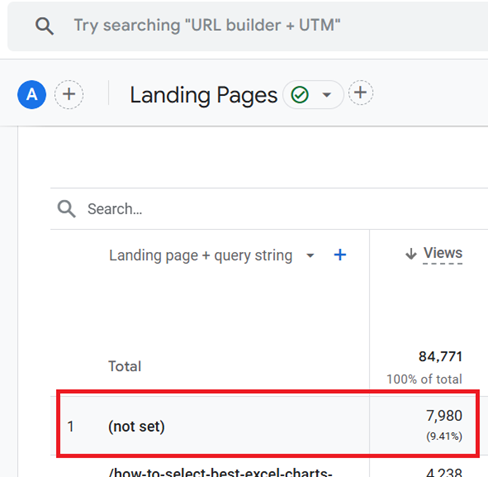
The following are the 10 methods to fix (not set) Landing page issues in GA4.
- Exclude Today and Yesterday from the Date Range.
- Extend GA4 Session Timeout Setting.
- Ensure GA4 Configuration Tag Fires Quickly.
- Use Standard GA4 Implementation.
- Verify page_view Event Fires on Landing.
- Configure Server-Side Tagging Correctly.
- Configure Measurement Protocol Correctly.
- Avoid Immediate Redirects .
- Avoid Redirects to Homepage Instead of 404 Page.
- Filter Out Spambot Traffic
#1 Exclude Today and Yesterday from the Date Range.
“(not set)” values may temporarily appear due to incomplete data processing in the last 24-48 hours.
Smaller GA4 properties may complete data processing faster, but larger properties might require up to 72 hours.
- When analysing “(not set)” landing pages, exclude today and yesterday from the date range.
- Set the date range to end at least 48 hours before data analysis. For example, if today is October 1, 2024, set the range to end on September 29, 2024 or earlier.
#2 Extend GA4 Session Timeout Setting.
A GA4 session can start without a page_view, leading to potential “(not set)” values.
Extending the GA4 session timeout setting reduces the chance of starting a new session without a page_view.
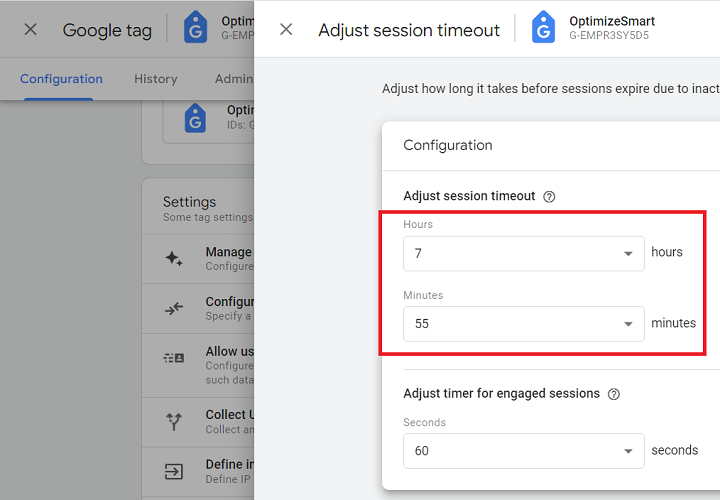
- Increase the session timeout from 30 minutes to 7 hours 55 minutes, the maximum allowed by GA4. This prevents early session expiration, allowing the page_view event to set the landing page before other events trigger a new session.
#3 Ensure GA4 Configuration Tag Fires Quickly.
The GA4 Configuration tag (or Google tag) fires the page_view event. If it delays longer than a second, other events, such as user_engagement, might fire first, causing “(not set)” landing pages.
Slow page load times, complex GTM setups, network latency, and large content can delay firing.
- Improve page load speed, especially on mobile devices.
- Place the GTM container code at the top of the section.
- Trigger the GA4 Configuration tag on all pages and ensure it fires before other GA4 event tags.
- Minimise container size by removing unnecessary elements (tags, triggers, and variables) and use Server-side tagging if possible.
#4 Use Standard GA4 Implementation.
Standard GA4 implementation (hardcoded Google tag or GTM) ensures the page_view event fires at the right time, setting the landing page correctly.
Non-standard GA4 implementations (e.g., plugins, CDPs) can disrupt the event order, increasing the likelihood of “(not set)” values. Plugins or CDPs can alter event order or timing, causing issues.
- Avoid using plugins or CDPs (like ‘segment’) to deploy Google tags.
- Use GTM or a hardcoded tag directly, as this reduces timing issues that can cause “(not set)” landing pages.
#5 Verify page_view Event Fires on Landing.
To correctly attribute landing pages, the page_view event must fire when a user lands on the website.
- Use Google Tag Assistant and developer tools to check that the page_view event fires as expected on initial load across browsers (Chrome, Firefox, Safari) and devices (desktop, mobile, tablet).
#6 Configure Server-Side Tagging Correctly.
Incorrect GTM server-side tagging can delay the page_view event, resulting in “(not set)” values.
Misconfigured user consent or privacy settings can also prevent the page_view event from being sent to GA4.
- Ensure server-side GTM is configured to prioritize the page_view event, allowing GA4 to capture it as the first event.
- Set up a trigger in Server-Side GTM that only fires ‘user_engagement’ events when they don’t start a session.
#7 Configure Measurement Protocol Correctly.
Misconfigured Measurement Protocol requests, missing parameters, or an incorrectly formatted page_location parameter can lead to “(not set)” for the Landing Page dimension.
The page_location parameter is crucial for setting the landing page in GA4.
- Ensure the page_view event is sent as the first event of each session.
- Include the page_location parameter in each Measurement Protocol request, formatted correctly, and send requests with all required parameters.
#8 Avoid Immediate Redirects.
GA4 determines the landing page based on the first ‘page_view’ event of a session.
If the redirect happens immediately before the ‘page_view’ event can fire, GA4 may not be able to capture the original landing page, leading to (not set) landing pages.
- Set a short delay (e.g., 1 second) before redirects to allow the page_view event to register. This can be done with a custom HTML tag in GTM to delay the redirect, ensuring the initial page load is captured.
#9 Avoid Redirects to Homepage Instead of 404 Page.
Redirecting users to the homepage instead of a 404 page can result in “(not set)” for landing pages, as GA4 may not capture the initial page_view.
If a redirect occurs before the page_view event fires, GA4 may not capture the initial page. If other events fire before page_view, it may lead to “(not set)” values.
- Use a custom 404 error page that logs a page_view event, allowing GA4 to capture the initial landing page.
- If you must redirect to the homepage, set a brief delay (1 second) before the redirect.
#10 Filter Out Spambot Traffic
Spambots may send fake traffic without triggering page_view events, resulting in “(not set)” landing pages.
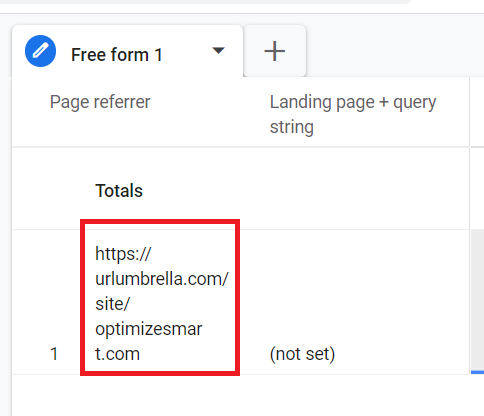
- Identify spambot traffic by analyzing irregular patterns.
- Filter out all such traffic from your reports before you analyze the (not set) landing pages.
Related Articles: How to Stop Google Analytics Spam – Remove Referral Spam.
FAQs about (not set) landing pages in GA4.
Q1. What are the most common causes of “(not set)” in the Landing Page report?
- Delayed or missing page_view event.
- Immediate redirects.
- Session timeout issues.
- Privacy settings and ad blockers.
- Misconfigured tags in GTM.
- Single page applications (SPAs).
Q2. Does using redirects contribute to “(not set)” in the Landing Page?
Yes, if a redirect happens before the page_view event fires.
Q3. Can delayed tag firing cause “(not set)” in the Landing Page?
Yes, esp. if the Google tag or the page_view event is delayed and as a result other events like user_engagement fire first.
Q4. Does adjusting session timeout settings in GA4 reduce “(not set)” instances in Landing Page?
Yes. Increasing the session timeout duration to 7 hours 55 minutes decreases the chances of a new session starting without a page_view event.
Q5. If the Landing Page is “(not set)” but other pages show data, what does that mean?
This situation usually means the session initially began without a page_view event firing.
Q6. How does using a Single Page Application (SPA) affect “(not set)” in Landing Page?
SPAs can increase “(not set)” instances in the Landing Page dimension despite the built-in GA4 functionality to track SPAs.
Q7. Can I completely eliminate “(not set)” Page Titles in GA4?
It is unlikely that you can 100% eliminate the issue of (not set) landing pages because of various factors that could be outside of your control, but you can certainly minimise this issue.

Other Articles on GA4.
- Understanding Google Tag Manager Container Tag.
- Google Analytics Debugger, GTM Debugger Tutorial.
- Tracking web pages with zero pageviews in Google Analytics 4.
- How to Connect Google Analytics 4 with BigQuery.
- 100+ Google Analytics Remarketing Audiences for Retargeting.
- Google Tag Manager Workspaces Tutorial.
- Stop Trusting GA4/GTM Tag Coverage Report – Do This Instead.
- Some of your pages are not tagged in GTM/GA4 [Fixed].
- Tracking single page apps in Google Analytics via GTM.
- Anonymize IP in Google Analytics, gtag & Google Tag Manager.
- Matomo vs Google Analytics vs Piwik Pro - Best Google Analytics Alternative.
- Are You Waiting 12 Days Before Analyzing GA4 Data?
- Using Element Visibility Trigger in Google Tag Manager (GTM).
- Google Analytics Javascript Tutorial.
- Google Tag Manager Debugger Console Tutorial.
- Data Trend Analysis in Google Analytics.
- Facebook Pixel vs Google Analytics Data Discrepancies.
- Google Analytics 4 Model comparison report.
- 10 methods to fix (not set) Landing page issues in GA4.
- How to use the Conversion Paths report in GA4.