

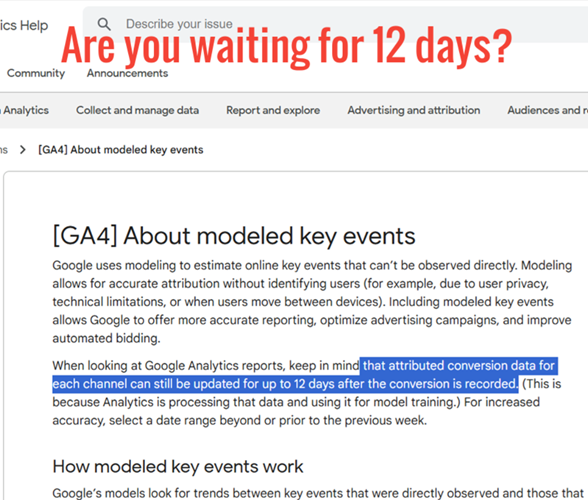
Your GA4 data analysis and reporting may not be accurate if you don’t wait for at least 12 days after a key event is recorded.
Many GA4 users seemed to have forgotten that they needed to wait at least “12 days” before analyzing conversion attribution data to get the most complete and accurate picture of channel performance.
This is because attributed conversion data for “each channel” can be updated for up to 12 days after the conversion (aka ‘Key event’) is recorded.
Earlier, Google displayed this information as a ‘tip’ at the bottom of the help article.
Now, it is displayed prominently at the top of the article.
Suppose you are running an e-commerce website and analyzing your GA4 data on Monday, July 15, 2024.
You are particularly interested in measuring the performance of a new marketing campaign that started on Wednesday, July 10.
Here’s how the delayed attribution might play out:
Initial view (July 15):
>> You see 100 key events attributed to the campaign from July 10-14.
>> The value associated with these key events shows $10,000 in revenue.
Updated view (July 27):
You check the same date range (July 10-14) again on July 27.
>> Now you see 120 key events attributed to the campaign.
>> The value associated with these key events has increased to $12,500 in revenue.
This difference can occur because of the following two reasons:
1) Some users who interacted with your ads during July 10-14 may have taken several days to complete key events (e.g., purchases).
2) GA4 continued processing and attributing these delayed key events to the appropriate channels and campaigns over the following 12 days.
As a result, the initial data analysis on July 15 underestimated the campaign’s performance.
The updated view on July 27 provides a more accurate picture of the campaign’s true impact, showing 20 additional key events and $2,500 more in revenue.
Takeaway>> For the most accurate data analysis, it is best to look at date ranges ending at least “12 days” before the current date.

Other Articles on GA4.
- Filter Google Analytics 4 Reports by UTM Parameters.
- Tracking 404 pages (broken links) in Google Analytics 4.
- How to identify the scope of any GA4 Dimension or Metric.
- You are doing Google Analytics all wrong. Here is why.
- How to check if Google Tag Manager is Working – Testing GTM.
- Setting up Facebook Conversion API via Google Tag Manager (GTM).
- Understanding Google Tag Manager Container Tag.
- Google Analytics Debugger, GTM Debugger Tutorial.
- Tracking web pages with zero pageviews in Google Analytics 4.
- How to Connect Google Analytics 4 with BigQuery.
- 100+ Google Analytics Remarketing Audiences for Retargeting.
- Google Tag Manager Workspaces Tutorial.
- Stop Trusting GA4/GTM Tag Coverage Report – Do This Instead.
- Some of your pages are not tagged in GTM/GA4 [Fixed].
- Tracking single page apps in Google Analytics via GTM.
- Anonymize IP in Google Analytics, gtag & Google Tag Manager.
- Matomo vs Google Analytics vs Piwik Pro - Best Google Analytics Alternative.
- Are You Waiting 12 Days Before Analyzing GA4 Data?
- Using Element Visibility Trigger in Google Tag Manager (GTM).
- Google Analytics Javascript Tutorial.