

Here is how you can quickly determine the scope of any dimension or metric in GA4 without using ‘GA4 Dimensions and Metrics Explorer‘ or ‘API Reference documentation‘.
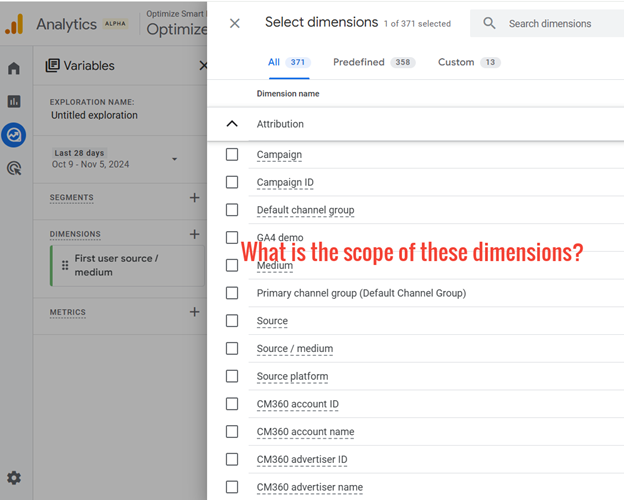
This will help you avoid mixing dimensions and metrics of different scopes in your reports and skewing analytics reports.
In GA4, a scope represents a different level of data aggregation and context.
GA4 supports three different scopes: user, session and event scope.
User-scoped dimensions are prefixed with ‘First user’ (like ‘First user source/medium’).
There are some user-scoped dimensions that are not prefixed with ‘First user’, like ‘country’, ‘city’, ‘Signed in with user ID’, etc.
You can determine the scope of such dimensions by understanding that user-scoped dimensions typically represent user attributes that remain relatively constant.
For example:
>> Country.
>> City.
>> User ID.
>> Membership Level.
>> Subscription plan.
If a dimension reflects a user characteristic unlikely to change frequently, it most likely has user scope.
Session-scoped dimensions are prefixed with ‘Session’ (like ‘Session source/medium’).
Event-scoped dimensions do not have a prefix (like ‘source/medium’).
That’s how you know they are event-scoped.
GA4 does not have user-scoped metrics in the traditional sense, even when these metrics aggregate data specific to individual users across all their sessions.
GA4 built-in metrics are typically session-scoped.
This means they focus on quantifiable aspects of user behaviour within individual sessions on your website or app.
Most built-in metrics in GA4 have a session scope, but for some odd reason, GA4 only allows creating custom metrics with an event scope.
So, if you see any custom metric in a GA4 report, it has an event scope.

Other Articles on GA4.
- Filter Google Analytics 4 Reports by UTM Parameters.
- Tracking 404 pages (broken links) in Google Analytics 4.
- How to identify the scope of any GA4 Dimension or Metric.
- You are doing Google Analytics all wrong. Here is why.
- How to check if Google Tag Manager is Working – Testing GTM.
- Setting up Facebook Conversion API via Google Tag Manager (GTM).
- Understanding Google Tag Manager Container Tag.
- Google Analytics Debugger, GTM Debugger Tutorial.
- Tracking web pages with zero pageviews in Google Analytics 4.
- How to Connect Google Analytics 4 with BigQuery.
- 100+ Google Analytics Remarketing Audiences for Retargeting.
- Google Tag Manager Workspaces Tutorial.
- Stop Trusting GA4/GTM Tag Coverage Report – Do This Instead.
- Some of your pages are not tagged in GTM/GA4 [Fixed].
- Tracking single page apps in Google Analytics via GTM.
- Anonymize IP in Google Analytics, gtag & Google Tag Manager.
- Matomo vs Google Analytics vs Piwik Pro - Best Google Analytics Alternative.
- Are You Waiting 12 Days Before Analyzing GA4 Data?
- Using Element Visibility Trigger in Google Tag Manager (GTM).
- Google Analytics Javascript Tutorial.