

Here is a nice little trick to filter Google Analytics 4 reports by UTM parameters.
Use the following filters while creating/editing an exploration report:
Page Referrer contains [add your UTM source]Page Referrer contains [add your UTM medium]Page Referrer contains [add your UTM campaign]
Examples:
Page Referrer contains facebook
Page Referrer contains paidsocial
Page Referrer contains GA%20Checklist
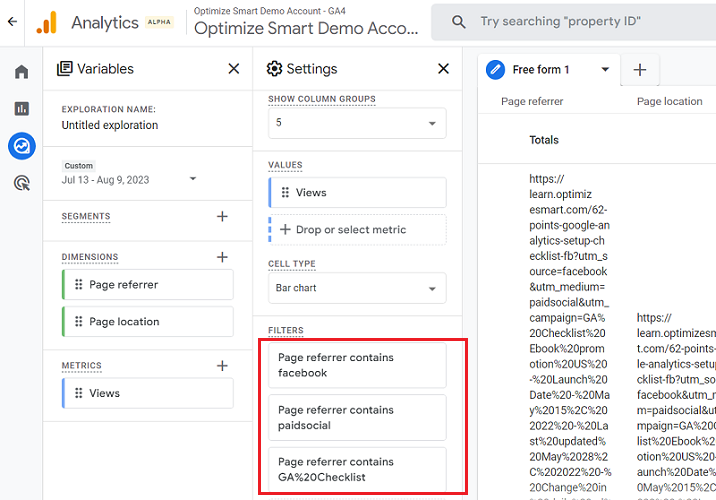
The filters above will filter the GA4 report by the Facebook campaign whose name contains ‘GA%20Checklist’.
The ‘Page Referrer’ dimension is the user’s previous URL and can also be your website’s domain.
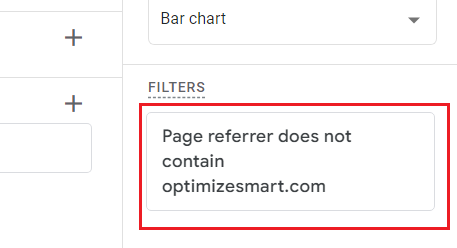
If you don’t want your own domain name to appear in the reports, then use the following filter:
Page referrer does not contain yourdomain.com
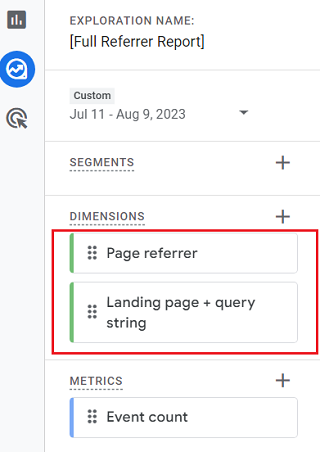
Use the ‘Page referrer’ dimension along with the ‘Landing page + query string’ dimension to check where the traffic lands on the website after clicking on your ads.
Use the ‘Page referrer’ dimension along with the ‘Page location’ dimension and then filter out ‘page location’ by pages where the conversions are recorded (like the order confirmation page).
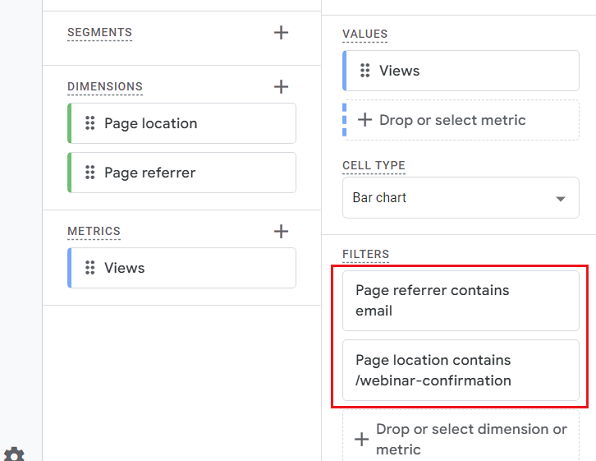
That way, you can check whether the traffic converts after visiting your website from a particular ad(s) in your GA4 reports.
Example:
Page referrer contains email.Page location contains https://learn.optimizesmart.com/confirmation
You can also use the ‘Page path + query string’ dimension instead of the ‘Page location’ dimension.
I use the ‘Page location’ dimension so that I can view the full URLs, including subdomains.
You can use the same logic to create custom events via the GA4 UI:
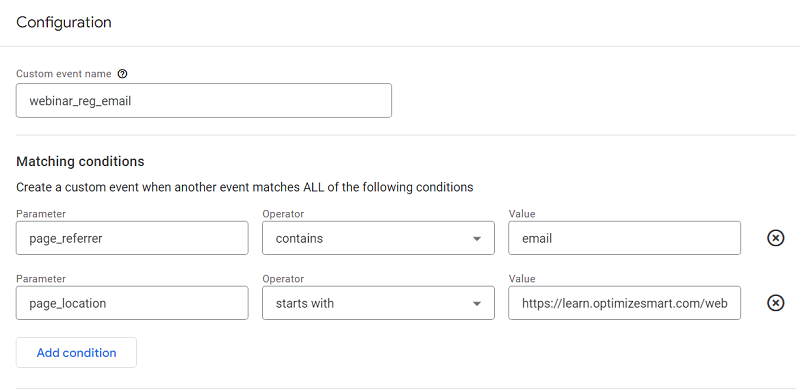
Here, I am tracking the users who visited the website via email newsletter (utm_medium=email) and registered for the webinar.

Other Articles on GA4.
- Google Analytics 4 often report inflated conversion counts by default.
- The Best Reporting Identity for Google Analytics 4.
- 'Days to key events' metric in Google Analytics 4.
- Advertising Reports in Google Analytics 4.
- Google Analytics 4 Data Delays Guidelines.
- Data deletion requests in Google Analytics 4 (GA4).
- How to Mix GA4 Dimensions & Metrics of Different Scopes?
- The best platform for GTM Server Side Tagging.
- Use the Data Manager API instead of the Measurement Protocol.
- utm_id (Campaign ID) in Google Analytics 4.
- utm_source (campaign traffic source) in Google Analytics 4.
- utm_medium (campaign traffic medium) in Google Analytics 4.
- utm_campaign (campaign name) in Google Analytics 4.
- utm_term (campaign term) in Google Analytics 4.
- utm_content (campaign content) in Google Analytics 4.
- utm_source_platform in Google Analytics 4.
- utm_campaign_id in Google Analytics 4.
- utm_creative_format in Google Analytics 4.
- utm_marketing_tactic in Google Analytics 4.
- Filter Google Analytics 4 Reports by UTM Parameters.