

Page titles can wreck your GA4 data analysis without you realizing it.
Avoid analyzing and reporting on landing page data via page title in GA4 or Google Data Studio, as the SEOs could change the page titles over time, giving you an incomplete/inaccurate picture.
GA4 splits the traffic data for the same page when a page title is changed.
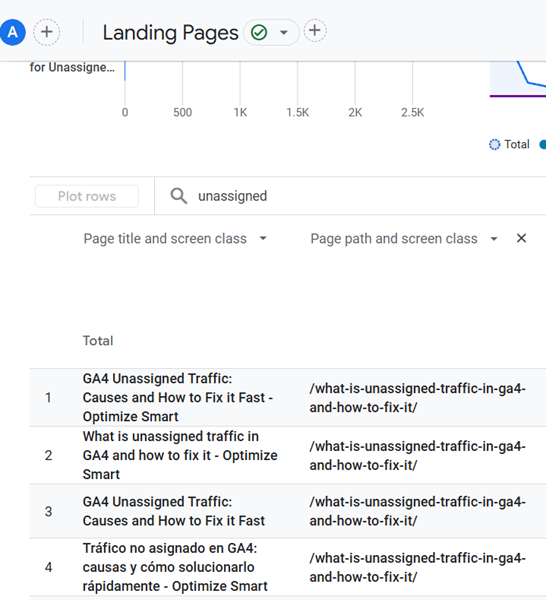
So more often a page title is changed, the more different rows (for the same page) you will see in the landing page report.
And if you do not consolidate this data, your data analysis and reporting will likely be flawed.
Use Page Paths dimension instead of Page Titles.
Page paths are often more stable (fixed) than page titles.
Instead of ‘Page title and screen class,’ use the ‘Page path and screen class‘ dimension for analyzing and reporting on landing page data.
Page Titles can change more often for SPA.
For websites with dynamic content like ‘Single Page Applications (SPA)‘, page titles might change more often based on user interactions or personalization without full page reloads.
Unlike traditional websites, SPAs load content within the same URL, changing titles via JavaScript. This can cause frequent title variations due to:
>> Actions like clicking tabs, applying filters, or viewing product details.
>> SPAs use client-side routing to simulate navigation without reloading pages. Each route change can trigger a new page title.
>> Marketing teams may dynamically change titles to test variations for engagement or search performance.
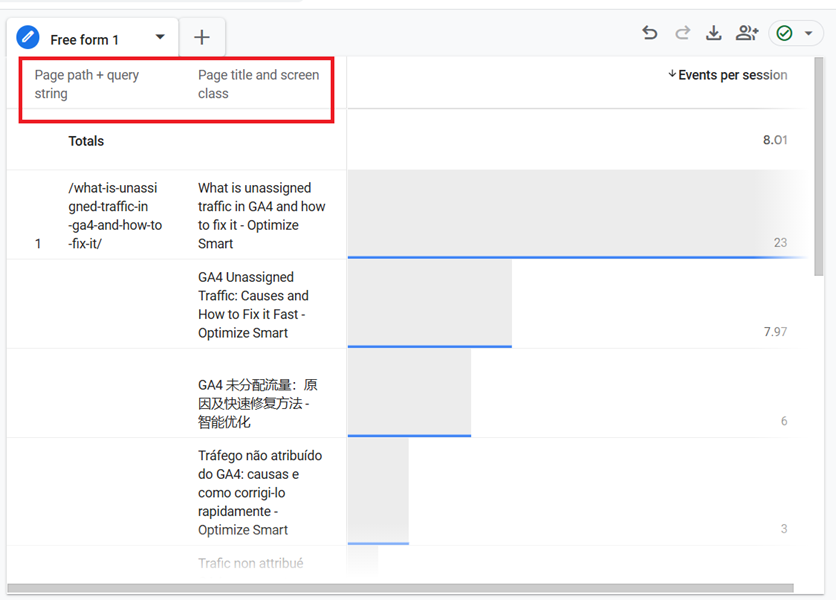
If you have to report on the page title, use it as a secondary dimension and as a nested row.

Related Articles.
- Google Data Studio Parameters explained with examples.
- Google Data Studio Tutorial.
- How to Change Language in Google Data Studio.
- Google Data Studio Report Tutorial.
- How to work with Boolean field in Google Data Studio.
- How to use Google Data Studio with Google Sheets.
- Stop Using Page Titles in GA4 & Google Data Studio Reports.
- Google Data Studio Geo Map – Latitude Longitude.
- Google Data Studio Data Sources – Tutorial.
- Guide to Data Types in Google Data Studio.
- Google Data Studio Date Format and Time Explained.
- Working with Numeric Data Types in Google Data Studio.