
Follow me on LinkedIn - AI, GA4, BigQuery

The secret to finding the real Google Analytics 4 Conversion Paths in BigQuery is to use the last non-funnel touch approach.

In GA4, the ‘first_visit’ event represents the user’s first interaction with your website.

The ‘first_visit’ event is automatically triggered the first time a user interacts with your website.

Extracting the ‘page_location’ (which corresponds to the URL of the page the user landed on) from this event provides the first meaningful touchpoint, aligning with GA4’s “First Touch” attribution logic.
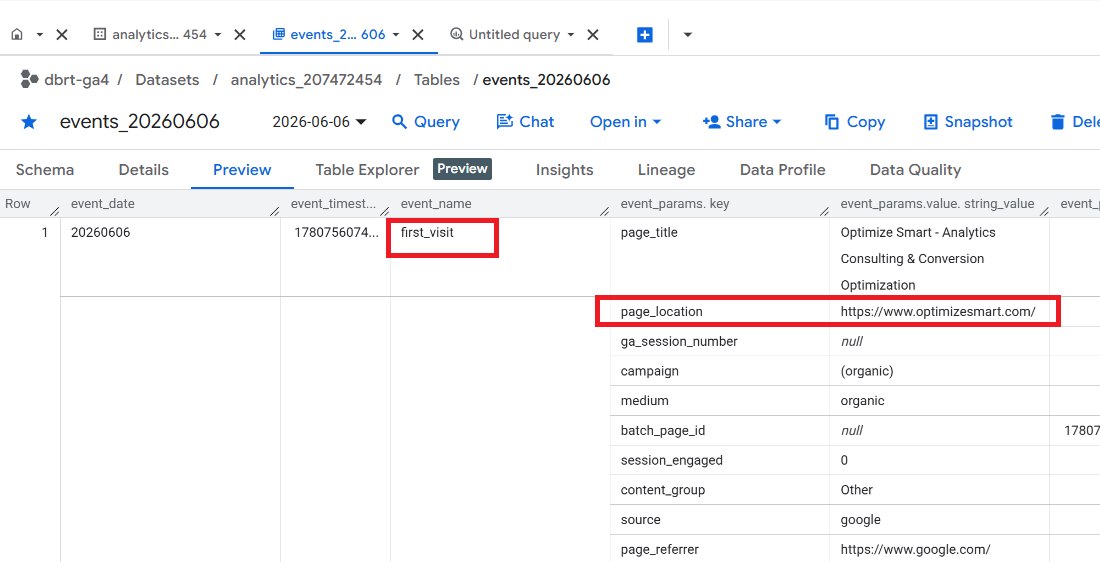

Extracting the ‘page_location’ from the key event (aka conversion event) identifies the “Last Touch” point leading to the conversion.
But if ‘page_location’ is one of the funnel pages (like shopping cart, order confirmation page, etc), then it is not really the last touch point leading to conversion.

Funnel pages are typically part of the checkout or post-decision flow, and earlier interactions often determine the user’s intent to convert. Therefore, these pages may not represent the “last meaningful touchpoint.”

In that case, you will need to retrieve the last non-funnel ‘page_location’ that leads to conversion.

Using the last non-funnel touch approach to correctly determine the last meaningful touchpoint in GA4 BigQuery.

Step-1: Maintain a list of funnel pages (e.g., /cart, /checkout, /order-confirmation).

Defining and maintaining a list of funnel pages is essential to identify and exclude them from being considered as meaningful touchpoints.


Step-2: Query the events for the same ‘user_pseudo_id’ leading up to the conversion event. Order them by ‘event_timestamp’.

The ‘user_pseudo_id’ uniquely identifies a user, and ordering events by ‘event_timestamp’ ensures that you can reconstruct the sequence of interactions.


Step-3: Skip events where ‘page_location’ is in the funnel page list.

Filtering out funnel pages prevents them from being incorrectly classified as the last meaningful touchpoint.


Step-4: Extract the most recent non-funnel ‘page_location’ before the conversion event.

By excluding funnel pages and looking at prior interactions, this approach accurately identifies the last meaningful page (‘page_location’) before the conversion.


Use the following SQL (automatically generated via a text prompt in ChatGPT) to implement these steps in BigQuery:

WITH conversion_events AS (
  -- Step 1: Extract all conversions
  SELECT
    user_pseudo_id,
    page_location AS conversion_page_location,
    event_timestamp AS conversion_time
  FROM
    `your_dataset.your_table`
  WHERE
    event_name = 'converted_xxx'
),
user_events AS (
  -- Step 2: Get all events excluding funnel pages
  SELECT
    user_pseudo_id,
    page_location AS touchpoint_page_location,
    event_timestamp
  FROM
    `your_dataset.your_table`
  WHERE
    page_location NOT IN ('/cart', '/checkout', '/order-confirmation') -- Exclude funnel pages
),
last_touch_before_conversion AS (
  -- Step 3: Find the last non-funnel touchpoint before conversion
  SELECT
    ue.user_pseudo_id,
    ue.touchpoint_page_location AS last_non_funnel_touchpoint,
    ue.event_timestamp
  FROM
    user_events ue
  JOIN
    conversion_events ce
  ON
    ue.user_pseudo_id = ce.user_pseudo_id
  WHERE
    ue.event_timestamp < ce.conversion_time
  QUALIFY ROW_NUMBER() OVER (PARTITION BY ue.user_pseudo_id ORDER BY ue.event_timestamp DESC) = 1 -- Get the last event before conversion
)
-- Combine First Touch, Last Non-Funnel Touch, and Conversion
SELECT
  ft.user_pseudo_id,
  ft.page_location AS first_touch_point,
  lt.last_non_funnel_touchpoint,
  ce.conversion_page_location
FROM
  (SELECT DISTINCT user_pseudo_id, page_location FROM `your_dataset.your_table` WHERE event_name = 'first_visit') ft
LEFT JOIN
  last_touch_before_conversion lt
ON
  ft.user_pseudo_id = lt.user_pseudo_id
LEFT JOIN
  conversion_events ce
ON
  ft.user_pseudo_id = ce.user_pseudo_id;

I am not a fan of cookie-cutter reports. But if you want one, this one could be for you.

All you have to do is supply your table ID to generate SQL that works for you.


If you want to customize this report according to your unique data analysis requirements then you need to understand the “logic” used behind calculating the various metrics in this report.

Once you understand the logic, customizing this report is easy peasy.


I teach you such logic in my GA4 BigQuery course, where you can learn to automate SQL generation via text prompts in ChatGPT.

There could be ‘N’ use cases, and it won’t be possible to provide ready-made SQL code for every possible case.

So, it is better that you understand the logic to scale SQL generation to the moon.


The future belongs to those who can query raw GA4 data in BigQuery, apply SQL logic, automate SQL generation via AI and drive insights beyond what GA4 UI can offer.
  1. How to create GA4 Site Search Tracking report in BigQuery.
  2. How to track outbound / external links in GA4 BigQuery data table.
  3. How to track GA4 BigQuery Schema Change.
  4. Stop Splitting GA4 Tables in BigQuery Keep Them Nested.
  5. How To Correctly Calculate GA4 Active Users in BigQuery.
  6. How to Calculate GA4 Engaged Users in BigQuery.
  7. Stop Chasing GA4 Backfills in BigQuery.
  8. Google Analytics 4 Scroll Tracking Report in BigQuery.
  9. Google Analytics 4 Landing Page Report in BigQuery.
  10. Google Analytics 4 Exit Page Report in BigQuery.
  11. Google Analytics 4 Landing Page Dimension in BigQuery.
  12. GA4 (not set) Landing Pages Show 0 Entrances in BigQuery.
  13. Google Analytics 4 Page Title, Page Path & Views in BigQuery
  14. Google Analytics 4 Unique Pageviews in BigQuery.
  15. Google Analytics 4 Traffic Attribution in BigQuery.
  16. Finding Real Google Analytics 4 Conversion Paths in BigQuery.
  17. Tracking Google Analytics 4 UTM Parameters in BigQuery.
  18. Tracking Google Analytics 4 AI Traffic in BigQuery.
  19. Tracking peak time for Website Traffic in GA4 BigQuery.
  20. How to Correctly Work With Google Analytics Data Types in BigQuery.