
‘event_params.source’, ‘event_params.medium’ and ‘event_params.campaign’ fields represent last-touch attribution at the event level.
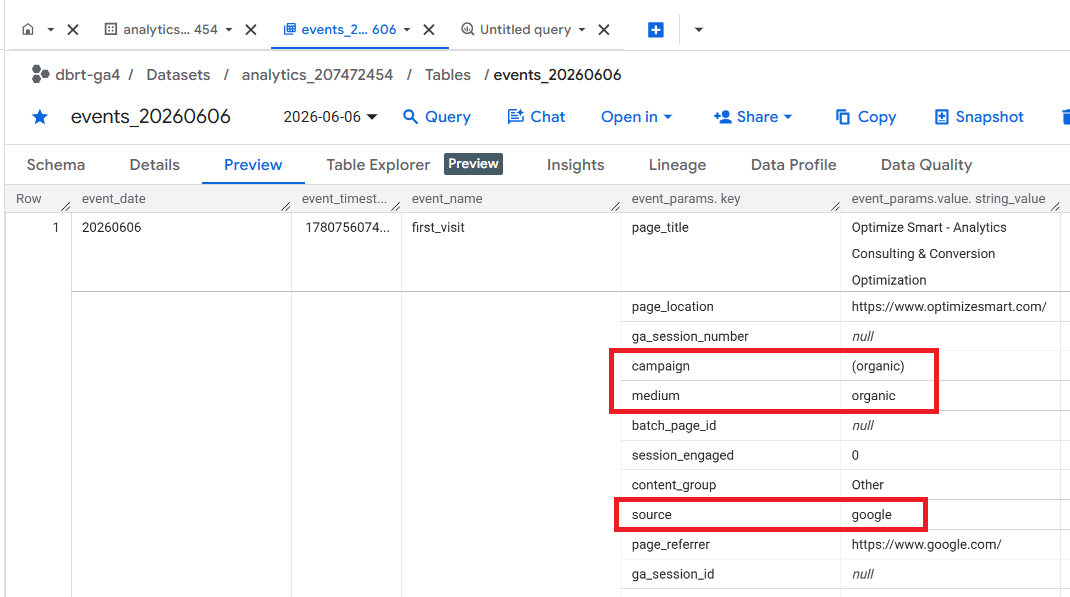
These fields do not necessarily change for every event within a session. But it could change if a new traffic source is detected mid-session.
In other words, within a session, all events inherit the same ‘event_params.source’, ‘event_params.medium’, and ‘event_params.campaign’ unless a new traffic source is detected mid-session.
Because of this reason,
The ‘event_params.source’, ‘event_params.medium’ and ‘event_params.campaign’ fields do not strictly represent last-touch attribution at the session level.
For example,
If a user visits your website via Google Ads and no new traffic source is detected mid-session, all events during that session will have ‘event_params.source’ = google and ‘event_params.medium’ = cpc.
If the same user comes back mid-session via a new traffic source, says ‘Email Newsletter’, all subsequent events of the same session will have ‘event_params.source’ = newsletter and ‘event_params.medium’ = email.
If the same user comes back again mid-session but this time directly, all subsequent events of the same session will have ‘event_params.source’ = (direct) and ‘event_params.medium’ = (none).
So, within one session:
Few events could have ‘event_params.source’ = google and ‘event_params.medium’ = cpc
Few events could have ‘event_params.source’ = newsletter and ‘event_params.medium’ = email.
And the remaining events could have ‘event_params.source’ = (direct) and ‘event_params.medium’ = (none).
GA4 User Interface (UI)/Data API uses the non-direct last touch attribution at the session level.
In GA4 UI (or GA Data API), mid-session direct traffic does not overwrite the last non-direct source.
But in the case of the GA4 BigQuery Export data table, mid-session direct traffic can overwrite the last non-direct source at the event level.
So when you aggregate the event-level data to session-level in GA4 BigQuery, all the events of the session should be manually attributed to the last non-direct traffic source (in our case, ‘Email Newsletter’) and stored in calculated fields.
However, the individual events would continue to retain their original ‘event_params.source’, ‘event_params.medium’ and ‘event_params.campaign’ values.
Traffic attribution is not the same as Conversion Attribution.
It’s important to note that session-level traffic attribution is different from conversion attribution. Here, I am referring to traffic attribution and not conversion attribution.
Session-level traffic attribution determines which traffic source gets credit for the session. Whereas, conversion attribution determines which traffic source gets credit for conversion events.
For conversion attribution, GA4 UI uses last click or data-driven attribution, which may handle direct traffic differently.
------------------------------
Enrol in my GA4 BigQuery course to automate SQL generation for attribution modelling in BigQuery. Skip wrestling with SQL and focus on the logic.

Related Articles:
- How to create GA4 Site Search Tracking report in BigQuery.
- How to track outbound / external links in GA4 BigQuery data table.
- How to track GA4 BigQuery Schema Change.
- Stop Splitting GA4 Tables in BigQuery Keep Them Nested.
- How To Correctly Calculate GA4 Active Users in BigQuery.
- How to Calculate GA4 Engaged Users in BigQuery.
- Stop Chasing GA4 Backfills in BigQuery.
- Google Analytics 4 Scroll Tracking Report in BigQuery.
- Google Analytics 4 Landing Page Report in BigQuery.
- Google Analytics 4 Exit Page Report in BigQuery.
- Google Analytics 4 Landing Page Dimension in BigQuery.
- GA4 (not set) Landing Pages Show 0 Entrances in BigQuery.
- Google Analytics 4 Page Title, Page Path & Views in BigQuery
- Google Analytics 4 Unique Pageviews in BigQuery.
- Google Analytics 4 Traffic Attribution in BigQuery.
- Finding Real Google Analytics 4 Conversion Paths in BigQuery.
- Tracking Google Analytics 4 UTM Parameters in BigQuery.
- Tracking Google Analytics 4 AI Traffic in BigQuery.
- Tracking peak time for Website Traffic in GA4 BigQuery.
- How to Correctly Work With Google Analytics Data Types in BigQuery.