

Google has moved the Measurement Protocol into maintenance mode. No new features are planned for it. If you send server-side events to GA4 this way, nothing breaks today. But your integration will not improve from here.
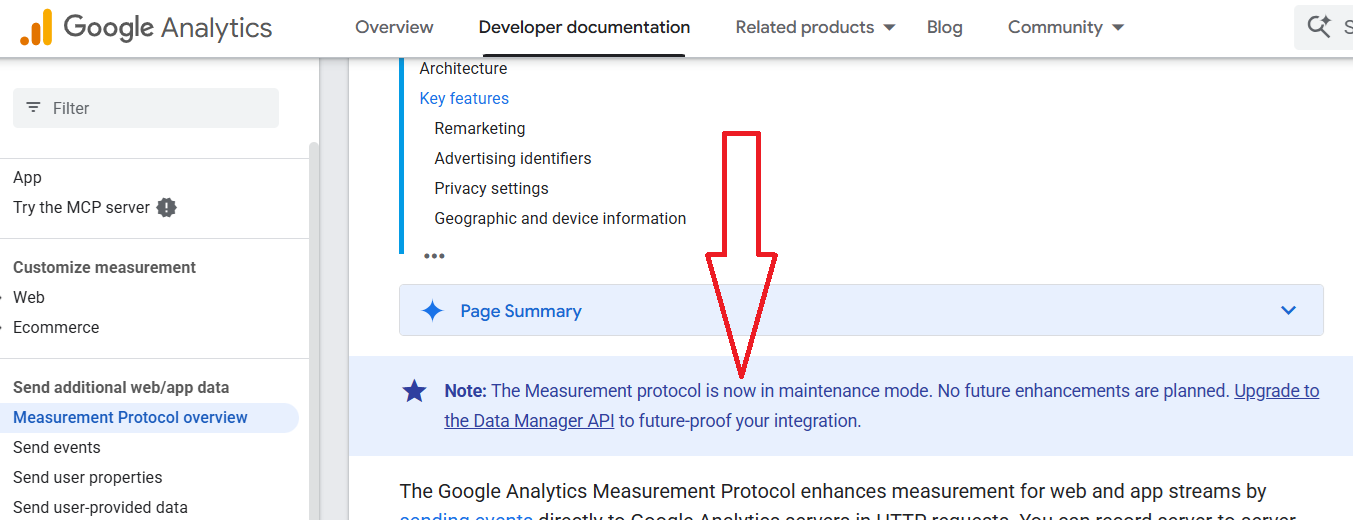
The replacement is the Data Manager API.
Here is what changes and how to move across.
What do you gain by upgrading?
- The Data Manager API uses one unified data model across all Google advertising products. The Measurement Protocol is tied to Google Analytics alone.
- The Data Manager API supports Encryption. The Measurement Protocol does not.
- One Data Manager API request can send events to multiple destinations. The Measurement Protocol sends to a single data stream per request.
- The Data Manager API does not need an API secret. The Measurement Protocol requires it.
The prerequisites.
Before you send anything, you need a project, credentials and account access.
Check the prerequisites:
- A Google Cloud project. Both new and existing work.
- A Google Account with the serviceusage.services.enable permission. Both the Owner and Service Usage Admin roles include it.
- The Google Cloud CLI is installed.
Then enable the Data Manager API in your Google Cloud project.
Next, authenticate.
You can use a user account or a service account.
The user account route uses Application Default Credentials, so your code automatically finds the credentials.
The steps are:
- Configure the Google Auth Platform branding settings for your project.
- Add the Data Manager API scope under Data Access, then set the publishing status and user type under Audience. The scope is sensitive, so any app that obtains user credentials for it must pass Google OAuth verification.
- Create a Desktop OAuth2 client and download the client configuration.
- Run gcloud auth application-default login with the datamanager and cloud-platform scopes, pointing at the client JSON file.
- Confirm it worked with gcloud auth application-default print-access-token. A successful run prints an access token.
Service accounts follow a similar path but use impersonation rather than keys, which is the safer option for unattended jobs.
Finally, grant access to the destination. For GA4, add the email of the operating account to your Google Analytics property.
With access in place, the migration itself is short.
- Install a client library.
- Convert your existing requests using the field mappings reference.
- Send your events to your GA4 property through the Data Manager API.
- Verify the results. Use the diagnostics tool, or check the Realtime report and DebugView inside GA4.
The bigger reason to move.
The Data Manager API lets you send audience and conversion data to multiple Google advertising products in a single call. It also supports confidential matching and encryption.
That is the real shift. You stop maintaining a Google Analytics-only pipe and start running one feed into the wider Google advertising stack.
If you collect server-side data, plan the upgrade now while the old path still works. Migrations are easier before a deadline forces them.

Further reading:
- Upgrade from Measurement Protocol to the Data Manager API.
- Here's how to set up access to the Data Manager API with an SDK or REST.
- Use the mappings in the tables to map a Measurement Protocol data collection request (/mp/collect) to its IngestEventsRequest equivalent in the Data Manager API.
- Work through this guide to get familiar with the process of sending events with the Data Manager API.
Other Articles on GA4.
- Google Analytics 4 often report inflated conversion counts by default.
- The Best Reporting Identity for Google Analytics 4.
- 'Days to key events' metric in Google Analytics 4.
- Advertising Reports in Google Analytics 4.
- Google Analytics 4 Data Delays Guidelines.
- Data deletion requests in Google Analytics 4 (GA4).
- How to Mix GA4 Dimensions & Metrics of Different Scopes?
- The best platform for GTM Server Side Tagging.
- Use the Data Manager API instead of the Measurement Protocol.
- utm_id (Campaign ID) in Google Analytics 4.
- utm_source (campaign traffic source) in Google Analytics 4.
- utm_medium (campaign traffic medium) in Google Analytics 4.
- utm_campaign (campaign name) in Google Analytics 4.
- utm_term (campaign term) in Google Analytics 4.
- utm_content (campaign content) in Google Analytics 4.
- utm_source_platform in Google Analytics 4.
- utm_campaign_id in Google Analytics 4.
- utm_creative_format in Google Analytics 4.
- utm_marketing_tactic in Google Analytics 4.
- Filter Google Analytics 4 Reports by UTM Parameters.