

Should you wait for 24 hrs, 3 days, 7 days or 12 days before analysing and reporting on your GA4 data?
The wait time largely depends on your current tracking setup and the number and type of data sources you use along with GA4.
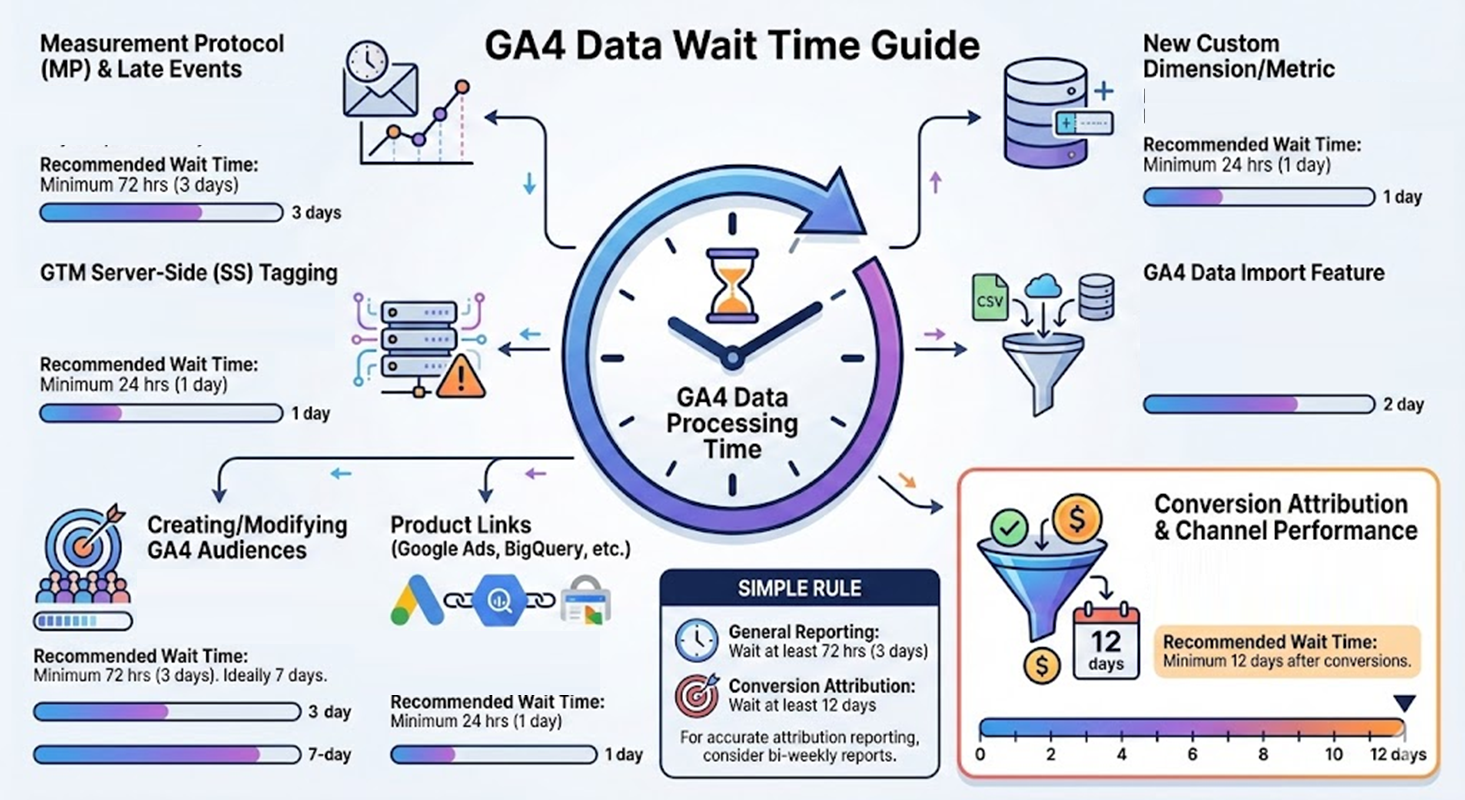
If you use Measurement Protocol (MP).
MP allows sending events retroactively (up to 72 hours /3 days after event time). Such events are called 'late events' as they are not sent immediately.
That means it may take up to 3 full days for data to be fully processed and available in your GA4 reports when using MP.
Recommended wait time before analysis: Minimum 72 hrs (3 days).
If you use GTM Server-Side (SS) Tagging.
SS tagging can delay data processing, especially if your server is experiencing high traffic or latency.
In such cases, data might not be available in GA4 reports immediately, and you could temporarily see (not set) values.
Recommended wait time before analysis: Minimum 24 hrs (1 day), depending on your server health.
If you recently added a new custom dimension/metric.
You may see a value of (not set) for a custom dimension during the first 24 hours after its creation.
Recommended wait time before analysis: Minimum 24 hrs (1 day) for reports that include the new custom dimension/metric.
You use the GA4 data import feature.
If you use the GA4 data import feature to enrich your data, it can take time for the imported data to be processed and integrated with your standard event data.
Recommended wait time before analysis: Minimum 48 hrs (2 days), depending on the nature and volume of the import.
Creating/Modifying GA4 Audiences.
Building and populating audiences, especially with more complex criteria, is usually not instantaneous.
It can take time for all users to be evaluated against the criteria of new or modified audiences.
Recommended wait time before analysis: Minimum 72 hrs (3 days) from the time you first created/modified your audience. Ideally, wait 7 days.
You recently connected GA4 to a product (like Google Ads, BigQuery, Search Console, etc.).
Recommended wait time before analysis: Minimum 24 hrs (1 day) from the time you first linked a product to your GA4 property.
Conversion Attribution and Channel Performance Analysis.
In GA4, attributed conversion data for each channel can be updated for up to 12 days after the conversion ('Key event') is recorded.
Recommended wait time before analysis: Minimum 12 days after conversions are recorded.
Recommended wait time before analysis for all other cases: Minimum 24 hrs.
If you want a simple rule:
Do not analyze or report on GA4 data that is less than 72 hours (3 days) old for general reporting.
For conversion attribution or channel performance, wait at least 12 days after conversions are recorded for the most accurate results.
So, if you want to report on conversion attribution, send bi-weekly reports instead of weekly reports.

Other Articles on GA4.
- Google Analytics 4 Migration Checklist - Upgrade to GA4.
- How to Install Google Analytics 4 on Shopify.
- How to link Google Analytics 4 with AdSense.
- Google Analytics 4 Subproperties Tutorial.
- How to connect Google Analytics 4 with Google Data Studio.
- Advertising Snapshot in Google Analytics 4 (GA4).
- Manage automatic event detection in Google Analytics 4.
- How to use Google Analytics 4 Event Builder.
- Is Safari Undermining Your GTM Server-Side Tagging?
- Guide to Google First Party Mode.
- You Can’t Really Trust Google Analytics 4 Engagement Metrics.
- Google Analytics 4 Metrics Tutorial.
- Google Analytics 4 Custom Metrics Tutorial.
- Don't Configure Google Tag via GTM, Google Ads and GA4.
- Retargeting Audiences in GA4 For Ecommerce Websites.
- Google Analytics 4 often report inflated conversion counts by default.
- The Best Reporting Identity for Google Analytics 4.
- 'Days to key events' metric in Google Analytics 4.
- Advertising Reports in Google Analytics 4.
- Google Analytics 4 Data Delays Guidelines.