

‘utm_source’ is key of a UTM parameter which is used to send information related to the traffic source of a custom campaign to Google Analytics 4.
Its value should be something which denotes the traffic source (i.e. the origin of the traffic).
The traffic source can be system-defined or user-defined.
A System defined traffic source is the one which Google Analytics already recognize as the known source of traffic.
The following are examples of system-defined traffic sources:
- bing
- yahoo
- twitter.com
- m.facebook.com
- t.co etc
When you use a system defined traffic source as the value for your ‘utm_source’ key, Google may group the traffic from custom campaign(s) with one of the system defined traffic source.
For example, consider the following URL:
https://www.abc.com/?utm_source=google&utm_medium=organic&utm_term=car-insurance&utm_content=text-ad&utm_campaign=car-insurance-promo-feb
Here,
The value of utm_source is ‘google’. That means the traffic source is ‘google’.
The value of utm_medium is ‘organic’. That means the traffic medium is ‘organic’.
Google Analytics will report this traffic as:
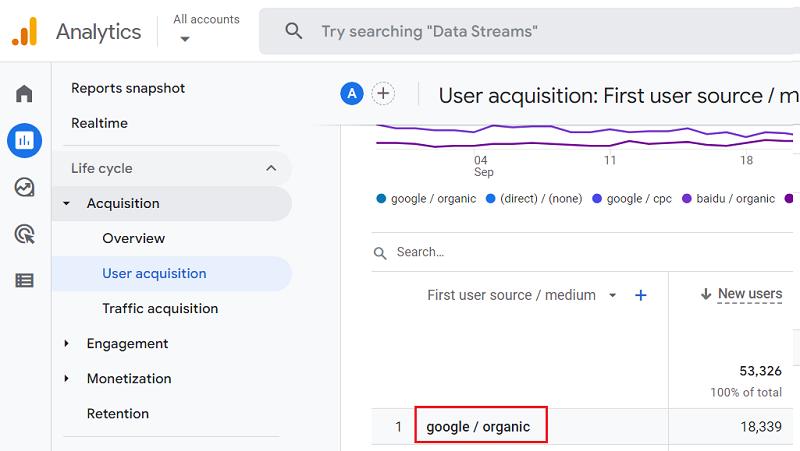
So Google Analytics will include the traffic from this campaign in Google Organic Search.
All system defined traffic sources in GA4 are (by default) in lowercase and case sensitive.
So for Google Analytics, the traffic source ‘google’ is different from ‘Google’.
Once you change the case /spelling of a system defined traffic source, it becomes a user defined traffic source and is reported separately by Google Analytics.
For example, consider the following URL:
https://www.abc.com/?utm_source=Google&utm_medium=organic&utm_term=car-insurance&utm_content=text-ad&utm_campaign=car-insurance-promo-feb
Here, the traffic source is ‘Google’ (and not ‘google’), and the medium is ‘organic’.
So Google Analytics will report the traffic from this custom campaign like the one below:
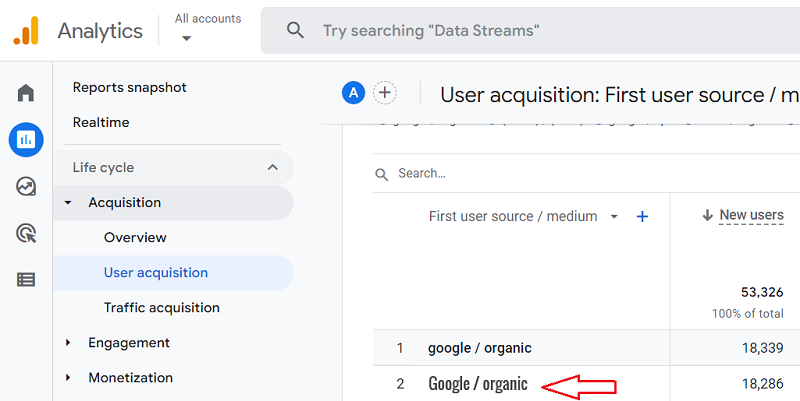
So,
If you are planning to use a system-defined traffic source as the value of the ‘utm_source’ key, then be very careful about how you spell the traffic source name and what case (lowercase, uppercase, camelcase) you use.
One small mistake and your system-defined traffic source will be treated as a user-defined traffic source by GA.
A user defined traffic source is the one which is defined by people like me and you and which is by default, not recognized by Google Analytics.
For example, consider the following URL:
https://www.abc.com/best-seo-contract-in-the-world/?utm_source=facebook+campaign&utm_medium=social&utm_campaign=seo+contract
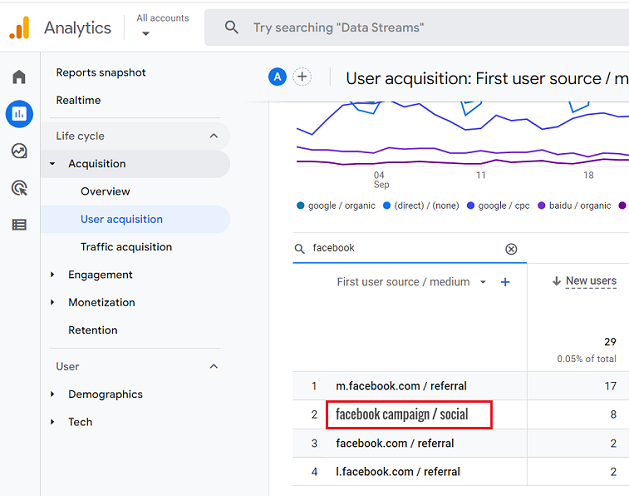
Here, ‘facebook+campaign’ is a user-defined traffic source.
Here is how GA will report on this traffic source:
Note: You can use white spaces to separate two or more words in the values of UTM parameters.
Just make sure that you use + instead of a single white space while building the custom campaign.
Generally, the domain name which is expected to refer traffic to your website is used as the value for ‘utm_source’.
So if you are expecting to get traffic from Facebook (as you are running Facebook ads), you can use ‘facebook’ as the value of ‘utm_source’.
Example:
utm_source=facebook
Similarly,
If you are expecting to get traffic from Twitter (as you are running Twitter ads), you can use ‘twitter’ as the value of ‘utm_source’.
Example:
utm_source=twitter
Technically speaking, you can use any number, text or combination of ‘number and text’ as the value for the ‘utm_source’ key:
Where can you find the values of the ‘utm_source’ key in GA4?
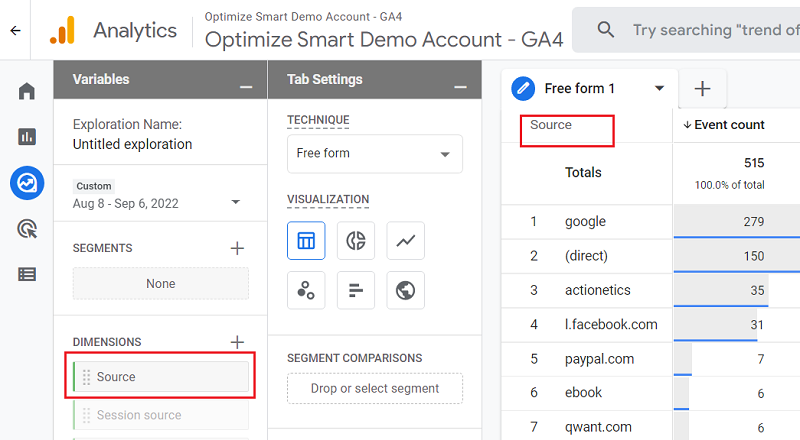
You can see the values of the ‘utm_source’ key in GA4 through the following dimensions:
- Source
- First user source
- Session source
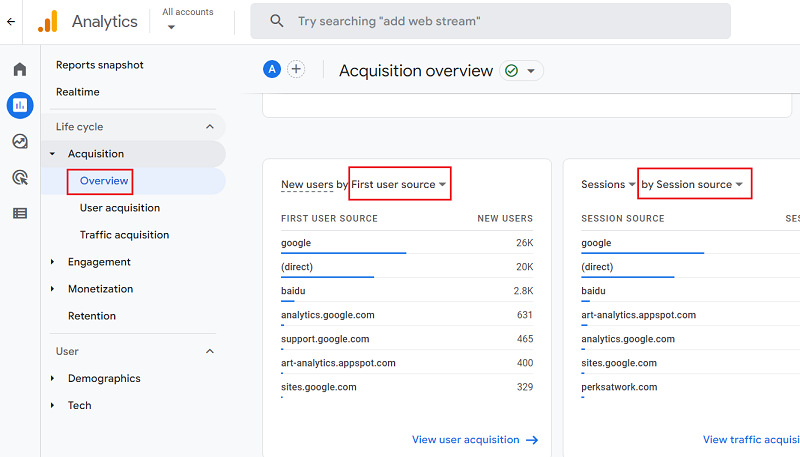
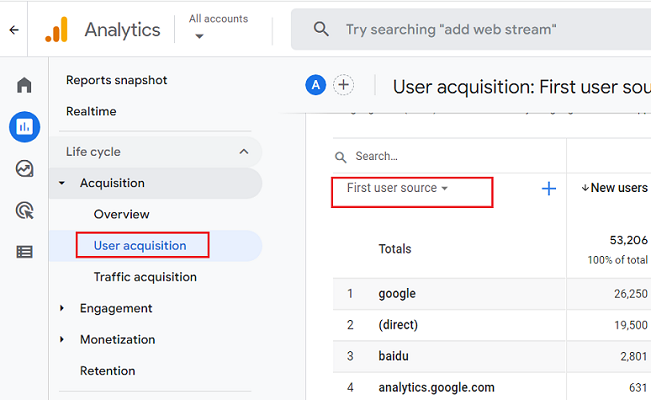
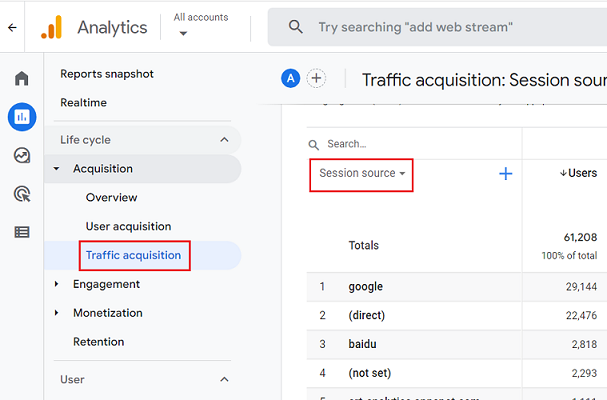
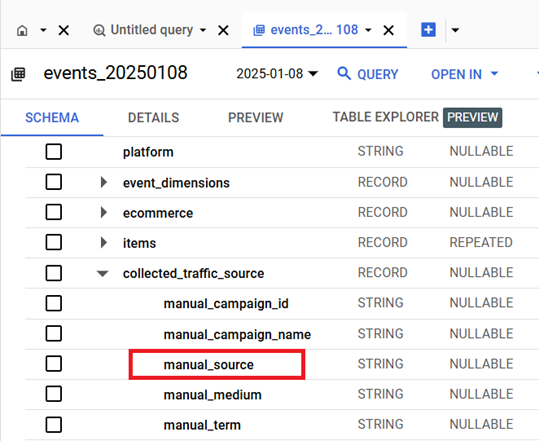
Where can you find the value of the ‘utm_source’ key in GA4 BigQuery?
You can find the value of the ‘utm_source’ key in GA4 BigQuery via the ‘manual_source‘ field under ‘collected_traffic_source‘:

Other Articles on GA4.
- Google Analytics 4 often report inflated conversion counts by default.
- The Best Reporting Identity for Google Analytics 4.
- 'Days to key events' metric in Google Analytics 4.
- Advertising Reports in Google Analytics 4.
- Google Analytics 4 Data Delays Guidelines.
- Data deletion requests in Google Analytics 4 (GA4).
- How to Mix GA4 Dimensions & Metrics of Different Scopes?
- The best platform for GTM Server Side Tagging.
- Use the Data Manager API instead of the Measurement Protocol.
- utm_id (Campaign ID) in Google Analytics 4.
- utm_source (campaign traffic source) in Google Analytics 4.
- utm_medium (campaign traffic medium) in Google Analytics 4.
- utm_campaign (campaign name) in Google Analytics 4.
- utm_term (campaign term) in Google Analytics 4.
- utm_content (campaign content) in Google Analytics 4.
- utm_source_platform in Google Analytics 4.
- utm_campaign_id in Google Analytics 4.
- utm_creative_format in Google Analytics 4.
- utm_marketing_tactic in Google Analytics 4.
- Filter Google Analytics 4 Reports by UTM Parameters.