

When your GA4 property uses a reporting identity setting other than "Blended", it can underreport conversions, transactions, and revenue.
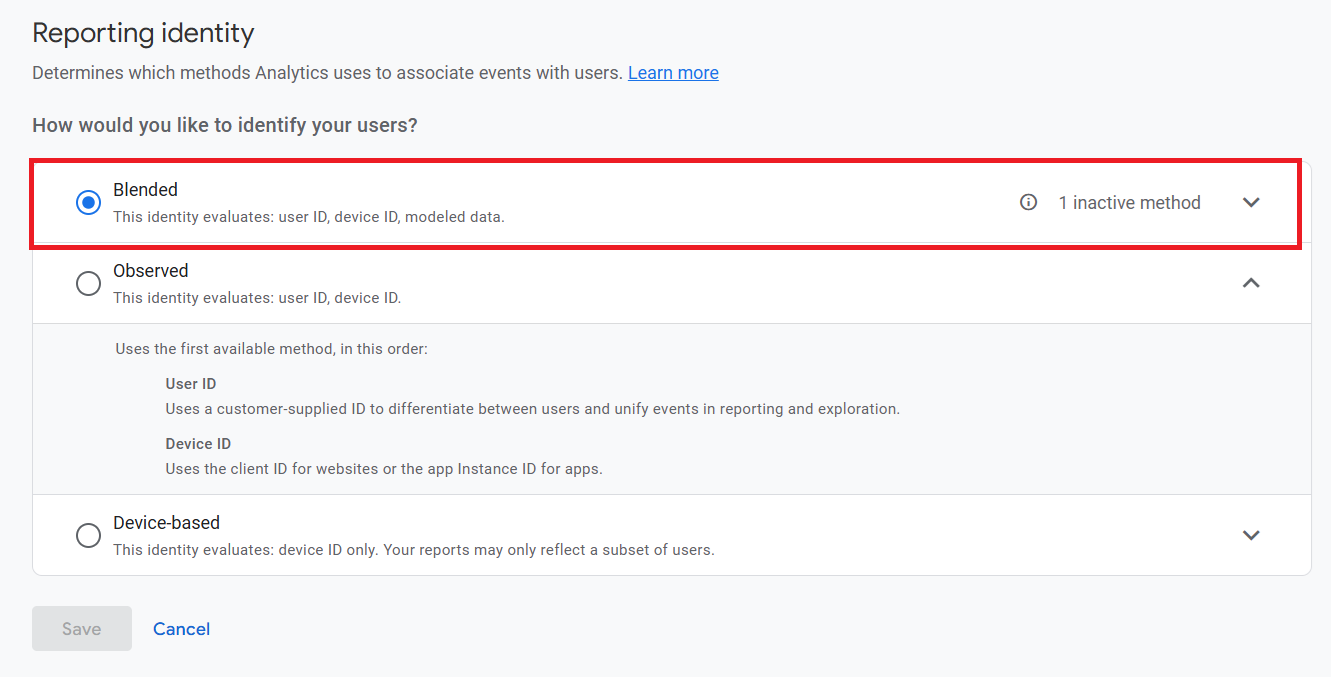
This underreporting also affects the data imported into Google Ads, potentially reducing the visibility of key user actions.
GA4's "Blended" reporting identity uses a combination of user ID, Google signals (if enabled), device ID (client ID for websites or the app Instance ID for apps) and conversion/behavioral modeling data for users who do not consent to tracking.
In contrast, non-blended identities (‘observed’ and ‘device-based’) do not use modelled data, meaning they rely solely on observed behaviour from consented users.
As a result, when a user declines cookies or does not provide consent, their activity (such as product views or purchases) is not recorded in GA4 under non-blended settings.
This could lead to underreported e-commerce metrics and can skew your understanding of user behaviour and sales performance.
Since conversions from non-consented users are missing, your GA4 reports will likely show lower revenue and fewer conversions than actually occurred.
These missing conversions cannot be imported into Google Ads, further reducing the accuracy of bidding strategies, return on ad spend calculations, and overall campaign performance.
The "Blended" identity helps close these data gaps by using machine learning to model the behavior of untracked users based on similar tracked users.
These modeled conversions are included in GA4 reporting and conversion exports to Google Ads.
Attribution and conversion modeling aren't affected by this setting?
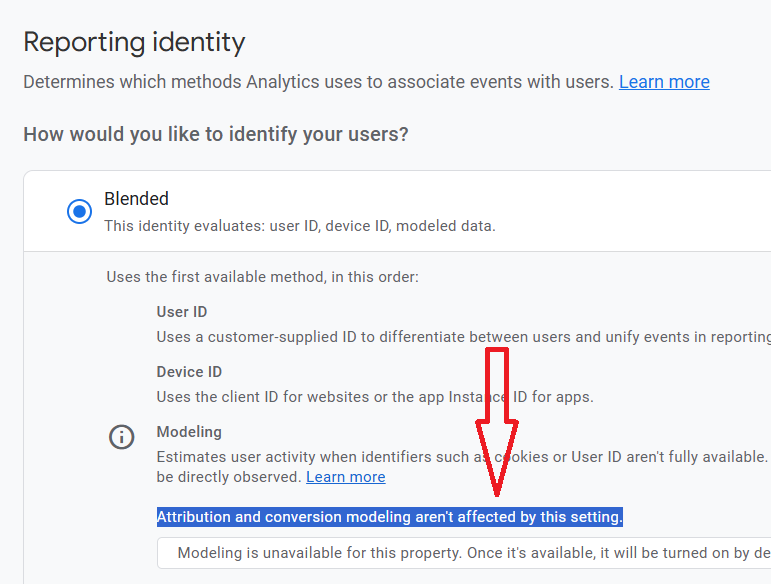
The UI text is technically incorrect.
What Google is trying to say here is that the attribution models (data‑driven, last click, etc.) and the machine‑learning models for filling gaps don’t change their logic just because you switch between Blended, Observed, or Device‑based reporting identity.
But even if the algorithms stay the same, the reporting identity setting controls which data actually appears in your reports.
With Blended, GA4 is allowed to surface modeled data alongside observed data (when your property is eligible), so your reported users, conversions, and revenue can include modeled contributions.
With Observed or Device‑based, GA4 hides modeled data and only shows consented, observable users, so those same reports will show lower numbers.
So from a practitioner’s standpoint, the setting clearly does affect the attribution and conversion numbers you see, because it decides whether the model outputs are included in the dataset being attributed.
The statement in the UI may be defensible in a very narrow technical sense (the math engine doesn’t change), but in terms of what matters for analysis and decision‑making, it’s incomplete and arguably misleading.
FAQ: If my GA4 property is not eligible for modelled data, should I still use blended reporting identity?
Yes, Blended is still the best default even when your GA4 property is not yet eligible for modeled data.
Blended allows modeled data to be shown when modeling is available.
When modeling is unavailable, Blended simply falls back to User‑ID, Google signals, and device ID; in other words, it behaves like an “observed‑only” identity and does not harm data quality.
Using Blended reporting identity now means that if you later implement Advanced Consent Mode correctly and cross Google’s volume/quality thresholds for data modelling, modeled data can start appearing automatically in your GA4 reports, without you having to change the setting manually.
Google may or may not warn you to enable blended reporting identity.
GA4 does not always show the “Excluding estimated user data” card, even when you are not using Blended.
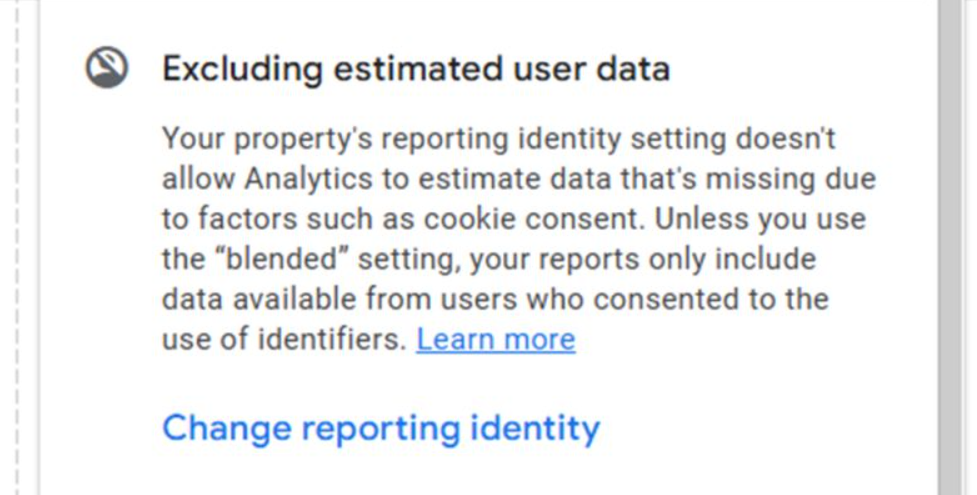
The absence of that warning does not guarantee that Blended is enabled or that you are seeing modeled data; it only means Google chose not to surface that specific hint in that view.
For a reliable setup, you should explicitly check and set the reporting identity to Blended.
Recommendation:
Always use the "Blended" reporting identity to ensure that GA4 provides the complete data possible, especially for e-commerce tracking and that Google Ads has access to all eligible conversions (including modelled ones).
Note: GA4 does not import modelled data to BigQuery. So any change in reporting identity does not impact the GA4 data in BigQuery. The modeled users/conversions exist only in the GA4 UI (and in some downstream products like Google Ads), not in the event tables you see in BigQuery.

Other Articles on GA4.
- Google Analytics 4 Migration Checklist - Upgrade to GA4.
- How to Install Google Analytics 4 on Shopify.
- How to link Google Analytics 4 with AdSense.
- Google Analytics 4 Subproperties Tutorial.
- How to connect Google Analytics 4 with Google Data Studio.
- Advertising Snapshot in Google Analytics 4 (GA4).
- Manage automatic event detection in Google Analytics 4.
- How to use Google Analytics 4 Event Builder.
- Is Safari Undermining Your GTM Server-Side Tagging?
- Guide to Google First Party Mode.
- You Can’t Really Trust Google Analytics 4 Engagement Metrics.
- Google Analytics 4 Metrics Tutorial.
- Google Analytics 4 Custom Metrics Tutorial.
- Don't Configure Google Tag via GTM, Google Ads and GA4.
- Retargeting Audiences in GA4 For Ecommerce Websites.
- Google Analytics 4 often report inflated conversion counts by default.
- The Best Reporting Identity for Google Analytics 4.
- 'Days to key events' metric in Google Analytics 4.
- Advertising Reports in Google Analytics 4.
- Google Analytics 4 Data Delays Guidelines.