

Learn what to expect when comparing GA4 vs Universal Analytics (GA3) data.
After setting up Google Analytics 4, you might be interested in comparing its reported data with that of your Universal Analytics property.
This article outlines the limitations and possibilities of comparing data between Universal Analytics and GA4.
Why should you compare GA4 vs Universal Analytics data?
You probably know that both Universal Analytics and GA4 use different data models.
Universal Analytics data model is based on sessions and pageviews. In contrast, the GA4 data model is based on events and parameters.
Thus, both Universal Analytics and GA4 can collect, process, and report the same data differently.
However, that should not stop you from comparing Universal Analytics and GA4 data.
It is a good practice to do such comparisons.
The following are the main benefits of comparing GA4 and Universal Analytics data:
- You can quickly detect feature gaps between the two platforms.
- You can explain data discrepancies between GA4 and Universal Analytics to your client/boss.
- You learn a lot about how GA4 works.
1) You can quickly detect feature gaps between the two platforms.
Identifying what is available in one version but not the other helps you decide what additional configurations are necessary for GA4.
2) You can explain data discrepancies between GA4 and Universal Analytics to your client/boss.
Comparing GA4 and Universal Analytics data equips you with the information needed to explain discrepancies between the two platforms to clients or higher-ups.
Articulating why the numbers differ, whether due to different tracking methods, new features, or data interpretation, adds credibility to your analytics process.
It can also help set proper expectations for data reporting and decision-making.
You don’t look like a fool in front of your client/boss when they ask you why the reports and metrics are not matching.
Even if you choose not to compare GA4 and Universal Analytics data, the decision-makers will likely do such a comparison and ask you questions about data discrepancies.
So, it is in your best interest to do such a comparison and improve your understanding of GA4.
3) You learn a lot about how GA4 works.
You can learn a lot about how GA4 works by comparing GA4 and Universal Analytics data.
Such comparison would help you in data interpretation and reporting in the following ways:
#1 Knowing how dimensions and metrics are defined differently in each platform ensures you are comparing like-for-like, avoiding misinterpretations.
#2 GA4’s event-based model is different from Universal Analytics’s session-based model. Understanding this difference will help you track and report user interactions more effectively.
#3 Being familiar with both platforms enables you to identify data anomalies, ensuring report accuracy quickly.
#4 Knowing the strengths and weaknesses of each platform helps you evaluate the quality and reliability of the data you’re reporting.
#5 GA4 handles conversions differently, so understanding this will improve your reporting on key performance indicators (KPIs).
#6 GA4 has different data retention and privacy settings. Knowing these can ensure your data collection and reporting comply with GDPR and other privacy laws.
Following are the 35 key differences between Google Analytics 4 (GA4) and Universal Analytics (GA3).
- GA4 vs Universal Analytics Reporting interface.
- GA4 Measurement model vs Universal Analytics Measurement model.
- Measurement ID vs Tracking IDs.
- Views vs Data Streams.
- GA4 vs Universal Analytics Event tracking setup.
- GA4 Event tracking automation.
- GA4 vs Universal Analytics User and event data retention.
- GA4 Ecommerce reports vs Universal Analytics Ecommerce reports.
- GA4 vs Universal Analytics Cross-device and cross-platform tracking.
- GA4 Attribution modelling Reports vs Universal Analytics Attribution modelling Reports.
- GA4 Custom dimensions vs Universal Analytics Custom dimensions.
- GA4 Custom metrics vs Universal Analytics Custom metrics.
- GA4 Debugging vs Universal Analytics Debugging.
- GA4 Engagement metrics vs Universal Analytics Engagement metrics.
- GA4 IP anonymization vs Universal Analytics IP anonymization.
- GA4 Reporting Views vs Universal Analytics Reporting views.
- GA4 BigQuery vs Universal Analytics BigQuery.
- GA4 events vs Universal Analytics hits.
- GA4 events vs Universal Analytics events.
- GA4 pageviews vs Universal Analytics pageviews.
- GA4 Sessions vs Universal Analytics Sessions.
- GA4 Session count vs Universal Analytics Session count.
- GA4 user counts vs Universal Analytics user counts.
- GA4 spam prevention vs Universal Analytics spam prevention.
- GA4 Explorations Reports vs Universal Analytics Explorations Reports.
- GA4 provides the ability to create conversions that satisfy multiple conditions.
- GA4 Content Grouping vs Universal Analytics Content Grouping.
- GA4 Users vs Universal Analytics Users.
- GA4 User ID vs Universal Analytics User ID.
- GA4 Client ID vs Universal Analytics Client ID.
- GA4 Funnels vs Universal Analytics Funnels.
- GA4 Conversion Count vs Universal Analytics Conversion count.
- GA4 purchase count vs Universal Analytics purchase count.
- GA4 Segments vs Universal Analytics Segments.
- Bounce Rate vs Engagement Rate.
#1 GA4 vs Universal Analytics Reporting interface.
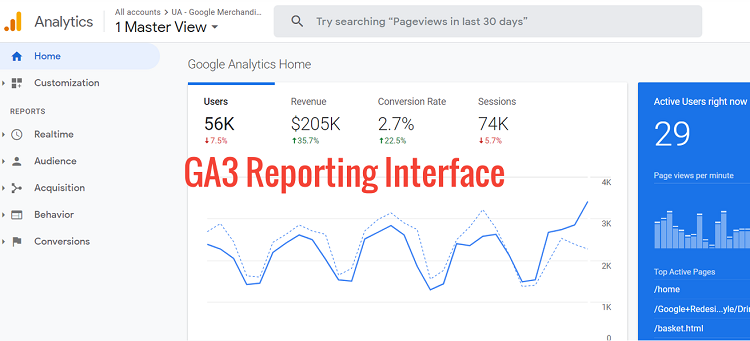
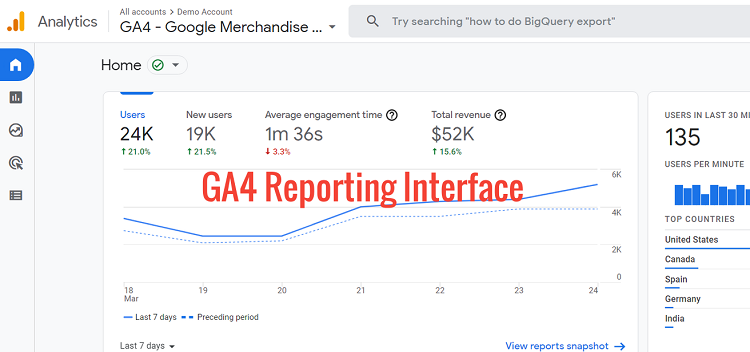
At first glance, the GA4 reporting view may look intimidating as many of the reports and metrics you are familiar with are not there. They have either been removed or replaced.
Businesses should not expect to see the same reports that were available in Universal Analytics since GA4 is based on a different measurement model.
You will see different sets of reports in your GA4 view, and you will not see many reports.
This is because many reports are only generated when you start tracking events.
The reporting interface of the GA4 view looks similar to that of Google Analytics for Firebase (because GA4 is built on Firebase analytics). But it is quite different from any Universal Analytics reporting view.
#2 GA4 Measurement model vs Universal Analytics Measurement model.
GA3 (aka Universal Analytics) uses the measurement model, which is based on sessions and pageviews.
GA4 uses the measurement model, which is based on events and parameters.
In GA4 even a ‘pageview’ is considered an event.
Every tracked activity taken by a user in GA4 is considered an event, and these events can provide much more detailed information.
Let’s say we are tracking ‘pageview’ as an event in GA4. This GA4 event would also have additional information attached to it, like the title of the page, user location, etc.
#3 Measurement ID vs Tracking IDs.
To set up any type of tracking in GA4 via GTM (Google Tag Manager), we use the measurement ID.
Whereas we use the tracking ID to set up tracking in Universal Analytics via GTM.
If you have set up a GA4 property with a web data stream, then your measurement ID begins with the characters ‘G-’.
For example, G-PSW1MY7HB4
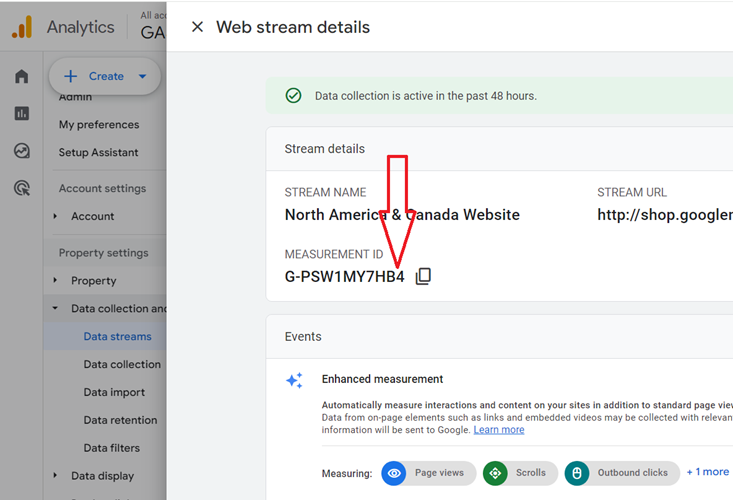
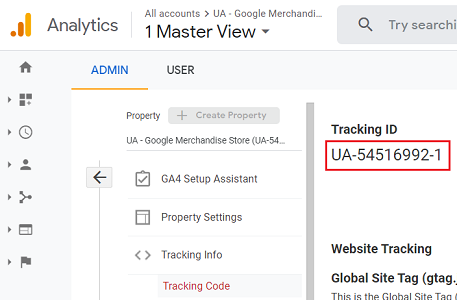
If you have set up a Universal Analytics property then it uses the tracking ID (and not measurement ID) and this tracking ID begins with characters ‘UA-‘.
, For example, UA-54516992-1
#4 Views vs Data Streams.
In Universal Analytics, you get the option to create different reporting views.
In GA4, there are no reporting views. Instead, there are data streams.
A data stream is data collection from a single source, such as a website or an app.
You can create multiple data streams in GA4, each for a different data source.
This allows you to track data from different sources separately.
For example, you could create one data stream for your website and another for your app.
Data streams are similar to reporting views in Universal Analytics, allowing you to organize and filter data.
However, data streams are more flexible than views. For example, you can create data streams for different devices and platforms.
#5 GA4 vs Universal Analytics Event tracking setup.
The events are tracked differently in GA4 than in Universal Analytics.
When you are using Universal Analytics, all the tracked events must follow the category-action-label-value schema:
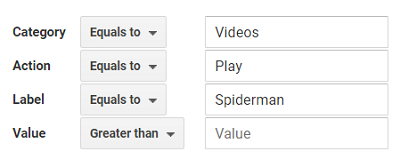
This is not the case with GA4, which provides a more flexible event tracking setup.
In the case of GA4, additional information is supplied to an event via parameters:
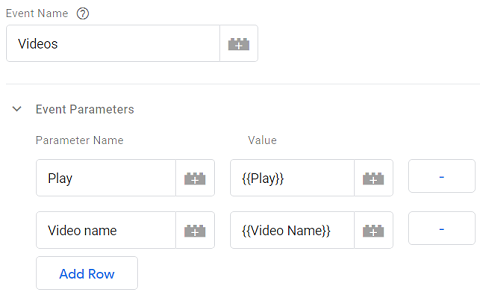
In GA4, there are no event categories, actions, or labels. Instead, there are four categories of events:
Out of the above four event categories, automatically collected and enhancement measurement events do not require code changes on the page or app.
This means that you can start collecting data from these events without making any changes to your website or app code.
#6 GA4 Event tracking automation.
A GA4 property has the ‘enhanced measurement‘ feature built-in, which allows automatic tracking for certain types of events without any additional coding/tagging:
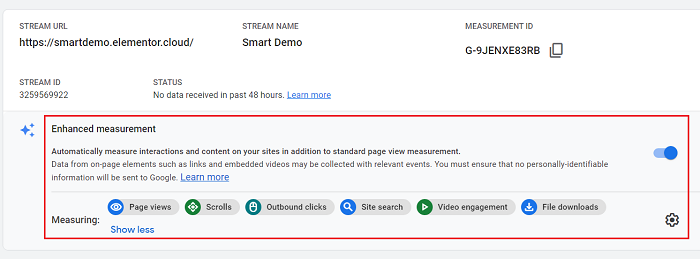
You can automate the following types of events in GA4:
- Scroll tracking.
- Outbound clicks (aka exit tracking).
- Site Search tracking.
- Video engagement (aka video tracking).
- Tracking file downloads.
This is something that is not possible with Universal Analytics.
Both automatically collected events and enhancement measurement events do not require any code changes.
Such events will be automatically captured if the page you are looking to track has gtag.js implemented.
However, the following two GA4 event categories require code changes to the app or web.
- Recommended events
- Custom events
Recommended events have predefined names and parameters and are used for specific business verticals like retail and ecommerce, travel, games, jobs, and real estate.
Custom events are implemented by people like you and me.
#7 GA4 vs Universal Analytics User and event data retention.
Through the ‘User and event data retention’ feature, you can set the amount of time for which Google Analytics retains user-specific data for an inactive website user before automatically deleting it.
The user-specific data is the data that is associated with cookies, user identifiers, or advertising identifiers.
In the case of Universal Analytics, you can set the amount of time to one of the following:
- 14 months
- 26 months
- 38 months
- 50 months or
- Do not automatically expire
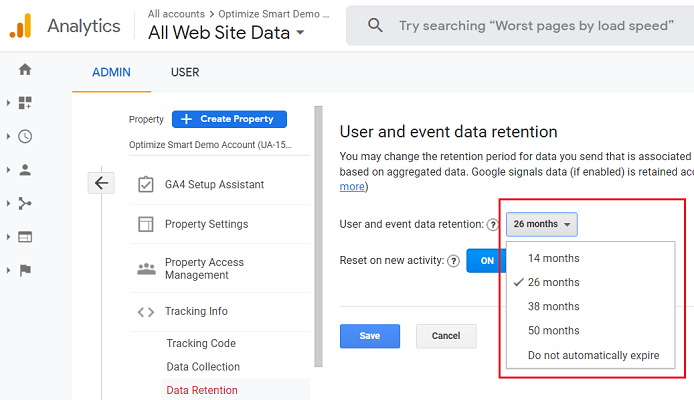
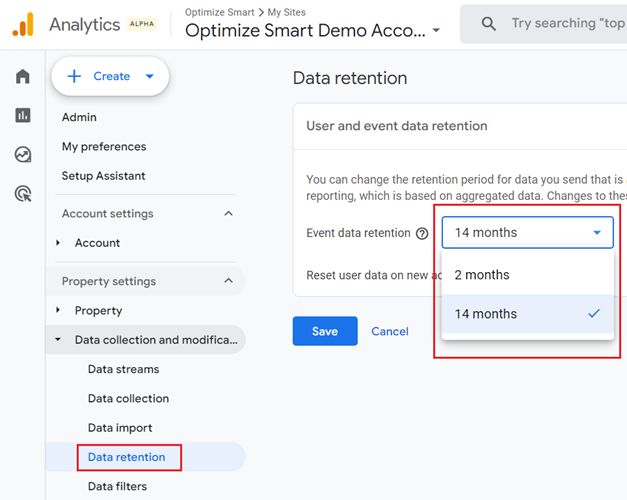
In the case of GA4, you can set the amount of time to either two months or 14 months.
There are no other options available:
#8 GA4 Ecommerce reports vs Universal Analytics Ecommerce reports.
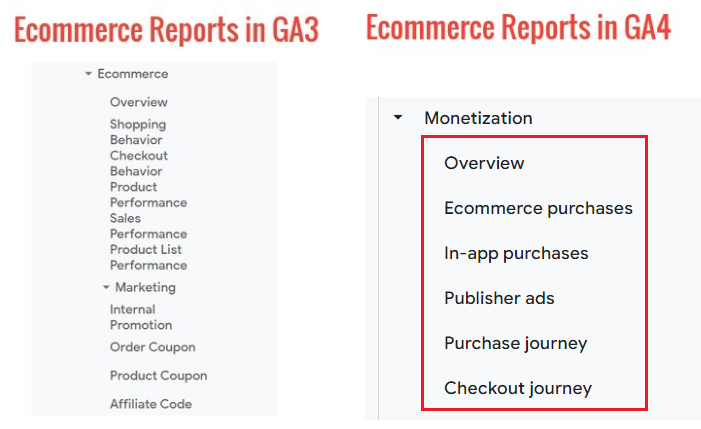
The ecommerce tracking capabilities provided by GA4 are still not as powerful as the ecommerce tracking capabilities provided by Universal Analytics.
#9 GA4 vs Universal Analytics Cross-device and cross-platform tracking.
In the case of GA4, both the web and app data use the same schema. Whereas in the case of Universal Analytics, this is not the case.
Because of this reason, GA4 provides much more robust and reliable cross-device and cross-platform tracking than Universal Analytics.
#10 GA4 Attribution modelling Reports vs Universal Analytics Attribution modelling Reports.
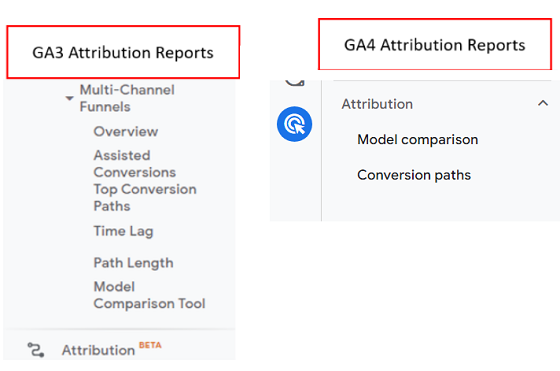
Universal Analytics provides powerful attribution modelling capabilities via multi-channel funnels and attribution reports.
Such attribution modelling capabilities barely exist in GA4.
Related Articles:
- Guide to Attribution Models in GA4 (Google Analytics 4)
- How to Change Attribution Models in GA4 (Google Analytics 4)?
- GA4 (Google Analytics 4) Conversion Paths Report in Attribution
- GA4 (Google Analytics 4) Model Comparison Report in Attribution
- Advertising Snapshot in GA4 (Google Analytics 4) Attribution
- GA4 Attribution Modelling Tutorial
#11 GA4 Custom dimensions vs Universal Analytics Custom dimensions.
In GA4, custom dimensions are created differently than in Universal Analytics.
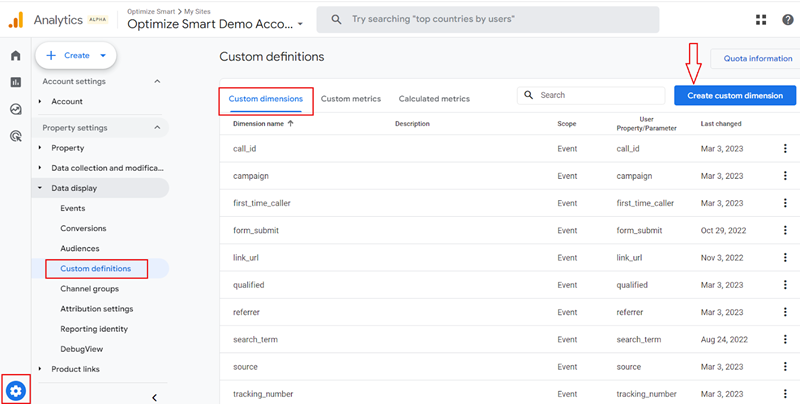
If you are using Universal Analytics, you can set/change the scope of your custom dimension to ‘Hit’, ‘Session’, ‘User’ or ‘Product’.
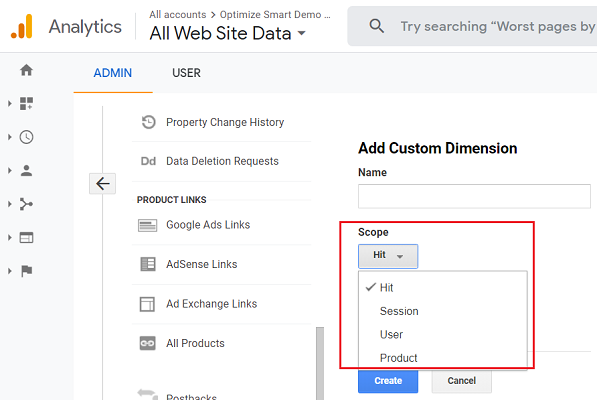
There are no ‘Hit’ and ‘Session’ scopes in the case of GA4. It has been replaced by the ‘event’ scope.
For now, you can not create a custom dimension with the ‘product’ scope in GA4. You would need to use e-commerce parameters.
You can create a custom dimension in GA4 with one of the following scopes: ‘event’, ‘user’ or ‘item’:
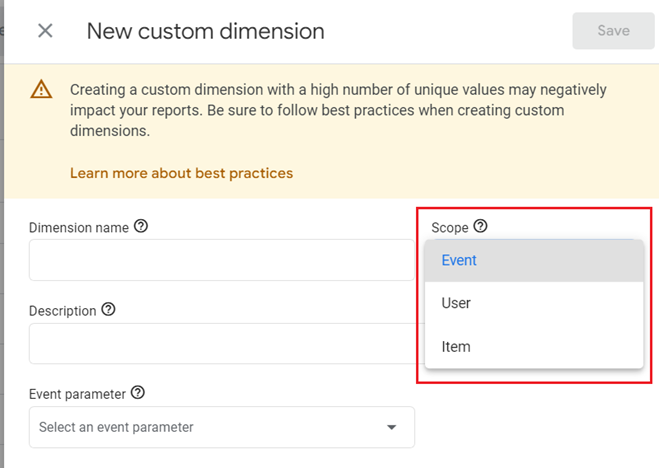
In GA4, the value of custom dimensions and custom metrics are supplied by logged event parameters and user properties.
This is not the case with Universal Analytics.
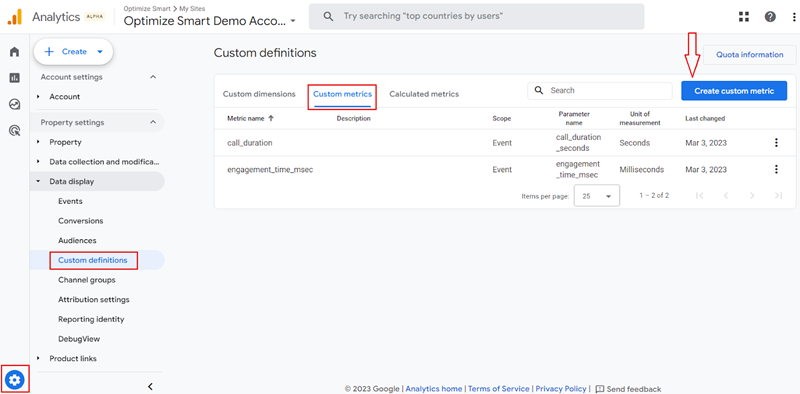
#12 GA4 Custom metrics vs Universal Analytics Custom metrics.
In GA4, custom metrics are created differently than in Universal Analytics.
If you are using Universal Analytics, then you can set/change the scope of your custom metric to ‘Hit’ or ‘Product’:
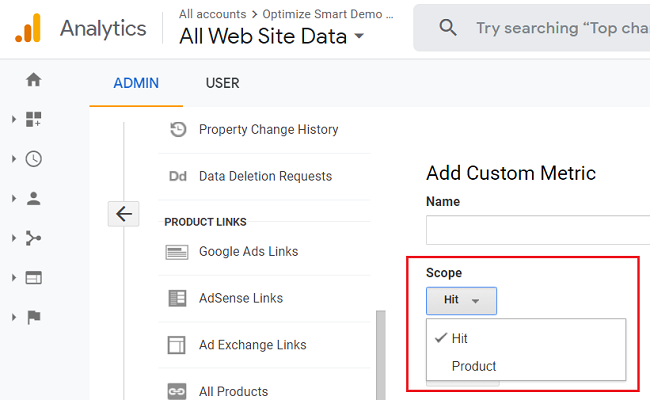
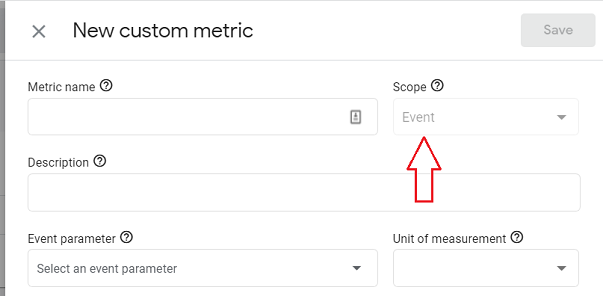
In the case of GA4, it is not possible to set/change the scope of your custom metric. A GA4 custom metric has only one scope and that is ‘event’ scope.
#13 GA4 Debugging vs Universal Analytics Debugging.
The GA4 reporting view provides the DebugView report through which you can validate your analytics configuration from within the reporting interface:
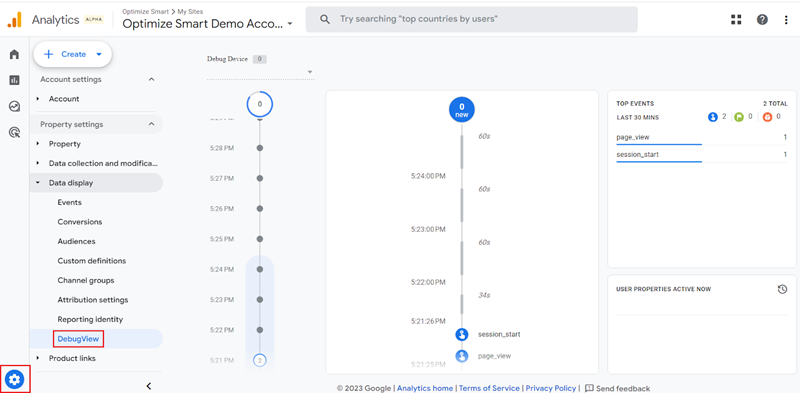
This is not possible with a Universal Analytics reporting view, as there is no DebugView report available.
#14 GA4 Engagement metrics vs Universal Analytics Engagement metrics.
GA4 reporting view provides a new set of engagement metrics that can track users’ engagement with your website/app much more accurately than the pageviews and bounce rate metrics used by Universal Analytics.
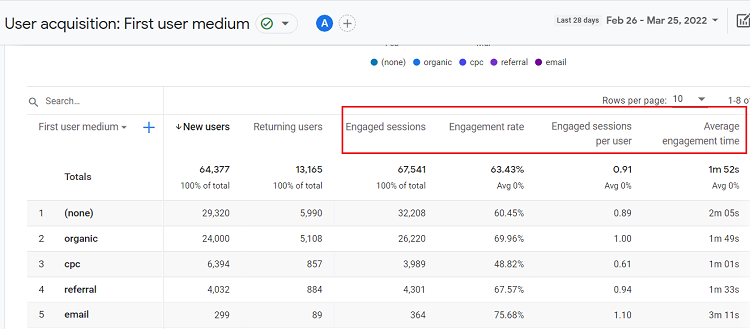
Following are examples of GA4 engagement metrics:
- Engaged Sessions
- Engagement Rate
- Engaged Sessions per User
- Average Engagement Time
Note: There is no concept of bounce rate in GA4.
#15 GA4 IP anonymization vs Universal Analytics IP anonymization.
Under GDPR, an IP address is considered personal data.
Google Analytics tracks and stores the IP addresses of your website users to report on geolocation data. However, Google Analytics does not report on IP addresses in its reports.
If your privacy policy or local privacy laws prevent the storage of full IP addresses, then you can use the IP anonymization feature of Universal Analytics to anonymize/mask website visitors’ IPs.
When you anonymize visitor IP, the last three digits from your website visitor’s IP address are automatically dropped/deleted.
In other words, the IP anonymization feature sets the last octet of IPv4 user IP addresses and the last 80 bits of IPv6 addresses to zeros.
For example,
If a website visitor has a public IP of 12.214.31.144, then as soon as the Analytics Collection Network receives the IP data, Google will anonymize/mask the IP to 12.214.31.0
If you are using the Universal Analytics property, you can enable or disable IP anonymization.
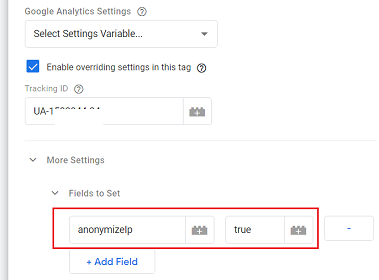
The IP anonymization is disabled by default in Universal Analytics.
However,
If you are using a GA4 property then the IP anonymization feature is built-in, is enabled by default and you can not disable it.
#16 GA4 Reporting Views vs Universal Analytics Reporting views.
Using Universal Analytics, you can create up to 25 reporting views per property. But in the case of GA4, you can use only one reporting view.
Currently, there is no option to create additional views in the standard GA4 property.
However,
If you are using GA4 360, you can create replicate some of the functionality of a reporting view by creating a new sub property.
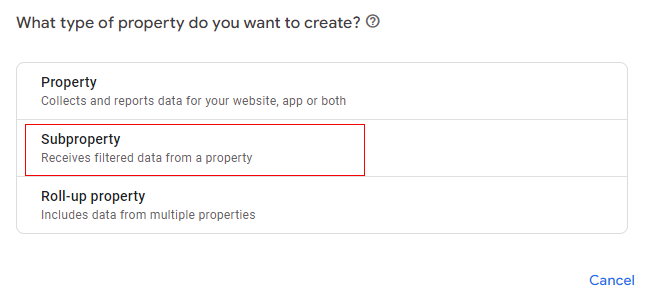
There are workarounds available for creating additional views in the GA4 standard.
You can create new ‘Audiences’ or ‘Data Streams’ and use them in place of filtered views.
#17 GA4 BigQuery vs Universal Analytics BigQuery.
GA4 comes with a free connection to BigQuery. So you can access the raw GA4 data and run SQL queries on it.
This helps in more precise and multilevel data analysis of your users so that it is easy to understand the user activities on the website.
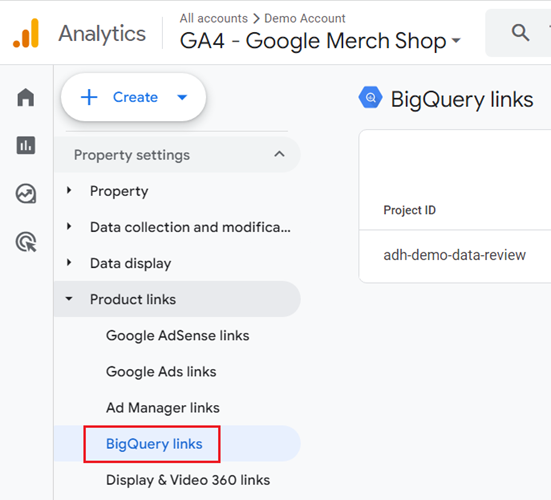
Universal Analytics does not come with a free connection to BigQuery (unless you are using GA 360).
#18 GA4 events vs Universal Analytics hits.
A Universal Analytics property captures users’ interactions with your website in the form of hits.
A hit is a user’s interaction with your website that sends data to the Google Analytics server.
A hit can be a pageview, event, social interaction, ecommerce, screenview etc.
A GA4 property captures all users’ interactions with your website only in the form of events.
As such:
- A pageview hit is captured as an event in a GA4 property.
- An event hit is captured as an event in a GA4 property.
- Social interaction hit is captured as an event in a GA4 property.
- An ecommerce hit is captured as an event in a GA4 property.
- A user timing hit is captured as an event in a GA4 property.
- An exception hit is captured as an event in a GA4 property.
- A Screenview hit is captured as an event in a GA4 property.
A Universal Analytics property will process the hits as long as they arrive within 4 hours of the preceding day’s close. Such hits are called ‘late hits’ as they are not sent immediately.
Whereas in GA4, events are processed even if they arrive up to 72 hours late. Such events are called ‘late events’ as they are not sent immediately.
#19 GA4 events vs Universal Analytics events.
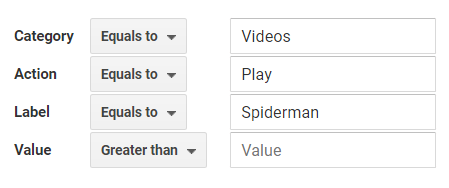
A Universal Analytics event hit follows the category-action-label-value schema and is its own hit type:
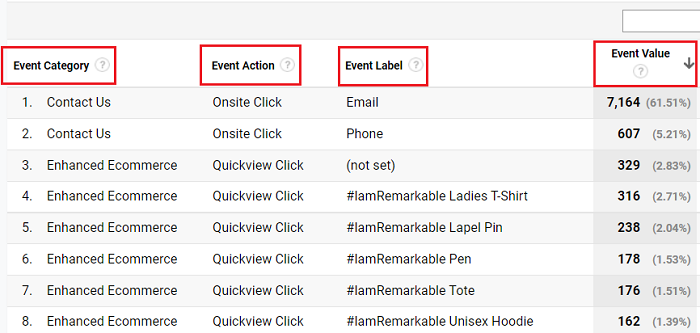
Universal Analytics reports display event hit data in the form of category-action-label-value:
A GA4 event is a hit of any type.
For example,
A GA4 event can be pageview, event, social interaction, ecommerce, screenview etc.
As such, the event count between Universal Analytics and GA4 is unlikely ever to match.
A GA4 event does not follow the category-action-label-value schema.
Also, GA4 reports do not display event hit data in the form of category-action-label-value.
Unlike in Universal Analytics, in GA4, you can send one or more parameters with each event.
Through parameters, you can provide additional information about an event like where, why and how the event was logged.
Unlike in Universal Analytics, in GA4, event names do not need to be unique and are differentiated by the parameter values collected.
In fact,
In GA4 reusing the same event name as many times as possible is considered as best practice.
#20 GA4 pageviews vs Universal Analytics pageviews.
In Universal Analytics, the pageviews metric represents the number of views of a web page or set of web pages:
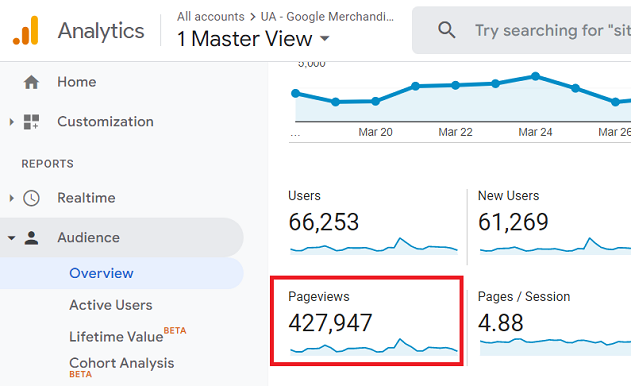
Repeated views of the same page are counted in the ‘Pageviews’ metric of Universal Analytics.
Note: The ‘pageviews’ metric in Universal Analytics does not report on screenviews. The screenviews are reported in a separate mobile-specific Universal Analytics property.
GA4 reports ‘pageviews’ via the ‘views’ metric:
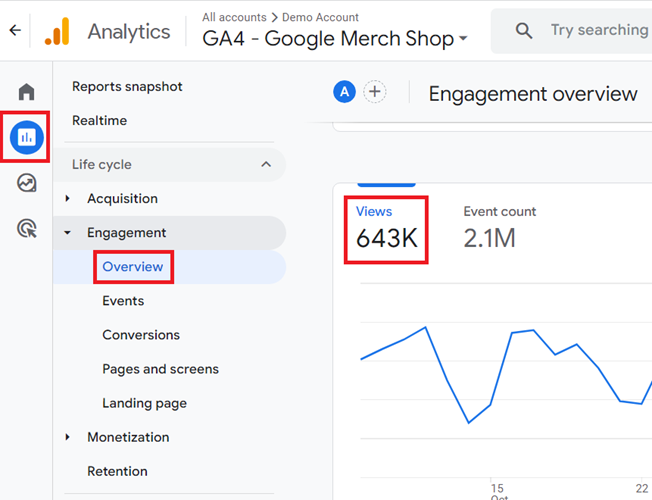
The ‘views’ metric in GA4 is the combination of pageviews and screenviews as GA4 combines both app and web data in the same property.
The repeated views of a single screen or page are counted in the ‘views’ metric of GA4.
Pageviews are calculated differently between Universal Analytics and GA4.
So you should not compare them. They are unlikely to match.
Unlike in Universal Analytics, the GA4 property does not have the ‘unique pageviews’ metric.
In Universal Analytics, you can apply view filters that can affect the pageview counts in the reporting view you are examining.
For example, excluding specific geographic locations could lead to different pageview counts than GA4.
Currently, Google Analytics 4 doesn’t support using view filters. Ensure that identical filters are active on both platforms when comparing pageviews data.
#21 GA4 Sessions vs Universal Analytics Sessions.
The Universal Analytics sessions count is unlikely to match the GA4 sessions count. This is because both Universal Analytics and GA4 sessions are calculated and adjusted differently.
A Universal Analytics session is a group of hits recorded for a user in a given time period. In contrast, a GA4 session is a group of events recorded for a user in a given time period.
Unlike in GA3, the GA4 property reports on ‘Engaged Sessions’ and ‘Engaged Sessions Per user’.
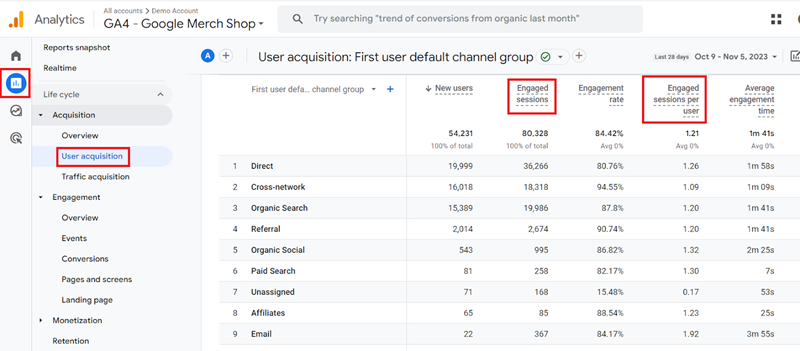
To learn more about the differences between Universal Analytics and GA4 sessions, check out this article: Understanding Google Analytics 4 Sessions
#22 GA4 Session count vs Universal Analytics Session count.
In Universal Analytics, a session is basically a combination of pageviews, events, ecommerce transactions, and social interactions and would end in 30 minutes in the case of inactivity.
In contrast to this, a Google Analytics 4 session is derived from the session_start event, and there is no limit to how long the session would last.
For an app session, it would begin to end when the app is moved to the background.
However, you can extend the session by logging the extend_session parameter (with a value of 1) on events logged while the app is in the background.
Additionally, you have the option to override the default 30-minute session timeout for an app by using the setSessionTimeoutDuration method.
You would also see lower session counts in Google Analytics 4 since it does not create a new session when the campaign source changes mid-session, like in Universal Analytics.
In GA4, we have three types of sessions-based metrics:
- Sessions: The number of sessions that began on your site based on the session_start event on the app or web.
- Engaged sessions: The number of sessions that have lasted for 10 seconds or longer.
- Engaged sessions per user: The number of engaged sessions per user.
#23 GA4 user counts vs Universal Analytics user counts.
Google Analytics 4 uses the User ID method and considers active users on the site who are currently engaging in calculating user count.
Universal Analytics uses the Client ID method and focuses on the total users on the site to calculate user counts.
#24 GA4 spam prevention vs Universal Analytics spam prevention.
A common problem in Universal Analytics has been spam referrals, and it was possible for anyone to send the spam hits to a Google Analytics property using measurement protocol.
This issue of spam hits has been addressed in Google Analytics 4 by forcing the measurement protocol hits to include the secret key.
This key is available only to the users who have access to analytics property and is not available publicly. Only hits with a valid key will be able to send data to a Google Analytics 4 property.
#25 GA4 Explorations Reports vs Universal Analytics Explorations Reports.
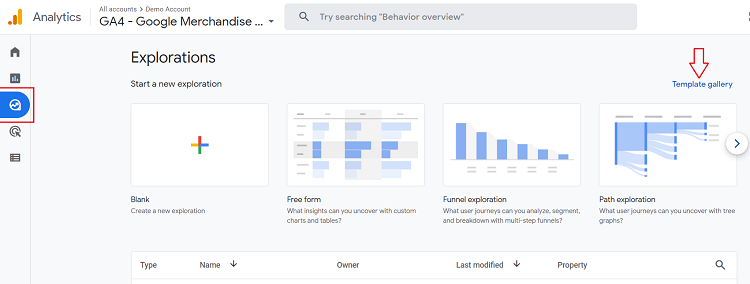
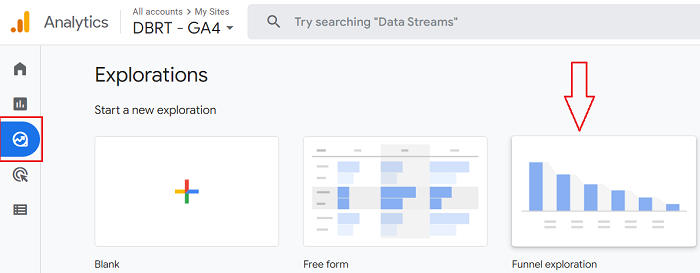
The reporting view of a GA4 property comes with a new set of report templates called ‘Explorations’ through which you can do advanced data analysis:
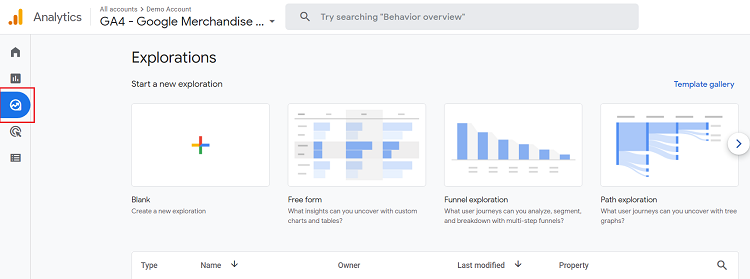
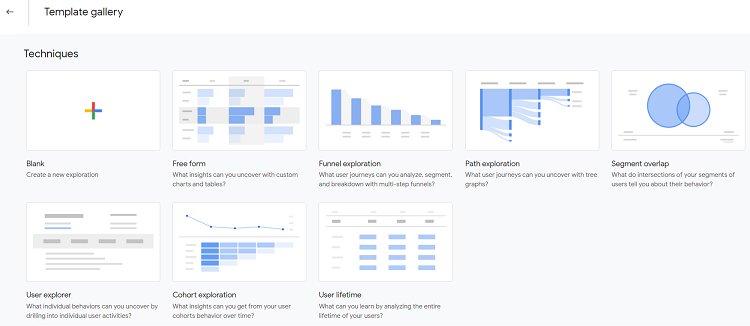
Following are the various GA4 Exploration report templates:
- Blank report
- Free form report
- Funnel exploration report
- Path exploration report
- Segment overlap report
- User explorer report
- Cohort exploration report
- User lifetime report
You can see the full list of the GA4 exploration report templates by clicking on the ‘Template Gallery‘ link:
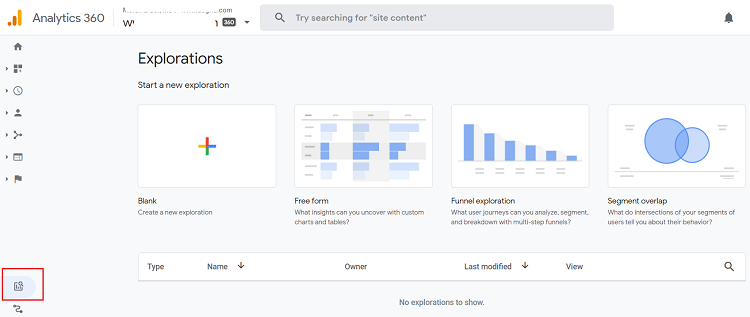
In the case of Universal Analytics, only GA 360 customers can use this feature.
#26 GA4 provides the ability to create conversions that satisfy multiple conditions.
Universal Analytics allows you to create conversions based on:
- Pageviews
- Events
- Duration
- Pageviews/screens per session
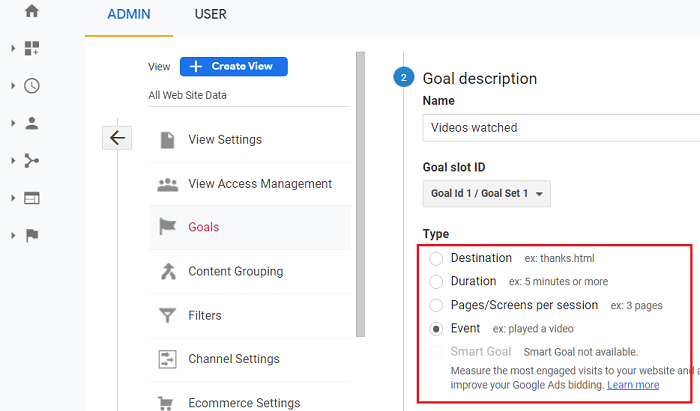
However, Universal Analytics does not allow you to create conversions that satisfy multiple conditions.
For example, you can not define the following user activity as a conversion in Universal Analytics:
A user who visited your website via your newsletter and then watched a five minutes long video before making a purchase above $100.
However,
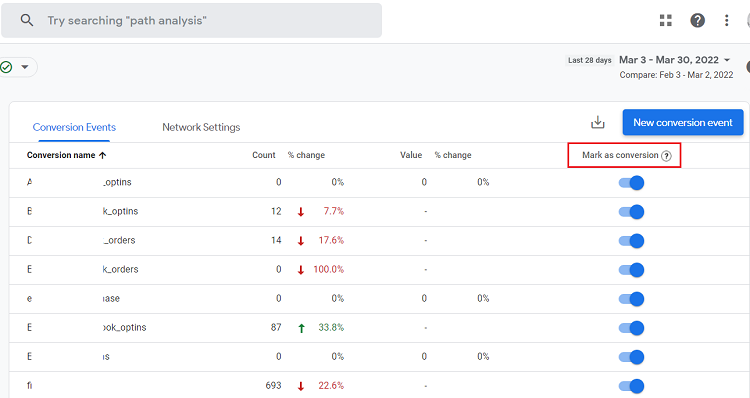
GA4 let you create conversions that are based on multiple conditions.
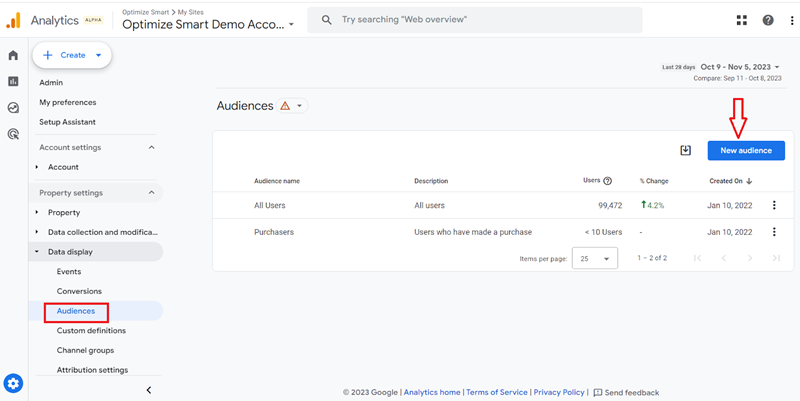
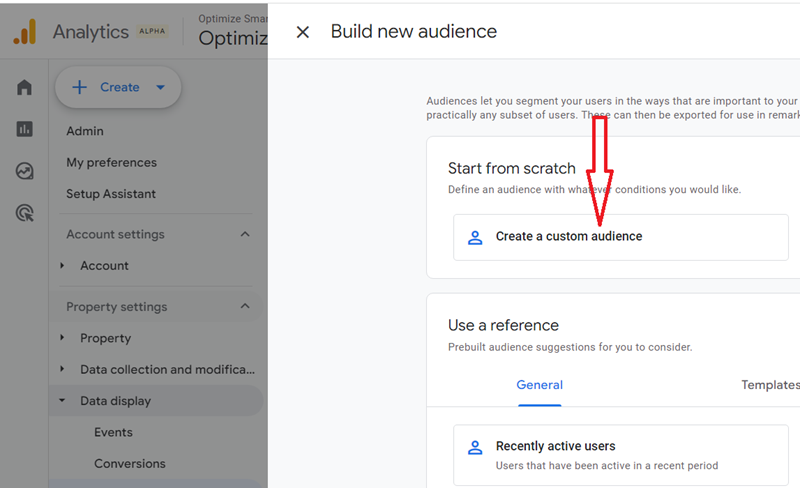
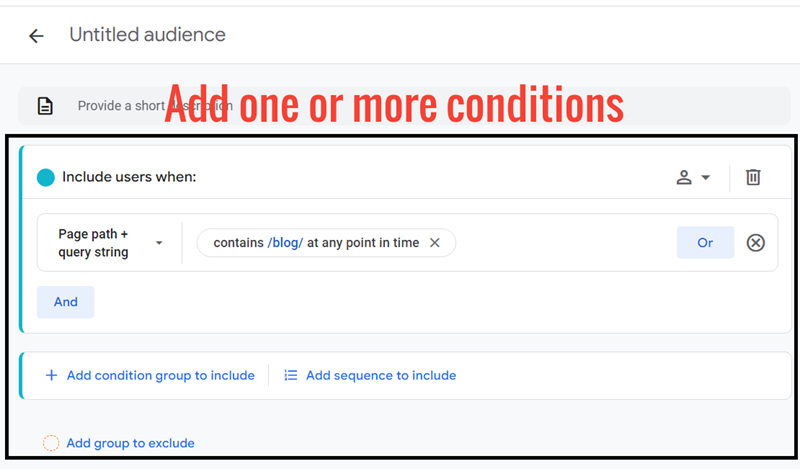
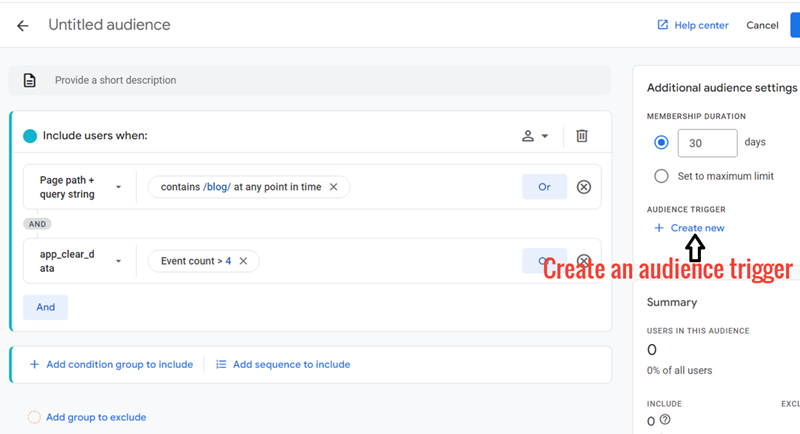
You can create such type of complex conversions in GA4 by carrying out the following three tasks:
#1 Create a new audience in GA4 with one or more conditions (like visiting your website via newsletter, watching a video for at least 5 minutes, etc.).
#2 Create an audience trigger that logs an event when a user becomes a member of this audience.
#3 Mark the event as conversion.
#27 GA4 Content Grouping vs Universal Analytics Content Grouping.
Content grouping is a rule-based grouping of related content groups. It is made up of one or more content groups.
A content group is a set of web pages that should be based on the same/similar theme.
So in the case of a blog, a content group can be a set of web pages based on the same/similar topic (like ‘Attribution Modelling’).
In the case of an ecommerce website, a content group can be a set of web pages that sell similar products (like ‘shirts’).
Since ‘content grouping’ is made up of one or more ‘content groups’, ‘Men’ content grouping can consist of the following content groups:
- Men shirts.
- Men trousers.
- Men sportswear.
Similarly,
‘Women’ content grouping can consist of the following content groups:
- Women shirts.
- Women trousers.
- Women sportswear.
As a rule of thumb use content/product categories for ‘content grouping’ and content/product sub-categories for ‘content groups’
Content grouping is used to quickly check the performance of a content group or compare the performance of different content groups with each other.
Content grouping is especially useful if you have a big website with hundreds or thousands of pages; you can realistically measure the content performance only at the group level and not at the individual page level.
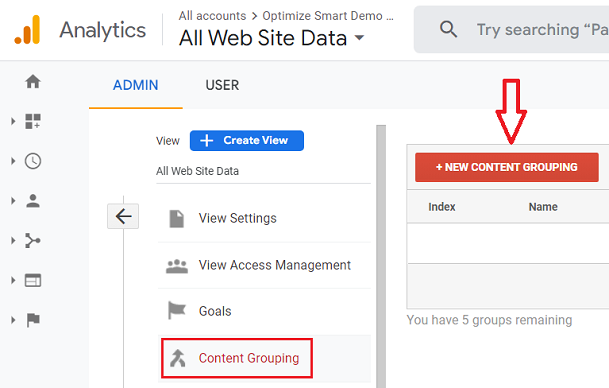
In Universal Analytics, you can create a new content grouping by clicking on the ‘+NEW CONTENT GROUPING’ button:
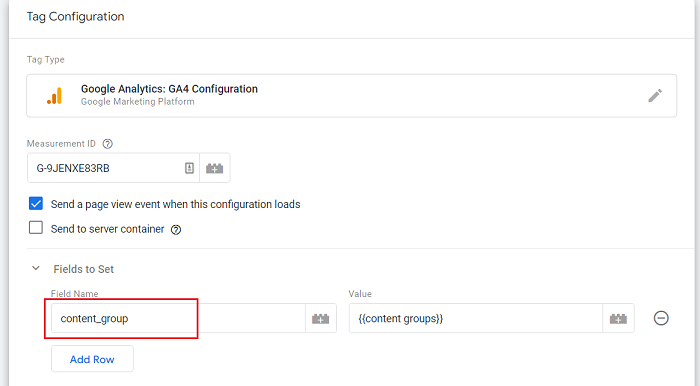
In GA4, we create content grouping using a predefined event parameter called “content_group“:
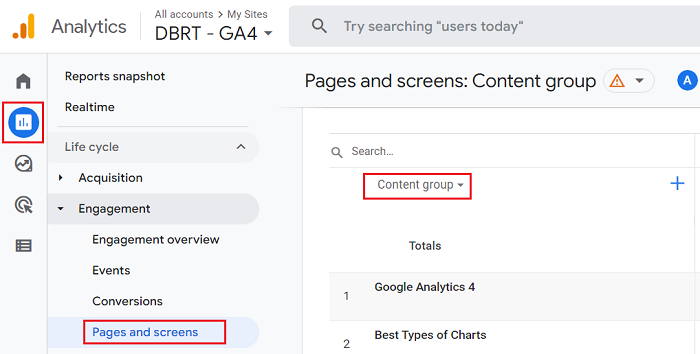
The “content_group” event parameter populates data into the “Content Group” dimension (found under Reports > Engagement > Pages and Screens):
Note: Unlike in Universal Analytics, you can create only one content grouping in GA4.
#28 GA4 Users vs Universal Analytics Users.
Both Universal Analytics and GA4 report on the total number of users via the ‘users’ metric:
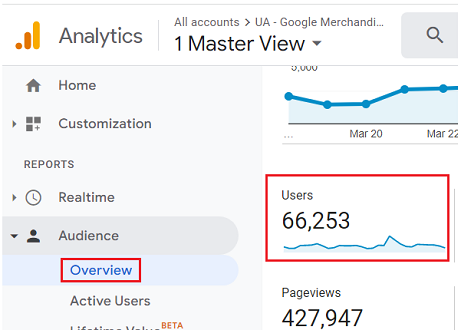
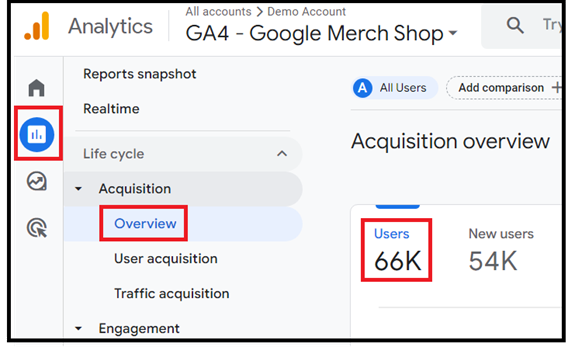
The total number of users reported by either Universal Analytics or GA4 is not equal to the sum of ‘New Users’ and ‘Returning Users’.
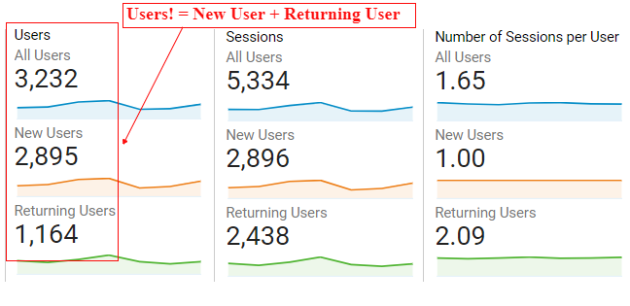
This is because Google Analytics also counts new users as returning users if they return within the selected time period.
Thus, there is an overlap between new and returning users.
A new user can also be labelled as a returning user both by Universal Analytics and GA4.
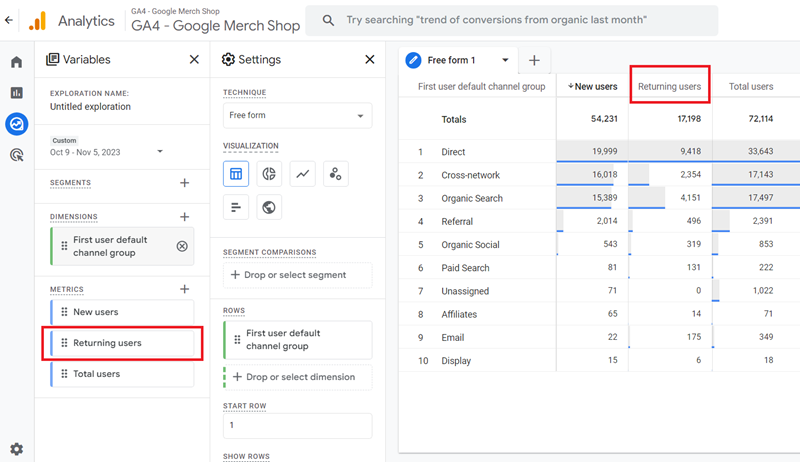
Universal Analytics does not have the ‘Returning Users’ metric. It is missing for no apparent reason.
Whereas GA4 has the Returning Users’ metric:
By default, Universal Analytics could not measure user engagement on a page, if a user does not navigate to another page.
As a result, the time spent on the page is reported as zero.
GA4 on the other hand could measure user engagement on a page even if a user does not navigate to another page.
It can do that via enhanced measurement events, which allow automatic tracking for certain types of events (scroll, click, site search, time elapsed, etc.) without any additional coding/tagging.
#29 GA4 User ID vs Universal Analytics User ID.
Both Universal Analytics and GA4 can use the following identifiers to identify a user:
- Google Signals – Identify Google account users who have enabled ads personalisation.
- Client ID – identify users by their device and browser.
- User ID – Identify users via the user IDs assigned to them.
Google Analytics (whether Universal Analytics or GA4) defines user ID as a unique set of characters (like 455688863) assigned to a user so that they can be identified across devices and/or web browsers and throughout multiple sessions.
The usage of the user ID feature helps in improving the cross-device measurement and in fixing cross-device attribution issues both in Universal Analytics and GA4.
Since each user ID is interpreted as a separate user, without the user ID implementation, the same user can be counted multiple times both by Universal Analytics and GA4.
This could inflate your user count in Universal Analytics/GA4.
Thus, implementing the user ID feature provides you with a more accurate user count whether you are using Universal Analytics or GA4.
From a data collection standpoint, no specific changes are necessary to map user IDs in a Universal Analytics property to a GA4 property.
However,
Unlike the Universal Analytics property, you don’t need a separate user ID view in a GA4 property as the user ID feature is built-in in a GA4 reporting view.
Google recommends that you keep the following factors in mind while implementing the user ID feature in a GA4 property so that the implementation of user ID on your website is consistent with the implementation of user ID on your mobile app:
- You use the same user ID to track a user across your mobile app and website.
- The values passed for user ID are of the same data type across your mobile app and website.
Google Analytics (whether Universal Analytics or GA4) cannot automatically generate user IDs for you. You also can not use Client IDs as User IDs.
To implement the User-ID feature, you would need to generate your own unique IDs and assign those IDs to new and returning users through your user authentication system.
You would need the help of a web developer here as the implementation is quite technical.
This user authentication system is usually your website login, the system through which users can log in and log out.
The unique ID that you use to identify a logged-in user (also known as login ID) on your website can be sent as a User ID to your GA4 property.
Note: The user ID should not be used to send personally identifiable information (PII) like name, email address, etc., to a GA4 property. However, you can still use PII data internally to identify users.
Once you have set up the user ID feature in GA4, you can do the following tasks:
- Compare the behaviour of logged-in users with not-logged users.
- Create remarketing audiences based on user IDs
For both Universal Analytics and GA4, a website user is technically a client ID. However, for a mobile app, GA4 uses the ‘App Instance ID’ instead of the client ID.
#30 GA4 Client ID vs Universal Analytics Client ID.
Whenever a user visits your website for the first time, a client ID is assigned to him.
When the same user later returns to your website, Google Analytics (whether Universal Analytics or GA4) checks for his client ID.
If the client ID is present, Google Analytics labels the user as a returning user and starts a new session.
If the Client ID is not present, Google Analytics labels the user as a new user and generates a new client ID.
That’s how with the help of client IDs, Google Analytics can detect new and returning users.
The client ID in both Universal Analytics and GA4 is an identifier that is used to anonymously identify a unique website user.
This identifier is a combination of a unique random number and the first timestamp (i.e. the time of the first visit).
Following is an example of a client ID:
5987532.16456790952
A Client ID represents a unique browser instance and is stored in browser cookies.
The client ID can exist only on the device/browser on which it has been set up. Because of this attribute, a Client ID cannot be used to measure across devices.
Since the client ID exists only on the device/browser on which it has been set up, whenever a user switches devices/browsers to visit your website, he can be labelled as a new user by Google Analytics.
As a result, client IDs cannot be used to identify the number of unique website users accurately.
#31 GA4 Funnels vs Universal Analytics Funnels.
The funnel creation and analysis capabilities have greatly improved in GA4.
For example, you can not create funnels on the fly in Universal Analytics, but you can in GA4.
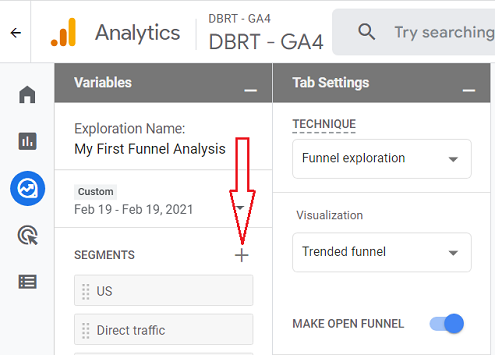
Similarly, you could not apply advanced segments to a funnel in Universal Analytics, but you can in GA4.
The GA4 funnel exploration report provides a visualization called ‘trended funnel’ through which you can determine how the funnel is performing over time:
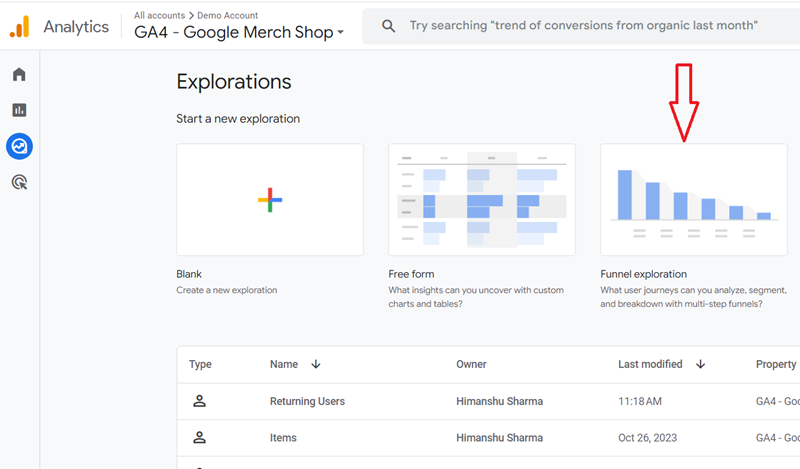
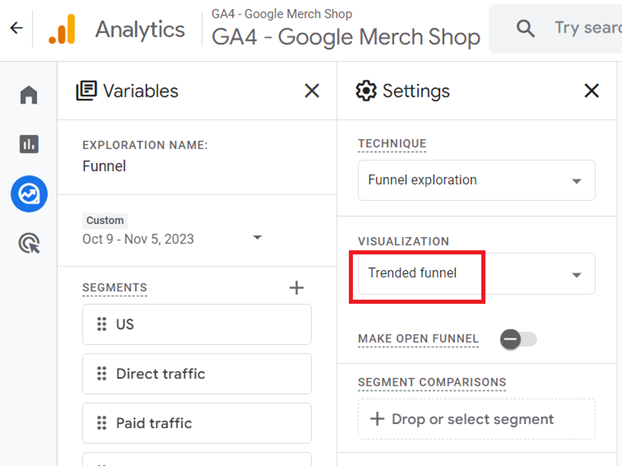
Neither Universal Analytics nor Universal Analytics 360 provided the ability to create trended funnels.
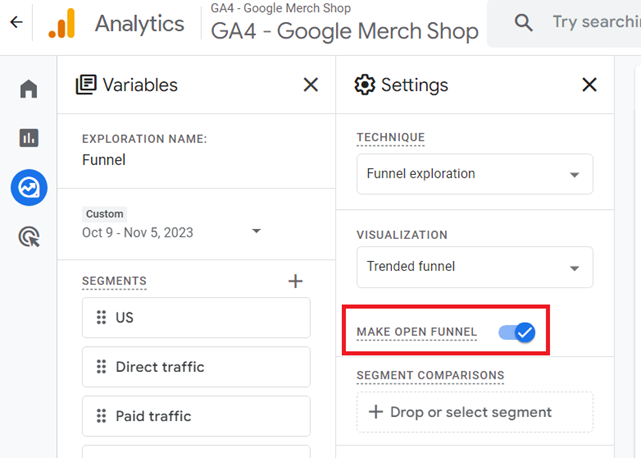
By default, the funnels that you create in GA4 are closed. What that means, if a user does not enter the funnel via the first step, he/she will not be counted in the funnel.
When you make a GA4 funnel open, a user can enter the funnel via any step and would still be counted in the funnel.
In GA4, you can make a funnel open or close on the fly by using a toggle button:
#32 GA4 Conversion Count vs Universal Analytics Conversion count.
In Universal Analytics, a conversion is counted only once per user session. Whereas in GA4, a conversion can be counted multiple times per user session.
So if you have defined ‘file download’ as a conversion, then Universal Analytics will count only one file download as a conversion in a given session, no matter how many times a user downloads the file in the same session.
Whereas in GA4, if a user downloaded a file twice in the same session, two conversions will be counted.
In GA4, you can change the conversion counting method. You can choose between once per event or once per session:
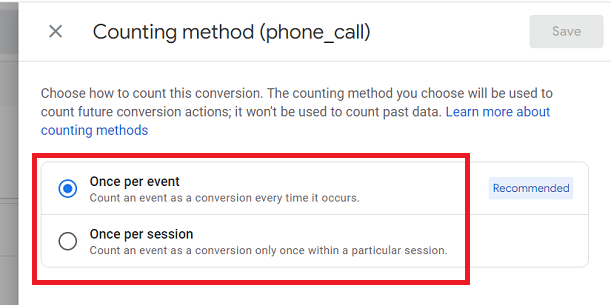
Note: The default counting method for new conversions is ‘Once per event’.
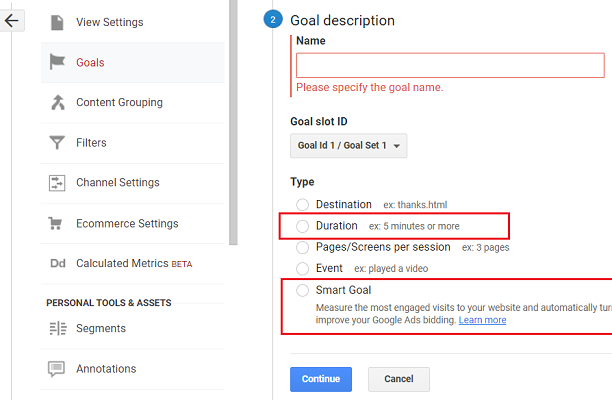
While you can duplicate most Universal Analytics goals using GA4 conversion events, two Universal Analytics goal types cannot be duplicated. These goals are ‘smart’ goals and ‘duration’ goals.
#33 GA4 purchase count vs Universal Analytics purchase count.
As long as you are collecting a unique transaction_id value in both Universal Analytics and GA4, the web purchase counts should match closely between Universal Analytics and GA4.
However, slight variations can still occur due to different tracking mechanisms, session definitions, or data processing between Universal Analytics and GA4.
#34 GA4 Segments vs Universal Analytics Segments.
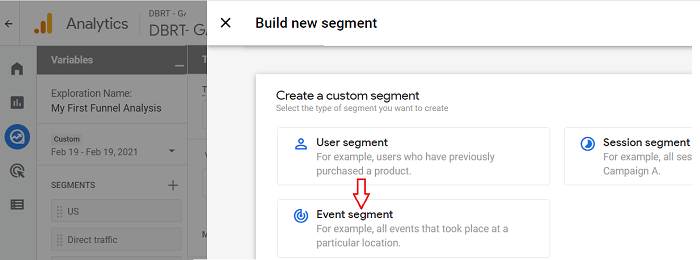
In Universal Analytics, you can create only the session and user-scoped advanced segments:
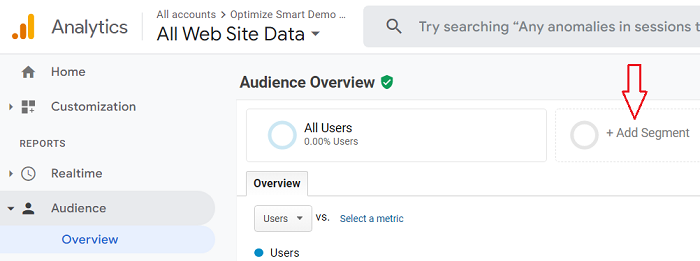
However, in GA4, you can create not only session and user-scoped segments but also event-scoped segments:
#35 Bounce Rate vs Engagement Rate.
Universal Analytics uses ‘bounce rate’ as one of the metrics to measure site engagement.
Bounce rate is the percentage of single page sessions in which there was no user interaction with the page.
Since the bounce rate does not have a time threshold associated with it, a bounced session has a duration of 0 seconds.
GA4 uses the ‘engagement rate’ metric instead of ‘bounce rate’.
The ‘engagement rate’ metric is defined as the percentage of engaged sessions.
By default, an ‘Engaged Session’ is defined as a session that lasted longer than 10 seconds, had a conversion event, or had at least two pageviews or screenviews.
Unlike the bounce rate metric, the ‘Engagement Rate’ metric has a time threshold associated with it.
Because of this attribute, the ‘Engagement Rate’ metric is more useful than the ‘bounce rate’ metric in measuring user engagement, especially on a single page app/web.
#36 Saving Customization in GA4 vs Universal Analytics
In Universal Analytics, you can save the customization applied to a report via the ‘Saved Report‘ feature.
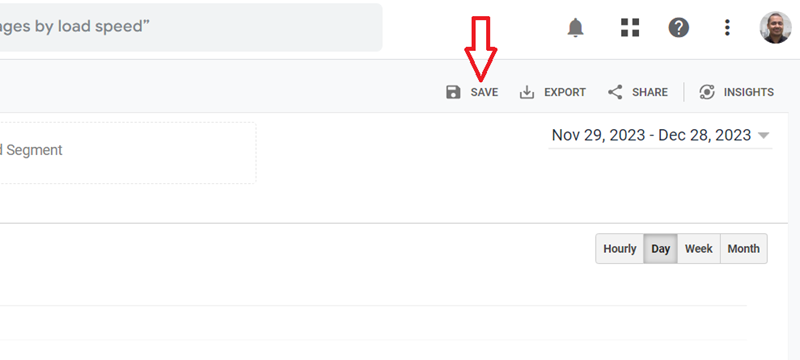
Unlike Universal Analytics, GA4 does not provide any direct feature to save customization applied to a report.
Any customization you apply to a GA4 standard report, like adding a comparison, adding a secondary dimension, or sorting the data table by a particular metric, can not be saved.
If you want to save customization applied to a standard report, bookmark the URL.
The URL includes all the customization settings applied to a report. For example:
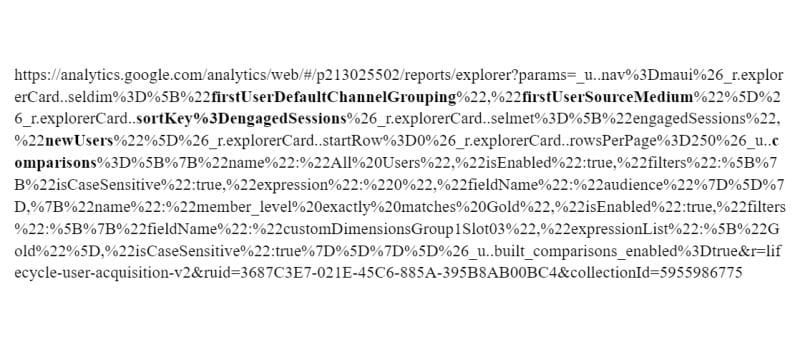
So when you reload the URL into your web browser, all customizations are automatically applied to your report.
Note(1): If you want to transfer report customization from one GA4 property to the other then just change the property ID in the URL. It begins with /p. For example: /p317472484/
Note(2): If you want your customization to be permanently available to all the users of your GA4 property, then save your standard report with customization applied as a new report. This report will then be available to your Library. You can then add the report to one of your report collections.
Note(3): Not every type of GA4 customization can be saved by bookmarking the URL or saving the standard report to the library. For example, if you filter a list of countries with a search query, the filtered results won’t show up even if you save and load that exact URL or save the customization as a new report.

Other Articles on GA4.
- Why GA4 Audiences not showing in Google Ads.
- Google Analytics 4 Scroll Tracking Tutorial.
- Why Google Ads and Google Analytics data don’t match & how to fix it.
- Google Analytics 4 Calculated Metrics with Examples.
- How to view subdomain traffic in Google Analytics 4.
- Google Analytics 4 Cookieless Tracking Setup.
- Using Funnel Exploration Report in Google Analytics 4.
- Google Advanced Consent Mode and GA4 BigQuery Export.
- Which Conversion Window to use in Google Analytics 4.
- Tracking single page apps in Google Analytics 4.
- Create Content Groups in Google Analytics 4.
- Google Analytics 4 BigQuery Tutorial for Beginners to Advanced.
- Google Analytics 4 Measurement ID and Property ID.
- Prompt Engineering for GA4 BigQuery SQL Generation.
- Google Analytics 4 vs Universal Analytics: The Key Differences.
- How to create a new BigQuery project.
- How to create a new Google Cloud Platform account.
- How to overcome GA4 BigQuery Export limit.
- ChatGPT Workflow That Simplifies GA4 Data Analysis.
- Understanding Google Analytics 4 Sessions.