
Follow me on LinkedIn - AI, GA4, BigQuery

GA4 BigQuery Attribution refers to how traffic sources and conversion credit are assigned to user interactions and events within GA4’s BigQuery export.

Unlike the GA4 UI, where attribution is based on predefined models (e.g., last click or data-driven attribution), the GA4 BigQuery export provides raw event-level data that enables analysts to create custom attribution models using SQL queries.

GA4 BigQuery provides multiple traffic source fields, which represent different attribution scopes:

Field Name

Attribution Scope

Description

traffic_source

User-level (First-touch)

Captures the first traffic source that acquired the user.

session_traffic_source_last_click

Session-level (Last-touch)

Captures the last non-direct traffic source that initiated the session.

collected_traffic_source

Event-level (Last-touch)

Captures the last traffic source at the event level.

traffic_source (First-Touch Attribution)

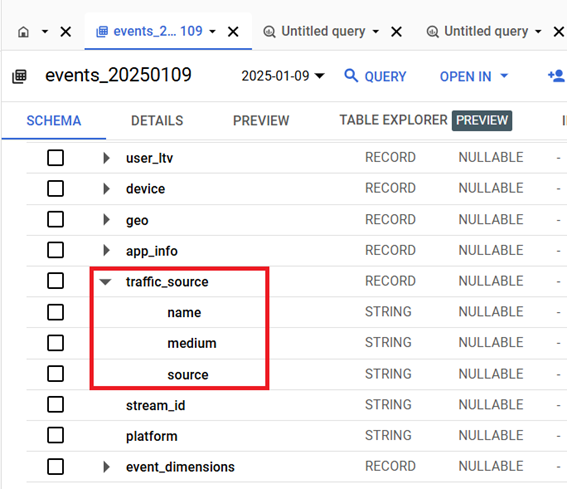
The ‘traffic_source’ fields in BigQuery represent user-level first-touch attribution.
traffic source fields

These fields capture the first campaign, source, and medium that brought the user to the website or app.

For example, if a user first visits your website via Google Ads, the traffic_source fields will always show google / cpc, even if the user returns later via different traffic sources (e.g., email, direct).

The ‘traffic_source’ fields are Ideal for analyzing long-term acquisition channels and identifying which campaigns drive new users.

session_traffic_source_last_click (Session-Level Last-Touch Attribution)

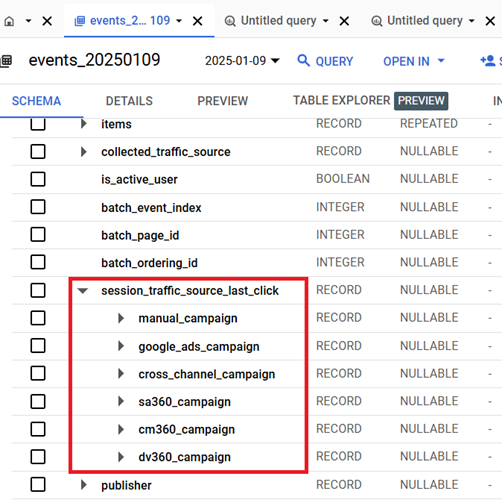
The ‘session_traffic_source_last_click’ fields represent last-touch attribution at the session level.
session traffic source last click

These fields capture the last non-direct traffic source that initiated the session.

For example, if a user first visits your website via Google Ads and later clicks an Email Newsletter link within the same session, the session is attributed to the Email Newsletter.

The ‘session_traffic_source_last_click’ fields are ideal for analyzing session-based reporting, such as sessions by traffic source or engaged sessions by traffic source.

collected_traffic_source (Event-Level Last-Touch Attribution)

The ‘collected_traffic_source’ fields represent last-touch attribution at the event level.

collected traffic source

These fields capture the traffic source that was present at the time of each event.

For example, if a user visits the website via Google Ads, then clicks an Email Newsletter, and finally types the URL directly into the browser:

Event 1: google / cpcEvent 2: newsletter / emailEvent 3: (direct) / (none)

The ‘collected_traffic_source’ fields are ideal for analyzing multi-touch journeys and understanding traffic source changes within sessions.

Key differences between attribution fields in GA4 BigQuery.

Field

Scope

Attribution Model

Granularity

Use Case

traffic_source

User-level

First-touch

Persistent

Acquisition reporting

session_traffic_source_last_click

Session-level

Last-touch (session-based)

Session-based

Session-based reporting

collected_traffic_source

Event-level

Last-touch (event-based)

Event-based

Multi-touch journey analysis

Attribution in GA4 UI vs. BigQuery.

Aspect

GA4 UI

GA4 BigQuery

Attribution Model

Predefined models (last click, data-driven)

Raw data for custom attribution modeling

Data Granularity

Session and conversion-level

Event-level

Flexibility

Limited

Full flexibility with SQL queries

Understanding event level Traffic Attribution in GA4 BigQuery.

The ‘event_params.source’, ‘event_params.medium’, and ‘event_params.campaign’ fields represent event-level last-touch attribution, meaning they track traffic sources for each event.

However, these fields remain the same within a session unless a new traffic source is detected mid-session. Unlike GA4 UI, mid-session direct traffic can overwrite previous sources in BigQuery.

For more details, check out this article: Learn Traffic Attribution in GA4 BigQuery in 2 minutes.

Tips on GA4 BigQuery Attribution Modeling – Focus on recency and the last few influential touchpoints.

#1 The role of Conversion Windows in Attribution.

The ‘conversion window’ is the time period (measured in days) that determines how far back in time a touchpoint (e.g., exposure to a marketing channel) is eligible for conversion credit.

For example, a 30 days conversion window means a touchpoint is eligible for conversion credit for up to 30 days from the day it first occurred.

#2 The case for narrow Conversion Windows.

I use “maximum” of 7 days conversion window for clićk through conversions and 1 day conversion window for view through conversions.

Using a longer conversion window because of longer sales cycles may produce optimum results in a world where there are no user consent, ad blockers, or privacy extensions. But we don’t live in the year 2010 any more.

To get optimum results from conversion attribution in 2025 and beyond, using the narrowest possible attribution window is no longer optional but a mandatory requirement. Otherwise, you will continue to get muddy analytical insight.

#3 Custom Attribution Models: Focus on Last Non-Direct Click and Time Decay.

For creating custom attribution models, I use either the last non-direct click attribution model or the time decay model as both models focus on recency.

In GA4, for conversions, the ‘page_location’ identifies the “Last Touch” point unless it’s a funnel page (e.g., /cart). In that case, extract the last non-funnel ‘page_location’ before conversion for meaningful attribution.

For more details, check out this article: How to Correctly Determine Last Touchpoint in GA4 BigQuery.

#4 Mulit-Channel Marketing and Conversion Windows.

In the world of multi-channel marketing, a customer is exposed to multiple touchpoints over a long period of time. Not all touchpoints are equally valuable (so a linear attribution model is useless).

For example, let’s say a user clicks on your LinkedIn post before purchasing on your website.

This act of reading and clicking on your LinkedIn post is far more valuable in influencing conversion than any ad click that occurred months ago because of the time decay factor and exposure to multiple touchpoints.

Now, GA4 can still give conversion credit to that Google Ad your customer clicked on 80 days ago because of the default 90-day conversion window set for click-through conversions.

And if you are heavily involved in multi-channel marketing, using long conversion windows means many channels can take credit for the same conversion, which could result in overstated revenue.

That’s why it is important to use the narrowest possible conversion windows for all your analytics and advertising platforms, regardless of the length of your sales cycle.

#5 The use of a longer attribution window (more than 30 days long) increases the likelihood of external factors influencing the conversion.

For example, if the conversion window is too wide, other marketing activities, customer touchpoints, or changes in market conditions may occur, making it difficult to attribute the conversion accurately.

By narrowing the conversion window, you can minimize the impact of such external factors and focus on the immediate impact of the tracked activity.

#6 First-touch attribution is useless in 2025 and beyond.

In today’s fast-paced digital world, first-touch attribution models are practically useless. It no longer matters which touchpoint or channel truly introduced a user to your brand.

What matters is the touchpoint/channel that most influenced conversions.

For example, a user may have first interacted with your brand months ago via an ad, but it was a recent LinkedIn post that actually convinced them to buy.

#7 Time plays a crucial role in determining the influence of touchpoints.

The closer the touchpoint is to the conversion event, the higher its influence. This is especially important in the era of ever-shrinking attention spans. That’s why using models like ‘last non-direct click’ or ‘time decay’ makes a lot more sense.