

Your Google Ads tags remain in the “Still Running” state in Google Tag Manager, most likely because the consent choices are not sent to Google tags.
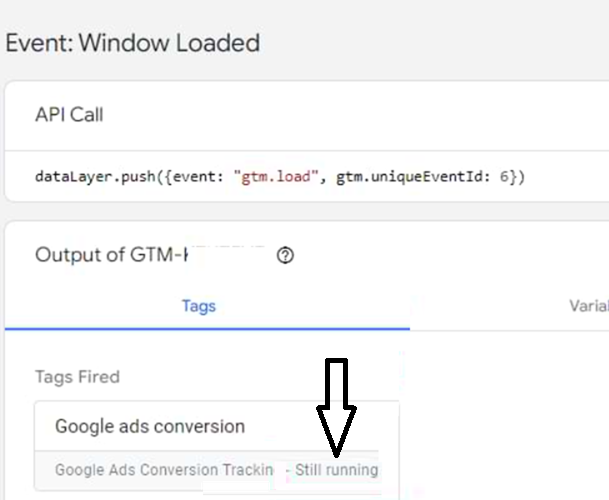
Here is how you can fix this issue.
Google Consent Mode can be implemented in two ways: basic and advanced.
The issue of tags waiting indefinitely for consent signals before firing is more relevant to the advanced implementation of Consent Mode.
The following are the 5 main reasons of consent choices are not sent to Google Tags:
- Google has detected that you have a Consent Management Platform (CMP) but have not enabled Consent Mode.
- Your CMP is not working correctly with Google Consent mode.
- You are using a CMP which is not Google certified.
- Ad blockers and privacy extensions can completely block or interfere with consent signals sent from a CMP to Google Tags.
- A Content Security Policy (CSP) can interfere with the transmission of consent signals to Google Tags.
1) Google has detected that you have a Consent Management Platform (CMP) but have not enabled Consent Mode.
If Consent Mode is not enabled, Google Ads tags may wait indefinitely for consent signals before firing.
If they do not receive the necessary consent signals to proceed, tags can remain in the “Still Running” state.
When users interact with a consent banner on your website, their consent choices are sent to Google tags.
These tags then adjust their behaviour based on whether consent is granted or denied.
When the consent choices are not sent to Google tags, they may wait indefinitely for consent signals before firing.
This is because the tags are designed to respect user consent, and without explicit consent, they cannot proceed with data collection.
2) Your CMP is not working correctly with Google Consent mode.
Your CMP may not be sending the updated consent states to Google tags or may be causing a delay in sending them.
If your CMP loads asynchronously and does not update the consent state before the Google tags are triggered, the tags may not receive the updated consent signals in time, causing them to wait indefinitely.
Your CMP may not be mapping user consent choices to the appropriate consent categories (e.g., ‘ad_storage’, ‘analytics_storage’).
Check the documentation provided by your CMP.
It should include instructions on mapping user consent choices to these categories.
3) You are using a CMP which is not Google certified.
Ideally, the CMP you use should be Google Certified, meaning Google recognizes it as capable of effectively managing and communicating user consent states in compliance with Google Consent Mode requirements across all Google services (Google Analytics, Google Ads, Google Tag Manager, Adsense, etc).
You are more likely to encounter issues when you use a CMP not certified by Google.
4) Ad blockers and privacy extensions can completely block or interfere with consent signals sent from a CMP to Google Tags.
When consent signals are blocked, Google Tags may remain in a “Still Running” state because they wait for consent information that never arrives.
So before you test your consent mode setup, disable adblockers and all unnecessary browser extensions.
5) A Content Security Policy (CSP) can interfere with the transmission of consent signals to Google Tags.
A Content Security Policy (CSP) can interfere with the transmission of consent signals to Google Tags by restricting the loading and execution of scripts and resources necessary for tag operation.
A restrictive CSP could also block the CMP scripts, thereby stopping the transmission of consent signals from CMP to Google Tags.
Include the domains necessary for your CMP and Google Tags to function to ensure that CSP does not interfere with Google Tags and consent signal transmission.

Other Articles on GA4.
- Fixing unassigned issues with GTM Server Side Tagging.
- How to exclude internal traffic in Google Analytics 4.
- Understanding data filters in Google Analytics 4.
- Conversion Funnel Analysis in Google Analytics 4.
- How to use custom templates in Google Tag Manager.
- 6 Critical Flaws in Google Analytics 4 Attribution Paths.
- Google Analytics 4 Admin Settings Tutorial.
- How to Connect Google Ads to Google Analytics 4.
- Google Analytics 4 Predictive Audiences – Tutorial.
- How to use Segment Overlap Report in Google Analytics 4.
- Audience Triggers in Google Analytics 4.
- Google Tag Manager Regex Table Variable Explained.
- Understanding Lookup Table in Google Tag Manager.
- Google Tag Manager Variables and Triggers Tutorial.
- How to find Average Order Value in Google Analytics 4.
- Google Ads tag still running in GTM? Here is the fix.
- 8 Signs Your GA4 Property Needs Expert Help.
- Google Tag Assistant Tutorial.
- Google Analytics 4 not working? Here is how to fix it.
- Google Analytics 4 for Low Traffic Websites.