

Getting traffic to your website is one thing, but getting it to convert is a whole different ballgame.
You may be getting millions of visitors to your website each month, but if they are adding little to no value to the business bottomline then your cost per acquisition will remain high, and your gross profit will remain low.
To make your business a success, you need to focus on increasing revenue and reducing cost per acquisition/conversion.
The home page is the top landing page for many websites.
So, if the home page is your top landing page, you'll want to know how people progress through the conversion funnel once they land there.
The best way of doing this is by looking into the ‘Path Exploration’ report in GA4 and then identifying and removing the bottlenecks in your conversion funnels.
Look for a drop-off in the conversion funnel from one step to the next; determine the reason for the drop-off and what could be done about it.
If you are optimising your shopping cart experience, the path exploration report is very helpful.
Make sure that once a person adds an item to the shopping cart, they complete checkout on your website. You can do this by identifying and removing the bottlenecks in your checkout funnel and through remarketing.
If you could make more people reach the shopping cart page, you could generate more sales.
Now the problem is, you don’t know which website visitors proceeded to the shopping cart page from the home page and which didn’t.
You have got a lot of questions:
- Were they the visitors from organic search?
- Were they the visitors from paid search?
- Were they the visitors from social media?
- How many visitors viewed a particular product category page before they added items to the shopping cart?
- How many visitors viewed a particular product detail page before they added items to the shopping cart?
Without segmenting the conversion funnel, there is nothing much you can do about the drop-off from one step to the next in a conversion funnel.
Fortunately, Google Analytics allows you to apply segments to the Path Exploration report.
The following are my top 14 segments:
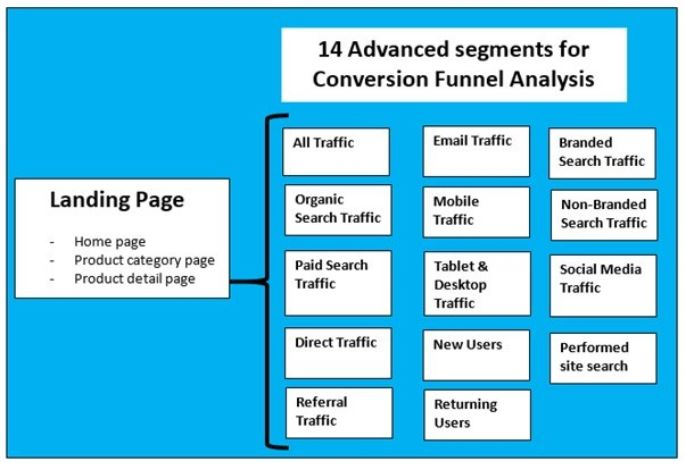
Apply these segments to your report one by one, then identify drop-offs from one step to the next.
Once you know the reason for the drop-off from one step to the next and which funnel page(s) need to be optimised, only then do you start your testing (A/B testing, usability testing, etc.) and/or optimise marketing campaigns.
Path Exploration beats Funnel Exploration for conversion funnel analysis.
#1 Funnel exploration only measures a path you've already chosen. Path exploration shows what users actually do. For conversion analysis, you usually don't yet know the optimal path. Path exploration helps you find it before you prescribe it.
#2 Real-life funnels aren't linear. Users can land from any traffic source to any page and browse pages in any order. Path exploration handles all of this without requiring configuration of open/closed funnel logic. It shows where users go from wherever they entered.
#3 Path exploration reveals conversion paths you didn't design. Funnel exploration misses these because they aren't in your predefined steps.

Other Articles on GA4.
- How to Create Landing Page Report in Google Analytics 4.
- How to segment Google Analytics 4 data by data stream.
- Setup Cross Domain Tracking in Google Analytics 4.
- How to see full page URLs in Google Analytics 4.
- Roll up Property in Google Analytics 4 – Tutorial.
- The Best Tag Auditing Tools for Google Analytics 4.
- How to Exclude URL Query Parameters in Google Analytics 4.
- How to Track Email Campaigns in Google Analytics 4.
- Google Analytics 4 Attribution Modelling Tutorial.
- Understanding Service Worker in GTM Server Side Tagging.
- Cohort Exploration Report in Google Analytics 4 (GA4).
- Google Analytics 4 vs Google Ads conversion tracking.
- Google Analytics 4 Custom Dimensions Tutorial.
- Google Analytics 4 Dimensions Tutorial.
- Event Scoped Custom Dimensions in Google Analytics 4.
- Google Analytics 4 Search Console Integration Tutorial.
- Fixing unassigned issues with GTM Server Side Tagging.
- How to exclude internal traffic in Google Analytics 4.
- Understanding data filters in Google Analytics 4.
- Conversion Funnel Analysis in Google Analytics 4.