

In GA4, the ‘Average Order Value’ metric is called ‘Average purchase revenue’.
It is calculated as ‘Purchase Revenue’ / ‘Transactions’.
‘Average purchase revenue’ is the average value of an e-commerce transaction.
Since a refund is also considered a transaction in GA4, it can impact the ‘average purchase revenue’ metric.
So, you need to take this factor into account when calculating the average order value in GA4.
Follow the steps below to correctly calculate the average order value in GA4:
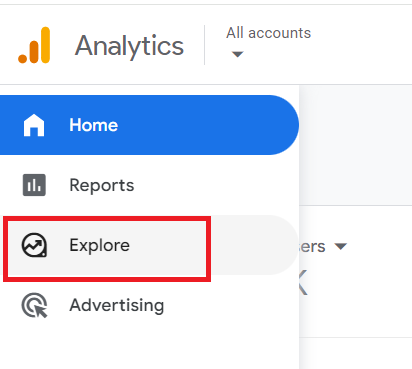
Step-1: Login to your GA4 property and then click on ‘Explore’ from the left-hand navigation menu:
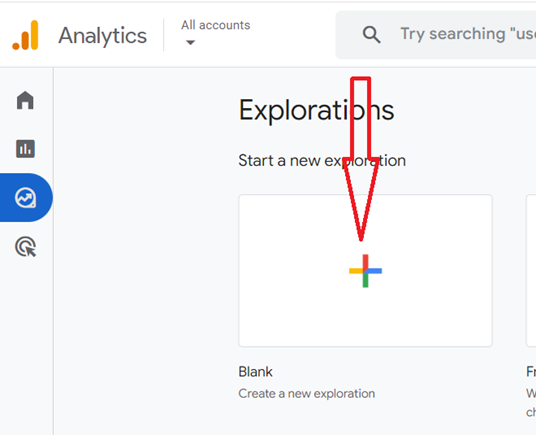
Step-2: Click on ‘Blank‘ to create an exploration report from scratch:
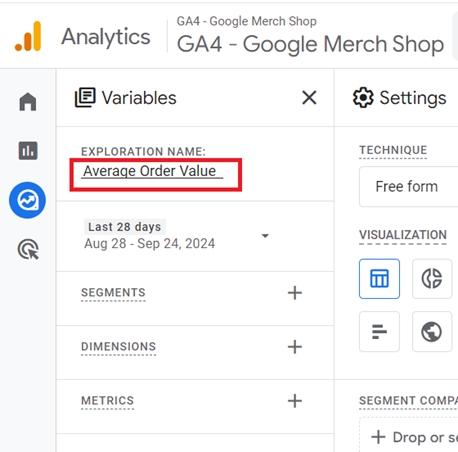
Step-3: Name this report ‘Average Order Value’:
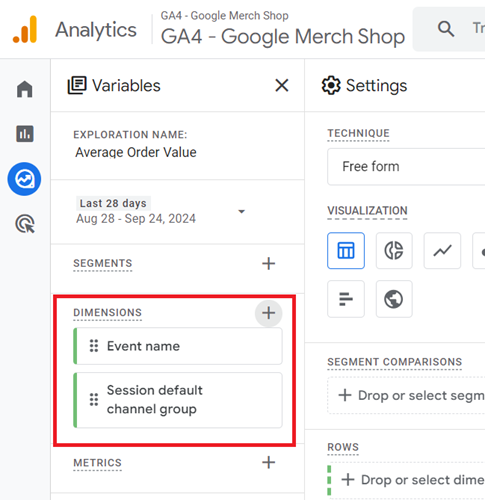
Step-4: Add the following dimensions to this report:
- Event Name.
- Session Default Channel Group.
Step-5: Add the following metrics to this report:
- Purchase Revenue.
- Transactions.
- Average Purchase Revenue.
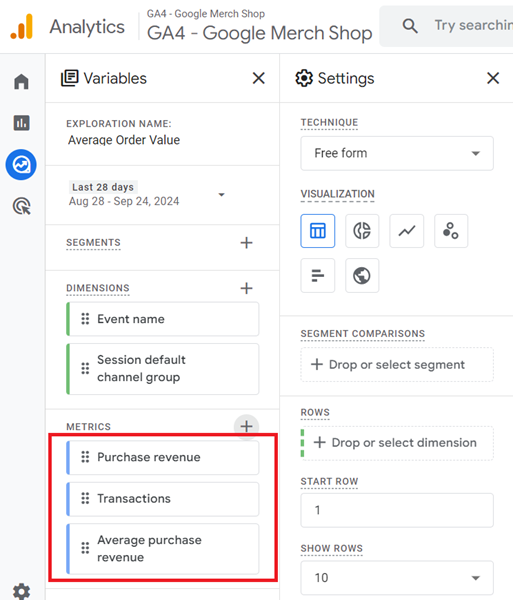
Step-6: Double click on the ‘Session default channel group’ dimension to add it to the canvas on right.
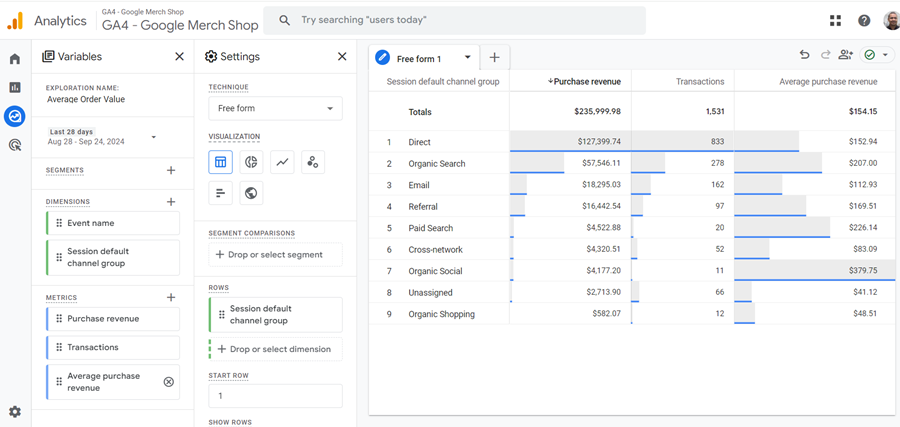
Step-7: Double click on the metrics one by one (in the order they are listed) to add them to the canvas on right.
Your screen should now look like the one below:
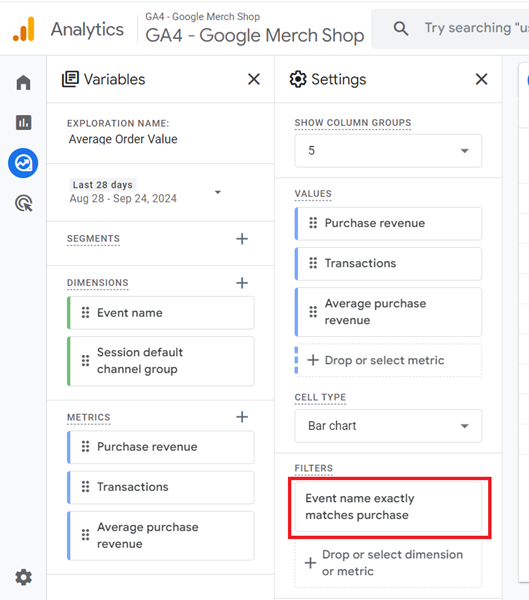
Step-8: Apply the following dimension filter to your report so that only the ‘purchase’ event is taken into account when calculating the ‘transactions’ and ‘average purchase revenue’ metrics.
Event name exactly matches purchase.
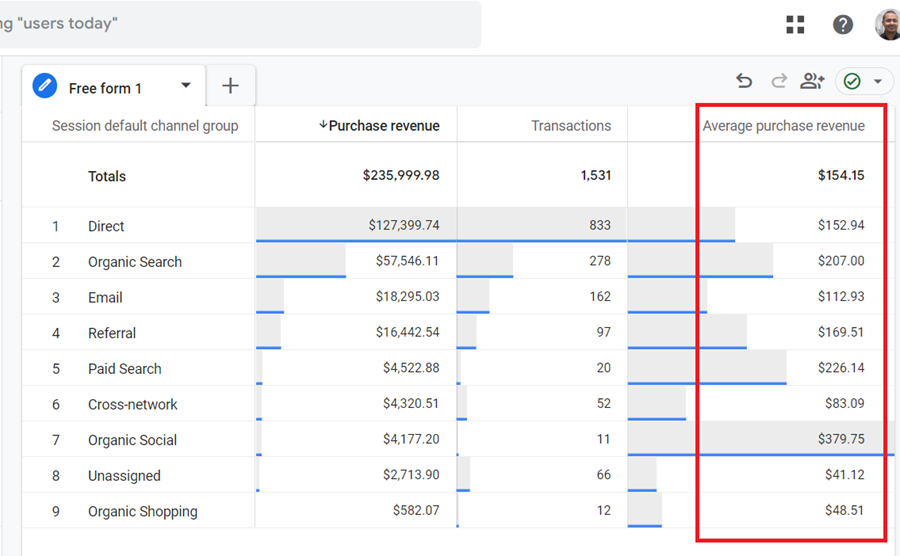
You should now see the accurate reporting of the average order value in your GA4 report via the ‘Average Purchase Revenue’ metric:

Other Articles on GA4.
- Fixing unassigned issues with GTM Server Side Tagging.
- How to exclude internal traffic in Google Analytics 4.
- Understanding data filters in Google Analytics 4.
- Conversion Funnel Analysis in Google Analytics 4.
- How to use custom templates in Google Tag Manager.
- 6 Critical Flaws in Google Analytics 4 Attribution Paths.
- Google Analytics 4 Admin Settings Tutorial.
- How to Connect Google Ads to Google Analytics 4.
- Google Analytics 4 Predictive Audiences – Tutorial.
- How to use Segment Overlap Report in Google Analytics 4.
- Audience Triggers in Google Analytics 4.
- Google Tag Manager Regex Table Variable Explained.
- Understanding Lookup Table in Google Tag Manager.
- Google Tag Manager Variables and Triggers Tutorial.
- How to find Average Order Value in Google Analytics 4.
- Google Ads tag still running in GTM? Here is the fix.
- 8 Signs Your GA4 Property Needs Expert Help.
- Google Tag Assistant Tutorial.
- Google Analytics 4 not working? Here is how to fix it.
- Google Analytics 4 for Low Traffic Websites.